
Last Updated: June 19, 2026
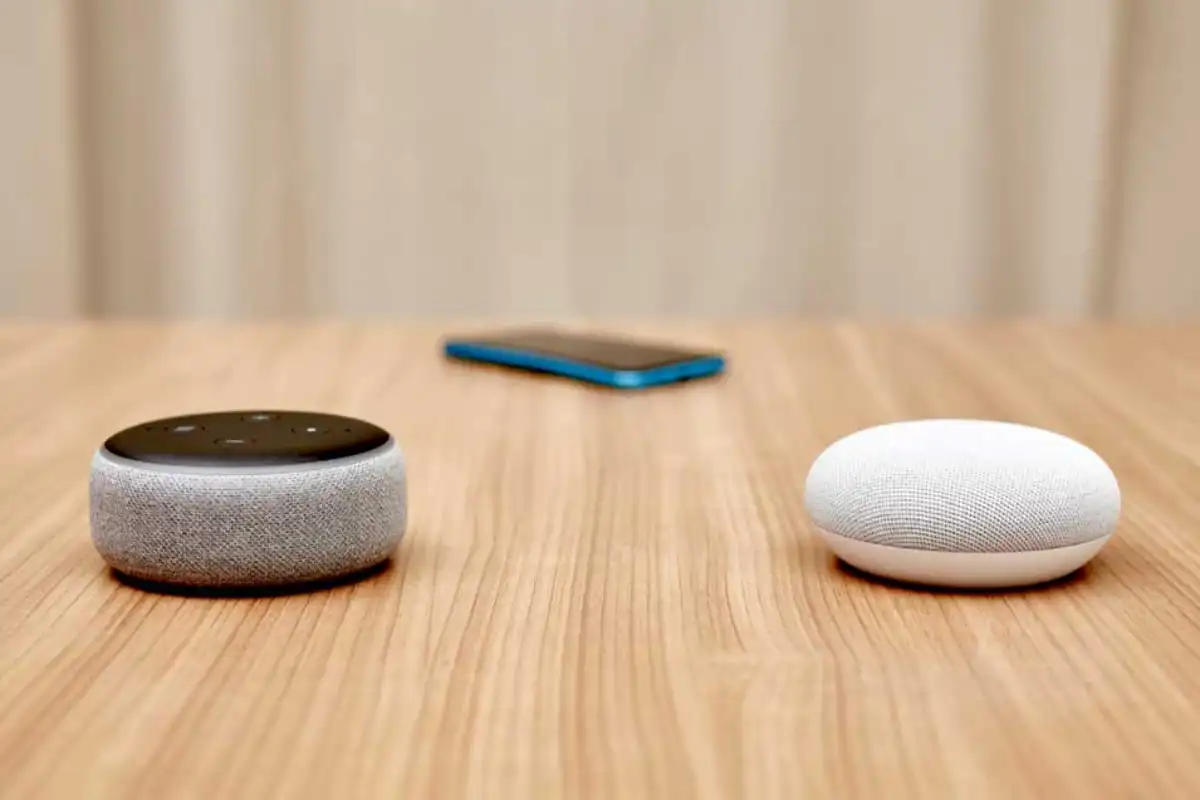
Smart homes have changed a lot in 2026. Before you needed to know a lot about technology and use different apps to control everything. Now you can use voice assistants routines that use artificial intelligence and a main control center, for your smart home to make things easier. There are two systems that most people use: Google Home and Amazon Alexa.
If you are setting up your home for the first time or if you already have one and you want to make it better this guide will help you with everything. It will show you how to install things connect devices make things automatic and fix problems when they happen.
Smart Home Market Overview in 2026
The global smart home market continues to expand as consumers prioritize convenience, security, and energy efficiency.
| Smart Home Statistic (2026) | Value |
| Global Smart Home Market | $245+ Billion |
| Smart Speaker Households | 500+ Million |
| Voice Assistant Users | 8.7 Billion Devices |
| Google Home Market Share | ~28% |
| Amazon Alexa Market Share | ~35% |
| Matter-Compatible Devices | 75%+ New Devices |
The introduction of Matter and Thread standards has made both ecosystems significantly easier to set up and manage.
Why Choose Google Home or Alexa?
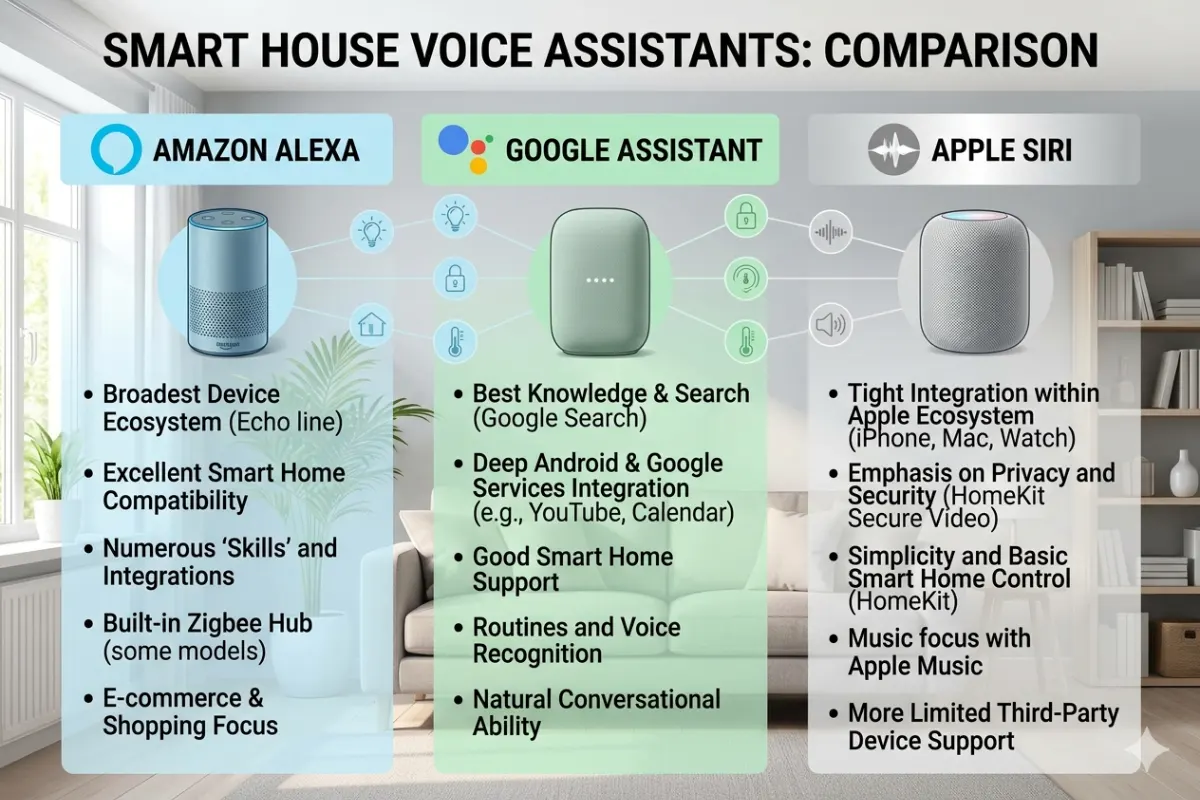
Before installation, it’s important to understand the strengths of each platform.
| Feature | Google Home | Amazon Alexa |
| Voice Recognition | Excellent | Very Good |
| Search Accuracy | Best-in-class | Good |
| Smart Device Compatibility | Excellent | Excellent |
| Automation Features | Advanced | Advanced |
| Music Services | Strong | Strong |
| Shopping Integration | Limited | Excellent |
| AI Assistant Features | Superior | Good |
| Multi-Room Audio | Excellent | Excellent |
| Ecosystem Simplicity | Very Easy | Easy |
Choose Google Home If
- You use Android devices
- You rely on Google services
- You want stronger AI assistance
- You prefer natural conversations
Choose Alexa If
- You shop frequently on Amazon
- You have many smart devices
- You want broader third-party support
- You prefer advanced custom routines
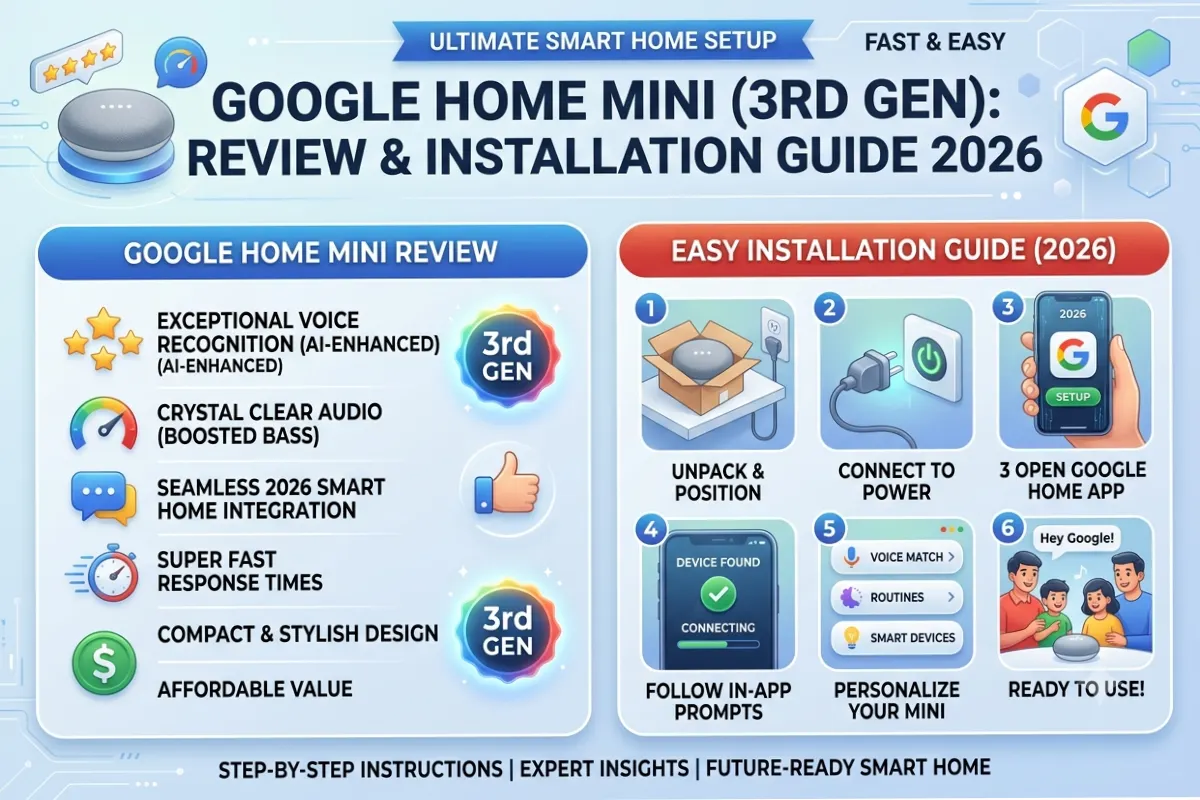
Google Home Installation Guide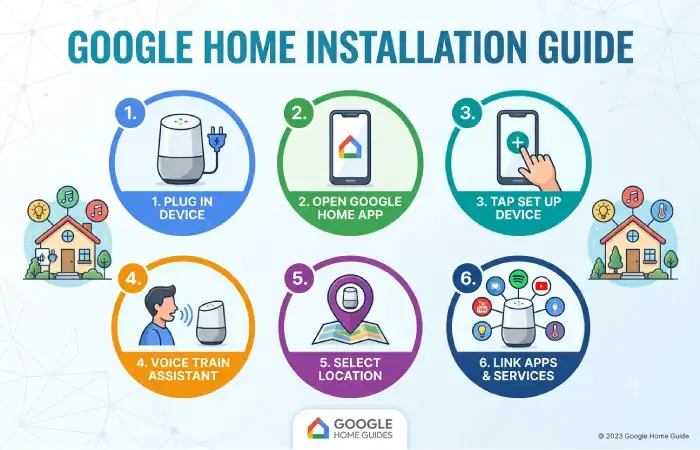
Setting up Google Home in 2026 is easier than ever thanks to Matter support and AI-assisted onboarding.
What You’ll Need
Hardware
- Google Nest Mini
- Google Nest Audio
- Google Nest Hub
- Wi-Fi Router
- Smartphone or Tablet
Software
- Google Home App
- Google Account
- Stable Internet Connection
Step 1: Download the Google Home App
Install the Google Home app from:
- Android Play Store
- Apple App Store
Sign in using your Google account.
Step 2: Power On Your Google Device
Plug in your:
- Nest Mini
- Nest Audio
- Nest Hub
Wait until the startup sound plays.
The device automatically enters pairing mode.
Step 3: Add a New Device
Inside Google Home:
- Open Home App
- Tap “+” Add Device
- Select “New Device”
- Choose Home Location
- Detect Nearby Device
Google automatically finds compatible devices.
Step 4: Connect to Wi-Fi
Choose:
- Home Wi-Fi Network
- Enter Password
The speaker will download updates automatically.
Step 5: Configure Voice Match
Voice Match allows personalized experiences.
Benefits include:
- Personal calendars
- Individual reminders
- Personalized music
- Custom schedules
Speak sample phrases when prompted.
Step 6: Assign Rooms
Place devices into rooms:
| Room | Suggested Device |
| Living Room | Nest Audio |
| Bedroom | Nest Mini |
| Kitchen | Nest Hub |
| Office | Nest Audio |
Room assignments improve voice commands and automation.
Step 7: Enable Matter Devices
In 2026, most smart devices support Matter.
To add:
- Tap Add Device
- Scan QR Code
- Select Matter Device
- Finish Setup
Most devices connect in under 60 seconds.
Amazon Alexa Smart Home Setup
Alexa remains one of the most versatile smart home ecosystems available.
Requirements
Hardware
- Echo Dot
- Echo Pop
- Echo Show
- Echo Hub
Software
- Alexa App
- Amazon Account
- Wi-Fi Network
Step 1: Install Alexa App
Download Alexa on:
- Android
- iPhone
- iPad
Sign into your Amazon account.
Step 2: Connect Echo Device
Power on your Echo.
The light ring turns orange.
Alexa enters setup mode automatically.
Step 3: Add Device
Open Alexa App.
Navigate:
Devices → “+” → Add Device
Select:
- Echo
- Smart Home Device
- Camera
- Light
- Plug
Follow on-screen instructions.
Step 4: Connect Wi-Fi
Choose your network.
Enter Wi-Fi credentials.
Alexa completes registration automatically.
Step 5: Enable Skills
Skills extend Alexa functionality.
Popular categories include:
- Home Security
- Smart Lighting
- Entertainment
- Productivity
- Energy Monitoring
Step 6: Create Device Groups
Examples:
| Group Name | Devices |
| Living Room | TV, Lights, Speaker |
| Bedroom | Lamp, Fan, Speaker |
| Kitchen | Lights, Smart Plug |
| Whole Home | All Devices |
You can then say:
“Alexa, turn off Bedroom.”
Linking Accounts & Devices
One of the most important steps in any smart home setup is linking services and devices.
Google Home Linking Process
Navigate:
Settings → Works With Google
Search for:
- Smart Lights
- Cameras
- Thermostats
- Security Systems
Login using manufacturer credentials.
Examples include:
- Philips Hue
- TP-Link Kasa
- Tapo
- SmartThings
Alexa Linking Process
Navigate:
Skills & Games
Enable desired skill.
Sign in to device manufacturer account.
Discover devices.
Alexa automatically imports supported products.
Device Compatibility Comparison
| Device Category | Google Home | Alexa |
| Smart Bulbs | ✓ | ✓ |
| Cameras | ✓ | ✓ |
| Smart Locks | ✓ | ✓ |
| Doorbells | ✓ | ✓ |
| Thermostats | ✓ | ✓ |
| Smart TVs | ✓ | ✓ |
| Robot Vacuums | ✓ | ✓ |
| Air Purifiers | ✓ | ✓ |
Matter Device Setup
Matter has become the universal language of smart homes.
Benefits include:
- Faster setup
- Better security
- Cross-platform compatibility
- Local device control
- Reduced cloud dependency
Routines & Automations Setup
Automation is where smart homes become truly intelligent.
Google Home Routines
Navigate:
Automation → New Routine
Example Morning Routine
Trigger:
- 7:00 AM
Actions:
- Turn on lights
- Read weather
- Read calendar
- Start coffee maker
- Play news
Evening Routine
Trigger:
- Sunset
Actions:
- Turn on porch lights
- Adjust thermostat
- Close blinds
- Play relaxing music
Alexa Routines
Navigate:
More → Routines
Create:
- Trigger
- Condition
- Action
Example Work Routine
Trigger:
“Alexa, start work.”
Actions:
- Turn office lights on
- Set thermostat
- Open smart blinds
- Launch productivity playlist
Example Vacation Routine
Actions:
- Randomize lights
- Simulate occupancy
- Activate cameras
- Enable security alerts
Automation Features Comparison
| Feature | Google Home | Alexa |
| Voice Trigger | Yes | Yes |
| Time Trigger | Yes | Yes |
| Location Trigger | Yes | Yes |
| Sensor Trigger | Yes | Yes |
| AI Suggestions | Excellent | Good |
| Multi-Step Routine | Yes | Yes |
| Custom Voice Commands | Limited | Excellent |
Smart Home Security Best Practices
Protecting connected devices is essential.
Use Strong Passwords
Avoid:
- 123456
- Password123
Use:
- Long unique passwords
- Password managers
Enable Two-Factor Authentication
Activate:
- Google Account 2FA
- Amazon Account 2FA
This dramatically improves security.
Keep Devices Updated
Enable automatic updates for:
- Smart speakers
- Cameras
- Hubs
- Routers
Separate Smart Home Network
Advanced users should create:
- Main Network
- Smart Device Network
This reduces security risks.
Troubleshooting Google vs Alexa
Even the best setups occasionally experience issues.
Google Home Not Finding Devices
Causes
- Different Wi-Fi network
- Outdated firmware
- Weak signal
Fixes
- Restart device
- Update app
- Reconnect Wi-Fi
- Move closer to router
Alexa Can’t Discover Devices
Causes
- Skill disabled
- Incorrect account link
- Unsupported device
Fixes
- Re-enable skill
- Relink account
- Run device discovery again
Voice Commands Not Working
Check:
- Internet connection
- Microphone status
- Speaker volume
- Firmware updates
Routine Failures
Common causes:
| Issue | Solution |
| Offline Device | Reconnect |
| Wrong Trigger | Reconfigure |
| Account Error | Relink Account |
| Firmware Issue | Update Device |
Google Home vs Alexa Comparison (2026)
Feature Scorecard
| Category | Google Home | Alexa |
| Setup Simplicity | 9.5/10 | 9/10 |
| AI Intelligence | 10/10 | 8.5/10 |
| Device Support | 9/10 | 10/10 |
| Automation | 9/10 | 10/10 |
| Search Accuracy | 10/10 | 8/10 |
| Shopping Features | 7/10 | 10/10 |
| Smart Home Control | 9/10 | 10/10 |
| Overall Score | 9.2/10 | 9.3/10 |
Recommended Smart Home Setup for 2026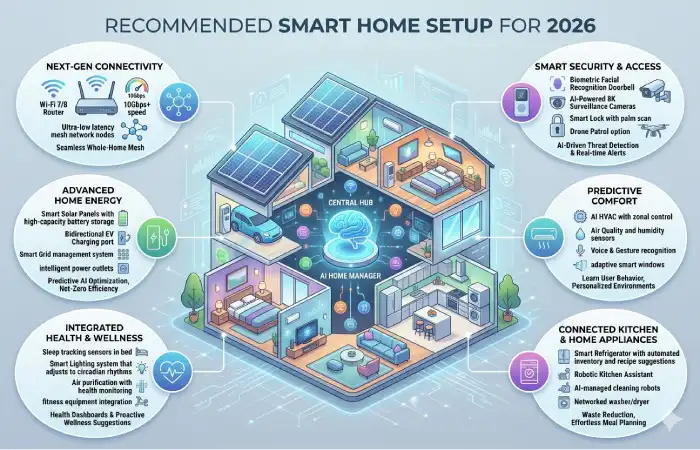
Beginner Setup
- Smart Speaker
- Smart Bulbs
- Smart Plug
- Video Doorbell
Estimated Budget:
$150–$300
Intermediate Setup
- Multiple Speakers
- Cameras
- Thermostat
- Smart Lock
- Smart Displays
Estimated Budget:
$500–$1,000
Advanced Setup
- Whole-Home Audio
- Smart Security System
- Energy Monitoring
- Smart Appliances
- AI Automations
Estimated Budget:
$2,000+
Frequently Asked Questions
Is Google Home better than Alexa in 2026?
Google Home offers superior AI, search accuracy, and natural conversations. Alexa generally supports more smart devices and advanced automation options.
Can Google Home and Alexa work together?
Yes. Many Matter-compatible devices can be controlled by both ecosystems simultaneously.
Do I need a smart hub?
Not always. Most modern devices connect directly through Matter, Thread, Wi-Fi, or Bluetooth.
Which smart home platform is easier for beginners?
Google Home is slightly simpler for first-time users, while Alexa offers greater customization for power users.
Is Matter replacing traditional smart home standards?
Matter is becoming the universal standard and is expected to dominate new smart home devices throughout 2026 and beyond.
Final Thoughts
When you are trying to decide between Google Home and Amazon Alexa it is not about saying things out loud anymore. It is about picking the system that works best for you and your family. Google Home is really good at helping you with things using intelligence finding answers to your questions and working well with other Google things. Amazon Alexa is better at working with a lot of devices letting you customize your smart home and giving you more options for automating things.
For a lot of people in 2026 both Google Home and Amazon Alexa can give you a home that is powerful and works well. The good thing is that Matter compatibility means a lot of devices can now work with both systems so you have choices, than ever before. You can start with an important devices make routines that make your life easier and then add more devices as you need them. Google Home and Amazon Alexa can both help you make a home that works for you. Start with what you need. Then you can add more Google Home or Amazon Alexa devices later on.