
Last Updated: September 15, 2026
Remote work gives employees more flexibility, but it can also make time management, focus, and performance measurement more difficult. Without a shared office environment, managers cannot rely on physical presence to understand whether projects are progressing as expected. At the same time, employees need the freedom to work without feeling constantly watched.
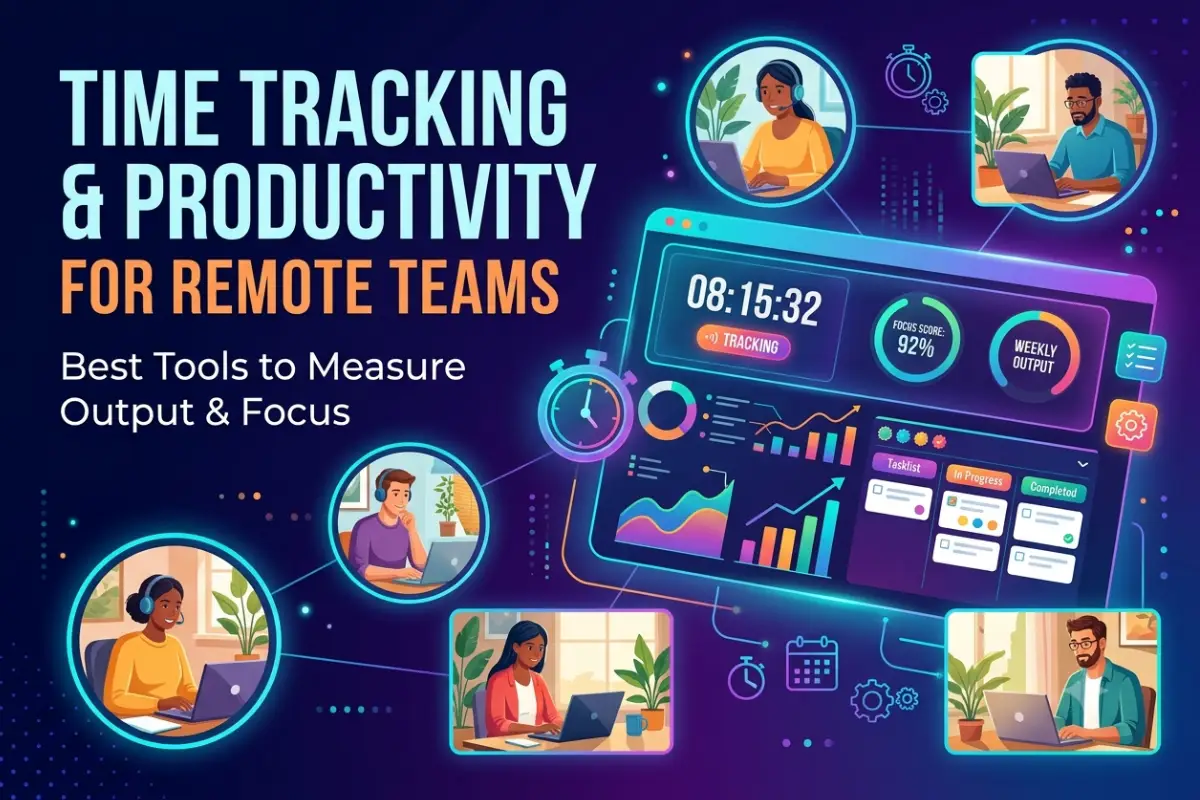
This is where time tracking and productivity for remote teams becomes important. The right combination of time tracking apps, productivity tools, focus systems, and performance metrics can help remote teams understand how work gets done while protecting employee autonomy.
The goal should not be to track every minute. Instead, successful remote teams should focus on output, priorities, completed work, and sustainable productivity.
Why Time Tracking Matters for Remote Teams
Remote employees often work from different locations, time zones, and schedules. Some employees may prefer starting early in the morning, while others are more productive later in the day.
Traditional office management often measures attendance. Remote work requires a different approach.
Time tracking helps teams answer important questions:
- How much time is being spent on projects?
- Which tasks take longer than expected?
- Are employees overloaded?
- Where are productivity bottlenecks occurring?
- How accurately are projects being estimated?
- Are clients being billed correctly?
For remote workers, time tracking can also improve self-awareness. Employees can identify distractions, understand how they use their workday, and create better routines.
However, time tracking alone does not equal productivity. An employee who records eight hours of work is not necessarily producing more value than someone who completes important work in six focused hours.
That is why remote businesses need to combine time tracking with output measurement.
Best Time Tracking Apps for Remote Workers
The best time tracking apps for remote workers make it easy to record working hours without creating unnecessary administrative work.
A good tool should provide simple timers, reports, project tracking, and integrations with the rest of the team’s workflow.
What to Look for in a Time Tracking App
Remote teams should consider the following features:
| Feature | Why It Matters |
| One-click timer | Makes tracking faster and easier |
| Project tracking | Shows time spent on specific projects |
| Task categories | Helps identify where work hours go |
| Reports | Provides productivity insights |
| Team dashboards | Gives managers a team-level overview |
| Integrations | Connects with project management tools |
| Mobile access | Supports flexible work environments |
| Privacy controls | Protects employee data |
Popular Types of Time Tracking Tools
| Tool Type | Best For |
| Simple time trackers | Freelancers and small teams |
| Project-based trackers | Agencies and client work |
| Automatic trackers | Employees who forget manual timers |
| Payroll trackers | Hourly remote teams |
| Analytics platforms | Larger organizations |
| All-in-one platforms | Teams needing time and productivity data |
The best choice depends on how your team works. A small content team may only need project timers, while a large remote support team may require shift tracking and workforce analytics.
Productivity Tools for Remote Employees
Time tracking works best when combined with productivity tools for remote employees.
These tools help teams organize tasks, communicate, reduce repetitive work, and maintain visibility across projects.
A strong remote productivity stack usually includes several categories.
Project Management Tools
Project management platforms help employees understand:
- What needs to be completed
- Who is responsible
- When work is due
- Which tasks have priority
- What has already been completed
This is especially important for asynchronous teams.
Instead of asking employees for constant updates, managers can review project progress through shared workflows.
Useful project management features include task boards, deadlines, dependencies, recurring tasks, and progress tracking.
Communication Tools
Remote teams need clear communication without creating endless meetings.
Good communication systems support both:
Synchronous communication, such as calls and meetings.
And:
Asynchronous communication, such as messages, recorded updates, documents, and project comments.
Reducing unnecessary meetings can improve productivity because employees get more uninterrupted time for focused work.
Documentation Tools
Remote employees should not have to search through old messages to find important information.
Centralized documentation helps teams store:
- Processes
- Project instructions
- Meeting notes
- Training resources
- Company policies
- Technical information
Better documentation reduces repeated questions and helps new remote employees become productive faster.
How to Measure Remote Team Productivity
One of the biggest mistakes companies make is measuring remote productivity through activity instead of results.
For example, these metrics can be misleading:
- Hours online
- Mouse movement
- Number of messages
- Screenshots
- Keyboard activity
An employee may appear highly active while completing very little meaningful work.
A better approach is to measure outputs and outcomes.
1. Measure Completed Work
Start by identifying what successful work looks like for each role.
Examples include:
| Role | Useful Productivity Metric |
| Content writer | Quality articles completed |
| Developer | Features and improvements delivered |
| Customer support | Issues resolved |
| Sales employee | Qualified opportunities created |
| Designer | Approved design deliverables |
| Marketing specialist | Campaign results |
| Project manager | Projects delivered successfully |
The exact metric will vary by role.
2. Track Goals and Objectives
Remote teams should connect daily tasks to larger business goals.
Employees need to understand why their work matters.
Useful frameworks include:
- OKRs
- KPIs
- Weekly priorities
- Project milestones
- Quarterly goals
This helps prevent employees from becoming busy without making meaningful progress.
3. Measure Quality, Not Just Quantity
More output is not always better.
For example, a support employee may close many tickets quickly but provide poor customer experiences.
A content team may publish more articles but reduce quality.
Remote productivity measurement should therefore include:
Quantity + Quality + Business Impact
This provides a more accurate picture of employee performance.
4. Review Project Completion Rates
Teams should regularly compare planned work with completed work.
Useful questions include:
- Were projects delivered on time?
- Were deadlines realistic?
- Which tasks caused delays?
- Were employees overloaded?
- Did the project meet its objectives?
This information is often more useful than monitoring daily computer activity.
Focus and Pomodoro Apps for Remote Work
Working from home creates distractions that are less common in traditional offices.
Remote employees may deal with:
- Social media
- Household interruptions
- Personal notifications
- Email overload
- Frequent meetings
- Multitasking
Focus and Pomodoro apps for remote work can help employees create more structured work sessions.
What Is the Pomodoro Technique?
The Pomodoro Technique divides work into focused intervals.
A common structure is:
- Work with full focus for 25 minutes.
- Take a short break.
- Repeat the process.
- Take a longer break after several sessions.
The exact timing can be adjusted.
Some remote workers prefer:
- 25-minute sessions
- 50-minute sessions
- 60-minute deep work blocks
- 90-minute focus sessions
The goal is to create uninterrupted periods for meaningful work.
Features to Look for in Focus Apps
A useful focus tool may include:
| Feature | Benefit |
| Focus timer | Creates structured work sessions |
| Website blocking | Reduces digital distractions |
| Break reminders | Prevents burnout |
| Task lists | Connects focus sessions to priorities |
| Focus reports | Shows productive work patterns |
| Notifications control | Reduces interruptions |
Remote employees should experiment with different focus methods rather than forcing everyone to use the same system.
Build a Productive Remote Work Routine
Productivity tools work best when combined with healthy routines.
A remote employee can use the following workflow:
Start With Daily Priorities
Identify the three most important tasks for the day.
Avoid creating long task lists that create stress without improving focus.
A short list of meaningful priorities is usually more effective.
Schedule Deep Work
Reserve uninterrupted time for difficult tasks.
This may include:
- Writing
- Programming
- Research
- Strategy
- Analysis
- Design work
During this period, employees should reduce notifications and avoid unnecessary meetings.
Group Similar Tasks
Task switching can reduce focus.
Employees can group similar activities together.
For example:
- Respond to messages at scheduled times.
- Review emails in batches.
- Attend meetings during specific periods.
- Complete creative work during deep focus sessions.
This approach reduces constant context switching.
End the Day With a Review
Before finishing work, employees can review:
- Completed tasks
- Unfinished priorities
- Upcoming deadlines
- Important messages
- Tomorrow’s priorities
This creates a clearer transition between work and personal time.
Employee Monitoring Software for Remote Teams
Employee monitoring software is one of the most controversial areas of remote productivity management.
Some platforms can track:
- Application usage
- Website activity
- Working hours
- Screenshots
- Keyboard activity
- Idle time
- Location information
- Device usage
While these tools may provide additional data, excessive monitoring can damage trust.
Employees may feel that the company values surveillance more than results.
When Employee Monitoring May Be Useful
Limited and transparent monitoring may be appropriate in certain situations.
Examples include:
Security Requirements
Organizations handling sensitive information may need to monitor systems for security reasons.
Compliance
Some industries have regulatory requirements for activity logging and access monitoring.
Company-Owned Devices
Businesses may need visibility into how company devices and software are being used.
Time-Based Work
Teams that bill clients by the hour may need accurate time records.
Even in these situations, companies should clearly explain what information is collected and why.
Best Practices for Ethical Remote Employee Monitoring
If your company uses employee monitoring software, follow these principles.
Be Transparent
Employees should know:
- What is being tracked
- When tracking occurs
- Why the information is collected
- Who can access the data
- How long data is stored
Hidden monitoring can seriously damage trust.
Collect Only Necessary Data
Avoid collecting information simply because technology makes it possible.
Ask whether each type of data is necessary for:
- Security
- Compliance
- Project management
- Payroll
- Business operations
Focus on Trends
Managers should avoid reacting to every small activity change.
Instead, look for larger patterns.
For example, if a team consistently spends too much time in meetings, the problem may be the workflow rather than individual employee performance.
Measure Results First
Monitoring should never replace good management.
Clear goals, realistic deadlines, and regular communication are usually more effective than surveillance.
Time Tracking vs Productivity Tracking
Although these terms are often used together, they measure different things.
| Time Tracking | Productivity Tracking |
| Measures time spent | Measures work completed |
| Useful for billing | Useful for performance |
| Shows effort duration | Shows results and outcomes |
| Tracks projects and tasks | Tracks goals and deliverables |
| Useful for capacity planning | Useful for improving workflows |
The best remote teams use both types of information.
For example, a team may discover that a project takes 40 hours to complete. Productivity data can then show whether those 40 hours produced the expected result.
This helps companies estimate future projects more accurately.
Create a Remote Productivity Dashboard
A remote productivity dashboard can combine important information without overwhelming managers.
Useful metrics may include:
Team Metrics
- Projects completed
- Tasks completed
- On-time delivery
- Workload distribution
- Time spent by project
- Goal progress
Individual Metrics
Metrics should depend on the employee’s role.
Examples include:
- Deliverables completed
- Project milestones
- Quality scores
- Customer feedback
- Goal completion
Avoid comparing employees using irrelevant activity metrics.
Avoid These Remote Productivity Mistakes
Tracking Every Minute
Excessive tracking creates pressure and can encourage employees to appear busy instead of doing meaningful work.
Measuring Everyone the Same Way
Developers, writers, designers, and support employees perform different types of work.
Each role needs appropriate metrics.
Too Many Productivity Tools
A complicated software stack can reduce productivity.
Employees may spend more time updating tools than completing work.
Choose tools that integrate well.
Ignoring Employee Feedback
Ask employees whether the current workflow helps or creates problems.
Remote workers often understand productivity challenges better than managers who only see reports.
Confusing Activity With Performance
Online activity is not the same as valuable work.
Focus on results whenever possible.
Recommended Remote Productivity Workflow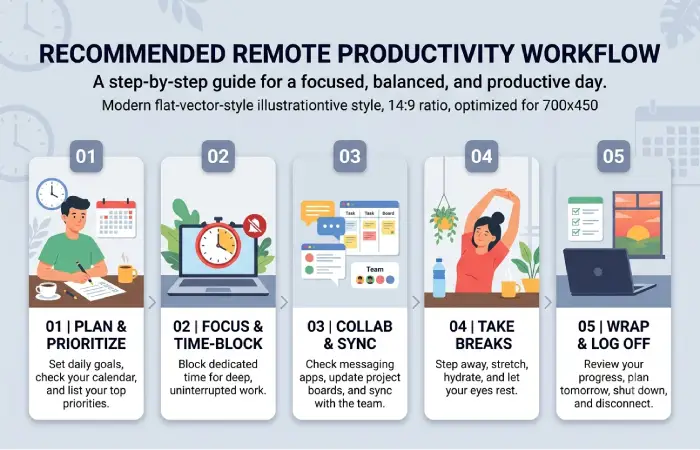
A simple workflow for remote teams can look like this:
Step 1: Set Clear Weekly Goals
Every employee should understand their most important priorities.
Step 2: Break Goals Into Tasks
Use a shared project management system.
Step 3: Track Project Time
Use time tracking where it provides useful business information.
Step 4: Protect Focus Time
Reduce unnecessary meetings and interruptions.
Step 5: Measure Completed Work
Review deliverables, quality, and progress.
Step 6: Review Workloads
Identify employees who may be overloaded.
Step 7: Improve the System
Use productivity data to improve workflows instead of simply judging employees.
Best Tool Categories for Remote Teams
| Need | Recommended Tool Category |
| Track work hours | Time tracking software |
| Manage projects | Project management platform |
| Team communication | Messaging and collaboration tools |
| Video meetings | Video conferencing software |
| Improve focus | Pomodoro and focus apps |
| Store knowledge | Documentation platforms |
| Measure results | Goal and performance dashboards |
| Improve security | Remote work security tools |
The most effective setup is usually simple.
Remote teams should avoid adding a new tool for every small problem.
Instead, create an integrated technology stack that supports communication, task management, focus, and performance measurement.
How Time Tracking Can Improve Remote Team Management
Time tracking data can provide useful insights beyond payroll.
Improve Project Estimates
Teams can compare estimated time with actual time.
Over time, this creates more accurate planning.
Identify Workflow Problems
If employees spend excessive time on repetitive tasks, businesses can explore automation.
Balance Workloads
Managers can identify employees who consistently receive too much work.
Improve Client Billing
Service businesses can create more accurate invoices.
Understand Team Capacity
Time data can help managers decide when to:
- Hire new employees
- Outsource work
- Delay new projects
- Automate repetitive tasks
The key is using data to improve the system rather than simply increasing employee pressure.
The Future of Remote Productivity Management
Remote productivity management is moving away from simple attendance tracking.
Modern teams are increasingly focused on:
- Outcome-based performance
- Asynchronous work
- AI-assisted workflows
- Automated reporting
- Flexible schedules
- Employee wellbeing
- Digital workplace analytics
Artificial intelligence can help automate repetitive reporting and summarize work patterns.
However, businesses should carefully manage privacy when using AI and workplace analytics.
The future of remote productivity will likely involve better automation with less manual tracking.
Instead of asking employees to constantly report their activity, systems can provide useful project insights automatically.
Frequently Asked Questions
What is the best way to track productivity for remote teams?
The best approach combines project completion, goal progress, quality, workload data, and time tracking. Companies should focus on outcomes instead of simply tracking computer activity.
Should remote employees track their time?
Time tracking can be useful for project planning, billing, payroll, and understanding workloads. However, not every remote role requires minute-by-minute tracking.
What are the best time tracking apps for remote workers?
The best app depends on your needs. Look for simple timers, project tracking, reporting, integrations, mobile access, and privacy controls.
How can remote employees improve focus?
Remote employees can improve focus by scheduling deep work sessions, reducing notifications, using Pomodoro timers, grouping similar tasks, and creating a dedicated workspace.
Is employee monitoring software good for remote teams?
Monitoring software can be useful for security, compliance, and time-based work, but excessive monitoring can reduce trust. Companies should be transparent and focus primarily on results.
How do you measure remote employee performance?
Measure employees using role-specific outcomes, completed projects, quality, customer feedback, goal achievement, and business impact.
Final Thoughts
Time tracking and productivity for remote teams should not be about watching employees every minute of the day. The goal is to understand how work happens, identify bottlenecks, improve focus, and help teams produce better results.
The most successful remote organizations create clear goals, use simple productivity tools, protect employee focus, and measure meaningful outcomes.
Start with a simple system. Track project time where it provides value, organize work clearly, measure completed results, and regularly ask employees what is preventing them from doing their best work.
When technology supports employees instead of surveilling them, remote teams can become more productive, flexible, and sustainable.