
Last Updated: July 29, 2026
Firewalls and VPN solutions are some of the most crucial tools in safeguarding today‘s enterprise networks. With more businesses transitioning to being dependent on cloud services, a remote workforce and internet-connected endpoints, it is vital to have data traversing your network protected.
Firewall Firewalls are the first line of defence by inspecting the traffic it receives and sends out. VPN A VPN is used to encrypt your internet connections so that private data can‘t be read if intercepted. They make an excellent basis for the office network security.
Regardless of how big or small you are, configuring a firewall and VPN system can help deter cyberattacks, secure sensitive data and provide safe access to your business systems.
What Are Firewall and VPN Solutions?
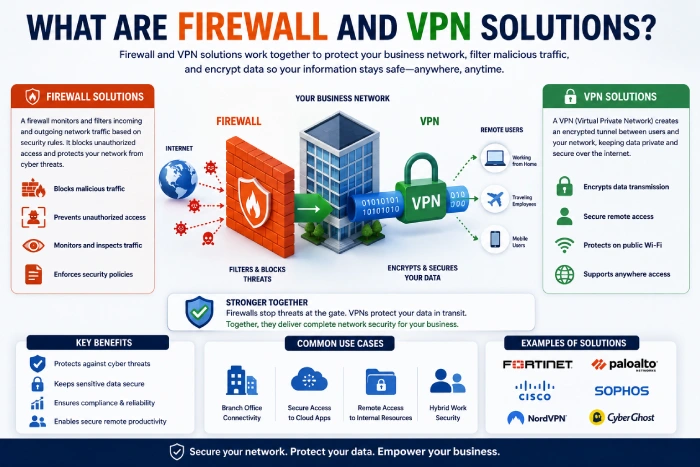
Firewall and VPN solutions combine two complementary security technologies:
- Firewalls: These security barriers are used for recording and controlling traffic from a network in response to previously established security rules.
- A VPN ( Virtual Private Network) is a secure encrypted “tunnel” that passes data between user and business networks.
Together, they provide protection for your organisation against unauthorised access, malware, ransomware and data interception.
Why Businesses Need Firewall and VPN Solutions
Business are under threat from ever more sophisticated attacks into their cyber security.
Common risks include:
- Data breaches
- Malware attacks
- Phishing campaigns
- Ransomware
- Network intrusions (unauthorised network access)
- Insider threats
- Public Wi-Fi attacks
The risks can be minimized by using a correctly configured firewall and VPN.
What Is a Firewall?
A firewall is a security feature such as a hardware device or software program that scans through a network s traffic and prevents unauthorised or suspicious connections.
It‘s the gateway between your internal network and the rest of the internet.
All connection requests are examined individually.
How Firewalls Work
Firewalls’ examine packets of data and analyze then according to the rules of security.
Depending on those rules, they may:
- Allow traffic
- Block traffic
- Log activity
- Alert administrators
- Identifying suspicious activities
Today, firewalls check applications, users and handle encrypted traffic for security reasons.
Types of Firewalls
Packet Filtering Firewall
Examines packets based on:
- IP address
- Port number
- Protocol
The minimum likely filter. This is the least complicated of all fires.used for filtering traffic.
Stateful Inspection Firewall
Tracks all active connections and allows only packets in valid sessions.
This provides more security than simple packet filtering.
Next-Generation Firewall (NGFW)
Modern businesses often use NGFWs because they provide:
- Deep packet inspection This is used within network firewalls to analyze packets of data in detail. The individual packet is inspected, as opposed to inspecting the header, and through this a finer degree of analysis is obtained.
- Intrusion prevention
- Malware detection
- Application awareness
- URL filtering
- SSL inspection
NGFWs are an excellent solution for companies requiring endpoint security.
Cloud Firewall
Cloud firewalls cloud firewalls are used to secure cloud-based workloads and remote users without having to route all traffic through on-premises hardware.
They‘re especially valuable to hybrid and remote-only businesses.
What Is a VPN?
A VPN encrypts the internet traffic starting from the user to the company network.
Wherever the data is intercepted, the information it will see will be encrypted in a form that is unreadable rather than having sensitive business information.
They are particularly useful for those employees who may be away from the office on a regular basis.
How VPNs Work
A VPN:
- Verifies the user.
- Creates an encrypted connection.
- Traffic is funneled through a secure tunnel.
- IM has the ability to obstruct data transfer by protecting them from being intercepted.
- – Permits authorized remote access to company resources.
This allows for the secret information to be kept secret, regardless of using the public network.
Types of VPN Solutions
Remote Access VPN
Employees securely connect to office resources from:
- Home
- Hotels
- Airports
- Client locations
This is the most popular way of deploying VPNs in contemporary working environments.
Site-to-Site VPN
Provides a number of offices the ability to connect through secure tunnels.
Site-to-site VPNs are often employed to facilitate secure communication between business branch offices.
Cloud VPN
Cloud VPNs allow you to connect to cloud applications and infrastructure securely without establishing (or being rooted in) a typical on-premises network.
Benefits of Firewall and VPN Solutions
Stronger Cybersecurity
They help prevent:
- Hackers
- Malware
- Data theft
- Network intrusions
Secure Remote Work
Employees can safely access:
- Shared files
- Internal applications
- Company databases
- Email servers
From almost anywhere.
Data Encryption
VPNs are used to hide sensitive information when the business information is to be transferred over the public internet.
Better Access Control
Administrators can define who can access:
- Servers
- Applications
- Cloud services
- Internal databases
It could be based on the access rights to the video according to user roles.
Regulatory Compliance
Numerous data protection requirements force organisations to put protections around their network traffic and restrict access to sensitive data.
Firewall, VPN solutions can help meet these requirements.
Firewall vs VPN
| Feature | Firewall | VPN |
| Prevents harmful traffic from reaching your network. | Yes | No |
| Encrypts internet traffic. | No | Yes |
| Will safeguard those working from home. | Limited | Yes |
| Access controls of the network | Yes | Limited |
| Prevents the connection of unauthorised devices. | Yes | Yes |
| Protects public Wi-Fi | No | Yes |
The two works together best as a combination.
Best Practices for Firewall and VPN Security
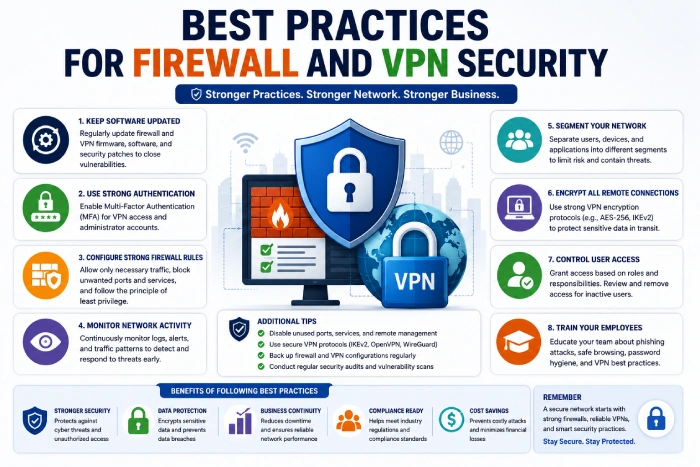
Keep Software Updated
Regularly install:
- Firmware updates
- Security patches
- Software upgrades
To defend against newly found errors.
Use Multi-Factor Authentication
For VPN LoginsRequire MFA to increase security beyond creating passwords.
Create Strong Firewall Policies
Block all network traffic that is not needed.
Block:
- Unknown ports
- Unused services
- Suspicious applications
In order to reduce your attack surface.
Monitor Network Activity
Review logs for:
- One of the major issues has been the inability to recover when you have 3 failed logins.
- Unusual traffic
- Unknown devices
- Suspicious downloads
By providing continuous monitoring, organizations are able to find the threat early.
Train Employees
Teach staff to:
- Never respond never click on a link if you receive unsolicited emails also known as spam. An Email scam often replies by email, where the contents an account number on a fake Web page.
- Use very strong passwords. Don‘t just use nine characters, make them difficult to guess. Use upper case, lower case, numbers and even symbols if you can: up8hAf#r, is a much more secure one than testtest.
- Protect VPN credentials
- Enter any activity which you believe is suspicious.
Employee knowledge is important for network security.
Common Mistakes to Avoid
Businesses often make avoidable security mistakes such as:
- Leaving firewall rules too loose
- Sharing VPN accounts
- By utilizing old VPN protocols
- Failure to apply software patches
- To turn security off for convenience in favor of the visual aspects of the page, I turned security off.
- Neglects to check network logs
Resolving these problems improves your overall security.
Choosing the Right Firewall and VPN Solution
When evaluating solutions, consider:
- Business size
- The number of users With the increased investments of firms and institutions into virtual worlds, the number of users will reach around 251 million by 2015. This optimistic figure is used within the paper.
- And for the remote work force: What are the requirements for a remote workforce? Even most of the demands for small remote workers can be difficult to fulfill. For many of these needs, the report suggests two solutions.
- Cloud integration
- Threat detection capabilities.
- Administration is simple. The system is easy to administer.
- Scalability
- Vendor support
Choose options that will expand with your business.
Future Trends in Firewall and VPN Technology
Network security continues to evolve with technologies such as:
- The use of AI for detecting threats: Misuse Detection One side of this dependence onto an extensive automation of threat detection by the AI system (sometimes called misuse detection).
- Zero Trust Network Access (ZTNA)
- Secure Access Service Edge (SASE)
- Cloud-native firewalls
- Behaviour-based analytics
- Automated incident response. It is unnecessary for a human incident handler to interact with the software in order to process a large number of occurrences.
These innovations allow businesses to more rapidly identify and act on threats while making security easier to administer.
How to Strengthen Your Network Security
Follow these practical steps:
- Utilize an advanced next generation firewall.
- Will establish a configured VPN for remote access.
- Implement multi-factor authentication.
- Update your firewall and VPN software regularly.
- Constantly monitor network traffic.
- Segment key business systems.
- Administration of periodic security audits.
- Provide your staff with training in cybersecurity practices.
Frequently Asked Questions
What is the difference between a firewall and a VPN?
A firewall is used to filter and control computer network traffic. A VPN encrypts your Internet connections with the aim of securing the data.
Do small businesses need firewall and VPN solutions?
Yes. These technologies are often use by small businesses to prevent the theft of computer data by crackers, and allow confidential data to be access securely from remote locations.
Can a VPN replace a firewall?
No. A VPN encrypts data but doesn‘t do any filtering on malicious traffic. A VPN and firewall work in different ways and are best used together.
Are cloud-based firewall solutions secure?
Yes. Cloud firewalls offer a much higher level of security for the cloud environment and remote users than traditional IT security andwould be the best solution to use for a hybrid or distributed workforce.
Why is multi-factor authentication important for VPNs?
MFA requires an additional check for every login request. It is virtually impossible for attackers to browse the MFA system even if they have broken into the password.
Conclusion
Firewall and VPN technology is essential for protecting today‘s business networks. Firewalls help to keep unauthorised traffic out of your network and sort out the “bad traffic” before it can get to your systems and the VPN technology strengthens your network by providing encrypted access to your network to trusted users outside the company. However, even the best technology need to be support by secure policies and software upgrades, as well as the constant awareness of the users on the part of the organisation, for the modern business network to be truly secure.