
Last Updated: June 22, 2026
The technology we employ has become much more advanced by 2026. Organizations have been investing large amounts of money in automating their workplaces with intelligence and creating intercommunicative systems. This makes people work better together. It is more secure and uses less energy. The market for offices was over $70 billion in 2026 and it is still growing very fast because people are working from home and the office now.
Whether you are making a smart office updating the place where you work from home or looking at different systems before you buy one you need to know what makes them different from each other. You have to understand the differences between the platforms and devices that are used in offices, like these.
This comprehensive guide compares:
- Smart Office vs Smart Home
- Alexa vs Google Assistant for offices
- Wired vs Wireless smart office devices
- Leading smart office ecosystems
- Smart office devices to purchase in 2026
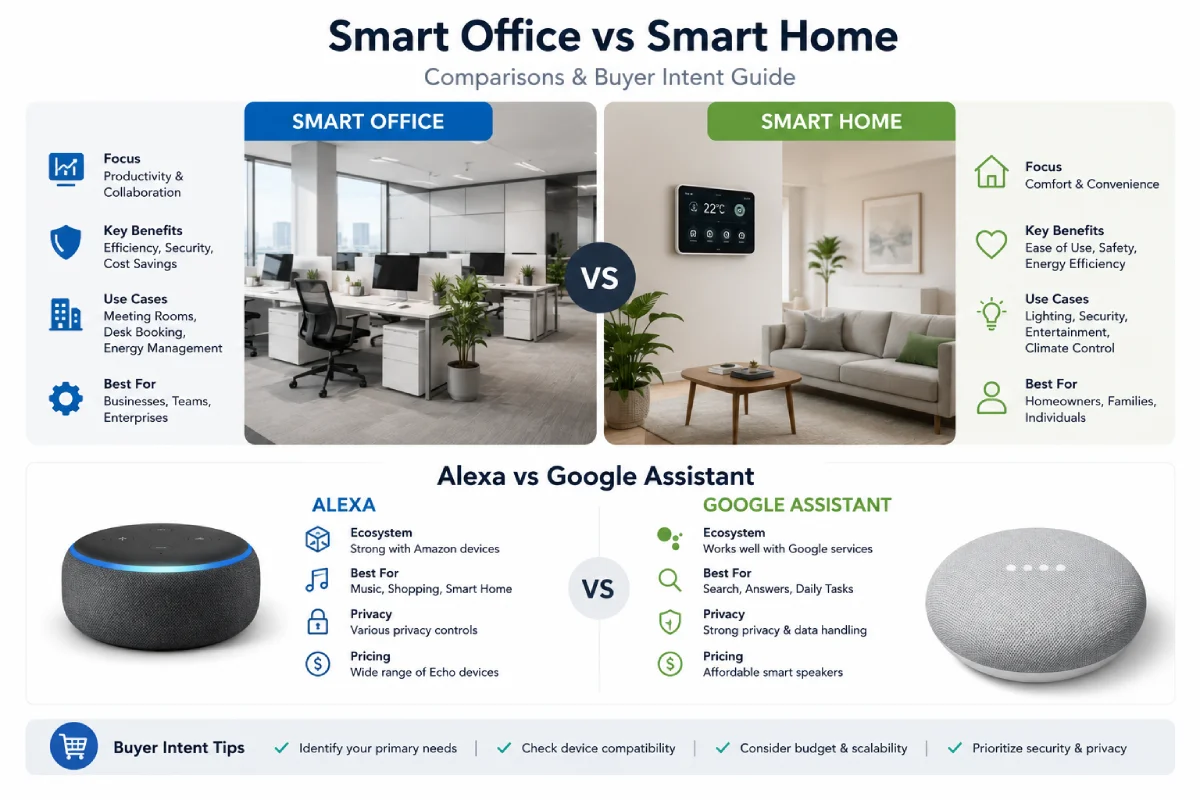
Smart Office vs Smart Home: Differences
Though based on similar principles of automation, AI, sensors, and IoT, smart office solutions are intended to achieve very different goals.
Smart Office vs Smart Home Comparison
| Feature | Smart Office | Smart Home |
| Primary Goal | Productivity & efficiency | Comfort & convenience |
| Users | Teams, employees, visitors | Families and individuals |
| Security Requirements | Enterprise-grade | Consumer-grade |
| Automation Complexity | Advanced workflows | Basic routines |
| Device Scale | Hundreds or thousands | Usually 10–100 devices |
| Collaboration Tools | Essential | Rarely required |
| Energy Management | Critical | Optional |
| Remote Management | High priority | Moderate priority |
| Analytics & Reporting | Extensive | Limited |
Smart Office Benefits
Modern smart offices focus on:
- Automated meeting room scheduling
- AI-powered collaboration
- Occupancy tracking
- Smart lighting systems
- Intelligent climate control
- Network monitoring
- Hybrid workforce management
- Energy optimization
Research indicates that smart office deployments improve operational efficiency while reducing energy waste through occupancy-based automation and cloud-based management systems.
Smart Home Benefits
Smart homes prioritize:
- Voice control
- Entertainment
- Home security
- Smart lighting
- Convenience automation
- Personal comfort
Which Is Better?
Neither.
Smart offices optimize business outcomes.
While smart homes aim to facilitate lifestyle convenience,
for remote workers, a hybrid approach is often the best option.
Comparison of Smart Office Ecosystems
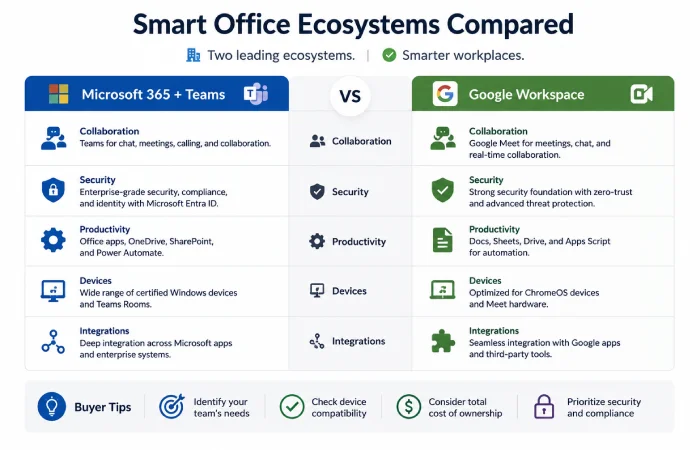
Choosing the right ecosystem is one of the most important buying decisions.
Smart Office Ecosystems in 2026
| Ecosystem | Best For | Strengths | Weaknesses |
| Amazon Alexa | Automation-intensive offices | Large number of compatible devices | Less integration with Google services |
| Google Home/Gemini | Google Workspace users | Search and AI capabilities | Fewer advanced automations |
| Apple HomeKit | Apple-centric teams | Security and privacy | Limited device support |
| Microsoft Teams Rooms | Enterprise collaboration | Business integration | Higher deployment cost |
| Samsung SmartThings | Mixed environments | Broad compatibility | Smaller office adoption |
Alexa vs Google Assistant in Smart Offices
It is one of the questions frequently asked by companies in 2026.
Alexa vs Google Assistant Scorecard
| Category | Alexa | Google Assistant/Gemini |
| Compatibility | 9/10 | 8/10 |
| Automation | 9/10 | 7/10 |
| Smart Routines | 9/10 | 7/10 |
| Information Searching | 8/10 | 10/10 |
| Meeting Management | 8/10 | 9/10 |
| Ease of Setup | 9/10 | 8/10 |
| Ecosystem Flexibility | 9/10 | 8/10 |
| Productivity in Workplaces | 9/10 | 8/10 |
Consistently, sources indicate the dominance of Alexa in regards to automation flexibility and device integrations, and that Google is superior in search intelligence and AI-driven replies.
Alexa Advantages
Better Automation
Alexa routines remain more powerful for office automation.
Examples:
- Automatic morning office startup
- Conference room preparation
- Device synchronization
- Employee notifications
Wider Device Support
Many smart office devices launch with Alexa compatibility first.
Easier Device Integration
Business users frequently report simpler onboarding and device management.
Google Assistant Advantages
Superior Search Intelligence
Google continues leading in:
- Knowledge queries
- Context understanding
- Information retrieval
Better Google Workspace Integration
Ideal for organizations using:
- Google Calendar
- Google Meet
- Gmail
- Google Workspace
AI Enhancements in Gemini
The move by Google towards Gemini-powered smart offices enhances conversational AI.
Winner for Smart Offices
Choose Alexa If:
- Automation is your priority
- You use many third-party devices
- You need advanced routines
Choose Google If:
- Your company uses Google Workspace
- AI-powered assistance is critical
- Search functionality matters most
For most offices, Alexa currently remains the stronger smart office platform.
See full reviews in our smart office gadgets guide.
Wired vs Wireless Smart Office Devices
Businesses often struggle with deployment choices.
Wired vs Wireless Comparison
| Feature | Wired Devices | Wireless Devices |
| Reliability | Excellent | Good |
| Installation | Complex | Easy |
| Cost | Higher upfront | Lower upfront |
| Maintenance | Lower | Moderate |
| Flexibility | Limited | High |
| Scalability | Moderate | Excellent |
| Security | Higher | Good |
| Mobility | Poor | Excellent |
Wired Devices Are Best For
- Conference rooms
- Smart displays
- Security cameras
- Enterprise networking
- Video conferencing systems
Advantages
- Lower latency
- Consistent performance
- Greater reliability
Wireless Devices Are Best For
- Hybrid offices
- Remote workspaces
- Temporary installations
- Flexible seating arrangements
Advantages
- Easy deployment
- Lower installation cost
- Scalability
Which Smart Office Should You Pick?
Most of today’s offices utilize the following combination of elements:
Wired Infrastructure + Wireless Endpoints
This provides maximum reliability and flexibility.
Worthwhile Smart Office Devices to Purchase in 2026
The following categories provide the highest return on investment.
Smart Displays
Smart displays have become productivity hubs.
Benefits
- Calendar management
- Meeting reminders
- Task tracking
- Video conferencing
- Voice control
Industry experts continue ranking smart displays among the most useful office automation tools.
Recommended Use Cases
| Office Type | Recommendation |
| Home Office | Smart Display |
| Small Business | Multiple Displays |
| Conference Room | Large Interactive Display |
AI Webcams
AI-powered cameras are transforming hybrid meetings.
Features
- Auto-framing
- Speaker tracking
- Gesture controls
- Noise filtering
Productivity Impact
AI cameras improve meeting quality and reduce manual adjustments.
Smart Lighting Systems
Smart lighting remains one of the fastest ROI investments.
Benefits
- Reduced eye strain
- Energy savings
- Automated scheduling
- Occupancy-based control
Estimated Benefits
| Metric | Improvement |
| Energy Efficiency | 20–40% |
| User Comfort | High |
| Maintenance Costs | Lower |
Intelligent Meeting Room Systems
Modern meeting rooms increasingly include:
- Smart displays
- Occupancy sensors
- Voice assistants
- Wireless presentation systems
The demand for AI-enabled collaboration technology continues growing as organizations support hybrid work environments.
Smart Security Cameras
Office security is becoming more intelligent.
Modern Features
- AI motion detection
- Facial recognition
- Cloud recording
- Remote monitoring
Ideal For
- Small businesses
- Shared workspaces
- Enterprise facilities
Occupancy Sensors
One of the most underrated smart office technologies.
What They Do
- Monitor workspace utilization
- Control lighting automatically
- Optimize HVAC systems
- Improve energy efficiency
Why Businesses Buy Them
Occupancy analytics help organizations reduce operational costs while improving space planning.
Smart Office Buying Guide for 2026
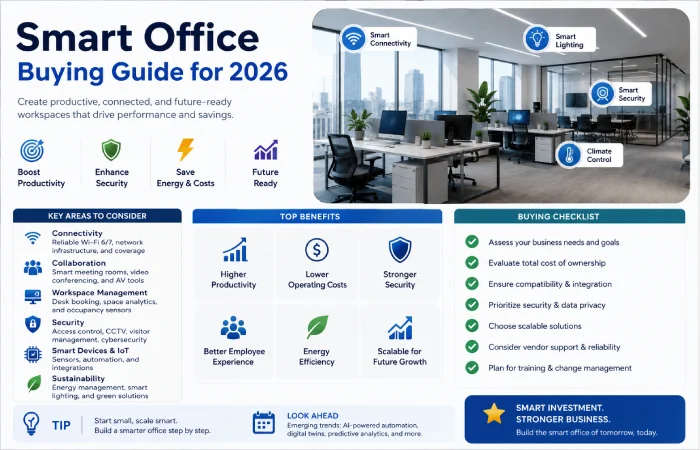
For Freelancers
Priority purchases:
- Smart display
- Smart lighting
- AI webcam
- Voice assistant
For Small Businesses
Priority purchases:
- Smart conference room technology
- Security systems
- Occupancy sensors
- Smart networking equipment
For Enterprises
Priority purchases:
- Integrated workplace management systems
- AI collaboration platforms
- Building automation systems
- Advanced analytics solutions
Find your fit in our industry-specific smart office guide.
Smart Office Technology Trends for 2026
AI Everywhere
Artificial intelligence now powers:
- Meeting summaries
- Workplace analytics
- Smart scheduling
- Predictive maintenance
Hybrid Work Optimization
Organizations continue investing heavily in:
- Smart meeting rooms
- Collaboration displays
- Cloud management systems
Energy Management
Sustainability continues being one of the driving forces behind the adoption of smart offices.
Automated lighting, HVAC, and occupancy detection are some of the technologies that have helped companies cut costs of operation.
Conclusion
In 2026, when building your smart office, think productivity-first instead of merely connecting the devices.
The best formula for success will be:
- Alexa-based ecosystem for advanced automation
- Smart displays for collaboration
- AI webcams for hybrid meetings
- Occupancy sensors for efficiency
- Smart lighting for comfort and savings
- Wireless and wired hybrid network
Businesses which make smart investments in smart offices benefit greatly in terms of productivity, collaboration, efficiency, and the employee experience. With the incorporation of artificial intelligence in office technology, smart offices continue becoming increasingly popular and necessary.