
Last Updated: October 1, 2026
Back in the day, video editing involved fiddling around by hand with the hard mouse and keyboard, chopping out a few frames here and there, dicing duplicate shots, stripping out awkward spacebar pauses, juggling in some subtitles, tweaking the audio mix, enhancing the saturation levels. Now, there are AI tools that do all of that.
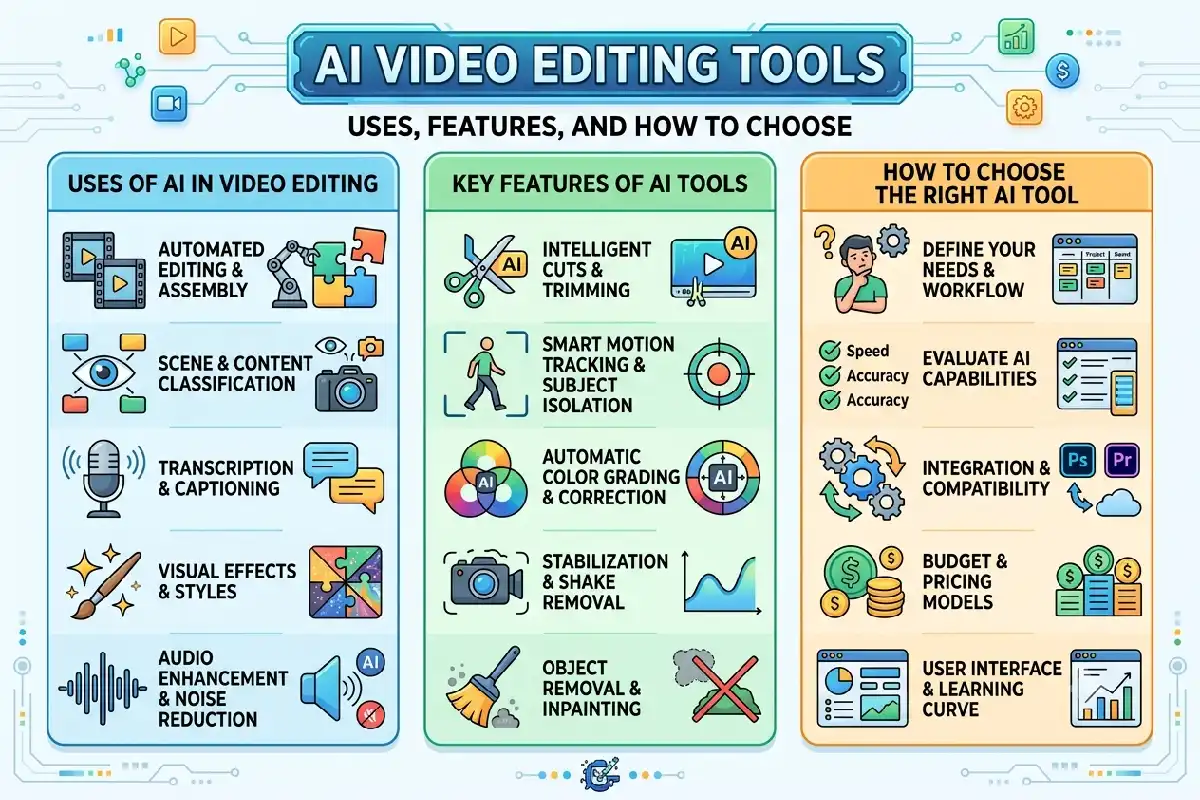
Using artificial intelligence (AI), these applications can examine video and sound, identify speech and images, determine highlight moments and recommend or apply edits. They can enable creators to produce finished pieces of work from untouched material without having to handle everything themselves.
AI is certainly not a substitute for a good editor, can be more effective used as a tool that takes the time-consuming work away from the editor. This can be done effectively when the editor makes the creative choices.
AI Video Editing Tools: Meaning and Key Concepts
AI video editing tools are programs that employ machine learning and other similar algorithms to facilitate or replace some of the editing tasks.
General editing such as searching for clips, cutting timelines, making captions, cleaning up audio, and visual adjustments is handled manually by the user. An auto AI editor can take on some of these tasks automatically.
For example, it may detect long silences and suggest removing them. Using another tool, you could even have the interview transcribed, then edit the video by just removing words in the transcript.
Common AI-powered features include:
- Auto-generated subtitles and transcriptions
- Silence and filler-word removal
- Background removal
- Audio cleanup
- Scene and object detection
- Automatic reframing
- Highlight detection
- Text-based video editing
- Color and lighting adjustments
- Short-form clip generation
There is more or less automation. Some are regular film editors that happen to have a dozen AI features in the application, others have essentially built the whole editing process on top of AI.
AI-Assisted vs Fully Automated Editing
AI-assisted editing has the creator pulling the strings. The program suggests sorts of manipulation or automatically performs some of the editing, but the person is in charge of arriving at the right version of the video:
Automated editing goes further. Upload your footage; choose a style or give directions, and then let the program do most of the work for you!
When creating a more commercial or branded piece of content, using editing with the help of AI can often be beneficial because of the blend between automation and human creativity.
Why AI Video Editing Tools Matters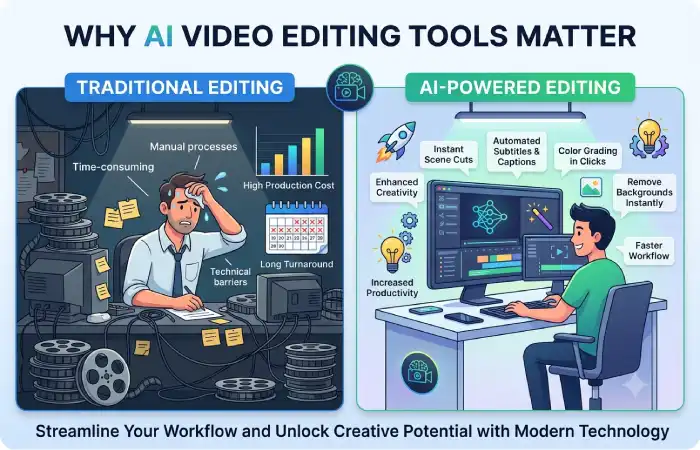
The greatest benefit of AI video editing is just time.
Think about a one hour interview. Listening through the whole recording manually, finding the best parts, adding captions, cleaning up the audio, and editing short social media clips can take a lot of time.
AI can speed up many of those steps.
Faster Editing
AI can scan footage, and can find out locations, speeches, pauses..etc. Editor can spend less time on the labor task nd more on shaping the story.
Easier Editing for Beginners
Editing software for professionals can be daunting when first starting out. Features such as AI make simple tasks easier.
Instead of learning a complicated masking process, for example, a beginner may be able to remove a background with a few clicks.
Easier Content Repurposing
One long video can potentially become several pieces of content.
A webinar could be turned into:
- A full YouTube video
- Several short clips
- Captioned social videos
- Promotional highlights
- Transcribed content
AI helps identify sections that may work well as standalone clips.
More Consistent Workflows
Films-on a regular basiscan additionally take advantage of template and automations for captions, formats, branding, and formatting.
The key is that quicker editing is not necessarily better editing. Human review still plays a role for context, correctness, pacing, and the story.
Key Types, Methods, and Examples
AI video editing tools are not all designed for the same purpose. Understanding the main categories makes choosing one easier.
| Type | Common Use |
| Text-based editors | Edit spoken videos through transcripts |
| Automatic clip generators | Turn long videos into shorter clips |
| AI caption tools | Generate subtitles automatically |
| Audio enhancement tools | Reduce noise and improve speech |
| Generative editing tools | Create or modify visual elements |
| Background removal tools | Separate people or objects from backgrounds |
| Smart reframing tools | Resize videos for different platforms |
Text-Based Video Editing
These editors convert spoken audio into text. Users can then make changes through the transcript.
If you delete, say, a sentence from the text, that can also delete the corresponding part from the video.
It would be very beneficial for podcasts, tutorials, interviews, and talking-head videos.
Automatic Short-Form Editing
There are a few programs that look through longer recordings and find segments that could be used as short clips.
Useful for creators that upload shorts across YouTube Shorts, Reels, TikTok, And so on.
Nevertheless, the automatically selected clips should be checked. AI may identify an interesting sentence without understanding the context around it.
Generative AI Editing
Newer tools can modify video using written instructions. Depending on the software, this might include removing objects, changing backgrounds, generating visual elements, or extending footage.
These capabilities can save time, but generated results may contain visual inconsistencies. If realistic footage is to be shot or edited, most care will need to be taken.
How to Use or Apply AI Video Editing Tools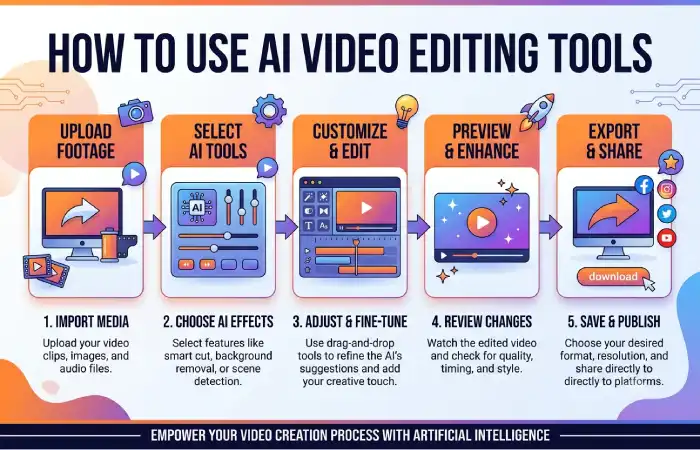
A good workflow starts before opening the editing software.
1. Decide What You Are Creating
Know the final format first.
A YouTube tutorial, product demonstration, podcast clip, advertisement, and Instagram Reel all require different editing choices.
2. Organize Your Footage
Eliminate the clearly unworkable files and group the others (video, audio, pictures, graphics). The editing section can be much easier if the source materials are cleaned up.
3. Let AI Handle Repetitive Tasks
Automize the task of transcription, silence removal, subtitle creation, densification, or initial clip selection.
These are areas where AI can save considerable time.
4. Make the Creative Decisions Yourself
Review pacing and transitions,music,storyboardimages, and significant cuts.
Does each edit add to the viewer’s experience rather than accept all AI suggestions?
5. Review the Entire Video
Take a look at the finished video from start to finish.
Double check subtitles, names, numbers, cuts, sound levels, graphics, and all transitions. Miscorrection in automation script for the subtitler c0uld misinterpretions on items such as accents, terminology, names.
6. Export for the Correct Platform
Select a resolution, aspect ratio and format suitable for the intended publishing platform of the video.
A social vertical video is different from a normal widescreen YouTube video visual layout.
Best Practices and Common Mistakes
The most effective AI video editing process will use a mixture of technology and human interpretation.
Start with good source footage. AI can improve certain problems, but poor lighting, badly recorded audio, or weak composition can still limit the final result.
Review generated captions. Automatic transcription can make mistakes, particularly with names, brands, accents, and industry terminology.
Avoid over using automation. Whenever you inserting transitions, effects, zooms or cuts dont let automation take over. If the AI is helping you take less time, than more power to it but if it takes more control than leave it alone.
Secure confidential material. Review the storage and handling of uploaded files if you intend to upload sensitive recordings, client footage, internal meetings or other proprietary information.
Check commercial-use terms. If artificial intelligence creates footage, images, music, voices or any other assets, check what licensing and use conditions are set by the platform before commercial use.
Keep the original media files. Back-up all raw video and important project files. Do not rely entirely on an online editing platform to store your work.
How to Choose the Right AI Video Editing Tool
Choose your real editing task rather than the editing task that appears to offer the longest feature set.
An online creator might care about automatic clipping, captions, vertical reframing, and fast exports. A professional editor might be more concerned with the timeline, color tools, audio editing, collaboration, and tightly integrated with a workflow.
Before choosing, consider:
- Ease of use
- Editing control
- AI features you will actually use
- Supported video formats
- Export quality
- Processing speed
- Collaboration options
- Privacy and data handling
- Commercial-use terms
- Pricing and usage limits
Try the software with one real project whenever possible. This quickly demonstrates whether there is both a reduction of editing time with the AI features, or if there is an added step!
Final Thoughts
AI video editing tools are revolutionizing video production by enabling faster and easier editing. They can transcribe video for captions, enhance and clean up audio, identify key moments, remove backgrounds, reframe shots, and perform numerous other repeatable editing processes.
Above all, their real importance is in helping the creator, rather than making creative decisions for them.
Utilize AI for the mechanical portions, then add human input for story-telling, correctness, pacing and style. This semi-aided approach can help to great enhance the quality of the videos, with much less editing time.