
Last Updated: September 23, 2026
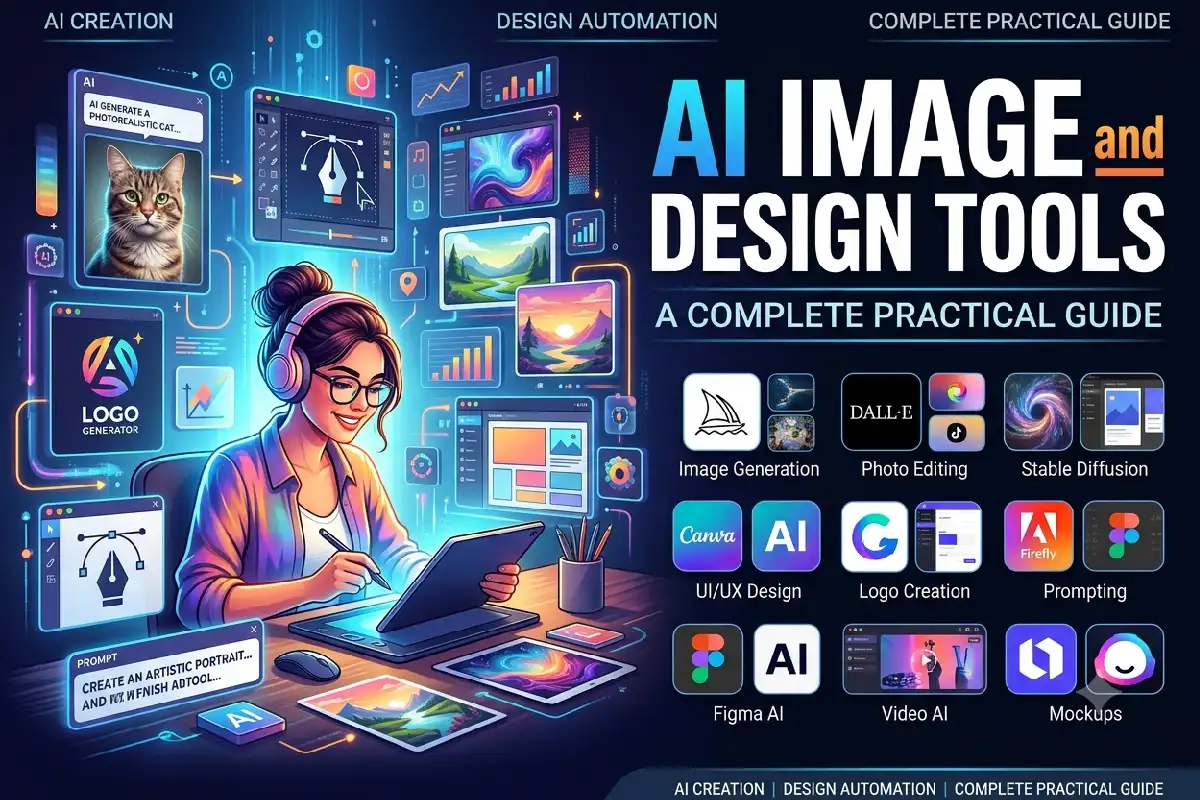
AI image and design software have revolutionized the way visual imagery is created. Much of what once took educated graphic design knowledge has become achievable with an AI-assisted design program in only minutes.
AI can assist with a wide variety of creative tasks, ranging from creating original artwork and 12 removing backgrounds, designing marketing visuals and presentations, photo editing and producing prototypes for products.
These tools are great for the inexperienced users, marketers, content creators, designers, business owners, teachers and for other companies as well. They help in eliminating unnecessary work and provide the ease to try different visual ideas.
That does not mean that AI will make a good design. The result will depend on the tool, prompt, source material, editing, and human judgment.
Knowing the functions of AI-image and design tools will empower you to select suitable software for your needs and be more efficient in using it.
What Are AI Image and Design Application?
AI image and design tools are machine learning-based software programs that can create, modify, improve or Manage images.
It can also generate a new image from a text description. If you wanted to generate an image of, say, a contemporary smart office, you could describe it as a room with lots of natural light, floor-to-ceiling windows, cheerful indoor plants, and ergonomic furniture, and the AI will output an image based on your description.
Design-centric AI tools may complete wider or more general tasks. These could include producing graphics for social media, slideshows, advertisements, layouts, drawings or mock-ups of products.
Certain implementations integrate AI-produced content with established design practices. For example, these can offer a user the opportunity to produce a starting design and then alter font, type, layout, colors, spacing, graphics and the like.
Common AI image and design capabilities include:
| Capability | What It Does |
| Text-to-image | Generates images from written prompts |
| Image editing | Modifies parts of an existing image |
| Background removal | Removes or replaces backgrounds |
| Generative fill | Adds or replaces visual elements |
| Image enhancement | Improves image quality or resolution |
| Style generation | Creates images using a specified visual style |
| Design generation | Produces layouts and graphics |
| Object removal | Removes unwanted elements |
| Image expansion | Extends an image beyond its original boundaries |
| Design resizing | Adapts designs for different platforms |
Choose the best tool for your product. You may only need to generate images for a blogger, or perhaps a team of marketing professionals need brand templates, collaboration features, editing capabilities and commercial licensing.
How AI Image Generators Work
Tools like AI image generators employ machine-learning models that are trained to learn an association between visual information and language.
At a simplified level, the process starts with your prompt. The system interprets the words and attempts to translate concepts such as objects, people, environments, composition, lighting, colors, and styles into an image.
Many modern image-generation systems use diffusion-based techniques. As the model trains, it learns how the image and its data is constructed. When generating, images are produced one step at a time according to the commands it has been given.
For example, consider this prompt:
An intelligently designed modern human-centered smart office with ergonomic desks, big screens, plants Indoor, natural light coming from early Morning, study decor with hyper-realistic photography.
The system then takes these concepts and draws the image. The system is choosing out of those learned patterns.
The output can vary between generations. Even when you use the same general description, the composition, objects, lighting, and other details may change.
Text-to-Image Generation
Text-to-image generation is one of the most recognizable AI design capabilities.
Users can describe what they want instead of manually drawing every component.
A prompt can include:
- Main subject
- Environment
- Composition
- Camera angle
- Lighting
- Color palette
- Mood
- Artistic style
- Level of realism
- Aspect ratio
For example, instead of searching through stock-image libraries for a specific technology concept, a content creator can generate an image designed around the exact topic.
AI Image Editing
AI can also modify images that already exist.
Depending on the software, users can remove unwanted objects, replace backgrounds, extend images, change specific elements, improve resolution, or add new visual components.
This makes AI useful for post-production as well as image creation.
For instance, an ecommerce website might take a cluttered product image, crop out the distracting backgrounds, and replace it with a normal studio-type background.
Generative Fill and Expansion
Generative fill allows AI to add or replace part of an image based on a description.
Image expansion – This technique enlarges an image with the help of existing image by keeping it around the image.
These characteristics are perfect to use for any image that doesn‘t have the appropriate aspect ratio to be used as a banner for a website, a social media post, a PowerPoint presentation, or an ad.
Popular Design Tasks You Can Automate
Any visual task. rather than translating into text, AI can help with the visual task… As well as remapping an entire design process, it may make many more repetitive or tentative steps go much faster.
Social Media Graphics
Discuss the importance of Fresh Content for social media sites that is updated on a frequent basis.
Design tools for artificial intelligence would be used for brainstorming ideas for a post, ads, banners, thumbnails, stories or visuals to promote a product or service.
A creator can also create multiple iterations and then settle on the most suitable for the brand.
For recurring campaigns, AI can also be used to evolve one idea into other formats.
Blog and Website Images
Artificial images can be included in web pages, such as information articles, landing pages, tutorials and educational material.
For instance, a technology website might render conceptual images on subjects like artificial intelligence, cloud computing, network computer security, networking, automation in the home, or robotics.
Nevertheless, the subject matter of the generated images is very important; good appearance does not equal meaning.
For technical content, human review is particularly important.
Marketing Materials
The use of AI may assist marketing teams in developing ideas for advertising, promotional banner graphics, email images, campaign imagery, and product advertisements.
Instead of settling down for a single concept, a team can develop multiple courses of action and just have a look at them during the creation process.
The final design can then be further improved through a traditional design program.
Presentations
Designing slides can be a laborious job.
AI tools can be used to help with slide ideas, images, diagrams, backgrounds, formats, and supporting graphics.
They allow you to develop a general idea into a much more visually organized presentation.
Persuading a human is still relevant. Online presentations often need correction of information, branding, readability of text, and structure.
Product Concepts and Mockups
Can use AI to visualize ideas of product concept before developing physical prototype.
For instance, the designer of a new smart home device might come up with several different shapes, materials, colors, and usage settings for the product.
These images need to be regarded as ideas rather than precise technical specifications.
Product images created by artificial intelligence might include nuances that are not feasible to produce or do not match the product itself.
Brand and Campaign Concepts
What the AI can do for teams? For instance, instead of physically exploring visual directions for a new campaign, By inputting some words into the system, the teams can use AI to achieve the same result.
Or a marketer may experiment with various moods, compositions, color schemes or creative themes to decide on which one to pursue for an innovative production.
Thus, AI are very helpful during brainstorming and the initial stage of design.
How to Write Better Image Prompts
Good prompts provide clear visual direction.
A vague prompt gives the AI considerable freedom to decide what the image should look like. A detailed prompt provides more constraints.
A useful prompt structure is:
Subject + Environment + Composition + Style + Lighting + Details
For example:
Basic prompt:
“Modern office with computers.”
Detailed prompt:
Contemporary intelligent workplace furnished with 2 ergonomic tables, huge screens, indoor greenery, daylight window light, tidy spartan decor, authentic architectural photography.
The second prompt establishes considerably more information.
Be Specific About the Subject
Describe exactly what should appear.
Instead of:
“Create a laptop image.”
Try:
Design a silver laptop open on a clean wooden desk with a wireless keyboard, a smartphone, and a note pad around it.
Definie descriptions eliminate ambiguity.
Describe the Composition
Composition determines how the scene is arranged.
Useful terms include:
- Close-up
- Wide-angle
- Top-down view
- Eye-level perspective
- Centered composition
- Subject in foreground
- Shallow depth of field
- Background blur
- Symmetrical composition
You do not need to use every term in every prompt. Select the details that matter for the intended image.
Specify the Visual Style
The visual style can significantly affect the result.
Examples include:
- Photorealistic
- Product photography
- Editorial photography
- Cinematic
- Minimalist illustration
- 3D render
- Flat vector design
- Watercolor
- Technical illustration
Select a style that suits the goal.
A children article related to education might call for a simple cartoon- like illustration, whereas a page selling a product may necessitate some very high quality, clean, product photography.
Mention Lighting and Mood
Lighting affects the atmosphere of an image.
For example:
“Soft natural morning light”
creates a different visual direction from:
Dark and cinematic lighting with deeply rendered shadows.
Can also mention the choice of mood here also; professional, lively, calm, futuristic, friendly or luxurious.
Use an Iterative Prompting Process
The first image created doesn‘t have to be world class;
If things are near where you want them, improve rather than redoing everything.
For example:
The same layout but a brighter room, removing some objects from the desk, and using a wider camera view.
This way, you have more experienced control over the creative process.
Copyright, Ethics, and Responsible Design
Artificially-created images also concern issues of creativity, ownership, and copyright, as well as privacy, consent, authenticity, and ethics of how they are used.
The above is only a general outline and the legal position is likely to differ by country, tool, type of content and use to which the content is to be put. Users should always check the most up to date terms of the AI service and the law as it pertains to their use.
Check Commercial Usage Rights
One should not necessarily assume that every work produced by a machine learning program is available for commercial use.
Services differ in the way free and paid accounts are licensed.
Prior to an AI generated image being used in ads, packaging, products, websites or selling campaign call the supplier for the current terms and conditions before using.
Avoid Misleading Images
Artificial Intelligence will be able to create extremely accurate images of events, places, products, or people that never took place.
Misusing this kind of material without proper context can easily mislead the reader.
This concept is especially significant for reporting, marketing, advertising, education, product promotion, and any other sector where true-to-life images may be required.
Where an image is conceptual or synthetic, clarifying that fact may help sell the concept.
Respect People and Privacy
AI image generators should not be exploited to deceive the identification of individuals or to generate fabricated depictions of existing persons.
Companies must design their own internal rules for managing photos, PII, images of customers and AI content.
Review Every Generated Image
Mistakes in the illustrations created by AI can be very easy to miss.
Common problems include:
- Distorted hands
- Incorrect text
- Unrealistic objects
- Inconsistent reflections
- Incorrect proportions
- Strange facial details
- Product inaccuracies
- Inconsistent logos
- Physically impossible designs
Always inspect the final image before publishing it.
AI Image Tools vs Traditional Design Software
AI tools and traditional design software serve different purposes.
The AI is particularly ideal for abstracting ideas and speeding up repetitive design tasks where regular CAD‘s may be better suited for detailed control over individual aspects of the design.
| Task | AI Tools | Traditional Software |
| Generate concepts | Very fast | Usually manual |
| Create image variations | Fast | More time-consuming |
| Brainstorm visual ideas | Strong | Manual |
| Pixel-level editing | Varies | Strong |
| Precise typography | Can be limited | Strong |
| Brand consistency | Improving | Highly controllable |
| Complex layouts | Improving | Strong |
| Final professional production | Often requires review | Strong |
They could work in collaboration.
A designer could conceive the project with AI, then pursue one of these avenues, Using traditional software programs for typography, alignment, branding, color correction, printing.
Benefits and Limitations of AI Image and Design Tools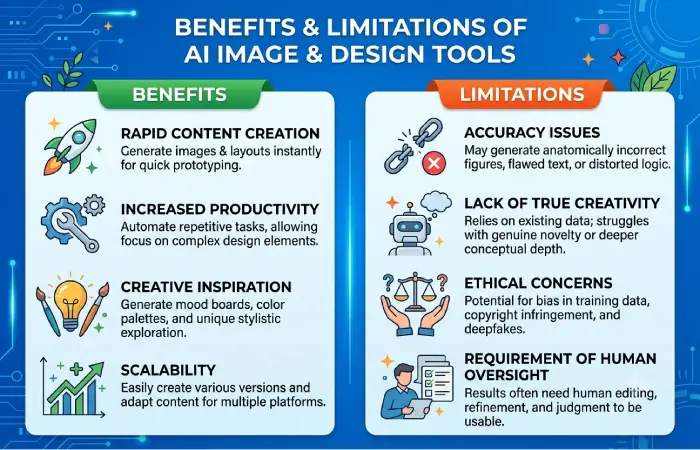
The biggest benefit is speed.
AI can generate many ideas at once in a short amount of time this allows creators to not spend what may originally take much longer.
It can also enable those who lack skill to do some form of visual experimentation.
Another advantage is accessibility. A small business owner can create an initial marketing concept without hiring a designer for every early-stage idea.
However, AI has limitations.
Generated images can contain visual errors, inaccurate details, unwanted objects, and inconsistent styles. Text generation inside images can also be unreliable depending on the system.
Maintaining exactly the same character, product, environment, or brand identity across multiple images may also require additional tools and editing.
Licensing and copyright questions can also affect commercial use.
For these reasons, AI is often most effective as a creative assistant rather than a complete replacement for human design judgment.
How to Choose an AI Image and Design Tool
Start with your specific use case.
Do not choose software simply because it is popular. A tool designed for professional image generation may not be the most convenient option for someone who mainly needs social media templates.
Consider these factors:
| Factor | What to Check |
| Image generation | Quality, realism, and consistency |
| Editing | Object removal, background editing, generative fill |
| Templates | Social media, presentations, advertisements |
| Ease of use | Beginner-friendly workflow |
| Output quality | Resolution and file formats |
| Commercial rights | Licensing and usage conditions |
| Brand controls | Logos, fonts, colors, templates |
| Collaboration | Team editing and review |
| Integrations | Compatibility with existing software |
| Pricing | Free limits, subscriptions, and usage costs |
Beginners
For new users, tools that package templates with drag-and drop editing and AI creation could be useful.
A simple interface might be more useful than an extremely technical one in terms of speed of graphics production
Content Creators
Bloggers, YouTubers, those producing social networking site content rapid image generation and thumbnail creation, image resizing, removing backgrounds, and making quick variations.
Businesses
All these characteristics should be considered carefully by the companies, especially the aspects of commercial licensing, brand controls, team collaboration, privacy, consistency and workflow integration.
Professional Designers
In addition, professionals may want a software with features such as editing and image manipulation controls, reference-image editing features, and the ability to work with other digital art and design tools.
Best Practices for Using AI in Design
There are several simple things you can do to make your results more useful from your AI design tools.
Upfront come in with a clear goal. Find out if you will be developing the illustration for a blog, ad, product idea, facebook graphic or a slide.
Keep prompts focused on key details. Do not add unnecessary instructions simply to make a prompt longer.
Generate multiple variations. The first result is rarely the only possible interpretation.
Review every output. Check objects, text, proportions, branding, and factual accuracy.
Edit the result. AI generation can be one step in a series of design steps.
Remain consistent with the brand. Make use of existing fonts, colors, logos, rules & style guides.
Check licensing. Before releasing, ensure that the tool‘s existing policies on commercial use and content are acceptable.
Final Thoughts
Artificial intelligence image and design software have revolutionized how we create visually. These programs can be used for creating images and editing, quick concepts, social media images, presentation backgrounds, marketing images, concepts for products, and much more.
The optimal workflow involves the use of AI with human guidance.
Set a goal, write a definite prompt, generate several variations, analyze the results, and create the best idea. For the work in use, more editing and quality testing probably still need.
Further to that, we need to consider copyright, licensing, privacy, authenticity and how the material is used. If we create content using AI we can‘t be sure whether it‘s true, up-to-date or available for use in a commercial setting.
Lastly, AI will not be useful by simply being able to generate an image from a description. Its usefulness will be in helping users quickly navigate concepts, in automating tedious design tasks, in helping humans turn ideas into finished images while keeping human design intuition central.