
Last Updated: September 23, 2026
The 6 th and 7 th generation of WiFi is designed to provide a faster and more efficient wireless network, with an ability of supporting more connected devices. The 6 th generation WiFi was designed to serve this purpose by introduction of increased capacity and reliable networks, whereas the 7 th generation WiFi provides: Multi-Link Operation, 320 MHz channels, and 4096-QAM.
As for homes, workspaces, gaming seating, and intelligent equipment, selecting one of WiFi 6, WiFi 6E, and WiFi 7 will be tailored to your existing equipment, internet connectivity, coverage requirements, and cost.
What Is Wi-Fi 6?
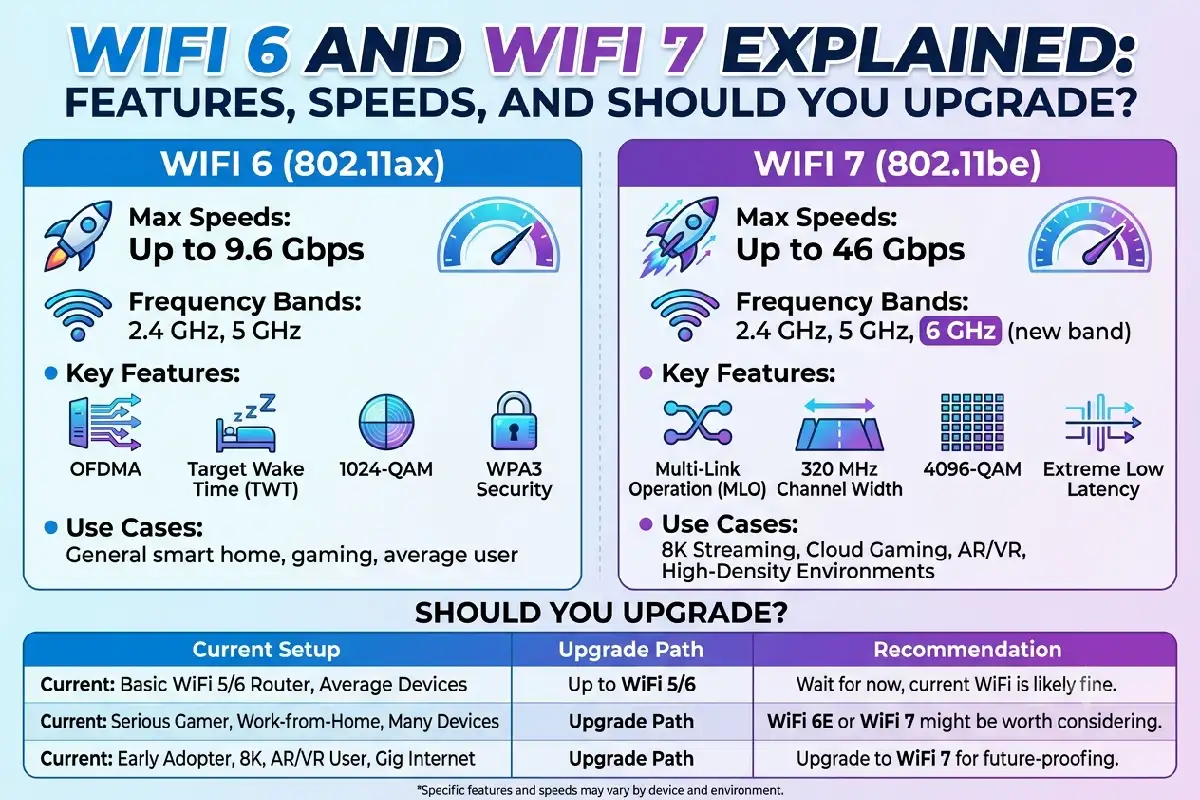
Another promising product is WiFi 6, the third generation of wireless standard- IEEE 802.11ax. Its main concern is efficiency, not top speeds.
It brought in features such as OFDM (OFDMA), enhanced MU-MIMO, Target Wake Time, and more sophisticated support for congested wireless networks.
WiFi 6 could theoretically provide up to 9.6 Gbps spread over many streams, but cannot be expected to provide speeds close to this in practice. In the real world, the speed depends greatly on the router, client device, channel width, interference, and internet connection.
The main advantage is probably network performance. A WiFi 6 router is able to handle multiple connected devices more efficiently than WiFi 5 equipment.
Wifi 6 versus wifi 6e versus wifi 7
WiFi 6E upgrades the existing WiFi 6 into the 6 GHz spectrum for devices capable of using the extended spectrum. By comparison a lot of work has gone into the next generation. WiFi 7:
| Feature | WiFi 6 | WiFi 6E | WiFi 7 |
| Standard | 802.11ax | 802.11ax | 802.11be |
| Main bands | 2.4/5 GHz | 2.4/5/6 GHz | 2.4/5/6 GHz |
| Maximum channel width | 160 MHz | 160 MHz | 320 MHz |
| Modulation | 1024-QAM | 1024-QAM | 4096-QAM |
| OFDMA | Yes | Yes | Yes |
| MU-MIMO | Yes | Yes | Yes |
| Multi-Link Operation | No | No | Yes |
| Main advantage | Efficiency | More spectrum | Higher performance and flexibility |
WiFi 7’s certified feature set includes technologies such as Multi-RU, 320 MHz operation, Multi-Link Operation-related capabilities, and 4096-QAM-class modulation.
The 6 GHz band is particularly useful because it can provide additional capacity with less congestion than heavily used older bands, although availability and permitted channels depend on the country.
OFDMA and MU-MIMO Benefits
There are two key WiFi 6 technologies which are OFDMA and MU-MIMO.
OFDMA divides a wireless channel into smaller resource units. Instead of giving an entire channel to one device at a time, a compatible router can efficiently schedule transmissions for multiple devices.
This has its benefits. For example, in an environment such as a home‘s where there are many wifi enabled phones, laptops, smart TVs, cameras, speakers, sensors, and other house hold appliances all talking at the same time.
MU-MIMO or Multi-User Multiple Input Multiple Output, enables an access point equipped with a MU-MIMO capable device to transmit data to several clients utilizing several spatial streams.
By combining these technologies, increases network effectiveness and minimizes delay when many devices are using a common network. WiFi 6 will also include downlink and uplink OFDMA and MU-MIMO.
What sets WiFi 7 apart is.
WiFi 7 is not just a faster WiFi 6. Many technologies are introduced to increase throughput, decrease latency, and increase flexibility,
320 MHz Channels
WiFi 7 supports channels as wide as 320 MHz in compatible spectrum.
A broader channel can transmit more data, but the advantage is limited by spectrum and local regulations, the configuration of router and whether the client device supports.
4096-QAM
WiFi 7 uses 4096-QAM, whereas 6 uses 1024-QAM.
Higher modulation achieves the ability for greater throughput in same radio spectrum in favorable signal situations.
Multi-Link Operation
Multi-Link Operation (MLO) is one of WiFi 7’s most important features.
A more intelligent approach of devices that are compatible with several bands or wireless links in stead of a single one. This improves throughput, latency and connection stability.
The WiFi 7 approval documentation also contain capabilities related to MLO, such as Enhanced Multi-Link Single Radio, and simultaneous transmit- and receiving operation.
Best WiFi 6/7 Routers
When choosing a router, it is not necessarily selecting the highest speed it provides, but rather what type of network you want to build.
If you‘ve got a standard home using a reasonable broadband connection and the vast majority of your devices are using WiFi 5 or 6, then a decent WiFi 6 router might do the trick.
Suppose you have a 6GHz device or 2, and if you are compatible and need more spectrum then it might be worth having a WiFi 6E router.
The new WiFi 7 will be most exciting for those with newer laptops, phones, gaming consoles, multi-Gigabit internet, powerful NAS devices and/or very congested networks.
When comparing routers, check these specifications:
| Feature | Why It Matters |
| WiFi generation | Determines supported wireless technologies |
| 6 GHz support | Important for WiFi 6E and WiFi 7 |
| 160/320 MHz channels | Affects peak wireless throughput |
| MLO | Important WiFi 7 capability |
| Ethernet ports | Important for multi-gigabit connections |
| Number of streams | Affects potential client capacity |
| Security features | Protects connected devices |
| Mesh support | Useful for larger homes |
Do not select a router based only on its advertised maximum speed. Your client devices and wired network should also support the performance you expect.
Device Compatibility With WiFi 7
Having purchased the WiFi 7 router, not every piece of hardware in your home will be a WiFi 7 device.
Older WiFi 5/6 devices are expected work, as they would be able to connect using their WiFi generation, however they won‘t be able to make use of WiFi 7-only features.
In order to enable MLO and 320 MHz and 4096-QAM, the router and the client device have to be capable of using those technologies.
| Device | WiFi 7 Router Compatibility | WiFi 7 Features |
| WiFi 5 laptop | Yes | No |
| WiFi 6 smartphone | Yes | No |
| WiFi 6E laptop | Yes | Limited to supported WiFi 6E features |
| WiFi 7 laptop | Yes | Yes |
| WiFi 7 smartphone | Yes | Yes |
| Older smart-home devices | Usually | No |
Compatibility can vary with respect to the operating-system support, drivers, spectrum regulations in the country or with the specific hardware implementation, location, country.
Transitioned from WiFi 5 to WiFi 7
A direct upgrade from WiFi 5 to WiFi 7 may be a large technology leap, but it isn‘t for everyone.
If your existing WiFi 5 network meets your coverage and performance needs, upgrading to a newer WiFi generation may not be significant when using older equipment.
An upgrade is more beneficial if you have a few newer machines, a highspeed broadband connection, network contention or demanding local programs.
If you‘re looking for a fairly simple to implement ways to boost efficiency and increase the number of devices alive then go for WiFi 6.
Use WiFi 6E for the 6 GHz band if desired, and enabled by your devices.
Remember WiFi 7 when you are searching for a new set of features like MLO, 320 MHz channels, and 4096-QAM, and are ready to have client devices that can utilize them.
WiFi 6 & WiFi 7 – Which is the best?
The decision should start with your existing network.
Choose WiFi 6 when:
- The majority of devices are WiFi 5 or WiFi 6.
- Your net connection is under multi-Gb/s.
- You need greater efficiency, but they don‘t want to pay the new features.
- You have many devices connected together but you don‘t require the use of WiFi 7.
Consider WiFi 7 when:
- You own several WiFi 7-compatible devices.
- You get internet with multi gigabit speeds.
- For competitive access low latency, high local-network throughput;
- You want MLO and other newer wireless capabilities.
- You are designing a new, high performance network.
Frequently Asked Questions
Will WiFi 7 be faster than WiFi 6?
Definitely. Features like wider channels, high density 4096-QAM modulation and other enhancements in WiFi 7 are expected to boost maximum throughput. Real maximum speed may vary according to equipment, distance from the access point, interference, network configuration, etc.
Is WiFi 6 still Good in 2026?
Although majority of homes and offices is still compatible with WiFi 6 in case majority of devices don’t support WiFi 7, WiFi 6 has significantly longer life.
Is WiFi 6E better than WiFi 6?
Furthermore, with the next generation of WiFi, WiFi 6E, access to 6 GHz spectrum is also provided. However, the usefulness of this, in practice, is dependent on the presence of compatible devices and local spectrum.
Is WiFi 7 necessary for gaming?
Not at all. Gaming experience also is affected by the latency, reliable connection, the amount of the distance between server and you or your connection setup. WiFi 7 may be beneficial for gaming but not as a long as your WiFi 6 network is set up in a right way.
Is it possible for WiFi 6 devices to link up with the WiFi 7?
Yes. WiFi 7 routers are backward compatible with the previous WiFi standards. A device that is WiFi 6 enabled will not have WiFi 7 features just because it is built to connect to WiFi 7 routers.
Final Takeaway
Wireless networks are still best served by WiFi 6 for everyday needs and WiFi 6E for new 6 GHz compatible devices. WiFi 7 builds upon those with 320 MHz channels, 4096-QAM, and Multi-Link Operation.
In the case of an overperformed existing network, it wasn‘t necessary to upgrade right now. Or, in the way of a new high-performanced network and for compatible devices connected on multi-gigabit links as well, Wifi 7 seems to be more advanced.
The key point to emphasize here is that the normal way of selecting a WiFi generation is to choose it on the basis of its peak speed, as if the fastest generation is the best for all cases. In realityit is not going to be used like that: find the router that fits your devices, broadband speed, coverage demands and actual network load.