Last Updated: September 23, 2026
Introduction
AI video and audio software are revolutionizing content creation processes used by creators, marketer, teachers, enterprises and media crews. It is now possible to accomplish things that previously needed a dozen softwares, advanced editing skills and a team of experts just by using AI-enabled workflows.
Contemporary AI applications include converting text into video, voiceovers, stripping audio of background noise, transcription of recordings, creation of subtitles, editing clips, translating speech, music production, and automating repeated production process.
However, not all the AI media tools are alike. Some were for text-to-video generation, and others were for audio cleanup, voice synthesis, video editing, avatars, transcription, or repurposing of content.
Learning the function and role of these tools in the production workflow can give you the knowledge needed to purchase a package that will do what you require, without the cost of unwanted features.
What Are These AI Video and Audio Tools?
AI video and audio tools are softwares, which employ artificial intelligence and machine learning to generate, modify, analyze or automate video and audio content.
Editing in the traditional way has involved users doing everything by hand such as slicing clips, changing sound levels, producing subtitles, cropping, or recording voice-overs.
The software with the help of AI can automate some of the processes by reading the content, and guessing the best result.
As an example, an AI video editor may detect pauses in a vocal recording and delete them. An audio software may minimize background sound to leave only what was spoken.
Common AI media capabilities
| Capability | Typical application | ||
| Text-to-video | Generate video scenes from written prompts | ||
| AI video editing | Automate cuts, transitions, captions, and enhancements | ||
| Text-to-speech | Convert written content into synthetic narration | ||
| Speech-to-text | Transcribe audio and video | ||
| Voice enhancement | Improve clarity and reduce background noise | ||
| AI avatars | Create presenter-style videos | ||
| Music generation | Generate background music and soundtracks | ||
| Dubbing | Translate spoken content into other languages | ||
| Object removal | Remove unwanted elements from video | ||
| Video upscaling | Improve resolution and visual quality |
The key distinctions are between AI tools for generation and AI tools for assistance with editing.
Generative systems produce media which is created from a prompt or other input. Editors influenced by AI tend to simply automate or enhance existing media.
Many modern platforms combine both approaches.
How Generative Video and Audio Work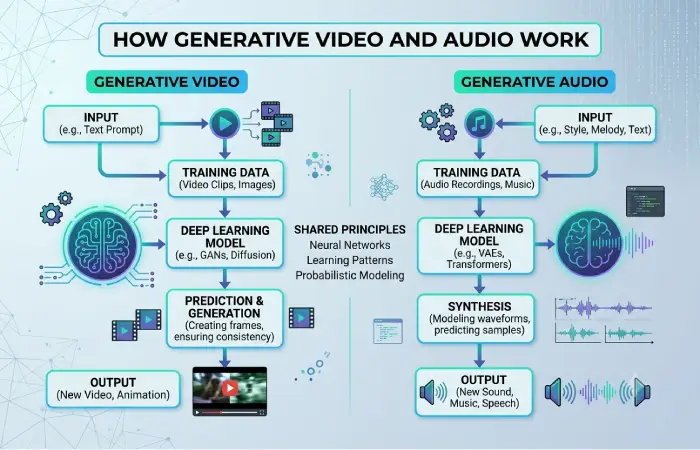
Generators for video and audio generally employ machine-learning models that are trained on massive datasets. The use of data varies greatly by application: models are trained on associations between text, images, speech, sound, motion and other media.
Text-to-video generation
Text-to-video A generative video system will take a text prompt or cue and generate the desired output video.
A prompt might describe:
A contemporary office set against a view of a city at dawn, with colleagues working around a digital desk.
The system renders ideas like objects, environment, lighting, motion and style prior to any sequence creation.
The technology is useful for:
- Concept visualization
- Marketing content
- Social media clips
- Storyboarding
- Educational demonstrations
- Product concepts
- B-roll generation
Results can vary considerably depending on the model, prompt, duration, resolution, and available controls.
Image-to-video generation
Some AI systems can animate an existing image rather than generating the entire scene from text.
For instance, the creator might give an item image and instruct the system to generate camera motion or minor animation.
This may be a convenient way to do this if it is more important to keep the presence of an image (asset) than to generate a new scene.
Text-to-speech
AI voice systems convert written text into spoken audio.
Modern systems can generate voices with different languages, speaking styles, pacing, and levels of expressiveness.
Common applications include:
- Narration
- Tutorials
- Audiobooks
- Accessibility
- Training content
- Marketing videos
- Podcasts
It can be high voice quality but user need be aware of commercial licensing and voice-consent.
Speech-to-text
Speech recognition systems transcribe spoken language into written language.
It supplies the technology behind transcription service providers that generate transcriptions automatically, caption data, meeting minutes, podcast transcripts, video archive libraries, and more.
It can also become part of an automated workflow. For example:
Video → transcription → summary → social posts → captions
This allows a single piece of content to produce multiple formats.
Common Creation and Editing Use Cases
AI video and audio tools are useful across several stages of the content-production process.
1. Creating videos from text
There is a technology which can convert text to video, This enables a computer to take a written idea and turn it into a visual.
This is really useful to creators who would prefer supporting images but cannot fund every set to be shot.
Generated footage should be carefully scrutinized for any visual anomalies, inaccurate details and possible continuity errors.
2. Automated video editing
AI editing tools can detect scenes, speakers, pauses, highlights and such.
During the editing process, rather than physically searching through the whole recording, the creators can use the AI to search for the fragments that need editing.
Typical features include:
- Automatic scene detection
- Silence removal
- Smart cropping
- Caption generation
- Background removal
- Object tracking
- Automatic reframing
- Highlight detection
Human review remains important for final editing because automated systems can misunderstand context.
3. AI voiceovers
AI generated narration will eliminate the need of recording all of the script manually.
This can be particularly useful for:
- Explainer videos
- Product tutorials
- Internal training
- E-learning
- Short-form content
Verify that after publication you can use the tool commercially, and that the chosen voice is authorized.
4. Audio enhancement
AI audio processing can enhance recordings made under sub optimal conditions.
Noise suppression (reduction), speech enhancement, echo suppression (cancellation) and automatic leveling will all make dialogue more intelligible.
This then could be useful to podcasters, remote teams, educators and any video creators that record with everyday microphones.
5. Automatic subtitles and captions
AI transcription is also capable of producing captioning based on the lines within speech.
Captions enhance accessibility as well as potentially ease the process of consuming video without sound.
However, creators need to check auto-generated captions as names, technical words, accents and background noise may cause errors.
6. Dubbing and translation
The technology can even translate speech and produce a foreign-language dubbing.
This approach can help content creators target international markets.
The process can involve:
Speech (original) → transcription (converting speech to text) → translation (translating from one language to another)→ voice synthesis (building an artificial voice)→ synchronization (controlling the timing)
Human review is especially useful when the material is culturally sensitive or highly technical.
7. Content repurposing
AI is enabling one long video to be sliced and diced into multiple bite-sized pieces of content.
For example:
| Original content | AI-assisted outputs |
| 30-minute webinar | Short clips |
| Podcast episode | Audiograms and social clips |
| Tutorial | Short videos and captions |
| Interview | Quote graphics and clips |
| Product demo | Promotional videos |
| Webinar transcript | Blog posts and summaries |
This is one of the practical benefits of AI media tools: content multiplication rather than simply content generation.
AI Video and Audio Tools for Different Users
Different users need different capabilities.
| User | Useful AI capabilities |
| YouTubers | Editing, captions, thumbnails, voiceovers |
| Podcasters | Transcription, noise removal, audio enhancement |
| Marketers | Video generation, avatars, localization |
| Educators | Narration, captions, translation |
| Businesses | Training videos, presentations, automation |
| Social creators | Short-form editing, effects, repurposing |
| Developers | APIs, media automation, speech processing |
A professional video production team may require fine controls, exports at higher resolutions, team collaboration facilities, and integration with workflow.
Another beginner might only want some software for converting a script into an attractive finished short film.
How to Choose the Right AI Media Tool
The most suitable tool is the one that aligns with your workflow rather than the one with the most AI features on its pricing page.
The main task will be to determine whether or not the word emotion is explicitly present in the book.
Start with one question:
What do I want the tool to do?
If transcription is needed then you may not require a video-generation system.
If you require synthetic narration, it‘s possible that an advanced video editor will not be an optimal method.
Set the core task first of all. Compare platforms.
Check output quality
This all sounds very impressive in a demo, but how well will it work in the reality of your workflow?
Test:
- Video consistency
- Voice quality
- Lip synchronization
- Audio clarity
- Subtitle accuracy
- Export quality
- Rendering speed
Always take the free trial/sample generation before you go to a paid plan.
Examine commercial rights
Licensing is a unique case for media generated by AI.
Check whether the platform allows commercial use of:
- Generated videos
- Generated voices
- Music
- Images
- Avatars
- Templates
Also review whether additional restrictions apply to specific models or third-party assets.
Consider editing controls
A tool may generate excellent results but provide limited control.
Professional users may need controls for:
- Timeline editing
- Aspect ratios
- Frame-level adjustments
- Audio mixing
- Color correction
- Subtitles
- Brand assets
- Export settings
Compare pricing by actual usage
With AI tools, they tend to have a credit, minute, generation, or processing limits rather than a pure unlimited plan.
For how many it would need to publish each month.
A low monthly subscription can cost a lot if the heavy traffic requires an extra credit.
Look for integrations
Integrations can make AI tools more valuable.
Useful connections may include:
- Cloud storage
- Video editing software
- Content management systems
- Collaboration platforms
- Marketing platforms
- APIs
- Automation services
For businesses, integrating with their workflow might be more important than offering the most AI features.
Deepfakes, Copyright, and Responsible Use
AI media generation creates important ethical and legal considerations.
Deepfakes & Synthetic Media.
Deepfake technology allows the creation or alteration of realistic videos, images, and voices.
Not all synthetic media has to be malicious. For instance, tagged as fictional characters, these digital presenters might serve a valid purpose.
Difficulties occur when synthetic media has been done on people to pretend to different audiences, to mislead, to fabricate evidence or to produce unwarranted material.
Creators must make clear disclosure of such material, synthetic or otherwise , whenever this disclosure is necessary.
Voice cloning
Voice cloning should be paid special attention to since one‘s voice can be employed to produce realistic synthetic speech.
Before you clone or copy another person‘s voice, have the proper authorization and read the terms of the product.
Refrain from employing synthetic voices to imitate people with fraudulent intents.
Copyright and training data
The copyright issues around generative AI are also debated as patchy.
Creators cannot simply take for granted that using works created by AI will not infringe copyright.
Potential issues can involve:
- Training data
- Input materials
- Generated output
- Third-party assets
- Music
- Voice likeness
- Brand identity
- Existing copyrighted characters
When using AI-generated media commercially, review the platform’s current terms and applicable laws.
Human review remains essential
AI‘s is not going to boost the speed of a producer/ editor. It can, simply, increase their efficiency.. Increasing efficiency does not mean replacing the producer/editor with an AI.
Before publishing AI-generated content, check:
- Accuracy — Are facts and statements correct?
- Quality — Does the output meet your standards?
- Rights — Do you have permission to use the source material?
- Authenticity — Could viewers reasonably misunderstand the content?
- Safety — Does the content create unnecessary harm or deception?
AI Video vs. AI Audio Tools
Although these technologies increasingly overlap, their primary purposes remain different.
| Feature | AI Video Tools | AI Audio Tools |
| Text-to-video | Common | No |
| Text-to-speech | Sometimes | Core capability |
| Video editing | Core capability | No |
| Audio cleanup | Common | Core capability |
| Transcription | Common | Core capability |
| Voice cloning | Sometimes | Common |
| Music generation | Sometimes | Common |
| AI avatars | Common | Limited |
| Video translation | Common | Sometimes |
| Podcast production | Useful | Highly relevant |
Many creators will eventually use both categories together.
Consider a YouTube workflow, for instance. This might incorporate an audio application for voice enhancement, and an AI video editor for captions, visuals and completion.
Benefits and Limitations of AI Media Tools
AI media tools offer several practical advantages.
Benefits include:
- Faster production
- Lower barriers to entry
- Automated repetitive tasks
- Easier content repurposing
- Faster localization
- Improved accessibility
- Reduced manual editing
But they also have limitations.
AI systems can produce:
- Visual artifacts
- Incorrect transcriptions
- Unnatural speech
- Inconsistent characters
- Generic creative output
- Contextual mistakes
- Licensing uncertainty
The most effective workflow is probably AI-assisted rather than AI-only.
AI manages production tasks that are to be repeated time and again, Human provides the general instructions, verify, edit and judge.
A Practical AI Media Workflow
A simple AI-powered production workflow can look like this:
1. Plan → 2. Create → 3. Edit → 4. Enhance → 5. Review → 6. Publish
For example, a video creator could:
- Write a script
- Generate or record narration
- Create supporting visuals
- Assemble the footage
- Generate captions
- Clean the audio
- Create short clips
- Review the final content
- Publish different versions across platforms
The specific tools may evolve, but the workflow still proves valuable because it distinguishes the stages of creation, automation, and quality assurance.
Frequently Asked Questions
What are AI Video & Audio Tools?
AI video and audio (publicly available) tools apply artificial intelligence methods to generate, edit, process, improve, or perform multimedia content including video, audio (voice recordings, music, podcasts), and presentations.
Can AI generate an entire video?
Yes. Some platforms allow video creation based on text prompts, scripts, images, or mixtures of all these. There is a need for human moderation for refinements and final product.
Is it possible for AI to produce a “believable” voice?
Certainly. Current text-to-speech synthesis can generate far more natural sounding synthetic speech. Voice cloning is also available on certain systems and would be appropriate to use with permission.
Can we consider any video created by a machine as free of copyright?
Not always. Whether AI-related content is legal is contingent on the meanings of the content for the jurisdiction, the human component, the source languages and content, the page content and rules, and the content.
Are AI video creation tools helpful for learners?
Yes. Since AI editors are developed for autonomous editing and production, a lot of content can be done without professional video-editing skills.
Should organizations make use of the voices provided by AI?
Training, narration and localization are some of the rules where there are no restrictions, and user should consider licensing, consent, disclosure and various legal aspects.
Final Takeaway
AI for Video & Audio These make a real difference in helping the content-creation process flow more quickly and easily. They can produce media, including edits, enhancement, auto-captioning, as well as translation and repurposing online.
It is not right to select a tool only based on the number of AI features that it contains. Instead, identify the production problem you want to solve, assess the output quality and learn about its cost and licensing, and experiment on how the tool fits your workflow.
However, for the majority of content creators and companies, where the best thing is produced by using AI automation combined with the creative final editing and quality control of humans.