
Last Updated: October 1, 2026
Photo editing often involved selecting objects from images by hand, erasing camera backgrounds, fixing lighting problems and taking extra time to learn how to use difficult editing applications. Today AI photo editing applications can often automate many of these tasks and significantly speed up common edits. You can often quickly brighten or darken, remove an object or replace a background, enlarge or crop an image, erase distractions or make other adjustments within the application through simple text commands. However, AI editing doesn t always work 100 percent of the time. Understanding how to leverage editing features effectively enables you to produce natural and accurate results.
What Are AI Photo Editing Tools?
What are AI photo editors? AI photo editors refers to a kind of software applications that utilize artificial intelligence to manipulate, improve, repair, or change digital images without any human input.
Usually in common photo editing, you have to outline an area and manually edit yourself. The AI can analyze an image and automatically do some work for you.
Like this: You could also upload a product photo and instruct the editor to remove everything behind it.
Other tools may let you write instructions such as:
Get rid of the chair on the background.
or:
“Extend the image on the left. Continue the gym background naturally.”
The capabilities on offer are determined by the software being used.
What Can AI Photo Editing Tools Do?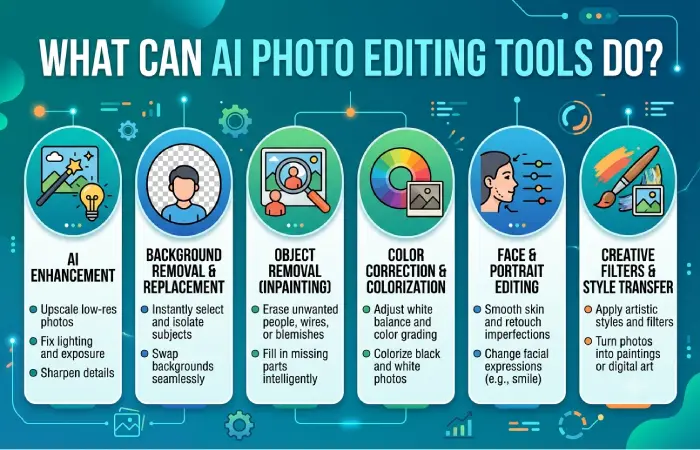
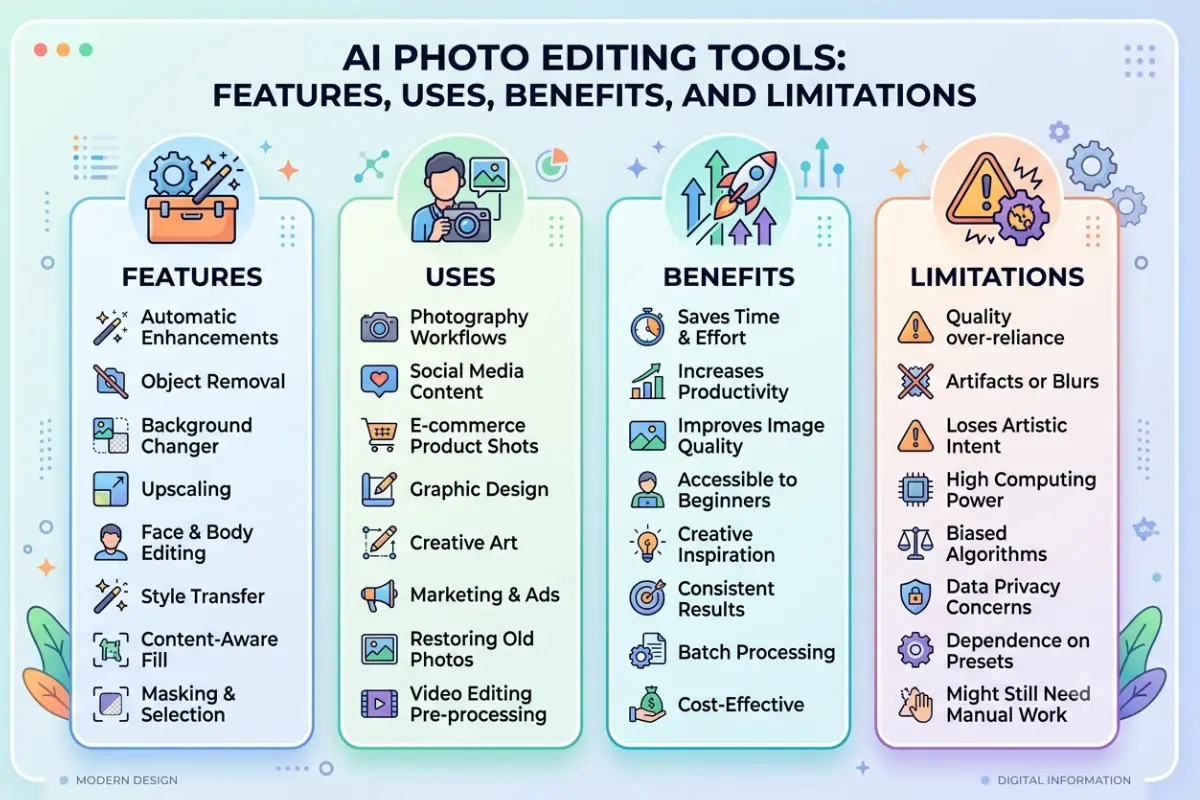
Some of the usual editing the current AI editing tools are capable of.does the following;
Remove Backgrounds
The use of AI is able to Maximize the focus on the subjectivity and imagery, and minimizing the distractions from the background.
This can be useful for:
- Product images
- Profile pictures
- Social media images. Graphics that communicate ideas quickly to your audience. These might include images, infographics, or charts.
- Website designs
- Marketing materials
There may even be difficult edges: for example hair, see throughs, or very fine hair.
Remove Unwanted Objects
Object removal is used to pick something that you don‘t want there in the photo and the AI will try to fill in what should have been there. This could help if you think there is a distracting object in a good photo.
Replace Backgrounds
Rather than just removing the background, some software will allow you to create a new one. For instance, taking a picture of a product behind a white wall and inserting it into another image. Be careful that the end product does not give a false impression of the product being advertised.
Expand Images
Ai image expansion can be used to extend a photo behind the edges. For example a square image could be extended across the width to help make a website banner. The AI adds additional visual data around the image.
Improve Image Quality
Some tools can automatically adjust:
- Brightness
- Contrast
- Sharpness
- Noise
- Exposure
- Color balance
It can even save time; though, too much processing can result in artificial looking.
AI Photo Editing vs. Traditional Photo Editing
AI-editing and manual editing isn‘t a zero-sum game.
They can teaming.
| AI Photo Editing | Traditional Editing |
| Fast can also be used for repetitive tasks. | More manual control: The ability to manually control aspects of the program, such as easily being able to select directly from the program; along with the free text element, made the program much easier to use. |
| Other significant features:. More user-friendly for beginners. | Much more demanding1 Please note that more difficult to pass a test. |
| Automated selections | Accurate customized picks. |
| Quick background removal | A high level of edge refinement. Animation was challenging because of the refining of the edge of the experimental box. |
| Attempts to improve the use of human resources. An exercise in job redesign and benefit it is suggested. Useful for first-pass editing. | Has multiple uses… Helpful for precise tuning |
AI can perform the first step and a human edit the output. Such combined workflow is more preferred for professional work.
Benefits of AI Photo Editing Tools
Faster Editing
Sometimes you do not need to do multiple step procedure, but a one-step command. If you have many images, this might be very helpful.
Easier for Beginners
There might not be a need to learn all the traditional editing methods before simple corrections are made. Instructions in natural language may help some of the tools be less intimidating.
Useful for Content Creation
Bloggers and website owners can use AI editing to adapt existing visuals for:
- Featured images
- Blog graphics
- Social posts
- Thumbnails
- Banners
It might be re-sized, stretched, re-touched and tidied up so that it looks up for insertion into various locations, without having to begin from a piece of scratch.
Quick Experimentation
You can test a number of backgrounds or compositions before you find the one that looks best; thus AI is very helpful in the creative process.
How to Choose an AI Photo Editing Tool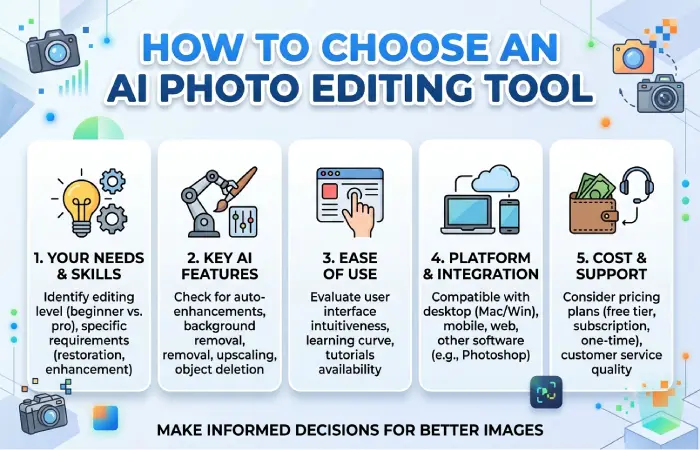
Avoid the assume-it-alls of the longest feature list; rather what do you Want.
Editing Features
Identify if you require background removal, object removal, generative fill, image expansion or enhancement, or all of the above.
Ease of Use
: Even a simple interface might be more useful than more sophisticated features you may never use.
Image Quality
Pay close attention to those tiny details after the corrections.
Check:
- Hair
- Hands
- Faces
- Shadows
- Reflections
- Text
- Product edges
- Repeating patterns
Editing “Mist mistakes” can be highlighted in these regions.
Export Options
Determine what file formats can be opened, maximum resolution, compression options, and if the application puts a watermark on the image.
Privacy
When uploading your photographs, take care if they include sensitive or recognizable faces as data uploaded by users is stored with the hosting service. Read relevant information on the policy of the service used for storing data and its present data policy.
Common AI Photo Editing Mistakes
Over-Editing
There is a point where more editing does not improve the photo. Over-sharpening, over-smoothing or over-enhancement can cause the image to have an unnatural appearance.
Ignoring Small Errors
Auto-generated backgrounds can be interesting at first glance but contain an odd object or distort shadows, zoom in before the next step.
Changing Products Unrealistically
If an AI edit significantly alters the appearance of the item, such as its color, shape, size, or features, the buyer could be deceived by the appearance of the listing.
Forgetting the Original
Retain an unedited copy of all critical photographs. This will represent a fresh starting point should anything go wrong after an edit.
Publishing Without Human Review
Use AI-generated edits even when the result is set to be checked by a human.
Responsible AI Photo Editing
Much more sensitive for images containing real human beings, events, products and evidence Don’t make any edits that could be perceived as deceiving the viewer about something serious that did not in fact occur. Other people: remember obtaining permission and respecting privacy when editing images of third parties. For commercial projects, always verify the licence permissions of the tool.
AI Photo Editing for Websites
AI editing has benefits when preparing images for the website.
After completing an edit:
- Trim the image to fit the placement.
- 3D problems and compare the results with experimental solutions. Please resize it to its original size. 87 Effect of Sediment Composition on Dams in Ogee Spillways Abstract.
- Simply compress the file.
- Select an appropriate image format.
- Provide descriptive ALT text where relevant.
- Preview on desktop and mobile.
A beautiful image should not impede page load speed in any way that is either overly minimal or rare.
FAQs
What is an AI photo editing tool?
This is an application that employs artificial intelligence to automate or support image editing processes like background erasing, object removal, image enhancement, image upscaling, and more.
Can AI remove objects from photos?
Numerous AI editing applications are capable of deleting the object and creating New Content in fill for the area.
Can AI replace a photo background?
Yes, some tools are able to delete the original background and create or place one instead.
Is AI photo editing good for beginners?
It will not always improve the results, but can assist many simple editing operations. You should still give the document a once-over before using it.
Conclusion
AI photo editing tools can simplify daily image editing. Remove backgrounds, clean objects, expand, enhance, and generative edits can often be completed with far less manual work. The technology works best when paired with human judgment. Choose tools according to the editing features you actually need, protect sensitive images, keep your originals, and carefully review generated changes before publishing. Used thoughtfully, AI can handle much of the repetitive editing work while leaving the final creative decisions in your hands.