
Last Updated: September 22, 2026
AI writing tools have become practical assistants for drafting, rewriting, editing, summarizing, brainstorming, and adapting content for different audiences. Instead of treating them as replacements for writers, it is more useful to understand them as software that can accelerate parts of the writing process while leaving human users responsible for facts, judgment, originality, and final editing.
Modern AI writing systems commonly rely on generative AI models, particularly large language models (LLMs), that learn patterns from large datasets and generate text in response to instructions.
The challenge is no longer simply finding an AI tool that can produce readable text. The better question is whether a tool fits your writing goals, workflow, budget, privacy requirements, accuracy expectations, and level of human review.
What Are AI Writing Tools?
AI writing tools are software applications that use artificial intelligence to help create, transform, or improve written content.
Depending on the product, an AI writing tool may help you:
- Generate an article outline
- Draft emails and reports
- Rewrite existing text
- Improve grammar and clarity
- Summarize long documents
- Brainstorm ideas and headlines
- Change the tone of a message
- Create product descriptions
- Develop social media copy
- Translate or adapt content
- Extract information from documents
- Research and organize information
Some tools focus on a single task, such as grammar correction. Others provide a broader writing workspace where users can plan, generate, revise, and format content.
For example, a modern generative AI writing workflow can move from planning → drafting → revising → packaging, with the human writer providing context and reviewing the result.
AI Writing Tools vs Traditional Writing Software
Traditional writing software primarily gives you an environment for creating and editing text. A word processor, for example, can provide formatting, spelling, commenting, and document-management features.
AI writing software adds a generation or transformation layer.
| Feature | Traditional Writing Software | AI Writing Tools |
| Typing and editing | Yes | Yes |
| Spell checking | Usually | Usually |
| Grammar suggestions | Often | Usually |
| Generate new text | Limited | Yes |
| Rewrite paragraphs | Limited | Yes |
| Summarize content | Usually limited | Yes |
| Brainstorm ideas | Manual | AI-assisted |
| Change writing tone | Manual | Often available |
| Generate outlines | Manual | Yes |
| Analyze uploaded content | Limited | Many tools |
The distinction is becoming less clear as traditional productivity applications increasingly add AI capabilities.
How AI Writing Software Works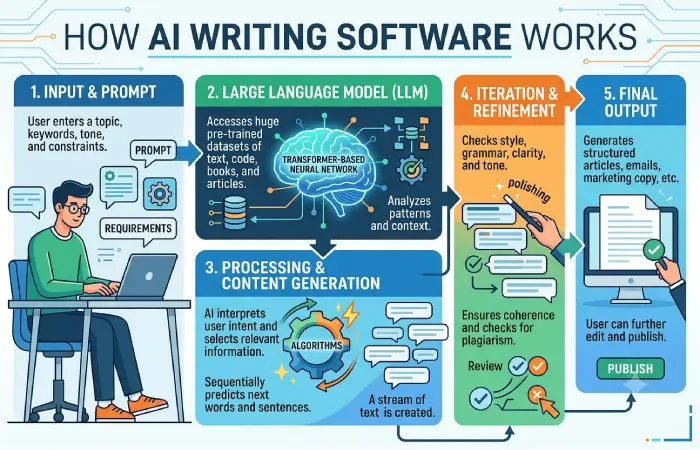
Most modern AI writing software is built around a generative AI model. For text generation, these systems commonly use large language models trained on large collections of text.
At a simplified level, the process looks like this:
Your instructions → AI model → generated text → human review → final content
The model does not simply retrieve a prewritten paragraph from a database every time you ask a question. Language models learn statistical and contextual patterns during training and use those patterns to generate a response. OpenAI describes its language models as processing text as tokens and predicting what text is likely to come next based on patterns learned during training.
1. You Provide a Prompt
The prompt tells the system what you want.
For example:
Write a 500-word beginner-friendly explanation of Wi-Fi security.
A stronger prompt can include the target audience, format, tone, facts to include, length, and restrictions.
2. The Tool Processes Context
The application processes your prompt along with other available context.
Depending on the tool, this may include:
- Previous messages
- Uploaded documents
- Templates
- Brand guidelines
- Reference information
- Connected data sources
- Custom instructions
Some AI applications can also connect models to external tools and data sources. Google, for example, describes grounding and retrieval-augmented generation (RAG) as methods for connecting models to relevant information to improve factual accuracy and reduce hallucinations.
- The Model Generates Text
The language model generates an output based on the instructions and context it receives.
This is why the same prompt can sometimes produce different wording or structures. Generative systems can have an element of variability in their outputs.
4. The User Reviews the Result
This is one of the most important steps.
AI-generated text can sound confident while containing incorrect, outdated, incomplete, or unsupported information. NIST’s AI Risk Management Framework emphasizes measuring accuracy and robustness using realistic test conditions rather than assuming that an AI system’s output is automatically trustworthy.
For important content, the workflow should therefore be:
Generate → verify → edit → fact-check → publish
Common Types and Use Cases
There is no single type of AI writing tool. Different products are designed around different writing problems.
AI Content Generators
These tools generate drafts from prompts.
Common uses include:
- Blog outlines
- Articles
- Product descriptions
- Landing-page copy
- FAQs
- Marketing drafts
- Video scripts
They can be useful when starting from a blank page or creating a first draft quickly.
AI Grammar and Editing Tools
These applications focus more on improving existing writing than generating complete documents.
Typical functions include:
- Grammar correction
- Spelling correction
- Sentence restructuring
- Clarity improvements
- Conciseness
- Tone suggestions
They are particularly useful when you already have a human-written draft.
AI Paraphrasing and Rewriting Tools
Paraphrasing tools transform existing text while attempting to preserve its meaning.
For example, the same information could be rewritten for:
- A beginner audience
- A professional audience
- A shorter social post
- A formal business document
- A conversational email
However, rewriting should not be used to disguise copied material or bypass attribution requirements.
AI Summarization Tools
AI summarizers condense longer material into shorter versions.
They can help with:
- Research papers
- Reports
- Meeting notes
- Articles
- Business documents
- Long emails
For important information, compare the summary with the original source because summarization can omit context or details.
AI Research and Writing Assistants
Some modern writing assistants combine generation with search, document analysis, citations, or external data.
This is particularly useful for research-heavy writing because the tool can work with source material rather than relying exclusively on its model’s internal knowledge.
AI Copywriting Tools
These tools are designed around marketing and conversion-oriented writing.
Typical applications include:
- Advertisements
- Product pages
- Email campaigns
- Sales copy
- Social media posts
- Calls to action
The quality of the result depends heavily on the information provided about the audience, product, positioning, and desired outcome.
AI Coding and Technical Writing Assistants
Some AI tools can also help developers and technical writers produce:
- Documentation
- Code comments
- Technical explanations
- API documentation
- Tutorials
- Release notes
These require careful verification because technically plausible output can still contain errors.
How to Choose an AI Writing Tool
Choosing an AI writing tool should start with the task rather than the brand.
A tool designed for grammar correction may not be appropriate for long-form research. Likewise, a general-purpose AI assistant may offer capabilities that a specialist copywriting application does not.
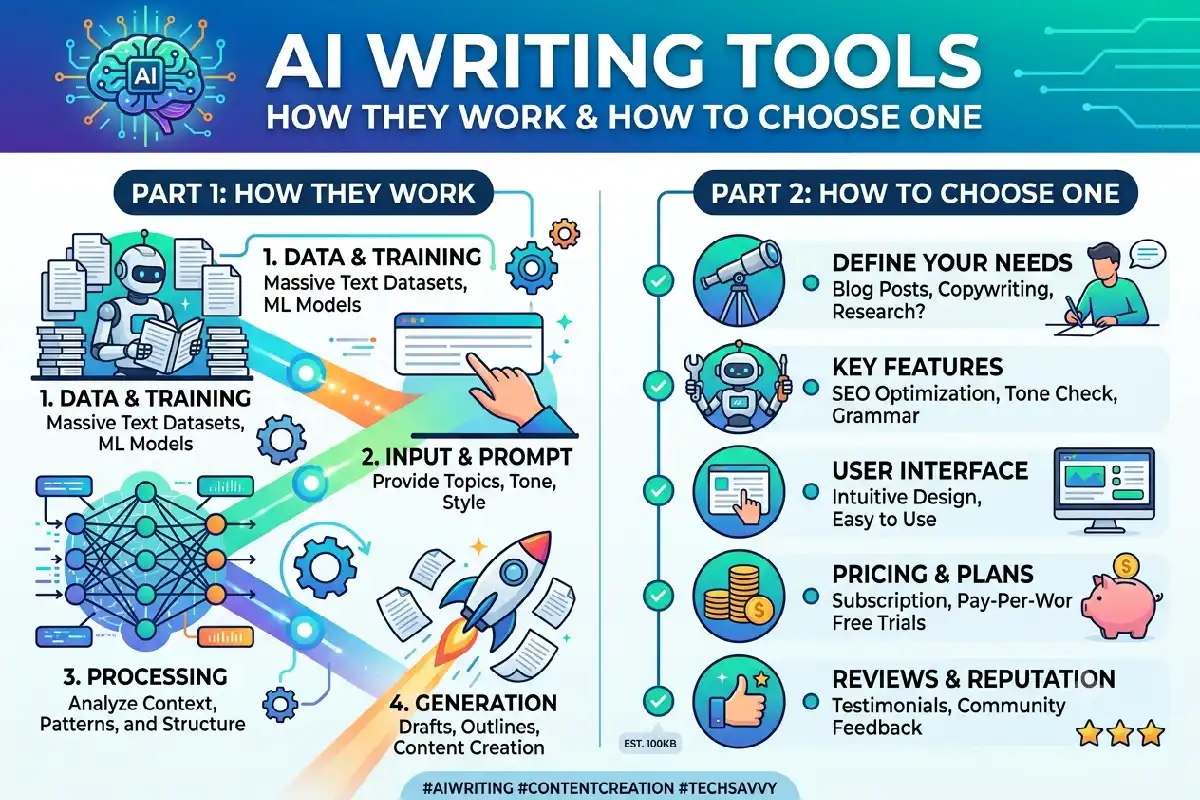
1. Define Your Main Use Case
Start with one question:
What do I actually want the tool to help me accomplish?
| Main Need | Useful Capabilities |
| Blog writing | Drafting, outlining, research, editing |
| SEO content | Outlining, keyword integration, editing, research |
| Business writing | Tone control, rewriting, summarization |
| Academic work | Research assistance, summarization, citation support |
| Marketing | Copy generation, audience adaptation, variations |
| Editing | Grammar, clarity, style improvements |
| Research | Search, document analysis, source handling |
| Team content | Templates, collaboration, brand controls |
2. Check Output Quality
Do not judge a tool from one impressive demonstration.
Test it with several real examples from your workflow.
Look for:
- Accuracy
- Relevance
- Clear structure
- Natural language
- Consistent tone
- Ability to follow instructions
- Appropriate level of detail
- Consistency across repeated tasks
A tool that produces excellent marketing copy but poor technical explanations may not be suitable for a technical publishing workflow.
3. Evaluate Research and Fact-Checking Features
If your work depends on current information, check whether the tool can use current sources or connected information.
Grounding and retrieval systems can provide relevant external information to a model, potentially helping reduce unsupported outputs.
Still, external retrieval does not eliminate the need for verification.
4. Examine Privacy and Data Handling
Before uploading confidential material, understand how the service handles your information.
Check the provider’s policies for:
- Data retention
- Model training
- Human review
- Account controls
- Business data protection
- File storage
- Data deletion
This matters particularly for legal documents, customer information, unpublished research, internal company material, and proprietary business data.
5. Compare Pricing With Actual Usage
Many AI writing tools use monthly subscriptions, usage limits, credit systems, or different feature tiers.
Instead of choosing based solely on the advertised price, estimate:
Monthly cost ÷ expected useful outputs = approximate cost per useful result
A cheaper tool may provide less value if you spend considerable time correcting its output.
6. Look at Workflow Integration
A writing tool becomes more useful when it fits naturally into your existing workflow.
Consider whether it works with:
- Your browser
- Word processors
- Content management systems
- Project-management software
- Cloud storage
- Collaboration platforms
- APIs
The objective is to reduce repetitive work rather than create another disconnected step.
7. Consider Human Editing Requirements
A useful AI writing tool should make your work faster without removing necessary quality control.
For professional content, the final workflow should generally include human review for:
- Facts
- Claims
- Sources
- Brand voice
- Original insights
- Sensitive statements
- Legal or regulatory content
- Final readability
Accuracy, Originality, and Responsible Use
AI writing can improve productivity, but responsible use requires more than generating text and publishing it.
Accuracy Matters
AI models can produce statements that sound authoritative but are incorrect.
This is often called a hallucination, although the underlying issue is more precisely an inaccurate or unsupported model output.
For factual writing, verify important claims against reliable sources.
A practical process is:
Generate → identify factual claims → verify sources → correct errors → publish
NIST’s current GenAI evaluation work specifically examines whether generated narratives are accurate, credible, and believable, highlighting why fluent writing should not automatically be treated as evidence of correctness.
Originality Is More Than Passing an AI Detector
AI-generated text can resemble human writing, and detecting whether text was produced by AI is itself an evolving technical problem.
NIST’s ongoing research evaluates both generation and detection capabilities, including how effectively systems can distinguish AI-generated and human-authored text.
That means an AI detector should not be treated as a definitive test of authorship or originality.
Instead, originality should come from the substance of the work:
- Your own research
- First-hand experience
- Original analysis
- Accurate sources
- Expert interpretation
- Unique examples
- Useful conclusions
Avoid Publishing Unreviewed AI Output
AI-generated content can contain:
- Incorrect facts
- Invented references
- Repetitive wording
- Generic explanations
- Missing context
- Outdated information
- Inappropriate claims
For this reason, AI should generally be treated as an assistant rather than an automatic publishing system.
OpenAI’s own writing guidance similarly recommends treating generated output as a draft that should be reviewed rather than as a final authority.
Protect Confidential Information
Think carefully before pasting sensitive information into an AI writing service.
For business use, establish rules around what employees can upload and which tools are approved.
Organizations can also use structured AI risk-management practices. NIST’s AI Risk Management Framework is designed to help organizations identify and manage risks associated with AI systems.
Respect Copyright and Attribution
AI assistance does not remove the need to respect copyright, licensing, attribution, or publisher requirements.
When using source material:
- Identify the original source.
- Verify the information.
- Attribute quotations and ideas where required.
- Do not present another person’s work as your own.
- Add meaningful original analysis.
AI Writing Tools vs Human Writers
AI and human writers have different strengths.
| Area | AI Writing Tools | Human Writers |
| Draft generation | Fast | Slower |
| Rewriting | Very fast | Fast |
| Brainstorming | Strong | Strong |
| Pattern recognition | Strong | Context-dependent |
| Personal experience | Limited | Strong |
| Original judgment | Limited | Strong |
| Fact verification | Requires external checking | Requires research |
| Empathy and lived context | Limited | Strong |
| Consistent formatting | Strong | Requires effort |
| Final editorial judgment | Limited | Strong |
The most practical workflow for many professional applications is therefore collaborative:
Human defines the objective → AI assists with research or drafting → human verifies and improves → final content is published
How to Get Better Results From AI Writing Tools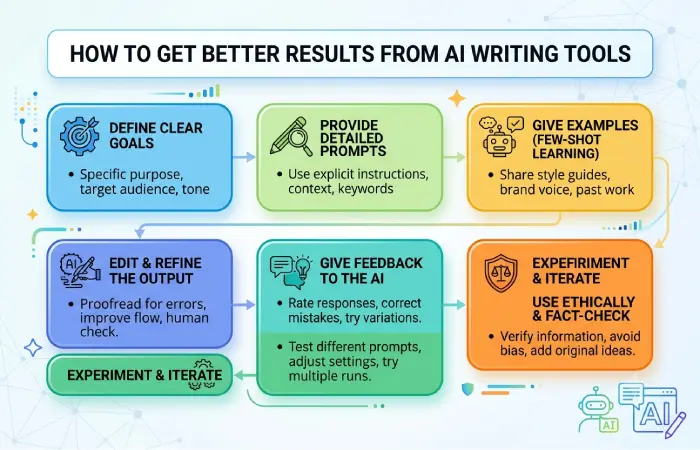
The quality of an AI writing output often depends on the quality of the instructions and context provided.
Instead of:
Write an article about cybersecurity.
Try:
Write a beginner-friendly 1,500-word guide to preventing network attacks. Explain phishing, DDoS, malware, and man-in-the-middle attacks. Use short paragraphs, practical examples, and a comparison table. Avoid unsupported statistics and clearly identify where current sources should be checked.
The second prompt provides:
- Topic
- Audience
- Length
- Scope
- Required topics
- Format
- Quality requirements
- Research constraints
A useful general prompt structure is:
Role + task + audience + context + constraints + format + quality requirements
Providing source material or specific context can also improve results. OpenAI’s writing guidance recommends supplying raw material, constraints, audience information, and the intended format when using an AI assistant for writing.
A Practical AI Writing Workflow
For content creators, marketers, students, and business professionals, this workflow is simple and repeatable.
Step 1: Define the Goal
Decide what the finished content needs to accomplish.
Step 2: Gather Reliable Information
Collect primary sources, company information, research, statistics, or other relevant material.
Step 3: Create an Outline
Use the AI tool to organize the subject into logical sections.
Step 4: Generate a Draft
Give the model enough context and specific instructions.
Step 5: Fact-Check
Verify statistics, dates, names, product information, technical claims, and quotations.
Step 6: Add Human Expertise
Include examples, experience, original analysis, opinions where appropriate, and useful context.
Step 7: Edit for Readers
Remove repetition, generic wording, unsupported claims, and unnecessary sections.
Step 8: Review Before Publishing
Perform a final check for accuracy, originality, attribution, privacy, formatting, and brand requirements.
Frequently Asked Questions
Are AI writing tools worth using?
They can be useful when they solve a specific writing problem such as drafting, summarizing, rewriting, brainstorming, or editing. Their value depends on the quality of their output and how much editing they save you.
Can AI writing tools replace writers?
They can automate parts of the writing process, but they do not eliminate the need for human judgment, research, fact-checking, subject expertise, and editorial decisions.
Are AI writing tools accurate?
Not necessarily. AI-generated text can contain inaccurate or unsupported information, so important factual claims should be independently verified. NIST’s AI evaluation work specifically addresses accuracy and believability as separate concerns.
Can AI-generated content be detected?
Some detection systems attempt to distinguish AI-generated text from human-written text, but detection remains an active research area. NIST is conducting ongoing evaluations of both text generators and discriminators.
Should I use AI to write everything?
A better approach is to use AI selectively. It can handle repetitive drafting, restructuring, brainstorming, and summarization while humans provide research, judgment, experience, verification, and final editorial control.
What should I look for in an AI writing tool?
Focus on output quality, accuracy, research capabilities, privacy, integrations, pricing, usage limits, customization, and how much human editing the tool requires.