Last Updated: September 22, 2026
Network attacks can disrupt business operations, expose sensitive information, and compromise connected devices. As organizations increasingly depend on cloud services, remote access, Wi-Fi, IoT devices, and distributed networks, network security needs to be treated as an ongoing process rather than a one-time setup.
Preventing network attacks starts with understanding common threats and reducing the opportunities attackers can exploit. Strong authentication, timely patching, network segmentation, intrusion detection, endpoint protection, secure configurations, and a tested incident response plan all contribute to a stronger defense.
This guide explains how to prevent network attacks and build practical security controls for home networks, small businesses, and larger organizations.
What Are Network Attacks?
A network attack is an attempt to disrupt network availability, gain unauthorized access, steal information, or compromise connected systems.
Attackers can target different parts of an environment, including routers, switches, firewalls, servers, workstations, wireless networks, cloud infrastructure, and applications.
Some attacks attempt to overwhelm a service, while others focus on stealing credentials or intercepting communications.
Common objectives include:
- Unauthorized access
- Data theft
- Service disruption
- Credential theft
- Malware delivery
- Network reconnaissance
- Privilege escalation
- Lateral movement
- Ransomware deployment
No single security product can prevent every type of attack. Effective protection combines preventive controls, monitoring, user awareness, and a response process.
Common Network Attacks
Understanding common network attacks makes it easier to select appropriate security controls.
Distributed Denial-of-Service (DDoS)
A DDoS attack attempts to make a service unavailable by overwhelming it with traffic or requests from many systems.
Public websites, APIs, gaming services, and other internet-facing applications can become targets.
Organizations can reduce DDoS risk through:
- DDoS protection services
- Rate limiting
- Web application firewalls
- Traffic filtering
- Content delivery networks
- Redundant infrastructure
- Monitoring and alerting
DDoS protection should be designed according to the organization’s traffic patterns and availability requirements.
Man-in-the-Middle Attacks
A man-in-the-middle (MITM) attack occurs when an attacker intercepts or manipulates communication between two parties.
Unsecured public Wi-Fi and poorly protected communications can increase exposure.
Using HTTPS, encrypted connections, properly configured VPNs, certificate validation, and secure Wi-Fi helps reduce the risk.
Users should also avoid connecting to unknown or suspicious wireless networks when handling sensitive information.
Phishing and Credential Theft
Phishing attacks attempt to trick users into revealing passwords, authentication codes, financial information, or other sensitive data.
Although phishing often begins through email or messaging platforms, stolen credentials can eventually provide access to network resources.
Organizations should combine:
- Security awareness training
- Multi-factor authentication
- Email filtering
- Password managers
- Phishing-resistant authentication where appropriate
- Conditional access controls
- Login monitoring
MFA is particularly important because a stolen password alone may not be sufficient to access protected resources.
Malware and Ransomware
Malware can enter a network through malicious attachments, compromised websites, vulnerable software, stolen credentials, or infected devices.
Ransomware is particularly disruptive because it can encrypt files and affect multiple systems.
Reducing malware risk requires endpoint protection, application control, patch management, email security, restricted privileges, network segmentation, and reliable backups.
Password and Credential Attacks
Attackers may attempt to guess, reuse, steal, or obtain credentials through various techniques.
Organizations should enforce strong authentication policies and prevent unnecessary exposure of administrative interfaces.
Where supported, use MFA and phishing-resistant authentication for privileged and remote-access accounts.
Intrusion Detection and Prevention Systems
Intrusion detection and prevention systems help organizations identify suspicious network activity.
An Intrusion Detection System (IDS) monitors traffic and generates alerts when it detects potentially malicious behavior.
An Intrusion Prevention System (IPS) can go further by automatically blocking or preventing certain detected activity.
| Feature | IDS | IPS |
| Monitors network traffic | Yes | Yes |
| Generates security alerts | Yes | Yes |
| Automatically blocks traffic | Usually no | Yes |
| Primary purpose | Detection | Detection and prevention |
| Best suited for | Visibility and monitoring | Active network defense |
IDS/IPS should not be treated as a replacement for firewalls, endpoint security, authentication controls, or patching.
Instead, these systems form part of a broader defense strategy.
Network Monitoring
Security monitoring helps identify unusual behavior that may indicate an attack.
Useful signals include:
- Unexpected outbound traffic
- Repeated failed login attempts
- Connections to suspicious destinations
- Sudden bandwidth changes
- Unusual DNS requests
- New devices appearing on the network
- Unexpected administrative activity
Centralized logging can make it easier to correlate events across firewalls, servers, endpoints, applications, and authentication systems.
Patch Management Best Practices
Unpatched software can contain vulnerabilities that attackers may exploit.
Patch management should cover more than operating systems. Organizations should also monitor updates for:
- Routers
- Firewalls
- Switches
- Access points
- Servers
- Applications
- VPN appliances
- Endpoint devices
- IoT equipment
- Network management software
A practical patch management process includes four stages:
Identify → Prioritize → Test → Deploy
First, maintain an inventory of hardware and software. Then prioritize vulnerabilities according to factors such as severity, exploit availability, exposure, and business impact.
Critical internet-facing systems generally require faster remediation than low-risk internal systems.
After testing patches where appropriate, deploy them according to an established maintenance process and verify that systems remain operational.
Network Segmentation for Defense
Network segmentation divides a network into separate security zones.
Instead of allowing every device to communicate freely, administrators can control which systems are allowed to communicate with each other.
For example, a business could separate:
- Employee devices
- Servers
- Guest Wi-Fi
- IoT devices
- Security cameras
- Voice systems
- Administrative systems
This can help limit lateral movement if an attacker compromises one device.
VLANs and Security Zones
VLANs can logically separate network traffic, while firewalls and access-control policies can determine which traffic is allowed between segments.
A simplified structure might look like:
Internet → Firewall → Core Network
Then the internal network can be separated into:
Employees | Servers | Guest Wi-Fi | IoT | Management
Access between these areas should follow the principle of least privilege.
For example, guest devices generally do not need direct access to internal servers.
Firewalls and Access Control
Firewalls are a foundational network security control.
A firewall can control traffic based on factors such as:
- Source address
- Destination address
- Port
- Protocol
- Application
- User or identity
- Network zone
Firewall rules should be reviewed regularly.
Avoid creating broad rules simply to solve temporary connectivity problems. Unnecessary open ports and unrestricted access can increase the attack surface.
A useful principle is:
Allow only the traffic that is required.
Organizations should also restrict administrative interfaces and avoid exposing management services directly to the public internet unless there is a clear security requirement and appropriate protection.
Secure Wi-Fi Networks
Wireless networks can become an entry point into an organization if they are poorly configured.
For stronger Wi-Fi security:
- Use modern Wi-Fi security standards supported by your equipment.
- Use strong, unique wireless credentials.
- Change default administrator credentials.
- Keep access points updated.
- Separate guest Wi-Fi from internal systems.
- Disable unnecessary features.
- Monitor connected devices.
- Use enterprise authentication where appropriate.
Guest networks should be isolated from internal business resources whenever possible.
Protect Remote Access
Remote access is another important security consideration, particularly for organizations with hybrid and remote workers.
Protect remote access by using:
- Multi-factor authentication
- VPNs where appropriate
- Zero-trust access controls
- Device security requirements
- Least-privilege permissions
- Session monitoring
- Strong authentication
- Regular access reviews
Remote access accounts should be removed or disabled when they are no longer required.
Endpoint Security
Network security cannot stop at the firewall.
Every connected endpoint can potentially become an entry point for attackers.
Organizations should maintain security controls on laptops, desktops, servers, and other supported devices.
Important controls include:
- Endpoint detection and response
- Anti-malware protection
- Host firewalls
- Disk encryption
- Automatic updates
- Application control
- Least-privilege accounts
- Device inventory
Endpoint protection becomes especially important when employees work outside the organization’s physical network.
Security Awareness and Phishing Prevention
Employees are an important part of network defense.
Security awareness training should teach users how to recognize suspicious messages, links, attachments, login pages, and unexpected requests.
Training should also explain what employees should do after clicking a suspicious link or entering credentials into a questionable website.
A good security culture focuses on quick reporting rather than blaming users.
The faster a suspicious event is reported, the sooner security teams can investigate and contain it.
Incident Response Planning
Even strong security controls cannot guarantee that an organization will never experience an attack.
An incident response plan provides a structured process for handling security incidents.
A basic incident response lifecycle includes:
- Preparation – Establish tools, procedures, contacts, and responsibilities.
- Detection – Identify and validate suspicious activity.
- Containment – Limit the spread or impact of the incident.
- Eradication – Remove malicious software, unauthorized access, or other causes.
- Recovery – Restore affected systems and monitor them.
- Lessons learned – Document what happened and improve defenses.
The plan should identify who has authority to isolate systems, disable accounts, contact vendors, communicate with customers, and coordinate recovery.
Backups and Network Attack Prevention
Backups are primarily a recovery control, but they are essential for reducing the impact of destructive attacks such as ransomware.
Follow a structured backup strategy that includes:
- Regular backups
- Multiple backup copies
- Offline or otherwise isolated copies where appropriate
- Access controls
- Encryption
- Backup monitoring
- Regular restoration tests
A backup that has never been tested should not be assumed to be recoverable.
Organizations should periodically perform restoration exercises to verify that important data and systems can actually be recovered.
Security Hardening Checklist
Use this checklist as a starting point for preventing network attacks:
| Security Control | Recommended Action |
| Firewall | Review and restrict unnecessary traffic |
| Passwords | Use strong, unique credentials |
| MFA | Enable it for important accounts |
| Patching | Apply security updates promptly |
| Network segmentation | Separate sensitive systems and untrusted devices |
| IDS/IPS | Monitor and block suspicious traffic where appropriate |
| Wi-Fi | Use strong encryption and isolated guest access |
| Remote access | Protect with MFA and appropriate access controls |
| Endpoints | Keep security software and operating systems updated |
| Backups | Maintain tested and protected backups |
| Monitoring | Centralize important security logs |
| Incident response | Maintain and test a response plan |
| User training | Conduct regular security awareness training |
| Access reviews | Remove unnecessary accounts and permissions |
How to Build a Network Attack Prevention Strategy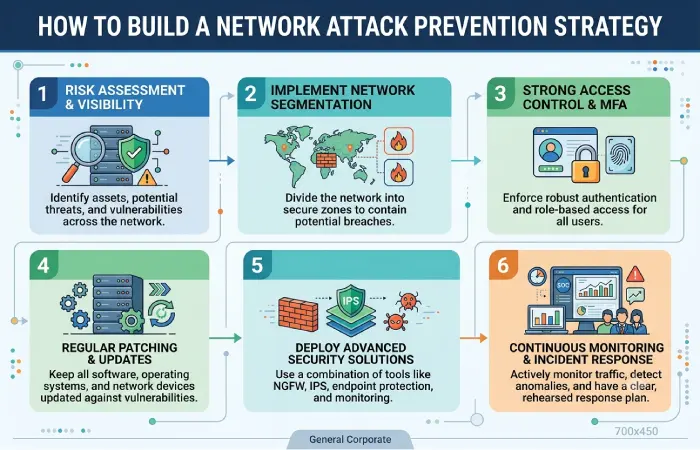
A practical security program can be built in stages.
Step 1: Inventory Your Network
Identify routers, switches, firewalls, servers, endpoints, applications, cloud services, IoT devices, and remote-access systems.
You cannot adequately protect assets that you do not know exist.
Step 2: Identify Exposed Services
Determine which systems are accessible from the internet and which ports and services are exposed.
Remove unnecessary public access and secure legitimate internet-facing services.
Step 3: Strengthen Authentication
Enable MFA for important accounts, particularly administrator and remote-access accounts.
Use unique credentials and apply least-privilege access.
Step 4: Segment the Network
Separate guest devices, IoT equipment, employee systems, servers, and management infrastructure where practical.
Use firewall policies to control communication between segments.
Step 5: Patch and Harden Systems
Create a repeatable process for identifying vulnerabilities and applying security updates.
Disable unnecessary services and replace default credentials.
Step 6: Monitor for Threats
Collect relevant logs and establish alerts for suspicious authentication, network, and endpoint activity.
For larger environments, security information and event management (SIEM) platforms can help correlate events from multiple sources.
Step 7: Prepare for Incidents
Create response procedures and make sure responsible employees know what to do during an incident.
Test the plan through tabletop exercises or controlled simulations.
Common Network Security Mistakes
Several mistakes can weaken otherwise good security programs.
Relying Only on a Firewall
A firewall is important, but it cannot protect against every threat.
Attackers may use compromised credentials, phishing, malicious files, or trusted applications to bypass traditional perimeter defenses.
Delaying Security Updates
Leaving vulnerable systems unpatched increases the window during which known vulnerabilities can be exploited.
Using One Flat Network
A flat network can make lateral movement easier after an attacker compromises a device.
Segmentation can limit communication and reduce the potential blast radius.
Ignoring IoT Devices
Printers, cameras, smart devices, access points, and other connected equipment can introduce additional security risks.
Inventory these devices and isolate them when appropriate.
Failing to Test Backups
Backups are valuable only if they can be restored successfully.
Regular recovery testing should be part of the backup strategy.
Not Reviewing Access
Former employees, old service accounts, unused administrator accounts, and excessive permissions can create unnecessary security exposure.
Review access regularly and remove privileges that are no longer required.
Frequently Asked Questions
What is the best way to prevent network attacks?
There is no single control that prevents all network attacks. A layered approach combining MFA, patch management, firewalls, segmentation, endpoint security, monitoring, user training, and incident response provides broader protection.
How does network segmentation prevent attacks?
Segmentation restricts communication between different parts of a network. If one device is compromised, properly configured segmentation can make it harder for an attacker to reach other systems.
Is an IDS enough to protect a network?
No. An IDS primarily detects and alerts on suspicious activity. Network security also requires preventive controls such as access control, patching, firewalls, authentication, endpoint protection, and secure configurations.
How often should network security be reviewed?
Security should be monitored continuously, while formal reviews should occur regularly and after significant changes to infrastructure, applications, access requirements, or threats.
Can VPNs prevent network attacks?
A VPN encrypts certain network communications and can provide secure remote access, but it does not protect against every attack. Devices and accounts using the VPN still need appropriate security controls.
Why is patch management important for network security?
Security updates can address known vulnerabilities in operating systems, applications, network equipment, and other infrastructure. Promptly addressing relevant vulnerabilities reduces exposure to attacks that target those weaknesses.
Conclusion
Preventing network attacks requires multiple layers of protection. Firewalls, IDS/IPS, patch management, network segmentation, secure authentication, endpoint protection, monitoring, backups, and incident response all address different parts of the security problem.
For a home network, start with secure router configuration, strong Wi-Fi security, device updates, MFA, and network segmentation where supported. For businesses, extend these controls with centralized monitoring, formal vulnerability management, access reviews, endpoint security, and a tested incident response process.
The goal is not simply to block individual attacks. A resilient network should make unauthorized access harder, detect suspicious activity quickly, limit the spread of compromises, and provide reliable recovery when incidents occur.