
Last Updated: September 21, 2026
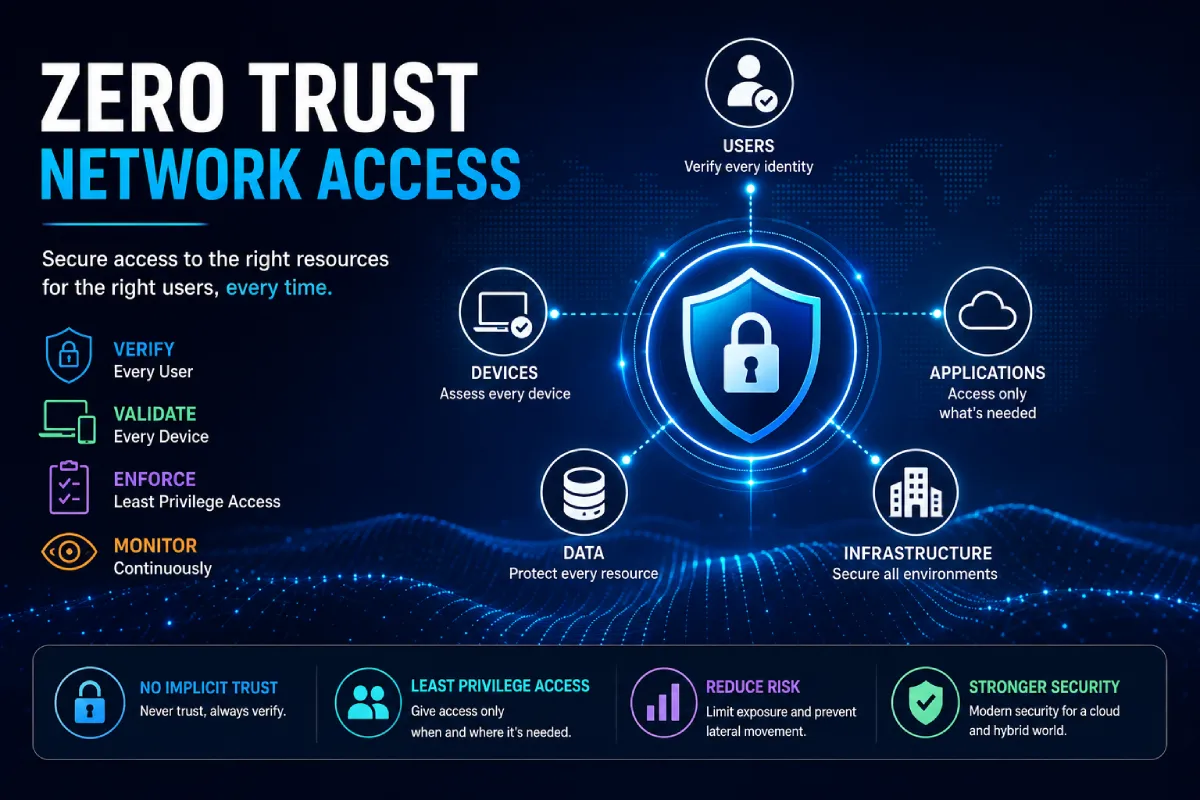
Zero Trust Network Access (ZTNA) is an identity-based security model for accessing private applications and data. It does not identify one as trustworthy just because he/she is connected to a corporate LAN. Instead, access is only granted according to the user‘s identity, device security status, context and authorizations.
Conventional network security has been the overall reliance on perimeter defenses.
If somehow a user had managed to log on to the VPN or get into the corporate network, in theory the user would have access to more resources than required.
ZTNA adopts a different perspective.
The basic idea is:
Is to not blindly trust anyone. Any piece of information you receive should be checked.
Rather than providing total network access, ZTNA enables access to only what applications and resources a user is authorized for. Thus, ZTNA is very attractive for organizations that have support for remote workers, cloud-based applications, third-party contractors and users, and day-to-day hybrid office.
“For the overarching strategy, read our complete guide on Security & Networking.
What Is Zero Trust Network Access
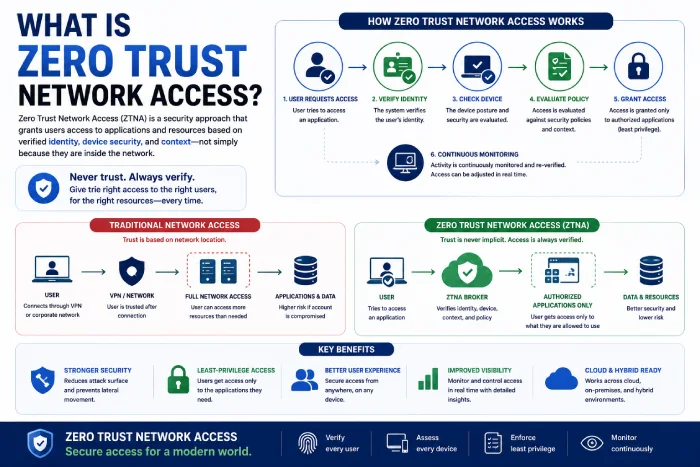
Zero Trust Network Access is a security technology and access-control model that enables secure, granular access to private applications and resources.
ZTNA generally considers factors such as:
- User identity
- Device identity
- Levels of device security posture. States of security posture are local device security capability and use of local device security services. Device security capability refers to local device security protection capability which may be provided by a security mechanism inside the device or by other means. Use of local device security services means the device uses services provided by the device‘s local security mechanisms to support the operation of the device.
- We first considered seven domains of application we were using.
- Location
- Authentication status
- User role
- Context
- Security policies
Access is subsequently being established based on the specified policies.
It also allows for the possibility that a single user may be given access to the company‘s project management application, but not to the accounts application.
This is not simply the case of providing free access to the corporate network to the employee.
How Does Zero Trust Network Access Work?
A typical ZTNA workflow looks like this:
Step 1: User Requests Access
Fills the application cache, which is an application for the user.
Step 2: Identity Is Verified
The user‘s identity is authenticated using the authentication methods of the ZTNA system.
Step 3: Device Is Evaluated
The system may verify that a device conforms to the security policies of the organization.
For example:
- Does the operating system support?
- An attempt to self-certify their security software (sits in the lowest set of broad categories) if active?
- Managing the device.
- Are the necessary security updates installed?
Step 4: Policy Is Evaluated
The system checks that the user and device are authorized to have access to the requested resource.
Step 5: Access Is Granted or Denied
If the request adheres to the organization‘s policies, permission is granted.
Thirdly, if not, interactions may be denied or an extra layer of authentication may need to be performed.
Step 6: Activity Is Monitored
An organization‘s access and security events can be logged beyond authentication.
Zero Trust vs. Traditional Network Security
The main difference is the way trust is managed:
| Traditional Network Access | Zero Trust Network Access |
| Very weak on network inside. | Concerns the issues of identity and resource availability |
| VPN generally provides network level access. | Access may be application specific . |
| After authentication, trust may climb further. | Trust is constantly monitored. |
| A few more assumptions can potentially be removed, which would lead to wider network visibility. | All the resources are exclusive and no-one has free access to them. |
| Typically com around corporate networks | Intended for hybrid, cloud and remote IT. |
ZTNA is not absence of all VPNs.
Alternatively, organizations can employ zero-trust concepts to grant more fine-grained access to applications and resources.
Key Components of ZTNA
Identity and Access Management
Identity is at the core of zero trust.
Organizations need to know:
Who is applying for access?
Identity systems can include:
- User accounts
- Single sign-on
- Multi-factor authentication
- Identity providers
- Access control according to role (role-based access controls). The users of the site have roles and r the owners of the site. The roles describe what the users are allowed to do. The access rights to all the pages included to the creation of the roles in the site.
Device Security
Once able to identify the user.
Organizations may also need to determine:
Is this device sufficiently secure to use the resource?
Device checks can include:
- The operating system version of the client.
- Security software
- Encryption
- Device management status- The communication status of a device. This include: Reselect mode; Initialize Mode; Show Logon; Show Logoff; Show the device being logged off. Offline; Cliped to online. Support mode; Support Normal While the device status details include: Appliance waitting to ash; Click the user off; Cliped online; Support mode; Support Norml The login status table shows a summary of the login statuses.
- Security patches
Least-Privilege Access
His thought is that zero-trust network access is the concept of providing users only with the privileges they require.
An example is a marketing employee; he may require access to a content management system but not to an internal payroll database.
By limiting access to what is needed, the impact of these accounts can be decreased.
Policy Enforcement
ZTNA uses policies deciding the subject, object, and conditions of access.
A policy might say:
The finance department employees are able to access the accounting application through managed machines with multi-factor authentication.
Another policy may need extra checks on the login if the access is from a suspicious site.
Continuous Monitoring
Zero trust isn‘t simply:
One stop authentication.
Organizations could be able to watch access events and context changes so as to discover suspicious activities.
Benefits of Zero Trust Network Access
Reduces Excessive Access
The users do not have a permission to access all over the corporate network directly.
Access can either be limited to specific applications or allow.
Supports Remote Work
The solution is suitable for companies where employees work at a variety of sites.
Access authorized applications securely without being directly on the corporate network.
Improves Security Visibility
Centralized access policies and logs can help security teams understand:
- Access- Who got to it!
- What they accessed18. There was no restriction on the kind of material that could be accessed hence this question was added to collect the answers to this question.
- Regarded, which it was. They examined1 the volume, which they did.
- By which device;
- If the access was within policy.
Limits Lateral Movement
If any account or device becomes compromised by an attacker, constraining access to only those resources which are inherently necessary may limit the attacker in traversing the environment.
This is a good reason for organizations to implement zero-trust policies.
Supports Cloud and Hybrid Environments
Modern organizations often use a mixture of:
- SaaS applications
- Cloud infrastructure
- Data centers
- Remote endpoints
- Branch offices
In these environments, ZTNA can provide the same access-control model.
ZTNA Use Cases
Remote Employees
Authorized internal applications are available to employees remotely or from other locations without exposing the network.
Contractors
In the course of its work, a construction contractor may require access to a certain application on a short-term basis.
Ztna can help provide restricted access without giving them full access to our internal systems.
Third-Party Vendors
External vendors might have access to some applications for maintenance and support.
The policies may just be limited in what they allow access to, therefore only granting the access a resource needs.
Hybrid Workforces
Where organizations have access needs from both office and remote users, they would look to apply the same access policy irrespective of where the users are connecting from.
Cloud Applications
ZTNA enables organizations to control access to private, in-house applications running in the cloud or a hybrid environment.
ZTNA and VPN: What’s the Difference?
Virutal Private Networks (VPNs) generally establish an encrypted VPN connection from the user‘s device to a network or network gateway.
In contrast, ZTNA concentrates more narrowly on application-level access, management, and enforcement.
With a traditional VPN:
User → VPN → Corporate Network → Applications
With a ZTNA approach:
User → Identity Verification → Policy Check → Authorized Application
This can lower the spam bandwidth.
However VPNs still are useful and some organization may just combine VPN and ZTNA technology for some transition period.
“To take the next step, see our detailed guide on Cloud Networking for Businesses.”
How to Implement Zero Trust Network Access
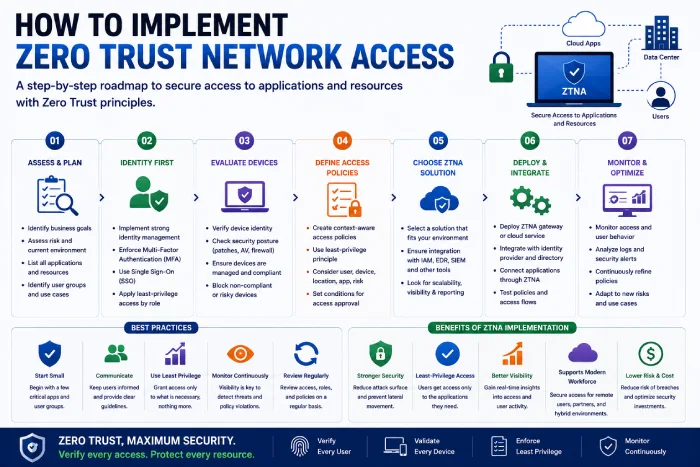
1. Identify Critical Applications
Initiate by identifying which applications and resources need safeguarding.
Create an inventory of:
- Internal applications
- Cloud services
- Servers
- Databases
- Sensitive data
2. Understand Users and Roles
Identify the users who should have access to each resource.
Add a section for grouping users by roles and responsibilities.
3. Strengthen Identity Security
Ensure robust verification.
Multi-factor authentication serves as a basic built-in that is near-essential to using modern day access security.
4. Evaluate Devices
Specify security minimum requirements for devices accessing sensitive applications.
For example:
- OS supporting may be specified by the OS supporting model, of course. Except that it is not always possible for a single operating system to support all those operating systems that it is employed to integrate.
- Active security controls This refers to monitors, controls and audit services that are used to regulate the network traffic entering and leaving the system. Several examples include firewalls and intrusion detection systems.
- Encryption
- Device management
- Security updates
5. Create Access Policies
Define rules based on:
- User
- Role
- Device
- Application
- Location
- Authentication
- Risk
Initially, keep simple policies and evolve them.
6. Start With a Pilot
It is not recommended to try to change the whole network in one night.
Select only a few applications or groups of users.
Test:
- Authentication
- Access policies
- User experience
- Device checks
- Logging
- Troubleshooting
7. Expand Gradually
Once the initial ZTNA implementation is successful, extend it to more users, applications and departments.
Monitor access continually, modify policies.
Common ZTNA Mistakes
Treating Zero Trust as a Single Product
Zero trust is holism than purchasing one security product.
It comprises identity, gadgets, programs, policies, tracking/policing/trapping and organizational procedures.
Creating Overly Complicated Policies
Complex access policies can result in confusion as well as troubleshooting headache.
Initially, be pragmatic and modify policies as you discover more about your environment.
Ignoring User Experience
Security controls must not hinder legitimate work.
Personal hassles If access procedures are too burdensome, employees may resort to workarounds.
Forgetting Legacy Applications
Some legacy applications may not interface well with newer access architectures.
Identify problems of compatibility prior to a large migration.
Granting Too Much Access
It‘s not the intent of ZTNA to transfer existing VPN permissions to a new platform.
Check if the users really require the access they have.
Best Practices for Zero Trust Network Access
Use Least Privilege
Keep access to users to the minimum necessary.
Require Strong Authentication
(Reduced) Use MFA and strong identity controls.
Verify Devices
One should not assume the authenticated user is accessing from a secure device.
Segment Sensitive Applications
Do not bring sensitive systems into contact with unauthorized access.
Monitor Access
Regularly review your logs and security events.
Automate Where Appropriate
Automated policy enforcement can help ensure that the policy is enforced.
Review Permissions Regularly
The employees’ roles and responsibilities can be altered.
Access must evolve as they change.
Frequently Asked Questions
Q1) What is Zero Trust Network Access?
Zero Trust Network Access The term is a way of providing secure, granular access to applications and resources that is determined from the verified identity, device health, context and authorisation.
Q2) Is ZTNA the same as a VPN?
No. ZTNA is usually designed to deliver limited access to certain applications and resources, whereas a VPN normally establishes network level connectivity.
Q3) Does ZTNA replace VPN?
It addresses some of the existing use cases of VPNs, especially application level connectivity for remote users, but organizations still have a reason to keep using VPNs for other network level connectivity.
Q4) Does ZTNA work for remote employees?
Yes. One of the typical use cases that ZTNA addresses is enabling secure access for remote or hybrid workers.
Q5) Does ZTNA prevent cyberattacks?
ZTNA does not provide all of the security measures needed. It can decrease the amount of non-requirement access and limit potential exposure, but still requires organizations to implement other controls such as endpoint security, identity protection, monitoring, vulnerabilities management, and incident handling.
Q6) What is the main principle behind zero trust?
The basic idea is to not assume that users or devices coming within the security perimeter are automatically trustworthy, just because they‘ve been there before or they‘ve logged in. They access must be authenticated and authorized according to policy and context.
Conclusion
Zero Trust Network Access: A Modern Approach to Secure Private Application and Resource Access Zero Trust Network Access is a state-of-the-art way of securing access to private applications and resources. It focuses on identity, device security, minimum-privilege access, policy enforcement, and continuous monitoring, rather than trusting user or device solely based on the fact that it is connected to a corporate network.
This approach can be even more useful for businesses that support remote workers, cloud-based applications, contractors, third-party vendors, or have hybrid infrastructure. More than simply putting a security product in place is required for success.
Organizations should determine the determining assets, understand the roles of users, strengthen the identity controls, assess the security of devices, establish reasonable access policies, and incrementally increase the system.
The goal is simple:
Providing the right users with the right access to the right resources without giving them more access than required.