
Last Updated: September 21, 2026
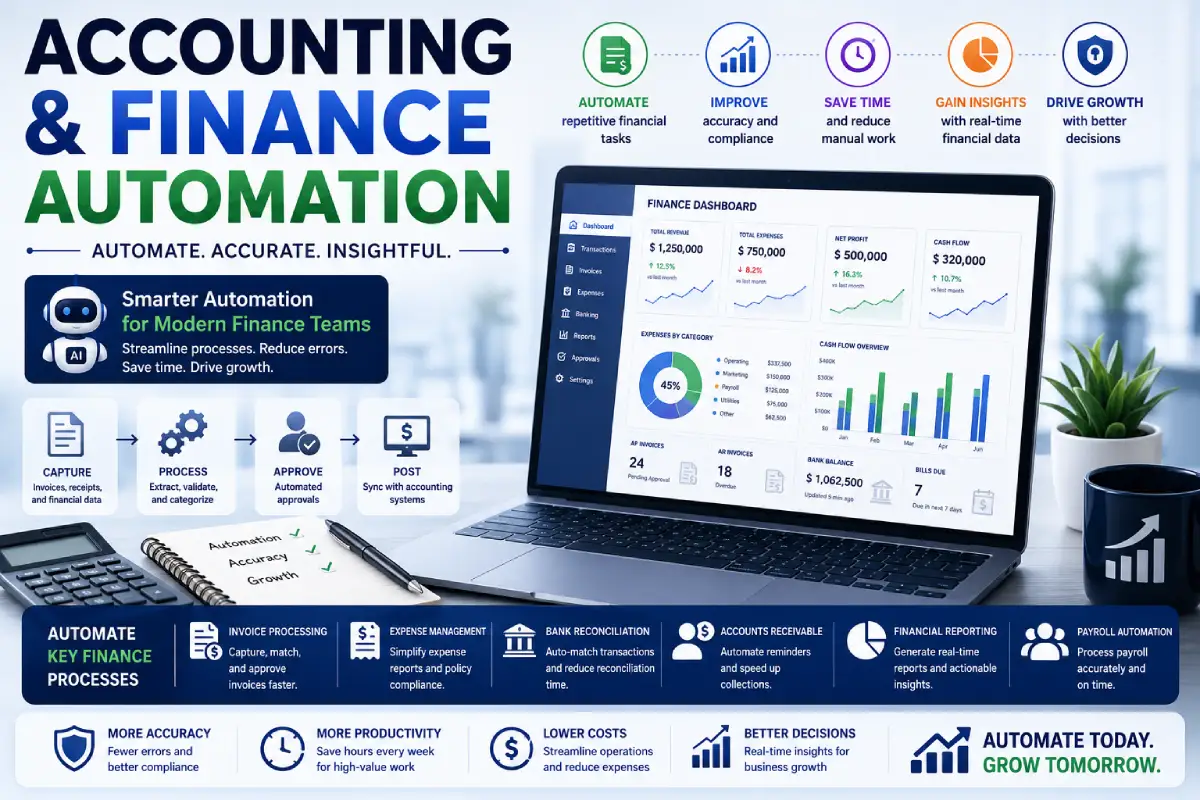
Automation of accounting & finance assists companies with the reduction of repetitive financial tasks, enhanced precision and receives the finance teams with timely access to critical information. The accounting departments sometimes spend hours reporting invoices, expense reports, processing payments, reconciling, generating financial reports and entering data.
Most of these activities are repetitive to automate efficiently. Artificial intelligence has potential to advance automation by classifying transactions, uncovering data from documents, detecting anomalies, summarising financial data, and supporting reporting.
This is not about replacing accountants or finance people. Or if anything, automation helps frees finance teams from the burden of mundane administrative tasks and spend more time on analysis,planning,compliance & business decisions.
“For the overarching strategy, read our complete guide on Office Automation.”
What Is Accounting and Finance Automation?
The automation of accounting and finance is the usage of software, rules, workflows and artificial intelligence, to make repetitive financial processes automated.
It can be used for:
- Invoice processing
- Expense management
- Accounts payable
- Accounts receivable
- Bank reconciliation
- Payroll workflows
- Financial reporting
- Payment approvals
- Budget tracking
- Data entry
- Document management
- Tax-related workflows
Usually things are being automated through a predefined rule.
For example:
Invoice received > Data extracted > Invoice matched > Approved > Payment to be sent.
Artificial intelligence enabled systems may have functionalities like document understanding, transaction categorization, fraud detection and natural-language report generation.
How Does Finance Automation Work?
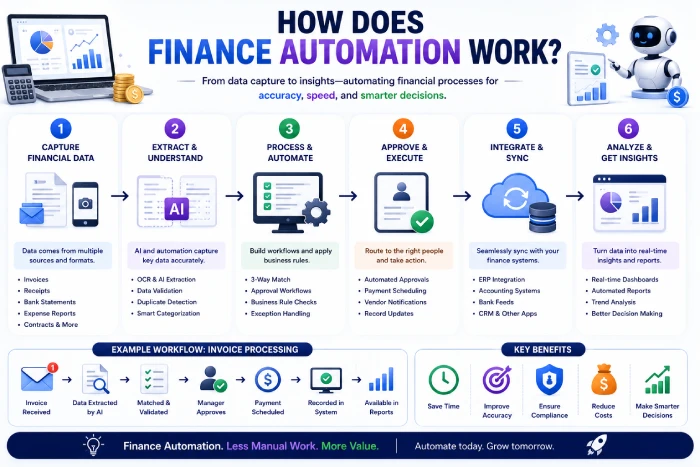
A standard automated financial process would proceed through these stages.
Step 1: Financial Data Enters the System
Information may come from:
- Invoices
- Receipts
- Bank accounts
- Expense reports
- Sales systems
- Payroll systems
Step 2: Data Is Extracted
Automation can capture relevant information such as:
- Vendor name
- Invoice number
- Amount
- Date
- Tax
- Payment terms
Step 3: Rules or AI Analyze the Information
The system reacts from this.
Step 4: Approvals Are Triggered
Invoices or expenses are automatically sent to the right person for manual approval.
Step 5: Records Are Updated
Approved transactions can be posted to the accounting system.
Step 6: Reports Are Generated
Once the relevant financial data has been extracted, it can then be used for reporting, forecasting or analysis.
What Can Accounting and Finance Automation Do?
1. Automate Invoice Processing
Processing invoices constitutes one of the most popular use cases for finance automation.
Automated systems will take information from each invoice and send it electronically through an approval process.
A typical process might look like:
Invoice received, data retrieved, PO verified, approved and entry made into accounting system, scheduled for payment.
Throughput periods of this type may lead to a decrease in manual data input and accelerate the accounts payable process.
2. Automate Expense Management
Employees regularly submit expenses for:
- Travel
- Meals
- Equipment
- Business services
- Client meetings
Employees submit receipts by scanning and the information is automatically read in.
Via the system, the expenses process can be forward for approval, and submissions not conforming to company policy can be highlighted.
3. Automate Bank Reconciliation
Bank reconciliation involves the comparison of transactions posted in accounting software to transactions appearing in bank accounts.
That automation highlights transactions that need to be matched and items is easy.
This eases the level of manual reconciliation needed by the finance teams.
4. Automate Accounts Receivable
Accounts receivable automation. Accounts receivable automation can help businesses manage their receivables.
Possible workflows include:
- Invoice creation
- Payment reminders
- Customer notifications
- Payment tracking
- Number of overdue invoice alerts (over the period).
- Receivables reporting
Automated reminders process pain of: Helping businesses track overdue payments, without burdening employees with the task of messaging each one.
5. Automate Financial Reporting
It has been assumed that finance teams have a lot of time spent alreadyon preparaing reams of reports.
Automation can collect information from connected systems and generate reports covering:
- Revenue
- Expenses
- Cash flow
- Accounts receivable
- Accounts payable
- Budget performance
AI may be used to summarize published financial data for managers and senior executives in understandable plain text.
Benefits of Accounting and Finance Automation
Saves Time
Automation decreases monotonous and repetitive tasks including data entry, reconciliation, processing of invoices, and reporting.
That provides more time for finance people to analyze and plan.
Reduces Manual Errors
Finance data may be manually entered into the system. It is prone to be mis-typed.
Predefined rules automated workflows can automatically apply pre-written rules and reduce unwanted data-entry errors.
There is still scope however, for the review of a document to be managed automatically.
Speeds Up Financial Processes
An invoice that took several emails and manual input can now easily flow through much quicker using an automated workflow.
This has the potential to enhance payments processing, and give better insight into the financial position.
Improves Financial Visibility
Automated systems can provide more current information about:
- Cash flow
- Expenses
- Outstanding invoices
- Revenue
- Budgets
- Financial performance
More information can help business leaders make decisions earlier.
Improves Compliance and Auditability
Automated workflows can create records showing:
- Who approved a transaction for completeness?
- Once it was approved, However it was approved;
- What information was altered
- Which set of rules were used?
This can simplify the examination and audit processes for finances.
AI in Accounting and Finance Automation
Allows AI to do things that rule based automation can’t do.
Document Processing
AI understands information stored in all finance including invoices, receipts, contracts etc.
Transaction Classification
AI can also assist in classifying transactions on the basis of past trends and predetermined accounting policies.
Anomaly Detection
AI flags suspicious transactions/abnormal behavior to be reviewed further.
A finance professional would have the ability to identify that the amount was abnormal (say, a large expense or outside transaction).
Financial Summaries
Using AI,it is possible to summarize a huge amount of financial data to a format that is much more convenient for managers to understand.
Forecasting Support
Advanced AI techniques and modeling could use past and present data to support financial prediction.
Forecasts should still have financial oversight as unanticipated business shifts can lead to the historical trends being irrelevant.
Accounting Automation Examples
| Process | Manual Approach | Automated Approach |
| Invoice processing | Data entry in is done manually. Each free search conducted by theresearchers in their online access is manually recorded in the Webadmin system. | Data capture 104 Method of extracting information automatically Key performance indicators (KPI‘s) Table 7. Automated data extraction 104 Data capture To acquire valuable datathe computer grouphold the minescence of the client‘s business. It is all about gathering data storage. |
| Expense reports | Email and spreadsheets. | Digital approval workflow. Using the built-in workflow in Access R3/20 they can now electronically request approval to manipulate a file. Access workflow is simply a way to electronically submit releases for approval. |
| Bank reconciliation | Manual matching | Automated transaction matching/processing I am concerned here with the automation of the matching process by allowing the computer to group transactions together in some intelligent way, then automatically find the matches in the general ledger. |
| Payment reminders | Manual emails | Scheduled reminders |
| Financial reporting | Manual spreadsheets | Automated reports |
| Transaction categorization | Manual coding | AI-assisted classification |
| Budget tracking | Manual updates | Automated dashboards |
| Document management | Shared folders | Automated document workflows. First, creation of the document has been automated with reliance on a stylesheet. Second, commitment of the document has been automated from the last submission stage, including document validation. |
How to Implement Accounting and Finance Automation
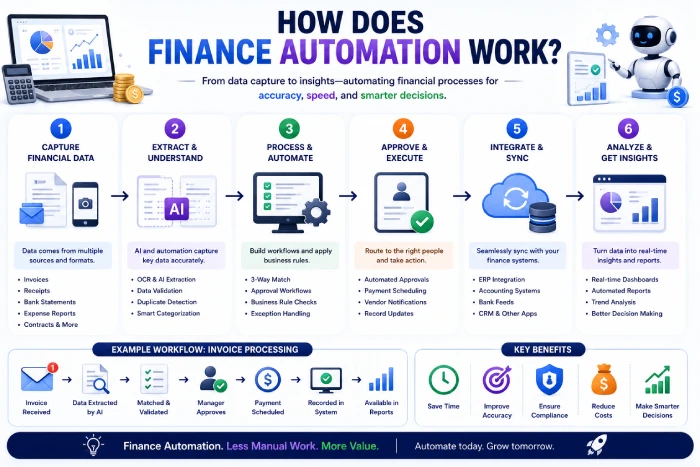
1. Identify Repetitive Processes
Start by finding tasks that:
- Occur frequently
- There is not enough detail to allow the experiment to be easily repeated, but taking each step in a logical order:
- Require considerable manual effort in their integration and deployment.
- Setting defined inputs and defined outputs.
Start with invoice processing and approving expenses, this is usually a good one to begin with.
2. Document the Current Workflow
Get a better idea of the process first, before you automate anything.
Document:
- Inputs
- Approvals
- Decisions
- Exceptions
- Outputs
- Systems involved
This way we can spot the repetitive steps before they get Automated.
3. Choose the Right Automation Tool
Seek software that can cater to the actual financial procedures of your business.
Consider:
- Accounting integrations
- Banking integrations
- Workflow automation
- Reporting
- AI capabilities
- Security
- User permissions
- Scalability
4. Connect Existing Systems
One of the biggest advantages of finance automation is the sharing of data between systems.
Depending on your organization, integrations may include:
- Accounting software
- Banking platforms
- Payroll systems
- CRM software
- Expense management
- ERP platforms
- Payment processors
5. Start With a Pilot
Do not automate all of your financial processes immediately.
Begin with one workflow and assess the outcome.
For example:
The process of automating invoice processing has been followed by: For example, using the indices of the previous table.
“To take the next step, see our detailed guide on Workflow Automation Software.”
Common Mistakes to Avoid
Automating a Broken Process
Make it easy to process if a financial workflow is awkward simplify it before automating.
Removing Human Oversight
There are crucial financial choices that are not best made on an autopilot.
Establish approval levels and escalation policies of transactions only those transactions that need human decision-making will be referred to the attention of the human reviewers;
Ignoring Security
It is very delicate information.
Implement a dedicated directory of sensitive information and utilize suitable access controls, authentication, encryption, audit logs and vendor security procedures.
Trusting AI Without Verification
Artificial intelligence will sometimes get the classification and/or interpretation wrong.
It‘s important for finance folks to double-check crucial output before being used for business decision making.
Using Too Many Disconnected Tools
Having more than one platform of Automation can create data silos and complex workflow.
If you can, favor those that work within your current financial technology portfolio.
How to Choose an Accounting Automation Tool
Check Integrations
Ensure the systemintegrates with your currentaccountingandfinancial systems.
Evaluate Automation Features
Check invoice processing, reconciliations, approvals, reporting and workflow automation.
Review AI Capabilities
If AI is really the case, then find what exactly it can do, and don‘t pick something just because it claims AI;
Prioritize Security
Review access rights, processing and storage, audit trails, and security controls.
Consider Scalability
Keep your solution scalable enough to expand with your transaction volumes and team.
Calculate the ROI
Compare the expense of the software to the time and operational expenses it could save.
Frequently Asked Questions
What is accounting and finance automation?
Accounting & finance automation automates repetitive financial processes, using software, workflows and artificial intelligence, for example invoice processing, reconciliation, expense management, reporting and payment workflows.
What is the biggest benefit of finance automation?
One of the biggest reasons for using automation is to eliminate the repetitive nature of manual tasks. Automation can also result in increased consistency, faster processing, greater visibility, and improved audit capability.
Can AI replace accountants?
AI is a great tool that could replace some aspects of accounting work, but the accountants will still be needed in judgment, analysis, regulation, strategy and checking the details of transactions.
Can finance automation reduce errors?
May decrease some types of manual data-entry and processing errors. However, automated systems still need controls and human checks.
Is accounting automation suitable for small businesses?
Yes. A small business may automate invoicing, expense processing and reconciliation, reminders, and reporting.
Is financial automation secure?
It can be secure when combined with the significant security infrastructure of login restrictions, authentication, encryption, risk detection mechanisms and the security of the vendor providing the automation. It is advisable that any financial automation platform be reviewed for security prior to providing it with sensitive data.
Conclusion
Financial and accounting automation can help a business standardize their repetitive financial procedures while automating to speed them up. Automation can also facilitate efficiency through, for example; invoicing and expense management, reconciliation, reminder for payments, reporting and analysis of the financial data. AI make these processes even more powerful by helping to process documents, classify transactions, identify anomalies, summarize financial data and assist in forecasting. But successful automation isn‘t about eliminating the humans from finance.
It is about enabling financial professionals to spend less time executing repetitive processes and spend more time on analysis, planning, controls, and value added decisions. Begin with one repetitive workflow, integrate it into what you already have, apply the controls and measure the outcome. The optimal finance automation solution isn‘t the one with the most artificial intelligence. It‘s what is making financial work quicker, more accurate, and easier to handle.