
Last Updated: September 21, 2026
Cloud networking for business offers the computing and networking infrastructure required for securely connecting applications, users, devices, data and cloud resources. Networking‘s role becomes even more critical when applications and workloads are moved away from traditional data centers.
Today a business might have people working from home, applications hosted in the cloud, branches linked up in different parts of the world and data stored in many places. Cloud networking is an effective way to encompass these environments.
Cloud networking enables organizations to develop and operate networks that are easily managed and securely connected within and across cloud environments as well as distributed sites. It also provides a flexible, resilient infrastructure for the wide-scale deployment of applications and services.
If your company is moving to the cloud, knowing about cloud networking is useful for achieving various aims such as performance management, security monitoring, high-availability, and cost reduction.
“For the overarching strategy, read our complete guide on Security & Networking.
What Is Cloud Networking?
Cloud networking is the utilization of cloud computing infrastructure and cloud network services to connect applications, workloads, users and data. In place of the rack of physical switches, routers, and data-center equipment, organizations can make use of software defined networking resources offered over the cloud infrastructure.
Common cloud networking components include:
- Virtual networks
- Subnets
- IP addresses
- Routing
- Firewalls
- Load balancers
- VPN connections
- Private connectivity
- DNS
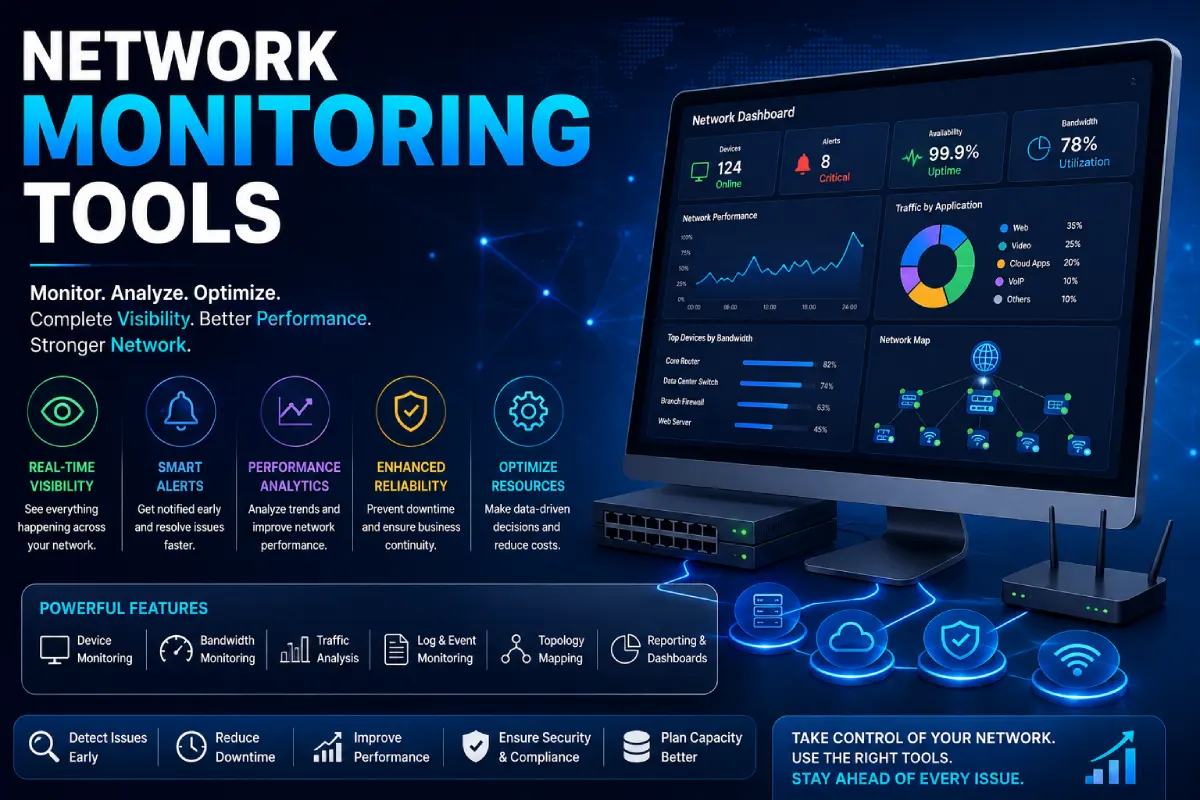
- Network monitoring
- Traffic management
Cloud providers then can provide these capabilities as services that can be configured so that businesses can create networks even if they do not purchase access to every hardware infrastructure.
How Does Cloud Networking Work?
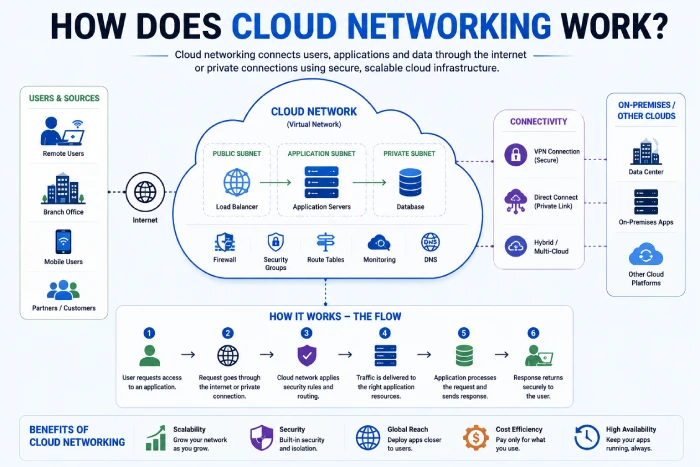
A basic cloud networking environment can look like this:
Users → Internet or dedicated connection → Cloud Network→ Applications and Data
Within the cloud network, resources can be isolated for different subnets and guarded using security policies.
For example:
Public-facing application→ Load balancer→ Application servers→ Private database.
This architecture provides businesses with the ability to manipulate traffic from one resource to another.
The cloud platform can further connect cloud environment to existing offices and data centers via VPN and dedicated connectivity service.
Key Components of Cloud Networking
1. Virtual Networks
Virtual network offers the foundational networking layer for cloud resources. Set boundaries for your networks. You also can establish various network boundaries of your companies by giving setting IP addresses, creating subnets and managing the incoming and outgoing traffics. In particular, as an instance, virtual networks or subnets which serve as building block for networking in Microsoft Azure.
2. Subnets
Subnets, or subnetworks, are created by breaking one large virtual network into a series of smaller networks.
Businesses can use separate subnets for:
- Web applications
- Application servers
- Databases
- Management systems
- Internal services
Segmentation can also simplify administering the network and applying security controls.
3. Routing
Routing is how you decide whether traffic should head down one link or another.
Businesses may need to route traffic between:
- Cloud resources
- Offices
- Data centers
- Various cloud regions
- Various cloud vendors
- Internet services
In intelligent routing, the scheme said above can enhance the performance of network and block the nonsence traffic path.
4. Firewalls and Network Security
However,cloud networks require the necessary security controls that exist in traditional networks.
Organizations can use:
- Cloud firewalls
- Network security groups
- Web application firewalls are a new form of web security. They are a form of reverse proxy and analyse the web traffic coming through them and block malicious activity.
- Access-control policies
- DDoS protection
- Private endpoints
Ultimately, the security for a cloud network should be focused on applications that are being protected and data which is used for cloud computing rather than replicating old style data center architecture.
As an example, the prescriptive guidance from Microsoft for cloud networking today includes network security groups, firewalls, WAF, DDoS protection, and private endpoints as part of the core set of security capabilities in use.
5. Load Balancers
Load balancers split traffic across multiple application resources.
This can help:
- Improve availability
- Handle traffic bursts} Prepare for peaks in traffic} Anticipate batching or high loads on your site. Consider the effect of running inefficient processes on page speed and processing power. Overcome overload} Get nimbler to reduce- Queues, backlogs or prioritise o/s jobs.4 Remember “for the systems and processes that are able to scale, you need to find a way to scale them positively. Don�t get scalable to be a failure.”
- Reduce single points of failure
- Enhance the application responsiveness.
This is useful when you have an application for customers where the traffic is unpredictable, for example:
6. VPN and Private Connectivity
Companies might require secure links connecting cloud platforms with on-site services. Deven asVPN connectioncan establish an encrypted connection through the internet. Private connectivity services may also be used where enterprises have higher performance or specific connectivity needs. There are multiple ways to couple the Cloud resources with the on-premises resources, thus relying on cloud providers.
Benefits of Cloud Networking for Businesses
Scalability
One of the biggest advantages is that networking resources can grow as quickly as your business does. As a leading company expands its cloud infrastructure, it can have a function of expanding new work load without having to buy and install dedicated hardware networking devices.
Faster Deployment
In addition to the standard way of provisioning resources on clouds as a virtual machine, virtual feed, or storage component-that can be set up using management console, or API-,“other cloud networking resources may be provisioned via infrastructure-as-code or automation.” This pace has potential to enable development and IT teams build network environments more quickly than a conventional hardware-based deployment.
Improved Availability
Cloud architectures may deploy applications onto multiple availability zones or regions. It can aid organizations to conceptualize systems that will keep functioning in the face of individual component failures. Cloud providers highlight regional and availability-zone architecture as crucial building blocks for highly available workloads.
Better Remote Access
For example, cloud applications can be accessed without human being physically present in the corporate office. Supports secure access for distributed teams where the organization doesn‘t necessarily know who will be accessing the services.
Global Reach
For businesses that serve customers across multiple locations, the applications can be places nearer to the consumers. This will allow us to reduce the time taken for the package transfer which in turn results in reducing the latency and improving the responsiveness.
Potential Cost Efficiency
Cloud networking has the potential to eliminate some of the physical infrastructure, enabling an enterprise to scale resources with their need. However, cloud networking is not necessarily cheaper. I‘m not saying an inefficient architecture, unnecessary data transfer, too high connectivity or over-provisioned resources cannot lead to high costs.
Cloud Networking Use Cases
Remote Work
Users can also access cloud applications from anywhere.
Which makes it very convenient for companies that has teams from all around.
E-Commerce
An online shop requires dependable networks to sustain customer traffic, payment gateways, databases, application program interfaces (APIs), and third-party integrations.
Cloud networking can be used for building scalable application architecture.
SaaS Applications
Software companies can employ cloud networking to connect to application servers, databases, APIs, monitoring systems, and customers.
Hybrid Cloud
Numerous businesses don‘t transfer everything to the cloud.
They may continue operating:
- On-premises servers
- Private infrastructure
- Cloud workloads
Cloud networking is capable of linking these environments.
Multicloud
Some organizations use multiple cloud providers.
So, for example, a business could still host some of its workloads in the AWS cloud, but still use a service from Microsoft‘s Azure cloud or the Google Cloud platform.
Multicloud networking can also lead to added complexity, since teams require consistent connectivity, routing, security and visibility for each environment. A Microsoft blog explains that multi-cloud organizations using more than one public cloud can lead to complexity when it comes to consolidating security and operational management.
Cloud Networking vs. Traditional Networking
| Traditional Networking | Cloud Networking |
| Primarily physical hardware is of much importance, The primary requirement had been to emulate hardware with software. | Software resources and services are fundamental to |
| Investment in hardware can be considerable. | Chapter 2: Resources may be available on demand |
| D. Equipment. | Scaling can be software driven. |
| The physical sites matter. | Resources roam between regions & clouds. |
| Manual configuration is fairly common. | APIs and automation are widely used |
| Hardware lifecycle management is.” | Cloud provider manages the underpinning infrastructure. |
This is by no means the death of networking.
Most businesses will be a hybrid of networks. This means they will have a physical infrastructure to run their actual networks on and a number of different cloud environments to plug into.
Cloud Networking Security
Security must be taken into account when designing the network, and not as an after effect.
Segment Important Resources
Separate sensitive systems from those resources which do not need access to it.
For instance, it could be defined that: there should be no global access to the database from all applications or all users.
Apply Least Privilege
Do not allow all the traffic and access that actually need.
Network isolation and segmentation can serve as mitigations against lateral movement if an attacker breaches a portion of an environment.
Protect Internet-Facing Applications
Internet-facing applications need to be protected too.
Businesses may use:
- Web Application Firewalls. Firewalls designed for protecting web applications. A web application firewall (WAF) is a specific use of a traditional firewall that applies to inter by the HTTP protocol. There are many packages for this currently available.
- DDoS protection
- Load balancers
- A secure way of controlling ingress to the organisation.
- Rate limiting
Monitor Network Activity
Monitoring helps security and IT teams identify:
- Unexpected traffic
- Configuration changes
- Performance issues
- Suspicious activity
- Connectivity failures
Logging at individual host can be required for further troubleshooting or security investigation.
How to Build a Cloud Network for Your Business
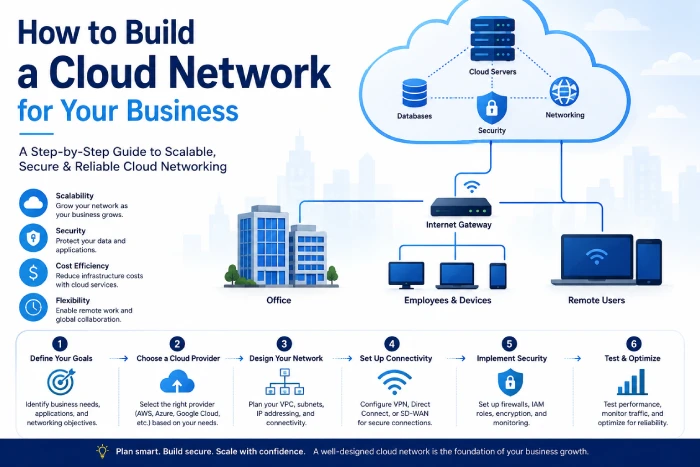
1. Define Business Requirements
Educate with business needs, not technologies.
Ask:
- What apps require cloud connectivity?
- Thus, who/what needs to access?
- Where are the users?
- What aspects of the data are sensitive?
- For how long needs the system have (or run)?
- Are the data centers still running?
Cloud adoption guidance urges you to defer until the very last moment certain key decisions about your overall networking and hybrid/multicloud environment until you‘ve made decisions based on clear business drivers, rather than random technology selection:
2. Design the Network Structure
Determine:
- IP address space. Classification of IPv4 addresses ( Class A, Class B, Class C and Class D) and the number of addresses in each range.
- Subnets
- Routing
- Connectivity
- Security boundaries
- Application architecture
If the requirements are met by a simple network don‘t make it complex.
3. Plan Security
Security policies should be defined prior to the deployment of loads.
Determine:
- Which traffic should be granted?
- What resources should stay private?
- Which users have the ability to run critical applications.
- Protect the external flow.
4. Connect Existing Infrastructure
Does your business already have any offices or data centers where VPN or private connectivity makes sense?
Plan routing carefully, making sure not to create overlapping address spaces or extra paths through the network.
5. Add Monitoring
Monitor:
- Network performance
- Traffic
- Availability
- Errors
- Security events
- Resource utilization
Monitoring gives the insight to debug problems and plan future capacity.
6. Automate Network Management
Use infrastructure-as-code and APIs for automating self-service deployment so that your company‘s platforms are consistent environments andmanual configuration can be minimized.
Another benefit could be to make is easier to reproduce network configurations through development, testing and production.
“To take the next step, see our detailed guide on Office Wi-Fi Security.”
Common Cloud Networking Mistakes
Treating Cloud Networking Like a Data Center
Cloud environments differ in their architecture and model of operation.
For example, a straightforward translation of an on-premises design to a cloud may lead to inefficiency and complexity. AWS in particular points out that if on-premises networking principles are adopted without regard to the nature of workloads in a cloud platform, then undesirable outcomes may occur.
Ignoring Data Transfer Costs
Migrating data between regions, cloud providers or thirdparty services is costly.
The network architecture should be focused on both performance and the data transfer requirements.
Creating Flat Networks
Cloud AdministrationOne potential downfall of a single network segment for all workloads is that the security risk can grow.
Employ segmentation when, to the depth of knowledge, it is needed.
Overcomplicating the Architecture
A very complicated network can be hard to maintain.
Build a two-tier system with the simplest architecture that would suit all your needs and then build up as the business develops.
Forgetting Monitoring
Unmanaged network can be difficult to troubleshoot.
We design our architecture with monitorability built-in from the outset.
Best Practices for Cloud Networking
Start With Business Requirements
Never choose the networking technology until you understand what the business really needs.
Use Network Segmentation
Unlock workloads according to security and application requirement.
Design for Failure
Develop a plan for fail points at component, zone, connection, and, possibly, regional levels.
Protect Sensitive Resources
Keep private any databases and other important systems.
Monitor Continuously
Monitor the products’ performance, availability, traffic, and security events.
Automate Repetitive Tasks
Use APIs and infrastructure as code when suitable.
Review Costs
Keep a close watch on the bandwidth and data-transfer consumption of this environment.
Plan for Hybrid and Multicloud
When working with multiple environments in your company, create with consistent access and security policies all along.
Frequently Asked Questions
What is cloud networking for businesses?
Cloud network provides businesses with flexible options through the use of virtual network connections, routing, security, connectivity services and monitoring to enable cloud applications, workloads, users, data and infrastructure to securely connect.
What are the benefits of cloud networking?
Some of the main advantages are scalability, faster deployment, flexible connectivity, enhancement of availability, global deployment and support of virtual and hybrid work environment.
Is cloud networking secure?
Cloud networking is potentially the most secure at providing a flexible, scalable business and IT platform providing: segmentation, access controls, encryption, firewalling, monitoring and identity based security are adopted by the organization. This is a shared responsibility model.
Can cloud networking connect to an office network?
Yes. Cloud providers can connect a company‘s on-premises offices and data center to a cloud provider using VPN and other private dedicated connectivity services.
What is hybrid cloud networking?
Hybrid cloud networking. Hybrid cloud networking links on-premises or private cloud infrastructure with public cloud infrastructures. Data and applications can run seamlessly across each.
Is cloud networking expensive?
Cost is a function of architecture, volume, connectivity, areas, services and provider pricing. While a properly designed architecture can be more efficient, it is also up to the business to keep an eye on the networking and data-transfer costs.
Conclusion
Cloud networking for businesses provides the foundation for connecting modern applications, users, infrastructure, and data across cloud and hybrid environments. It can help businesses scale faster, support remote teams, improve application availability, connect offices to cloud workloads, and serve customers across different locations.
But successful cloud networking requires more than creating a virtual network. Businesses need to consider architecture, connectivity, security, performance, monitoring, automation, and cost together. Start with business requirements, design a simple and scalable network, segment sensitive workloads, secure access, monitor performance, and automate repetitive management tasks.
As organizations adopt hybrid and multicloud environments, consistent networking and security become even more important. Modern cloud networking guidance increasingly emphasizes unified connectivity, centralized visibility, segmentation, and security controls across environments.
The goal is simple:
Build a cloud network that is secure, scalable, reliable, and flexible enough to grow with the business.