
Last Updated: September 21, 2026
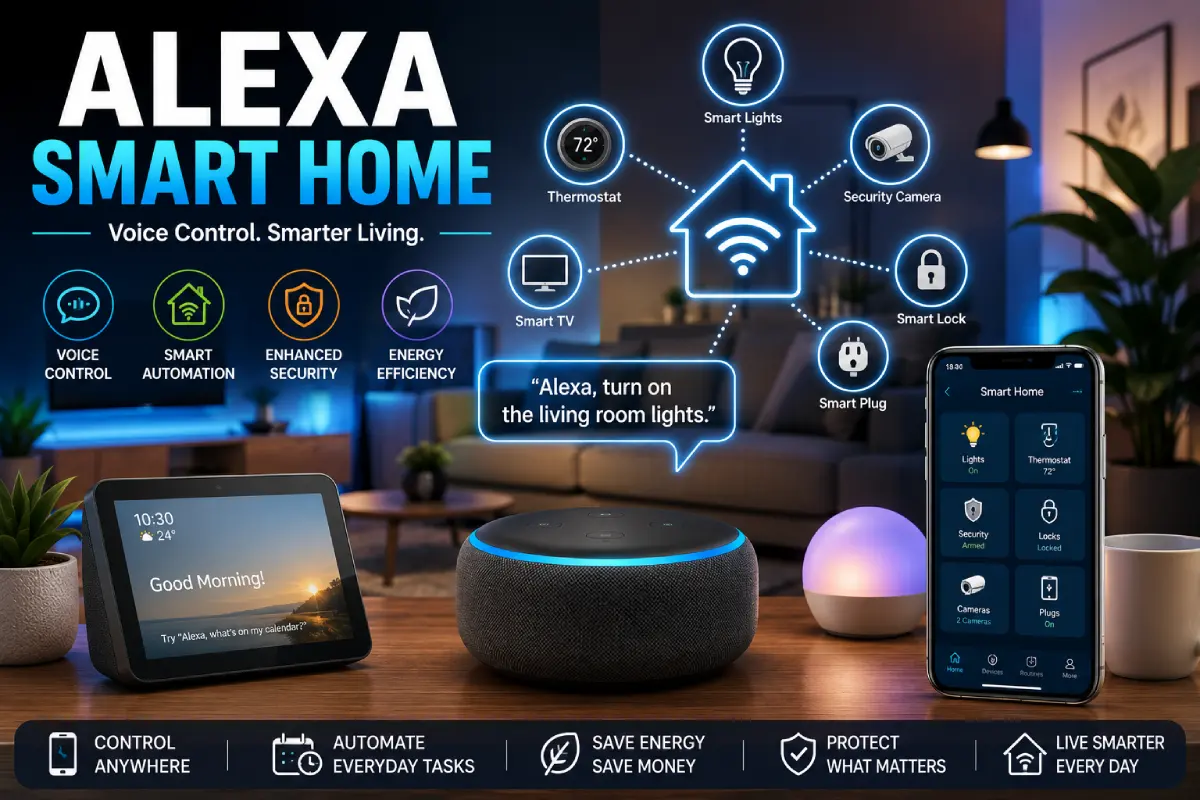
An Alexa smart home allows you to manage lights, appliances, security cameras, thermostats, entertainment systems, and anything else connected with simple voice commands or via the Alexa app. Incorporating Amazon‘s voice assistant Alexa, a connected smart home can make mundane routines easier, safer, and more energy efficient.
Whether you‘re building your first smart home or adding one to your existing set-up, here‘s what you need to know about how Alexa works, what devices work with it, and how to put together some powerful automation routines.
“For the overarching strategy, read our complete guide on Smart Devices.”
What Is Alexa for Smart Home?
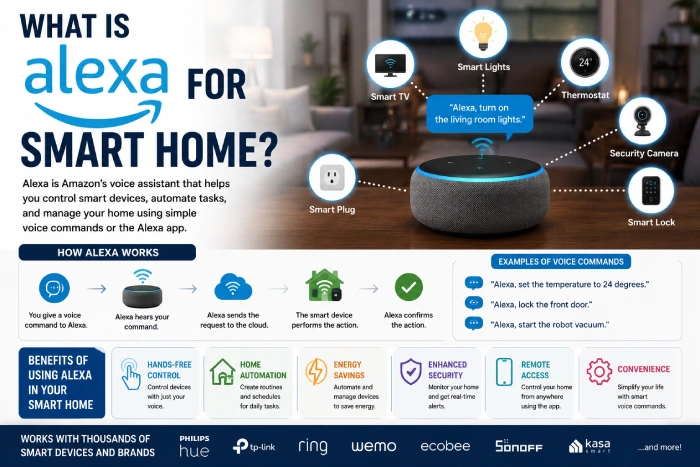
An Alexa smart home is a collection of internet of connected devices operated through a computer program.
Instead of manually controlling each device, you can use voice commands such as:
- “Alexa, can you switch on the lights in the living room.”
- ” Alexa, please lock the front door.”
- “Alexa, turn the heating up to 24 degrees.”
- “Alexa, begin the robot vacuum cleaner.”
Alexa now becomes your connected home‘s control center.
How does Alexa Smart Home work?
Alexa connects compatible smart devices through:
- Wi-Fi
- Bluetooth
- Zigbee
- Matter
- Thread
After linking your devices to the Alexa app, you can:
- Control devices remotely
- Create automation scripts
- Schedule actions
- Group with room
- Use voice commands:
- Check connected devices
Benefits of an Alexa Smart Home
Hands-Free Voice Control
Avoid the trouble of opening and closing several different applications. Control various devices all at once.
Home Automation
Develop routines that supports daily activities.
Example:
- Lights come on at sunset.
- Coffee is starting to brew, every morning.
- Thermostat will change according to your temperature settings.
Better Home Security
Combine all smart cameras, locks, alarms and doorbells for complete protection.
Energy Savings
Auto switch off lights and appliances when not in use.
Remote Access
Control your home from anywhere with the Alexa app.
Easy Expansion
As your smart home evolves you will be able to add new Alexa-enabled devices one after the other.
Best Alexa Smart Home Devices
Smart Speakers
Speakers, which are Alexa enabled Become your smart home hub.
Ideal for:
- Voice commands
- Music
- Smart house control
- Daily reminders
Smart Displays
Smart displays are also supplemented with the addition of touchscreen technology.
Features include:
- Video calls
- Watching video from security cameras
- Dashboard at a smart home
- Recipe assistance
Smart Lights
Manage brightness, colors, and programs.
Benefits:
- Voice control
- Energy savings
- Mood lighting
- Automation
Smart Plugs
Make every day items smart.
Perfect for:
- Lamps
- Coffee makers
- Fans
- Holiday decorations
Smart Thermostats
Automatically control the temperature in your home.
Advantages:
- A reduced cost for your electricity bill;
- Better comfort
- Remote control
Smart Cameras
Access your property from anyplace.
Features:
- Motion detection
- Live video
- Mobile notifications
- Night vision
Smart Video Doorbells
See who‘s at the door without opening it.
Benefits:
- HD video
- Two-way communication
- Motion alerts
- Package monitoring
Smart Locks
Use digital access instead of keys.
Features:
- Voice control
- Remote locking
- Guest access
- Activity logs
Robot Vacuums
Automate household cleaning.
Capabilities:
- Scheduled cleaning
- Room mapping
- Voice commands
- Self-charging
Smart Appliances
Many modern appliances work with Alexa.
Examples:
- Refrigerators
- Washing machines
- Ovens
- Air conditioners
- Coffee makers
Alexa Smart Home Devices by Room
Living Room
- Smart TV
- Smart lights
- Smart speaker
- Smart plugs
Kitchen
- Smart refrigerator
- Smart oven
- Smart coffee maker
- Smart display
Bedroom
- Smart lighting
- Smart thermostat
- Smart blinds
- Smart speaker
Bathroom
- Smart exhaust fan
- Smart lighting
- Smart speaker
Home Office
- Smart lights
- Smart plugs
- Smart airpurifier
- Smart display
“To take the next step, see our detailed guide on google home mini.”
How to Set Up an Alexa Smart Home
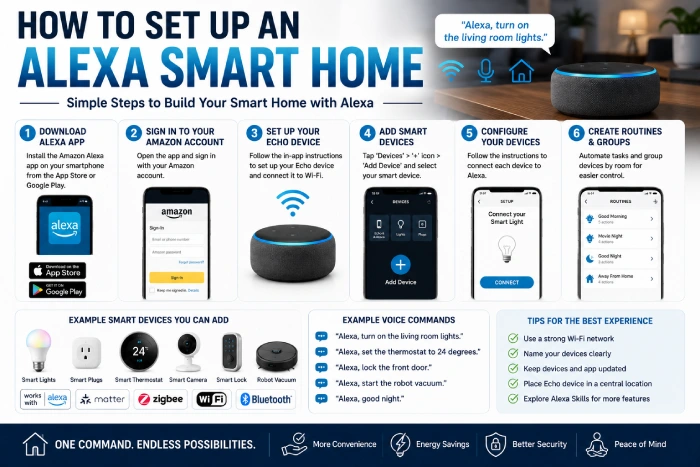
Step 1
Download and install the Alexa app.
Step 2
Link to your Amazon account.
Step 3
Add compatible smart devices.
Step 4
Combine the groupings of devices into rooms.
Step 5
Create an automation suite.
Step 6
Now test voice commands.
Within a matter of minutes your very own smart home is up and running.
Alexa Smart Home Routines
Automation routines simplify human life.
Morning Routine
- Lights on.
- Begins the process of making coffee4
- Read weather forecast
- Morning news during your playtime
Leaving Home
- Lights…
- Lock doors
- Activate cameras
- Lower thermostat
Movie Night
- Dim lights
- Turn on TV
- Close smart blinds
- Modifies room temperature
Bedtime Routine
- Lock doors
- Shut off lights
- Set alarm
- Turn on alarm system
Alexa Smart Home Tips
Name Devices Clearly
Simple names are better for voice recognition.
Use Device Groups
Control one command, multiple devices.
Enable Skills
Bring in new features and integrations to Alexa Skills.
Keep Software Updated
Update the firmware to inproved security and performance.
Use Strong Passwords
Safeguard your smart home accounts.
Alexa Smart Home vs Google Home
| Alexa Smart Home | Google Home |
| Widespread device compatibility | Robust integration within Google ecosystem |
| Large Skills library | Good searching services |
| More sophisticated automation snare guides: | Powerful AI assistance |
| Various smart home supports | Great Android integration |
| Easy voice commands,8 | Natural language understanding: Body and contents of the test18. The body of the test are50 questions, based on an investment management system, which were extracted from a real exam. The contents of the test covers50% of the type of questions that might come up in the FCA exam. |
Both are great, but Alexa has one of the biggest smart home compatible platforms out there.
Common Mistakes to Avoid
Buying Incompatible Devices
Always check the features to ensure it is Alexa compatible before buying.
Weak Wi-Fi Coverage
Stable network is needed for consistence.
Creating Too Many Routines
Begin with basic automations and build up from there.
Ignoring Security Settings
Two-factor authentication is recommended whenever possible.
Not Updating Devices
Regular updates ensure full functionality and security.
Future of Alexa Smart Homes
Alexa is likely to carry on moving forward with a host of new capabilities enabled by AI.
Future developments include:
- More intelligent voice recognition
- Enhanced contextual conversations
- Better Matter compatibility
- Home automation using AI
- Predictive routines
- Energy optimization improved
- More integration between devices
These add-ons will make Alexa-enabled homes even smarter and more customized.
Frequently Asked Questions
What is Alexa?
An Alexa smart home is a unified home where supported devices are operated using Amazon Alexa voice instructions, the Alexa application, or automation rules.
Do I require an Echo?
Many devices can be operated via the Alexa app but an Alexa-enabled smart speaker or display offers a hands-free experience.
How To Make Alexa Control Everything?
Alexa has a lot of compatible smart home devices with it thousands. Just make sure they will work with your Alexa before you buy do some research!
“Is Alexa smart home secure?”
Yes, once you‘ve adhered to the best password practices such as using strong passwords, having two-factor authentication in place and updating your devices periodically.
What is the best Alexa device for the beginner?
An Alexa-enabled smart speaker smart bulbs, smart plugs, and a smart display are a perfect starting point.
Conclusion
A smart home utilizing Alexa takes the hassle out of your daily tasks by combining voice activation, automation, energy savings and better security into a single interconnected system. Whether it‘s smart plugs, light bulbs and thermostats, or cameras, locks, appliances or robot vacuums, you can select Alexa-enabled products that communicate to make life easier and more customized. Begin with a couple of key items, set up your automation profiles, and add more items as you go for a smarter home.