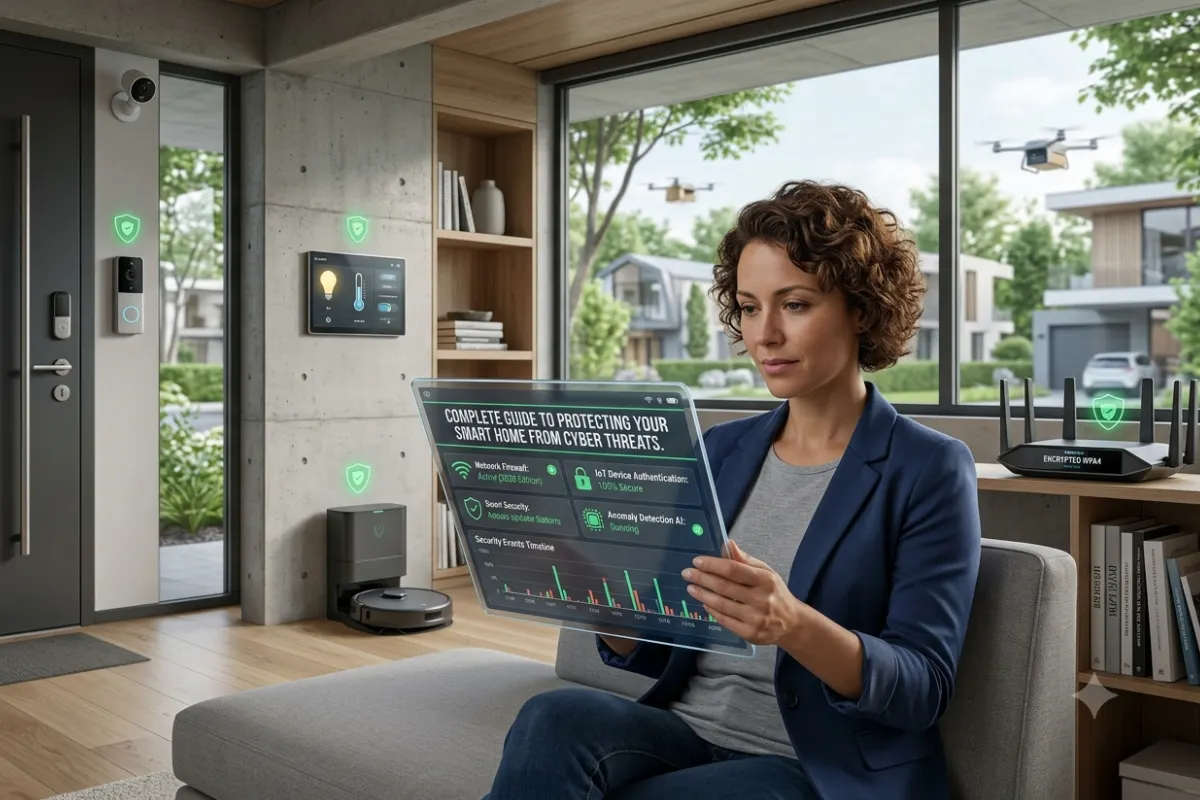

Last Updated: June 22, 2026
Smart Home Security in 2026: Everything You Need to Know
Homes are getting smarter and smarter. We have doorbells that can think and security cameras that use intelligence. We also have locks that can open and close by themselves and lights that turn on and off automatically. This means that people who own homes have a lot of control over what happens in their homes. With all these new things we have to be careful.
When we have devices that are connected to the internet bad people who like to hack into things start to pay attention to our homes.
Reports from companies that keep an eye on cybersecurity say that attacks on homes are happening more and more. This is because there are many devices connected to the internet at home.
So we need to ask ourselves:
Are our smart homes safe this year?
The answer is yes. Only if we do things to keep them safe.
This guide, to keeping our homes safe will tell us how security works for smart homes what kinds of bad things can happen to us what the best security systems are and how we can keep our smart devices from being hacked by bad people.
Security guide from our Smart Home Installation pillar.
What Is Smart Home Security?
Smart home security-or “connected” security, “internet of things,” or “IoT” security-is an integrated security solution in your house where a variety of connected security and protection gadgets work together on the internet, software application and automation in order to secure your home from the threats it faces.
A modern smart security system may include:
- Smart door locks
- Video doorbells
- Security cameras
- Motion sensors
- Glass-break detectors
- Smart alarms
- AI-powered monitoring
- Smart lighting automation
- Mobile security apps
All of these devices connect by means of a Wi-Fi, Zigbee, Z-Wave, Matter, Bluetooth, or Thread communication.
Unlike conventional, wired alarm systems, a smart home security system permits residents to:
- Monitor homes remotely
- Receive instant alerts
- Watch live camera feeds
- Lock or unlock doors remotely
- Automate security routines
- Integrate with voice assistants
Why Smart Home Security Matters More in 2026
Several trends have increased the importance of home cybersecurity:
Increased Device Adoption
The average smart home now contains between 15 and 30 connected devices.
These include:
- Smart TVs
- Cameras
- Voice assistants
- Smart thermostats
- Smart plugs
- Smart locks
Each connected device creates another entry point that hackers could potentially exploit.
Rise of AI-Powered Threats
Cybercriminals are using AI tools to:
- Crack weak passwords
- Generate phishing attacks
- Identify network vulnerabilities
- Automate cyberattacks
Remote Access Risks
Control from wherever. Most smart homes allow you to operate devices remotely. It can also make remote access a security issue if your passwords are too weak.
Are Smart Homes Safe?
The smart home’s major security concern and a major consideration for homeowners’ home life are privacy and hacking. In reality, if used correctly, homes with connected devices tend to be as safe as any home without the same technology.
Smart Home Safety Factors
| Security Factor | Safe When Properly Configured? | Risk Level |
| Smart Cameras | Yes | Low |
| Smart Locks | Yes | Low |
| Smart Doorbells | Yes | Low |
| Voice Assistants | Yes | Medium |
| Smart TVs | Yes | Medium |
| Cheap Unbranded Devices | Often No | High |
| Outdated Devices | No | High |
Key Insight
Most successful smart home hacks occur because of:
- Weak passwords
- Outdated firmware
- Unsecured Wi-Fi networks
- Poor device configuration
Not because smart technology itself is inherently unsafe.
How Smart Home Systems Get Hacked
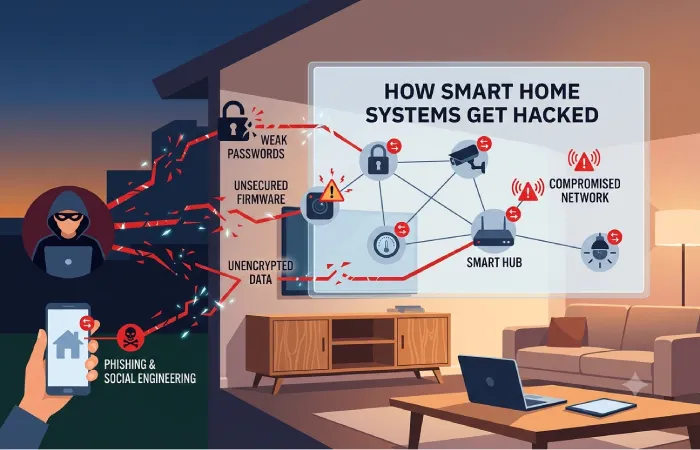
Understanding threats is the first step toward prevention.
1. Weak Passwords
Many users still use passwords such as:
- 123456
- Password123
- Admin
Hackers use automated tools capable of testing thousands of passwords every second.
2. Outdated Firmware
Manufacturers release updates to fix vulnerabilities.
Ignoring updates leaves devices exposed.
Common targets include:
- Cameras
- Routers
- Smart TVs
- Doorbells
3. Insecure Wi-Fi Networks
Your home network acts as the foundation of your smart home.
Weak Wi-Fi security often leads to:
- Device compromise
- Data theft
- Unauthorized access
4. Fake Mobile Apps
Cybercriminals create counterfeit apps that imitate:
- Camera software
- Security apps
- Home automation platforms
Installing these apps can expose login credentials.
5. Phishing Attacks
Attackers may send fake emails claiming to be from:
- Device manufacturers
- Security providers
- Smart home platforms
The goal is to steal account information.
Major Smart Home Security Threats in 2026
Threat Comparison Table
| Threat Type | Frequency | Potential Damage |
| Password Attacks | Very High | Medium |
| Phishing | High | High |
| Malware | Medium | High |
| Device Hijacking | Medium | High |
| Wi-Fi Breaches | High | Very High |
| Data Theft | Medium | High |
| Ransomware | Growing | Severe |
Components of a Secure Smart Home
A complete smart home security setup should include multiple layers.
Layer 1: Secure Network
The network is your first line of defense.
Recommended features:
- WPA3 encryption
- Strong passwords
- Guest networks
- VPN support
Layer 2: Smart Cameras
Modern security cameras provide:
- AI detection
- Facial recognition
- Cloud storage
- Local recording
Best locations:
- Front entrance
- Back door
- Garage
- Driveway
Layer 3: Smart Locks
Benefits include:
- Remote locking
- Temporary access codes
- Activity logs
- Auto-lock functionality
Layer 4: Motion Sensors
Motion detection helps identify:
- Intruders
- Unexpected activity
- Entry attempts
Layer 5: Security Monitoring
Professional monitoring services can:
- Contact emergency services
- Verify alarms
- Monitor homes 24/7
Secure your network using our smart home connectivity tips
Best Smart Security Systems in 2026
The market offers several excellent options.
Comparison Table: Best Smart Security Systems
| Security System | Best For | AI Features | Professional Monitoring |
| Ring Alarm | Beginners | Yes | Yes |
| ADT Smart Security | Maximum Protection | Advanced | Yes |
| SimpliSafe | Easy Setup | Yes | Yes |
| Abode Security | Smart Home Integration | Yes | Optional |
| Vivint | Premium Homes | Advanced AI | Yes |
| Eufy Security | Local Storage | Limited | Optional |
Smart Security Systems Feature Comparison
| Feature | Ring | ADT | SimpliSafe | Vivint | Abode |
| Smart Cameras | Yes | Yes | Yes | Yes | Yes |
| Smart Locks | Yes | Yes | Yes | Yes | Yes |
| AI Detection | Yes | Advanced | Yes | Advanced | Yes |
| Mobile App | Excellent | Excellent | Excellent | Excellent | Good |
| DIY Installation | Yes | Partial | Yes | No | Yes |
| Professional Monitoring | Yes | Yes | Yes | Yes | Optional |
Protect Smart Devices from Hackers
One of the most searched questions today is:
How can I protect smart devices from hackers?
Follow these proven strategies.
Use Strong Passwords
Create passwords that contain:
- Uppercase letters
- Lowercase letters
- Numbers
- Symbols
Example:
✔ T9!qW4#zLp28
Avoid:
✘ Password123
Enable Two-Factor Authentication
2FA adds an additional security layer.
Even if a password is stolen, hackers still need a second verification step.
Update Devices Regularly
Enable automatic updates whenever possible.
Updates fix:
- Security flaws
- Software bugs
- Vulnerabilities
Buy Trusted Brands
Reputable manufacturers invest heavily in security.
Trusted Brand-Specific Installation generally provide:
- Regular updates
- Encrypted communication
- Strong privacy protections
Secure Your Router
Your router protects every connected device.
Best practices:
- Change default admin credentials
- Enable WPA3
- Disable remote management
- Install firmware updates
Create a Separate IoT Network
Advanced users should place smart devices on a dedicated network.
Benefits include:
- Reduced attack surface
- Better device isolation
- Improved network security
Smart Home Security Architecture
🏠 Smart Home Security Architecture
│
└── 🌐 Internet
│
└── 🔒 Secure Router (WPA3)
│
├── 💻 Main Network (High Security/Private Data)
│ ├── 🖥️ Computers
│ ├── 📱 Smartphones
│ └── 平板 Tablets
│
└── 🤖 IoT Network (Isolated/Segmented)
├── 📹 Cameras
├── 🔔 Doorbells
├── 🔐 Smart Locks
├── 🌡️ Sensors
└── 📺 Smart TVs
Smart Home Security Trends for 2026
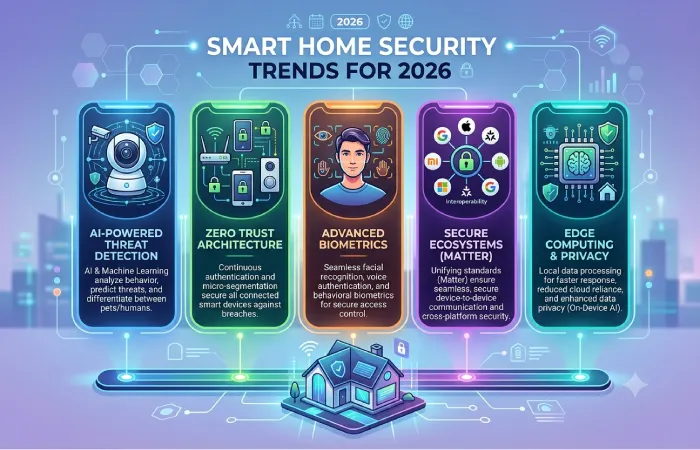
Several innovations are shaping the future.
AI Threat Detection
Security systems can now:
- Recognize unusual behavior
- Reduce false alarms
- Identify suspicious activity
Edge Computing Security
More processing occurs locally.
Benefits:
- Faster response times
- Better privacy
- Reduced cloud dependence
Matter Standard Adoption
The Matter standard continues expanding.
Advantages include:
- Improved interoperability
- Better device authentication
- Stronger security requirements
Biometric Authentication
Many premium systems now support:
- Fingerprints
- Facial recognition
- Voice identification
Common Smart Home Security Mistakes
Avoid these errors.
Using Default Passwords
The most common vulnerability.
Ignoring Firmware Updates
Creates unnecessary security risks.
Sharing Access Too Widely
Limit admin permissions.
Buying Extremely Cheap Devices
Low-cost products often lack security support.
Reusing Passwords
Each device ecosystem should have unique credentials.
Cost of Smart Home Security in 2026
Security Investment Comparison
| Security Level | Estimated Cost |
| Basic Setup | $150–$400 |
| Intermediate Setup | $500–$1,500 |
| Advanced Setup | $1,500–$5,000+ |
| Fully Integrated Smart Security Home | $5,000–$20,000+ |
Smart Home Security Checklist
Before installing smart devices:
- Secure router
- Enable WPA3
- Use password manager
- Enable 2FA
- Update firmware
- Install trusted apps
- Create guest network
- Monitor device activity
- Review privacy settings
- Replace unsupported devices
Try our smart home automation ideas for auto-alerts.
Frequently Asked Questions
Are Smart Homes Safe?
Yes. Smart homes are generally safe when protected with strong passwords, updated firmware, secure Wi-Fi networks, and two-factor authentication.
Can Smart Security Cameras Be Hacked?
Like most things on the Internet, everything can be hackable to some degree, but most Smart cameras use encrypted transmission and are secured in multiple ways to prevent hacking.
What is the best Smart home Platform on my account security and to monitor security?
You might think of anything with the very highest regard as long as they include and update firmware, offer secure ways of logging, and ensure good authentication practices as you’re setting it up.
Should My devices all use their own IoT smart house Network and device security?
For enhanced IoT smart house device and home networking Security, all your devices must not have access to sensitive private information stored on your computers and other digital devices.
Is Professional Monitoring Worth It?
Yes – to most house owners a level of added house monitoring protection from some outside entity can save the day.
Final Thoughts
Smart home technology is making our homes more convenient and easier to live in. It is also making them more efficient and safe.. We have to think about security when we add new devices to our homes.
The good thing is that we can stop security problems with a few simple rules:
- Use strong passwords for our devices
- Turn on two-factor authentication to keep our devices safe
- Update our devices when we need to
- Make sure our Wi-Fi network is secure
- Buy products from companies we trust
- Keep an eye on what our devices are doing
The best smart homes in 2026 are not just smart. They are also protected from hackers.
By using smart security systems and troubleshooting content being careful about cybersecurity people who own homes can have all the good things that come with smart home technology and not have to worry as much, about hackers and other digital threats. Smart home technology is a thing and it can make our lives easier. We just have to use home technology in a smart way.