
Last Updated: September 24, 2026
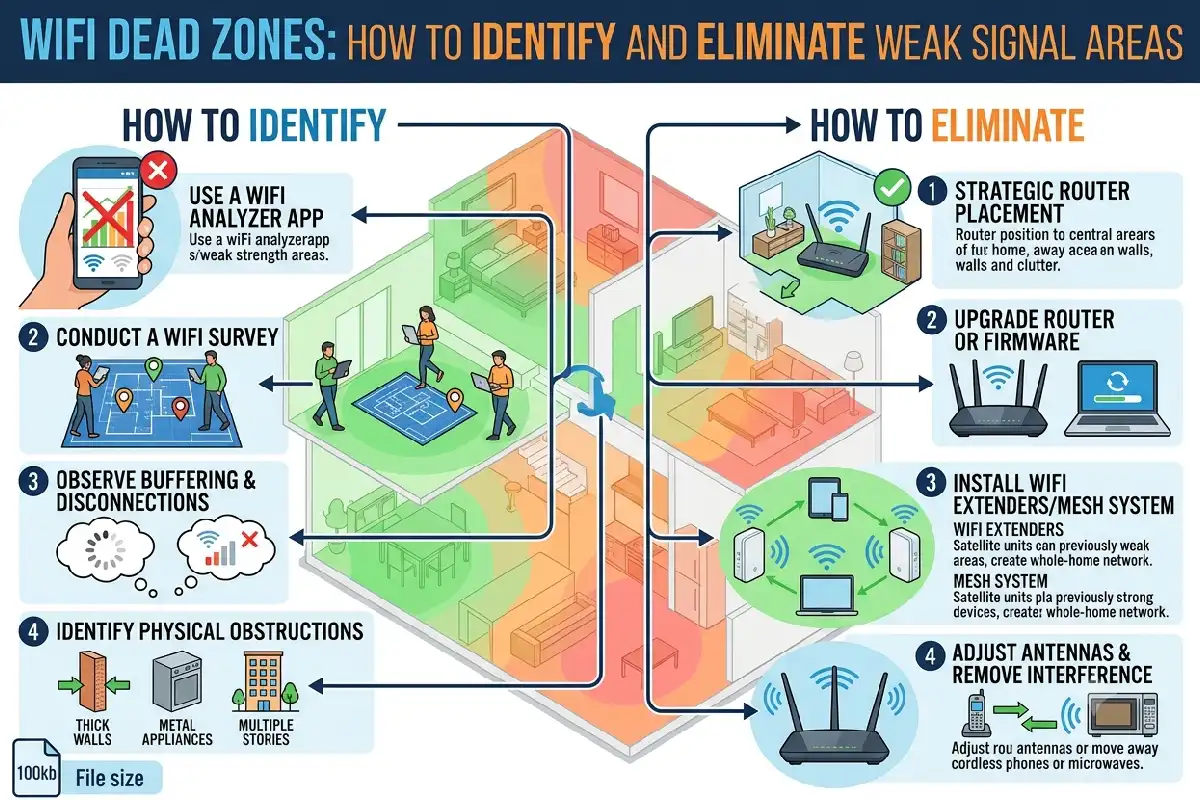
As a reminder, there is no perfect Internet plan. Cl…w WiFi in your home or office, no matter how good the plan. Dead spots on WiFi are quite common and are usually caused by: Thick concrete walls blocking the WiFi signal, Being too far from the WiFi hub, WiFi interference, incorrect placement of the router and congested WiFi channels.
The good news is that most dead spots are fixable without the need of one more network device. In this section we look at how to pinpoint weak spots, move your router and determine if you need a WiFi extender, a mesh system or a wired access point.
Finding WiFi Dead Zones
More precisely, what is called a WiFi dead zone is a dead zone when WiFi signal is received. This could be shown in many ways such as slow download speeds, buffering, freezing in a video call or just constant changing between WiFi and cell signal reception.
Check signal strength
While holding your Smartphone or passing your laptop around your house, observe its connection function properly in the areas where you having issues. Do include:
- Signal strength
- Download and upload speeds
- Latency or ping
- Connection stability
- The frequency of the disconnection by the equipment.
A WiFi analyzer app can give you a more detailed view of signal strength as well as what wireless networks are within reach.
The measurement of signal strength is usually in dBm. The closer to 0 the stronger the signal is. The value -50 dBm is a lot stronger than -75. For surfing and streaming values of a steady signal are more important than one individual measurement.
Map your home network
Draw a map of your home and locate weak signals. Take measurements in rooms at various distances from the router and see if any walls, floors, or pieces of furniture seem to have an impact.
This also allows us to identify the coverage problem from other factors like a busy router, ISP or wireless interference.
Router Placement Best Practices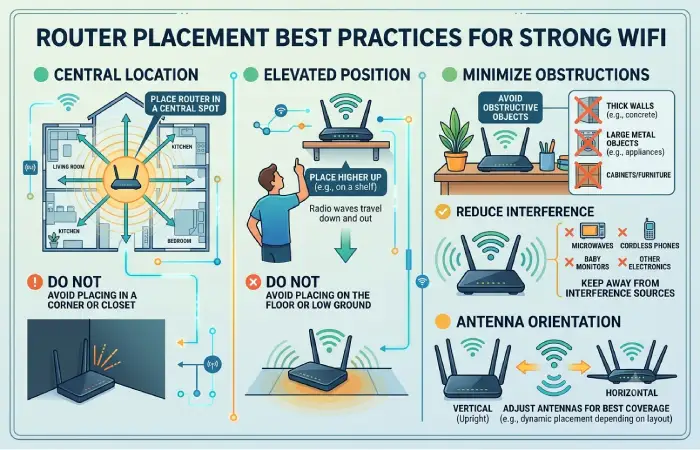
To put it differently, one of the simplest procedures to amplify the reach of your Wi-Fi is by adjusting your router position.
Place your main router towards the center of the coverage area as much as it is possible. Don‘t put it in a corner or at one end of the building if you require coverage throughout the entire house.
Keep the router elevated
Instead of putting the router on the ground, put it on a table, shelf, or in a bookshelf. If the router is open, the wireless signals can diffuse more considerably.
Avoid putting the router inside:
- Cabinets or drawers
- Closed entertainment units
- Metal enclosures
- Behind large appliances
- Areas surrounded by thick walls
Do not hide the router simply to make the room look cleaner. A visible, unobstructed router can provide better coverage.
Keep it away from interference
Wireless communication can be effected by certain types of electronic equipment closest to the router, the more likely it is to be affected on the 2.4 GHz band. Try to keep the router away from cordless telephones, microwaves, equipment heavy with Bluetooth, large electrical household appliances.
Also check your router’s antennas. For example, if the device has external antennas that are adjustable, the coverage can be enhanced by setting the towers as suggested by the manufactures.
Extenders, Mesh, and Access Points
When better router placement cannot eliminate a dead zone, additional networking hardware may be necessary. The three common options are WiFi extenders, mesh WiFi systems, and wireless access points.
| Solution | Best For | Main Advantage | Main Limitation |
| WiFi extender | Small coverage gaps | Affordable and simple | Can reduce performance |
| Mesh WiFi | Larger homes | Seamless whole-home coverage | Higher cost |
| Access point | Homes with Ethernet cabling | Strong, reliable coverage | Requires wired connection |
Using WiFi extenders
A WiFi extender takes the wireless signal and re-broadcasts it to another area. This can be helpful if the signal in a single room or corner of a building isn‘t strong enough.
Make sure the extender is not directly in the dead zone, but situated between the router and the dead zone. Otherwise, the far end will receive a very poor signal as the extender would have very little quality bandwidth to rebroadcast.
Wireless backhaul might also add a delay (latency) or lower the available throughput.
Mesh WiFi
A mesh system involves several nodes covering a wider wireless area. These nodes talk to each other and enable the devices to shuffle seamlessly between them.
Mesh WiFi can be especially helpful in bigger homes, multi-level buildings, and floor plans where a single router‘s coverage isn‘t reliable.
Opt for a wired Ethernet backhaul for your mesh system when available. Utilizing an Ethernet backhaul limits the dependence on WiFI in the communication process between mesh nodes and can lead to increased reliability.
Wired access points
If Ethernet cabling exists, a wired access point is often an ideal choice.
Rather than extending a weak wireless signal, the access point is connected to the network via Ethernet and generates it‘s own new WiFi zone, creating an excellent platform for high bandwidth activities like video conferencing, streaming, gaming, and file sharing.
Restoring dead zones. For difficult dead zones, an access point with wired backhaul correctly placed is likely to be more consistent than a wireless extender.
Building Materials Affecting WiFi
The physical layout of a building can also have an impact on WiFi.
Different materials will absorb, reflect or attenuate the radio signals to differing extents. Concrete and reinforced concrete can be especially difficult as can metal.
Common obstacles include:
- Reinforced concrete walls
- Brick walls
- Metal structures
- Metal-backed insulation
- Thick floors
- Mirrors and large reflective surfaces
- Water holding items like large aquariums
A router behind a couple of walls, for example, could be strikingly weaker at signal strength than the same device sat in an open space.
Multiple floors
Multi-story dwellings are often hard to cover using only one router. It may not be effective to place a router on the ground floor because the signal will easily be broken by the upper floors.
What about multi-storey buildings? Have a plan to put a few mesh nodes or wired access points on different floors.
DIY WiFi Boosters That Work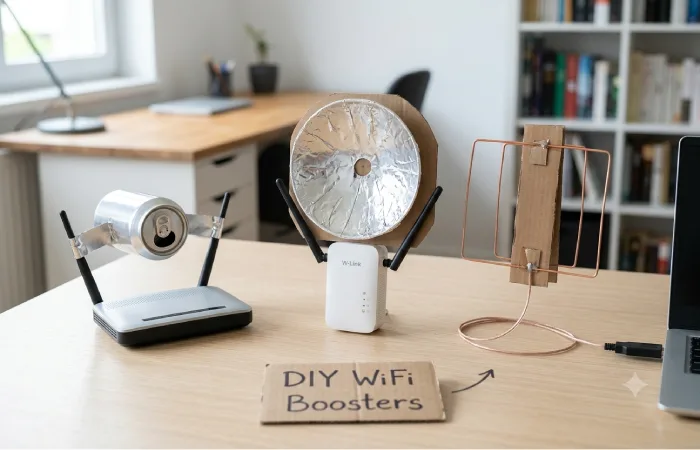
Many online DIY WiFi booster tricks involve homemade reflectors or improvised antenna modifications. Some may alter the direction of radio energy, but they are not a reliable replacement for proper network equipment.
There are, however, several DIY WiFi improvements that cost little or nothing.
1. Reposition the router
Relocating your router away from a corner, in a cabinet or close to the floor to the middle and on top of a shelf or cabinet can also be a large improvement.
2. Reduce physical obstacles
Whenever possible, keep the access point away from large appliances, metal furniture and thick walls.
3. Optimize WiFi channels
Nearby networks may interfere by fighting for airtime. It might be worth changing to another less congested channel, especially on the 2.4 GHz band.
Before you begin to change the channels, scan for your local WiFi using a WiFi analyzer.
4. Update router firmware
Most should have the ability to update the firmware. Sometimes manufacturers release updates that improve stability, security, or compatibility.
5. Use the appropriate frequency band
2.4 GHz tends to provide longer range and penetrate barriers more effectively. 5 GHz normally offers higher speeds at shorter ranges. Equipment is also available to operate at 6 GHz (introduced in 2016), which can offer increased capacity but usually has a shorter effective range than 2.4 GHz.
Choose the band which corresponds the most with your position, destination and your terminal.
How to Fix WiFi Dead Zones Step by Step
If you are troubleshooting a weak-signal area, use this sequence:
Step 1: Attempt to test the plugs in different rooms.
Step 2: Find where the antenna has the poorest signal and/or the harshest responses.
Step 3: Situate at somewhere between the middle, high and without any blocking.
Step 4: Find out if there are other points of interference and if there are busy wireless channels.
Step 5: Try to connect again.
Step 6: Troubleshooting one problem? Connect a WiFi extender, mesh node or wired access point.
Step 7: Test again on speeds, latency and stability all along of the area.
It spares you the cost of buying equipment that isn‘t really required before resolving the actual issue.
The Extender, the mesh, or the access point what do I need?
The correct answer will be different depending on the size and setup of the network.
For one small Dead Zone maybe a well placed extender would work.
The all mesh system might provide larger coverage for multiple rooms or multiple floors with one central management.
If the cabling for Ethernet is present, then Wired APs can provide the best reliability and performance.
Keep in mind, however, that WiFi coverage and internet speed are separate issues. If you‘ve got full bars on your device and internet speeds are still sluggish, you may need to check your Internet Service Provider connection, router load, transmission rates, or other parts of the network.
Frequently Asked Questions
What is a WiFi dead zone?
WiFi dead zone A location where there is either no, or very poor WiFi signal resulting in an unreliable network connection. Devices may suffer from slow speeds, buffering,high latency, and constant disconnections.
What are WiFi dead zones and how do I locate them?
Drive through your house while monitoring your signal strength and connection quality on a cell phone or laptop. To supplement, using a WiFi analyzer can also give you some extra details on signal levels and if there are any wireless conflicts.
Can a WiFi extender resolve a dead spot?
An extendercan resolve for a slight coverage deficiency – one that is placed in a location where it still can receive a relatively strong signal from the primary router. Meshetworking systems or wiredaccess points are better options for more significant coverage issues.
How does mesh WiFi compare to an extender?
They solve similar coverage problems differently. The mesh system is used for providing coordinated coverage of multiple nodes. The extender is used for retransmitting an existing WiFi network. The building, money and the requirement of performance decides which to choose.
Can walls cause WiFi dead zones?
Yes. Thick concrete, brick, metal, reinforced construction, and other dense materials can block wireless signals and cause dead spots.
Final Takeaway
A good WiFi dead spots repair should always begin with diagnosis instead of trying to buy fresh equipment straightaway. Check the quality of coverage; place your router in an open and central location; minimize interference and optimize your wireless settings.
If those aren‘t enough, select the appropriate coverage option: an extender if you just need to plug a small gap, mesh WiFi if you want more complete whole-home coverage, or a wired access point if you require greater dependability and bandwidth.