
Last Updated: September 14, 2026
Network security has become one of the most important parts of managing modern home and business technology. Every connected device, cloud application, smartphone, computer, smart device, and remote employee creates another potential entry point for cyber threats.
Strong network security protects the systems, devices, applications, and data that move across a network. It combines technologies such as firewalls, encryption, VPNs, access controls, network monitoring, and security policies to reduce the risk of unauthorized access and cyberattacks.
In 2026, network security is no longer something only large enterprises need. Small businesses, remote workers, home users, and organizations of every size need a clear strategy for protecting their networks.
This guide explains the fundamentals of network security, the most common threats, essential security technologies, and practical steps for building a safer network.
What Is Network Security?
Network security is the practice of protecting a computer network and the devices connected to it from unauthorized access, misuse, disruption, theft, and cyberattacks.
A network can include:
- Desktop computers
- Laptops
- Servers
- Smartphones
- Tablets
- Smart home devices
- Routers
- Switches
- Wireless access points
- Cloud services
- IoT devices
- Business applications
The goal of network security is to make sure that authorized users can safely access resources while preventing unauthorized users and malicious software from entering the network.
Network security usually combines hardware, software, policies, and monitoring systems.
For example, a small business network may use a firewall, secure Wi-Fi, VPN access for remote workers, endpoint protection, and multi-factor authentication. Together, these tools create multiple layers of protection.
This approach is often called defense in depth.
Why Is Network Security Important in 2026?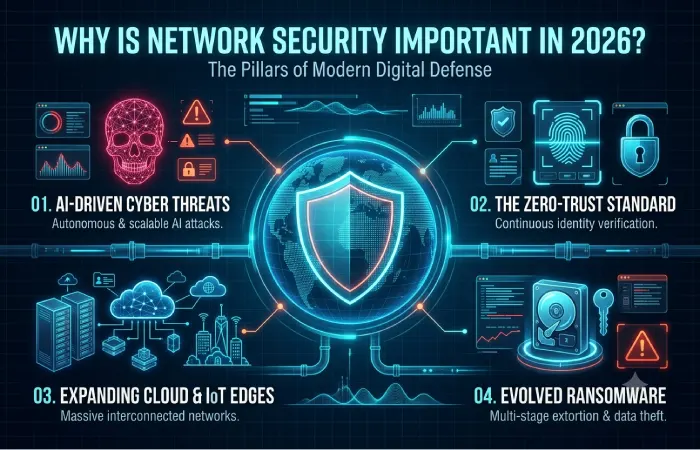
Modern networks are more complex than traditional office networks. Employees work remotely, businesses use cloud applications, customers connect through mobile devices, and smart devices communicate constantly over the internet.
This creates more opportunities for attackers.
Without proper network security, organizations may experience:
- Data breaches
- Ransomware attacks
- Financial losses
- Service interruptions
- Identity theft
- Stolen credentials
- Unauthorized access
- Loss of customer trust
- Compliance problems
Home users also face serious risks. Smart cameras, TVs, voice assistants, gaming systems, and other connected devices can become vulnerable if they are poorly configured.
A secure network helps reduce these risks by controlling who can connect, what they can access, and how information travels across the network.
Network Security Fundamentals
Understanding network security fundamentals helps users build stronger protection without becoming cybersecurity experts.
The foundation of network security is often based on three important goals.
Confidentiality
Confidentiality means sensitive information should only be available to authorized users.
Examples include:
- Customer information
- Financial records
- Passwords
- Business documents
- Personal information
Encryption and access controls help protect confidentiality.
Integrity
Integrity means information should remain accurate and should not be changed without authorization.
For example, attackers should not be able to modify financial records or business data while it moves across a network.
Security monitoring and encryption technologies help protect data integrity.
Availability
Availability means authorized users should be able to access systems and information when needed.
Cyberattacks such as Distributed Denial-of-Service attacks can affect availability by overwhelming a network or service.
Reliable infrastructure, backups, and network monitoring help improve availability.
The CIA Security Model
| Security Principle | Main Goal | Example |
| Confidentiality | Protect sensitive data | Encryption |
| Integrity | Prevent unauthorized changes | Access controls |
| Availability | Keep systems accessible | Backup systems |
These three principles are commonly known as the CIA triad and form an important foundation for network security strategies.
How Does Network Security Work?
Network security works by creating multiple layers of protection around devices, users, and data.
A typical process may include:
- Identifying users and devices.
- Authenticating access requests.
- Checking network traffic.
- Blocking suspicious activity.
- Encrypting sensitive information.
- Monitoring the network.
- Responding to security incidents.
Instead of trusting every device automatically, modern security strategies increasingly verify users and devices before granting access.
This is particularly important for businesses with remote workers and cloud-based applications.
Basic Network Security Architecture
| Security Layer | Purpose |
| Perimeter Security | Protect the network from external threats |
| Firewall | Control network traffic |
| Access Control | Restrict unauthorized users |
| Encryption | Protect sensitive information |
| Endpoint Security | Protect computers and devices |
| Network Monitoring | Detect suspicious activity |
| Backup and Recovery | Restore systems after incidents |
A strong network uses several of these layers together.
Types of Network Security
Different technologies protect networks in different ways.
Firewall Security
A firewall monitors and controls network traffic according to predefined security rules.
It can help determine:
- Which devices can connect
- Which applications can access the internet
- Which ports are open
- Which traffic should be blocked
Firewalls can be hardware-based, software-based, or cloud-based.
A business may use a dedicated firewall appliance, while a home user may rely on router firewall features and operating system security tools.
Network Access Control
Network access control determines who and what can connect to a network.
For example, a company may allow:
- Employees
- Approved company devices
- Authorized administrators
The network may restrict:
- Unknown devices
- Unauthorized users
- Outdated systems
- Suspicious connections
Network access control is particularly useful in offices with many devices.
Wireless Network Security
Wi-Fi networks must be configured carefully because wireless signals can potentially be accessed by devices outside the physical building.
Good wireless security includes:
- Strong Wi-Fi encryption
- Secure router passwords
- Separate guest networks
- Regular firmware updates
- Disabled unnecessary features
Home and business users should avoid weak or outdated wireless security configurations.
Endpoint Security
Endpoints are devices that connect to a network.
These may include:
- Computers
- Smartphones
- Tablets
- Servers
- IoT devices
Endpoint security helps protect these devices from malware, unauthorized access, and other threats.
Application Security
Applications can also become entry points for attackers.
Secure applications should include:
- Authentication
- Access controls
- Secure updates
- Vulnerability management
- Encryption
Businesses using cloud software should also understand how application access connects to their overall network security strategy.
Firewall Configuration: How to Secure Your Network
Proper firewall configuration is one of the most important parts of network security.
A firewall should not simply be installed and forgotten. Rules should be reviewed and updated as networks change.
Start With a Default-Deny Approach
A strong security strategy often blocks unnecessary traffic by default and only allows required services.
For example, if a server does not need public access to a particular port, that port should remain closed.
This reduces the potential attack surface.
Review Open Ports
Ports allow different types of network communication.
However, unnecessary open ports can create security risks.
Administrators should regularly review:
- Open ports
- Public-facing services
- Remote access systems
- Application requirements
Only necessary services should be exposed.
Separate Network Zones
Businesses should consider separating important systems into different network segments.
For example:
| Network Segment | Devices |
| Employee Network | Work computers |
| Server Network | Business servers |
| Guest Network | Visitor devices |
| IoT Network | Smart devices |
| Management Network | Network equipment |
Network segmentation reduces the risk of attackers moving freely across every system.
Keep Firewall Software Updated
Firewalls depend on updated software and threat intelligence.
Regular updates help protect against newly discovered vulnerabilities.
Security teams should also review firewall logs to identify unusual traffic patterns.
VPN and Encryption
VPN and encryption technologies help protect data when it moves across networks.
They are particularly useful when users connect through public networks or work remotely.
What Is a VPN?
A Virtual Private Network, or VPN, creates an encrypted connection between a device and another network or service.
VPNs are commonly used for:
- Remote work
- Secure access to business systems
- Protecting traffic on public Wi-Fi
- Connecting offices
- Accessing private resources
A VPN does not replace other security controls. It works as part of a larger network security strategy.
For example, remote workers should still use strong passwords, multi-factor authentication, updated devices, and endpoint protection.
What Is Encryption?
Encryption converts readable information into protected data that requires the correct key to access.
Encryption can protect:
- Files
- Network traffic
- Emails
- Cloud data
- Database information
Two common areas are:
Encryption in Transit
This protects information while it moves between devices and services.
Encryption at Rest
This protects information stored on devices, servers, and storage systems.
Both are important for protecting sensitive information.
VPN vs Encryption
| Feature | VPN | Encryption |
| Main Purpose | Secure network connection | Protect information |
| Protects | Network traffic | Data |
| Common Use | Remote access | Files and communications |
| Can Work Together | Yes | Yes |
A VPN often uses encryption, but encryption can also protect data without using a VPN.
Common Network Threats
Understanding common network threats helps users recognize potential risks before they become serious incidents.
Malware
Malware is malicious software designed to damage systems, steal information, or gain unauthorized access.
Common malware types include:
- Viruses
- Worms
- Trojans
- Spyware
Malware can spread through malicious downloads, compromised websites, infected email attachments, and vulnerable systems.
Ransomware
Ransomware encrypts files or systems and demands payment or other action from the victim.
A ransomware attack can disrupt:
- Business operations
- Customer services
- Internal communication
- Data access
Regular backups and endpoint protection are important parts of ransomware defense.
Phishing Attacks
Phishing attempts to trick users into sharing sensitive information or installing malicious software.
Attackers may impersonate:
- Banks
- Technology companies
- Managers
- Government organizations
- Business partners
Employee awareness is an important security control because technology alone cannot prevent every phishing attempt.
Man-in-the-Middle Attacks
A man-in-the-middle attack occurs when an attacker attempts to intercept communication between two parties.
Encryption helps reduce the risk by protecting information during transmission.
Distributed Denial-of-Service Attacks
A DDoS attack attempts to overwhelm a server or network with large amounts of traffic.
The goal may be to make websites or online services unavailable.
Businesses can use traffic monitoring and specialized protection services to reduce DDoS risks.
Insider Threats
Not every security risk comes from outside the organization.
Employees, contractors, or other authorized users may accidentally or intentionally expose sensitive information.
Access controls and monitoring help reduce this risk.
IoT Security Risks
Internet-connected devices can create additional security challenges.
Examples include:
- Smart cameras
- Smart speakers
- Sensors
- Printers
- Smart TVs
- Industrial devices
These devices should receive regular updates and should ideally be separated from important business systems.
Common Network Threats Comparison
| Threat | Primary Risk | Common Target | Protection |
| Malware | System compromise | Devices | Endpoint protection |
| Ransomware | Data loss | Businesses | Backups and monitoring |
| Phishing | Credential theft | Users | Security awareness |
| DDoS | Service disruption | Websites | Traffic protection |
| Unauthorized Access | Data theft | Networks | Authentication |
| IoT Attacks | Network compromise | Smart devices | Segmentation |
Network Security Best Practices
Following proven network security best practices can significantly reduce the risk of common cyberattacks.
1. Use Strong Passwords
Weak passwords remain one of the easiest ways for attackers to gain access.
Passwords should be:
- Long
- Unique
- Difficult to guess
Users should avoid reusing the same password across multiple accounts.
Password managers can help users create and store strong passwords securely.
2. Enable Multi-Factor Authentication
Multi-factor authentication requires users to provide additional verification.
For example:
- Password
- Authentication application
- Security key
Even if an attacker steals a password, MFA can provide an additional layer of protection.
3. Keep Software Updated
Outdated software can contain known vulnerabilities.
Regularly update:
- Operating systems
- Routers
- Firewalls
- Applications
- IoT devices
Businesses should develop a patch management process instead of relying on manual updates.
4. Secure Your Wi-Fi Network
Wi-Fi security should include modern encryption and strong administrative passwords.
Avoid:
- Default router passwords
- Weak Wi-Fi passwords
- Outdated encryption
- Unnecessary remote management
Businesses should also consider separate networks for employees, guests, and smart devices.
5. Segment Your Network
Network segmentation limits how far an attacker can move.
For example, a compromised guest device should not automatically access business servers.
Segmentation is especially important for:
- Businesses
- Smart offices
- IoT environments
- Healthcare systems
- Educational networks
6. Monitor Network Activity
Network monitoring helps identify:
- Unknown devices
- Unusual traffic
- Unauthorized access attempts
- Suspicious applications
Early detection can reduce the impact of security incidents.
7. Create Regular Backups
Backups are an important part of recovery planning.
A strong backup strategy should include:
- Regular backup schedules
- Secure storage
- Recovery testing
- Multiple backup locations
Organizations should test backups regularly to ensure data can actually be restored.
8. Train Users
Human error can create major security risks.
Employees should understand:
- Phishing
- Password security
- Suspicious downloads
- Public Wi-Fi risks
- Data handling
Security awareness should be an ongoing process.
Network Security for Home Networks
Home networks now contain far more devices than traditional home networks.
A modern home may include:
- Smartphones
- Laptops
- Smart TVs
- Gaming consoles
- Smart speakers
- Cameras
- Doorbells
- Smart appliances
Every connected device should be considered part of the security environment.
Home Network Security Checklist
| Security Step | Recommended Action |
| Router Password | Change the default password |
| Wi-Fi Security | Use strong modern encryption |
| Guest Access | Create a separate guest network |
| Firmware | Update regularly |
| IoT Devices | Separate when possible |
| Remote Access | Disable if unnecessary |
| Passwords | Use unique credentials |
Home users should also review which devices are currently connected to their network.
Unknown devices should be investigated.
Network Security for Small Businesses
Small businesses often face unique challenges because they may not have dedicated cybersecurity teams.
However, basic security improvements can significantly reduce risk.
A small business should focus on:
- Firewall protection
- Secure Wi-Fi
- MFA
- Regular backups
- Endpoint security
- Employee training
- Software updates
- Network monitoring
Cloud services can also provide useful security capabilities, but businesses must configure access controls correctly.
Network Security for Large Organizations
Large organizations usually require more advanced security systems.
These may include:
- Security operations centers
- Intrusion detection
- Intrusion prevention
- Network segmentation
- Security information platforms
- Zero-trust strategies
- Threat intelligence
- Incident response teams
Large environments should also maintain documented security policies and regularly test their defenses.
Home vs Business Network Security
| Feature | Home Network | Small Business | Enterprise |
| Firewall | Router-based | Dedicated firewall | Advanced firewall |
| Monitoring | Basic | Moderate | Continuous |
| Segmentation | Optional | Recommended | Essential |
| VPN | Optional | Recommended | Common |
| MFA | Important | Essential | Essential |
| Security Team | Usually none | Limited | Dedicated |
| Incident Response | Basic | Planned | Advanced |
The level of security should match the size, complexity, and value of the network.
Network Security Tools and Technologies
Several technologies work together to protect modern networks.
Firewalls
Control incoming and outgoing traffic.
VPNs
Protect remote connections.
Intrusion Detection Systems
Identify suspicious network activity.
Intrusion Prevention Systems
Detect and actively block potential threats.
Endpoint Protection
Protect connected devices.
Network Monitoring Tools
Provide visibility into network activity.
Access Control Systems
Manage who can connect to resources.
Encryption
Protect sensitive information.
The most effective strategy usually combines several technologies rather than depending on a single security product.
What Is Zero Trust Network Security?
Zero Trust is a security approach based on the idea that users and devices should not automatically be trusted simply because they are inside a network.
Instead, access requests should be verified.
Zero Trust strategies often include:
- Strong authentication
- Device verification
- Least-privilege access
- Continuous monitoring
- Network segmentation
This approach is increasingly relevant for organizations with remote workers and cloud infrastructure.
How to Create a Basic Network Security Plan
A practical network security plan can follow these steps.
Step 1: Identify Your Assets
Create a list of:
- Devices
- Applications
- Servers
- Network equipment
- Cloud services
You cannot effectively protect assets that you do not know exist.
Step 2: Identify Potential Risks
Consider:
- Malware
- Unauthorized access
- Weak passwords
- Outdated software
- Phishing
- Device theft
Different organizations will have different risks.
Step 3: Implement Basic Security Controls
Start with:
- Firewall
- MFA
- Secure passwords
- Encryption
- Updates
- Backups
These controls provide a strong foundation.
Step 4: Separate Important Systems
Use segmentation to separate:
- Employees
- Guests
- Servers
- IoT devices
This limits potential damage.
Step 5: Monitor and Improve
Network security is not a one-time project.
Regularly review:
- Security logs
- Connected devices
- Firewall rules
- Software updates
- Access permissions
Security strategies should evolve as networks change.
How AI Is Changing Network Security
Artificial intelligence is becoming increasingly important in network security.
AI-based security systems can help analyze large amounts of network data and identify unusual patterns.
Potential uses include:
- Threat detection
- Anomaly detection
- Automated response
- Log analysis
- Fraud detection
However, AI also creates new challenges because attackers can use automated tools to improve phishing campaigns and discover vulnerabilities.
Organizations should view AI as another security tool rather than a complete replacement for human expertise.
The Future of Network Security
Network security will continue to evolve as technology becomes more connected.
Several important trends include:
More Connected Devices
IoT and smart devices will continue increasing the number of connected endpoints.
Remote and Hybrid Work
Businesses will need stronger protection for users outside traditional office networks.
Cloud Security
More applications and infrastructure will operate through cloud environments.
AI-Powered Threats
Attackers and defenders will increasingly use AI tools.
Zero Trust Adoption
Organizations will continue moving away from traditional trust-based network models.
Automated Security
Security systems will increasingly detect and respond to threats automatically.
The future of network security will focus on visibility, identity verification, automation, and continuous monitoring.
Network Security Checklist
Use this checklist to review your network security.
Access Security
- Use strong passwords
- Enable MFA
- Remove unused accounts
- Review administrator access
Network Security
- Configure firewalls
- Review open ports
- Segment important networks
- Secure Wi-Fi
Device Security
- Update devices
- Install endpoint protection
- Remove unused software
- Secure IoT devices
Data Security
- Encrypt sensitive information
- Create backups
- Test recovery procedures
- Control access to important files
Monitoring
- Review network activity
- Monitor suspicious connections
- Review security logs
- Create an incident response plan
Frequently Asked Questions About Network Security
What is network security?
Network security is the practice of protecting networks, devices, systems, and data from unauthorized access, cyberattacks, and other security threats.
Why is network security important?
Network security helps protect sensitive information, maintain business operations, prevent unauthorized access, and reduce the risk of cyberattacks.
What are the main types of network security?
Major types include firewall security, access control, endpoint security, wireless security, encryption, VPN security, and network monitoring.
What is a firewall?
A firewall controls incoming and outgoing network traffic based on security rules. It helps block unauthorized or suspicious connections.
Does a VPN provide complete network security?
No. A VPN protects network connections and can encrypt traffic, but it should be used alongside other security measures such as MFA, firewalls, and endpoint protection.
What are the most common network threats?
Common threats include malware, ransomware, phishing, DDoS attacks, unauthorized access, insider threats, and vulnerable IoT devices.
How can I secure my home network?
Change default router passwords, secure Wi-Fi, update router firmware, use a guest network, review connected devices, and protect smart devices.
What is Zero Trust security?
Zero Trust is a security model that continuously verifies users and devices rather than automatically trusting connections inside a network.
Final Thoughts
Network security is essential for protecting modern digital environments. Whether you manage a home Wi-Fi network, a small business, or a large enterprise infrastructure, every connected device and application can introduce potential security risks.
The strongest approach is to build multiple layers of protection. Firewalls, encryption, VPNs, access controls, network segmentation, monitoring, and user awareness all play different roles in reducing cyber risks.
Start with the basics: secure your router, update your devices, enable multi-factor authentication, create strong passwords, configure firewall rules, and maintain reliable backups.
As networks grow, your security strategy should grow with them.
A well-planned network security system does not eliminate every threat, but it can significantly reduce the chances of a successful attack and help you recover more effectively when incidents occur.