
Last Updated: September 21, 2026
Introduction
In 2026, smart lighting is by far the easiest and the most effective way of upgrading one’s house. Whether you are putting in new bulbs or designing a smart home from the ground up, today’s systems offer functionality far beyond mere on-off functionality. Changing brightness levels, choosing colors, scheduling tasks, and even voice control of your lights using smartphones and applications are all possible.
Modern lighting systems are much more advanced and dependable than the systems in the past. With the emergence of such standards as Matter and Thread, numerous devices have started working smoothly within all popular smart home ecosystems, eliminating compatibility problems that existed some years back.
Apart from ease of access, smart lighting can be used as an energy-saving solution because lights will turn on only if needed. Motion detectors, occupancy sensors, daylighting automation, and automatic dimming allow reducing unnecessary electricity consumption and enhance the convenience and security of the place.
In this ultimate guide, you will find all necessary information about smart lighting – starting from technology basics and choosing appropriate devices ending up with setting up automation and finding the best brands according to your budget. Both beginners and those who already have a smart home system will find this guide helpful.
Table Of Content:
‘Explore our smart lighting guide:
What Is Smart Lighting?
Smart lights are lights that can be controlled with a phone or voice. They are different from lights that need to remain turned on and off with a wall switch.
These lights usage Wi-Fi, Zigbee, Thread, Bluetooth. Matter to connect.
You can control them with a phone, voice command, remote control or automation.
Smart lights differ from conventional lights in the sense that they allow the user to:
- Turn lights on or off remotely.
- Adjust brightness levels.
- Change color temperature from warm to cool white.
- Select millions of RGB colors (on compatible bulbs and strips).
- Schedule lights to follow daily routines.
- Automate lighting based on motion, occupancy, or sunrise and sunset times.
- Integrate lighting with other smart home devices such as security cameras, door sensors, and thermostats.
The Functioning of Smart Lighting Systems
A typical smart lighting system is made up of several parts that work together:
| Component | Purpose |
| Smart Bulb | Replaces a standard bulb and adds wireless control. |
| Smart Switch | Controls existing light fixtures while retaining physical switch functionality. |
| Smart LED Strip | Adds decorative or accent lighting to furniture, TVs, kitchens, and ceilings. |
| Smart Hub (optional) | Connects compatible devices using protocols like Zigbee or Thread for improved reliability and automation. |
| Mobile App | Allows users to configure, monitor, and control lighting from anywhere. |
| Voice Assistant | Enables hands-free control using natural language commands. |
Connecting lights to Wi-Fi is not all the same. Some products connect directly, but others are connected through a hub. The connection via a hub usually offers higher reaction speed, improved mesh networking features, and the possibility of a bigger setup.
Basic Features of Smart Lighting Systems
Here remain some features of lighting:
- Remote Control: Manage lights from anywhere using a mobile app.
- Dimming: Adjust brightness to match different activities and moods.
- Color Control: Choose from millions of colors or fine-tune white light temperatures.
- Scheduling: Automatically turn lights on or off at specific times.
- Scenes: Save preferred lighting combinations for activities like reading, watching movies, or entertaining guests.
- Automation: Trigger lighting changes based on motion, time of day, or other connected devices.
- Voice Control: Operate lights using popular voice assistants.
- Energy Monitoring: Some systems track electricity usage to help optimize efficiency.
Difference among Smart Lighting and Conventional Lighting
| Feature | Traditional Lighting | Smart Lighting |
| Remote Control | ❌ | ✅ |
| Scheduling | ❌ | ✅ |
| Dimming | Limited | ✅ |
| Color Changing | ❌ | ✅ (supported models) |
| Voice Control | ❌ | ✅ |
| Automation | ❌ | ✅ |
| Energy Optimization | Limited | ✅ |
| Smartphone Control | ❌ | ✅ |
Who Can Practice Smart Lighting Systems?
The following people can use smart lighting systems:
- Homeowners modernizing their living spaces.
- Renters looking for easy-to-install smart bulbs.
- Families wanting improved convenience and safety.
- People seeking to reduce energy consumption.
- Remote workers creating productive home office environments.
- Entertainment enthusiasts enhancing movie nights and gaming setups.
- Anyone beginning a broader smart home journey.
Advantages of Smart Lighting for House Application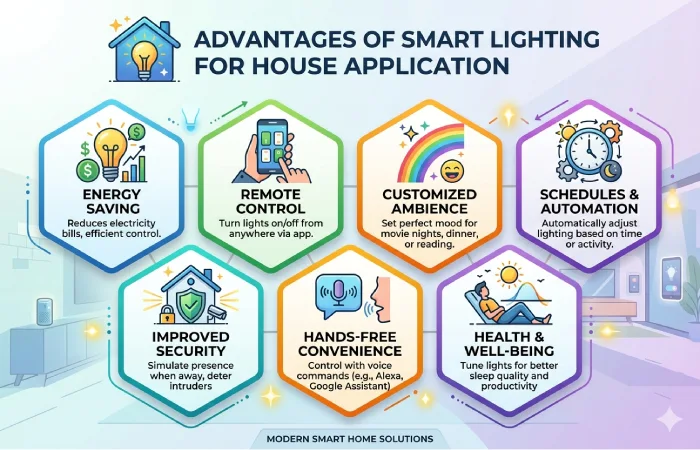
Smart Lighting goes beyond just being a contemporary convenience. There are many ways through which smart lighting systems will benefit you. You will be able to save money on your energy bill, increase home security, and create a better atmosphere among other benefits.
Regardless of whether you will be using a single smart light bulb or a complete home automation lighting solution, it will be good to get to know some of the benefits of smart lighting systems.
1. Remote Control
An advantage that comes with smart lighting technology is remote control of the lighting system. Anyone can use lighting systems. You can turn taking place or off the lights with a phone or smart watch.
Worried approximately forgetting to turn off the lights, in your living room before you leave for work? Worry not because with your smart phone you will turn off the lights even from your workplace.
You can:
- Turn lights on before arriving home.
- Control multiple rooms simultaneously.
- Group lights by room or floor.
- Share access with family members.
- Manage vacation homes remotely.
This kind of flexibility is really appreciated by families that are usually very busy, people who often travel, and people owning more than one house.
2. Light Control Via Voice Assistance
Voice controlled lights are going to work with smart lighting systems.
Some voice commands include:
- “Turn on the bedroom lights.”
- “Dim the dining room lights to 40%.”
- “Set the kitchen lights to warm white.”
- “Turn off all downstairs lights.”
Voice control may be especially helpful when:
- Your hands are full.
- You’re cooking.
- You’re relaxing in bed.
- Elderly family members need easier access.
- Children need simple controls.
3. Save on Electric Power Usage
Normal lighting systems usually take a lot of time to switch off.
Some functions that help save power include:
- Automatic schedules.
- Motion detection.
- Occupancy sensing.
- Sunrise and sunset automation.
- Adaptive brightness.
- Remote shutdown.
Example Energy Savings
| Lighting Habit | Traditional Lighting | Smart Lighting |
| Lights left on all day | High energy waste | Automatically turns off |
| Outdoor lighting | Manual control | Sunset-to-sunrise automation |
| Empty rooms | Lights remain on | Motion-based shutdown |
| Bedtime | Manual switching | One-tap “Good Night” scene |
With time, these automations may decrease electricity expenses and increase the life span of LED bulbs compatible with smart systems.
4. Increase Home Security
Smart lighting systems can create an illusion of someone being at home.
Popular security automations include:
- Random lighting schedules during vacations.
- Porch lights activating after sunset.
- Motion-triggered floodlights.
- Lights turning on when security cameras detect movement.
- Entryway lighting when smart locks are unlocked.
The following functions may serve as an additional security measure.
5. Personalized Lighting For All Activities
Various activities require various levels of lighting.
In place of changing the lights manually, smart lighting systems enable the creation of scenes to create an appropriate mood with just one click.
Example Lighting Scenes
| Activity | Brightness | Color Temperature |
| Reading | 100% | Cool White |
| Working | 90% | Daylight White |
| Cooking | 100% | Neutral White |
| Movie Night | 15% | Warm White |
| Gaming | 30% | RGB Colors |
| Dinner | 40% | Warm White |
| Sleeping | 5% | Soft Amber |
You can switch between different scenes within seconds by just pressing one button.
6. Better Sleep Patterns and Overall Wellness
Light is a crucial factor in helping you maintain the body’s internal clock system.
You can adjust your lighting settings automatically using smart lighting systems.
- Bright, cool light in the morning to promote alertness.
- Neutral light during the afternoon for productivity.
- Warm light in the evening to encourage relaxation.
- Dim amber lighting before bedtime to reduce blue light exposure.
Such a change will bring about a much more relaxing environment and healthy habits as well.
7. Automation Takes Care of Everything
In terms of automation, smart lighting becomes an absolute champion.
In contrast to manual lighting control, your house may adapt itself to certain conditions automatically depending on:
- Time of day.
- Motion detection.
- Occupancy.
- Sunrise and sunset.
- Weather conditions.
- Door openings.
- Smart lock activity.
- Security alarms.
- Voice commands.
- Custom routines.
Morning Routines Example
By 7:00 AM:
- Bedroom lights slowly brighten.
- Kitchen lights turn on.
- Coffee machine starts brewing.
- Smart blinds begin opening.
- Favorite morning playlist starts.
Everything happens automatically—no switches required.
8. Perfect for Entertainment
Smart lighting enhances:
- Home theaters.
- Gaming rooms.
- Music listening.
- Parties.
- Holiday decorations.
- Sports viewing.
Some lighting systems can even synchronize with:
- Movies.
- Music.
- PC games.
- TV content.
One can make entertainment experience more realistic with the help of dynamic lighting.
9. Several Ways to Install
Smart lighting is suitable both for owners and renters.
Smart bulbs
Ideal if you:
- Rent your home.
- Don’t want electrical work.
- Need a quick upgrade.
Installation takes only a few minutes—simply replace the existing bulb.
Smart Switches
Best if you:
- Own your home.
- Want traditional wall-switch functionality.
- Have multiple bulbs on one circuit.
Smart LED Strips
Perfect for:
- Kitchens.
- Bedrooms.
- TV backlighting.
- Staircases.
- Shelves.
- Gaming setups.
All these opportunities help to build up a project gradually.
10. Future-Proof with Matter Support
One problem in the case of old smart home systems was incompatibility.
Today, most of the smart lighting products support Matter protocol, which is a universal smart home protocol allowing various devices to operate smoothly together.
Advantages of it include:
- Easier setup.
- Improved interoperability.
- Reduced vendor lock-in.
- Better long-term compatibility.
- Simplified device management.
Choosing Matter-compatible products today helps ensure your smart home remains flexible as new devices are introduced.
11. Accessibility for All Ages
Smart lighting can improve accessibility for:
- Older adults.
- People with limited mobility.
- Individuals with disabilities.
- Young children.
Helpful features include:
- Voice activation.
- Motion-activated lights.
- Scheduled nighttime pathways.
- One-touch lighting scenes.
- Remote assistance through shared app access.
Such characteristics help to simplify and make daily lighting safer to control.
12. Raise Property Value
The features of a smart home are becoming increasingly attractive to many potential buyers.
The well-planned installation of smart lighting may allow:
- Modernize your home’s appearance.
- Improve energy efficiency.
- Enhance convenience.
- Add appeal to potential buyers.
- Complement other smart home upgrades.
Even though the effects differ from market to market, smart lighting is generally considered a nice addition to a connected home.
Benefits Comparison Table
| Benefit | Traditional Lighting | Smart Lighting |
| Remote Control | ❌ | ✅ |
| Voice Commands | ❌ | ✅ |
| Scheduling | ❌ | ✅ |
| Motion Detection | ❌ | ✅ |
| Color Changing | ❌ | ✅ |
| Energy Saving | Moderate | High |
| Home Security | Basic | Advanced |
| Automation | ❌ | ✅ |
| Smartphone Access | ❌ | ✅ |
| Custom Scenes | ❌ | ✅ |
Remains Smart Lighting Worth It?
For most families, smart lighting remains a very easy and affordable first step in building a smart home. It is not necessary to automate the whole house straight away; one can begin with a couple of smart bulbs in those rooms where people usually spend most of their time like living and bedroom.
Smart lighting has far more to offer than simply turning lights on and off for various reasons such as convenience, cost-effectiveness, safety, and personalization.
Types of Smart Lights (Lamps, Light Strips, Switches and Much More)
Picking the correct kind of smart light is one of the most important things when constructing a smart home. Although all smart lights have common characteristics like automation and remote controls, they can be used for various purposes. Some are perfect for changing regular bulbs into smart ones, while others are more decorative, convenient or room automation lights.
Knowing their features will make the process of setting up smart lighting easier for you.
Smart Lighting – Brief Overview
| Type | Best For | Installation | Price Range | Beginner Friendly |
| Smart Bulbs | General room lighting | Easy | $10–$60 per bulb | ⭐⭐⭐⭐⭐ |
| Smart Switches | Existing ceiling lights | Moderate | $25–$80 | ⭐⭐⭐⭐ |
| Smart LED Strips | Accent lighting | Easy | $20–$120 | ⭐⭐⭐⭐⭐ |
| Smart Light Panels | Decorative walls | Easy | $80–$300 | ⭐⭐⭐⭐ |
| Smart Ceiling Lights | Bedrooms & kitchens | Moderate | $40–$250 | ⭐⭐⭐⭐ |
| Smart Outdoor Lights | Gardens & pathways | Moderate | $30–$250 | ⭐⭐⭐⭐ |
| Smart Motion Sensors | Automation | Easy | $20–$60 | ⭐⭐⭐⭐⭐ |
1. Smart Bulbs
Smart bulbs remain the most widespread way of adding smart lighting to your home. They substitute conventional LED bulbs and can remain connected to your home network via Wi-Fi, Zigbee, Thread or Bluetooth.
The installation process is as easy as follows:
- Removing the old bulb.
- Install the smart bulb.
- Downloading the manufacturer’s app.
- Connecting the bulb to your network.
- Start controlling it remotely.
Features
- Remote control
- Dimming
- Adjustable white temperature
- RGB color changing (selected models)
- Scheduling
- Voice control
- Energy-efficient LED technology
Best Rooms
- Living room
- Bedroom
- Home office
- Dining room
- Children’s room
Advantages
✔ Simple installation
✔ Affordable entry point
✔ Excellent for renters
✔ No rewiring required
✔ Expandable over time
Disadvantages
✘ If someone turns off the wall switch, the bulb loses power and can’t be controlled until the switch is turned back on.
2. Smart Light Switches
Unlike smart bulbs, smart switches control the electrical circuit itself. This means your existing light fixtures remain in place while gaining smart functionality.
They’re ideal for rooms with:
- Multiple ceiling lights
- Chandeliers
- Recessed lighting
- Ceiling fans with lights
Advantages
✔ Everyone can still use the wall switch
✔ Controls multiple lights together
✔ Works with regular LED bulbs
✔ Great for families
✔ Often more reliable for shared spaces
Considerations
Some smart switches require:
- Neutral wire
- Standard wall box depth
- Professional installation (if you’re not comfortable with electrical work)
Smart Bulb vs Smart Switch
| Feature | Smart Bulb | Smart Switch |
| Easy Installation | ⭐⭐⭐⭐⭐ | ⭐⭐⭐ |
| Color Changing | ✅ | ❌ |
| Works with Existing Bulbs | ❌ | ✅ |
| Controls Multiple Lights | Limited | ✅ |
| Best for Renters | ✅ | ❌ |
| Best for Homeowners | Good | Excellent |
| Physical Switch Always Works | Only if powered | ✅ |
Which Should You Choose?
Choose smart bulbs if you:
- Rent your home.
- Want color-changing lighting.
- Need a quick and simple setup.
- Prefer room-by-room upgrades.
Choose smart switches if you:
- Own your home.
- Want traditional switch functionality.
- Control several lights with one switch.
- Prefer a cleaner, integrated installation.
3. Smart LED Light Strips
Smart LED strips are flexible lighting solutions used to create ambient or accent lighting.
Popular locations include:
- Under kitchen cabinets
- Behind TVs
- Along staircases
- Bookshelves
- Gaming desks
- Bedroom headboards
- Ceiling coves
Common Features
- Millions of RGB colors
- Adjustable brightness
- Music synchronization
- Dynamic lighting effects
- Scheduling
- Voice control
- Scene creation
Advantages
✔ Creates a premium look
✔ Easy to install with adhesive backing
✔ Excellent for mood lighting
✔ Great for gaming and entertainment
Limitations
- Doesn’t replace primary room lighting.
- Adhesive quality varies by manufacturer.
- Some models require a nearby power outlet.
4. Smart Ceiling Lights
Instead of replacing a bulb, smart ceiling fixtures replace the entire light fitting.
These are commonly used in:
- Kitchens
- Hallways
- Bedrooms
- Laundry rooms
- Offices
Advantages of smart bulbs:
- Integrated LEDs
- Even light distribution
- Slim, modern designs
- Long lifespan
- Full smart controls
5. Smart Light Panels
Light panels combine lighting with wall art, making them popular in gaming rooms, creative studios, and entertainment spaces.
Many systems allow you to:
- Arrange panels in custom patterns.
- Animate colors.
- React to music.
- Display dynamic lighting scenes.
These are decorative rather than primary light sources.
6. Smart Outdoor Lighting
Outdoor smart lighting improves both security and curb appeal.
Common options include:
- Pathway lights
- Garden spotlights
- Wall-mounted fixtures
- Floodlights
- String lights
- Deck lighting
Benefits
- Automatic sunset activation
- Motion-triggered illumination
- Remote control
- Vacation scheduling
- Weather-resistant designs
Outdoor lighting can make your property safer while highlighting landscaping features.
7. Smart Motion Sensors
Motion sensors don’t emit light themselves but trigger smart lights automatically.
Common use cases:
- Hallways
- Bathrooms
- Garages
- Closets
- Laundry rooms
- Entryways
Example Automation
When motion is detected after 10 PM:
- Hallway lights turn on at 20% brightness.
- After 5 minutes of no movement, they switch off automatically.
This provides convenience while conserving energy.
8. Smart Light Bars
Light bars are compact fixtures that project colored light onto walls or behind TVs and monitors.
They’re ideal for:
- Home theaters
- Gaming setups
- Streaming backgrounds
- Accent lighting
Many support synchronization with on-screen content for an immersive entertainment experience.
9. Smart Lamps
Instead of replacing built-in lighting, smart table and floor lamps offer portable illumination with smart features.
They’re well suited for:
- Reading corners
- Home offices
- Bedside tables
- Living rooms
Many include adjustable color temperatures and dimming to support different activities throughout the day.
10. Smart Lighting Accessories
A complete smart lighting system often includes accessories that enhance automation and control.
Popular Accessories
- Smart buttons
- Wireless remotes
- Motion sensors
- Door/window sensors
- Presence sensors
- Smart plugs
- Smart hubs or bridges
These accessories allow more advanced automations, such as turning on entryway lights when the front door opens or activating pathway lighting when motion is detected.
Which Smart Lighting Type Is Right for You?
| Your Goal | Recommended Option |
| Replace one bulb | Smart Bulb |
| Control an entire room | Smart Switch |
| Add ambient lighting | LED Strip |
| Decorate a gaming room | Light Panels |
| Upgrade ceiling fixtures | Smart Ceiling Light |
| Improve outdoor security | Outdoor Smart Lights |
| Hands-free automation | Motion Sensors |
| Enhance TV viewing | Light Bars |
How to Set Up Smart Lighting
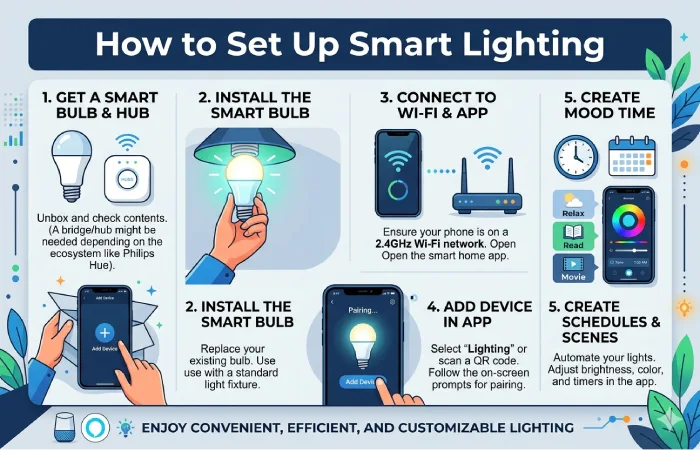
Setting up smart lighting is easier than ever in 2026. Most modern systems are designed with simple mobile apps, QR code pairing, and guided installation. Whether you’re replacing a single bulb or creating a whole-home lighting network, following a structured approach will save time and help you avoid common setup issues.
The good news is that you don’t need to automate your entire home at once. Start with one room, learn how the system works, and expand gradually as your needs grow.
Before You Begin
Before purchasing any smart lighting products, take a few minutes to plan your setup.
Ask Yourself:
- Which rooms do I want to automate first?
- Do I want simple white lighting or color-changing lights?
- Will I control lights with an app, voice assistant, or both?
- Do I want motion sensors or schedules?
- Am I renting or do I own my home?
- Will I add more smart devices in the future?
Planning ahead helps you choose products that work well together and support future expansion.
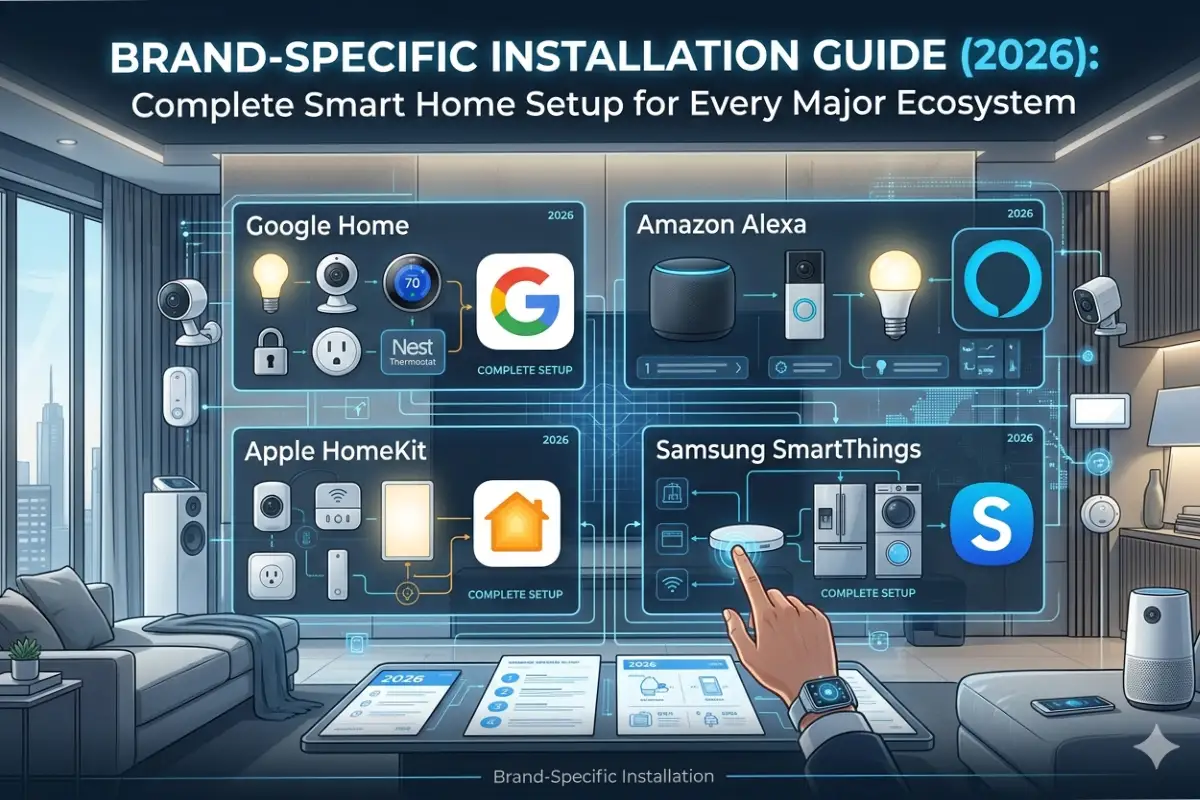
Step 1: Choose Your Smart Home Ecosystem
Your smart lighting system should fit into the ecosystem you already use—or plan to use.
Popular Ecosystems
| Ecosystem | Best For | Voice Assistant |
| Apple Home | iPhone users | Siri |
| Google Home | Android users | Google Assistant |
| Amazon Alexa | Voice-first homes | Alexa |
| Samsung SmartThings | Multi-brand smart homes | Alexa & Google Assistant |
Tip: If you’re just starting out, choose products that support Matter. This improves compatibility across multiple platforms and makes it easier to mix devices from different brands.
Step 2: Decide Between Wi-Fi, Zigbee, Thread, or Bluetooth
Different smart lighting products use different wireless technologies.
| Technology | Pros | Cons | Best For |
| Wi-Fi | No hub required | Can crowd your Wi-Fi network | Small setups |
| Zigbee | Reliable mesh network | Requires compatible hub | Larger homes |
| Thread | Fast, low-power mesh | Still expanding | Future-proof smart homes |
| Bluetooth | Simple setup | Limited range | Single-room use |
Which One Should Beginners Choose?
- Small apartment: Wi-Fi smart bulbs.
- Medium-sized home: Matter-compatible Wi-Fi or Thread devices.
- Large home: Zigbee or Thread with a compatible hub for better reliability.
Step 3: Install Your Smart Lighting
Installing a Smart Bulb
- Turn off the light switch.
- Removing the old bulb.
- Screw in the smart bulb.
- Turn the power back on.
- Downloading the manufacturer’s app.
- Follow the pairing instructions.
- Name the bulb (e.g., “Living Room Lamp”).
- Assign it to a room.
Most setups take less than five minutes.
Installing a Smart Switch
If you’re replacing a wall switch:
- Turn off power at the circuit breaker.
- Confirm power is off with a tester.
- Remove the existing switch.
- Connect the wires according to the manufacturer’s instructions.
- Secure the new switch.
- Restore power.
- Pair it with the app.
Safety Note: If you’re unfamiliar with household electrical wiring or your home has older electrical systems, consider hiring a qualified electrician.
Installing Smart LED Strips
- Measure the installation area.
- Clean the mounting surface.
- Attach the LED strip using the adhesive backing.
- Connect the controller.
- Plug in the power adapter.
- Pair the strip using the mobile app.
- Test colors, brightness, and scenes.
Step 4: Connect Your Devices
After installation:
- Open the app.
- Add a new device.
- Scan the QR code (if applicable).
- Connect to your Wi-Fi or hub.
- Wait for firmware updates to complete.
- Rename the device.
- Assign it to the correct room.
Using clear names like Kitchen Ceiling, Bedroom Lamp, or Hallway Light makes voice control much easier.
Step 5: Organize Rooms and Groups
Grouping devices lets you control multiple lights at once.
Example
Living Room
- Ceiling Light
- Floor Lamp
- TV Backlight
- Bookshelf LED Strip
Now a single command such as “Turn off the living room lights” controls every grouped device.
Step 6: Create Smart Lighting Scenes
Scenes combine multiple lighting settings into a single action.
Example Scenes
| Scene | Settings |
| Good Morning | Bedroom lights brighten gradually; kitchen lights turn on. |
| Work Mode | Bright, cool white lighting in the home office. |
| Movie Night | Living room lights dim; TV backlight activates. |
| Dinner | Warm white lighting at medium brightness. |
| Relax | Soft amber lighting throughout the house. |
| Good Night | All lights off except hallway at low brightness. |
Scenes save time and create consistent lighting for daily routines.
Step 7: Build Automations
Automation allows your lights to respond automatically to specific triggers.
Time-Based Automation
- Porch lights on at sunset.
- Bedroom lights off at 11 PM.
- Kitchen lights on at 6 AM.
Motion-Based Automation
- Hallway lights activate when movement is detected.
- Bathroom lights turn on automatically at night.
- Garage lights switch off after 10 minutes of inactivity.
Presence-Based Automation
- Lights turn on when you arrive home.
- All lights switch off when everyone leaves.
Door-Based Automation
- Entryway lights activate when the front door unlocks.
- Closet lights turn on when the door opens (with compatible sensors).
Step 8: Add Voice Control
Connect your lighting system to your preferred voice assistant.
Example commands:
- “Turn off all lights.”
- “Dim the bedroom lights to 30%.”
- “Set the kitchen lights to daylight white.”
- “Turn on Movie Night.”
Voice control is especially useful when your hands are occupied or when managing multiple rooms.
Step 9: Test Every Automation
Before relying on automations, verify that each one behaves as expected.
Check:
- Schedules trigger at the correct time.
- Motion sensors detect movement reliably.
- Groups control the intended lights.
- Voice commands recognize the correct room names.
- Remote access works outside your home network.
Making small adjustments now can prevent frustration later.
Sample Whole-Home Smart Lighting Setup
| Room | Devices | Automation |
| Living Room | Smart Bulbs + LED Strip | Movie Night scene |
| Kitchen | Smart Ceiling Light | Turns on at sunrise |
| Bedroom | Smart Bulbs | Gradual wake-up routine |
| Bathroom | Motion Sensor + Smart Light | Nighttime motion lighting |
| Hallway | Smart Switch | Auto-off after inactivity |
| Porch | Outdoor Smart Light | Sunset to sunrise schedule |
Common Setup Mistakes to Avoid
❌ Giving devices confusing names.
❌ Installing smart bulbs on switches that are frequently turned off.
❌ Ignoring Wi-Fi signal strength in distant rooms.
❌ Skipping firmware updates.
❌ Buying devices that don’t support your preferred ecosystem.
❌ Creating too many overlapping automations, which can lead to unexpected behavior.
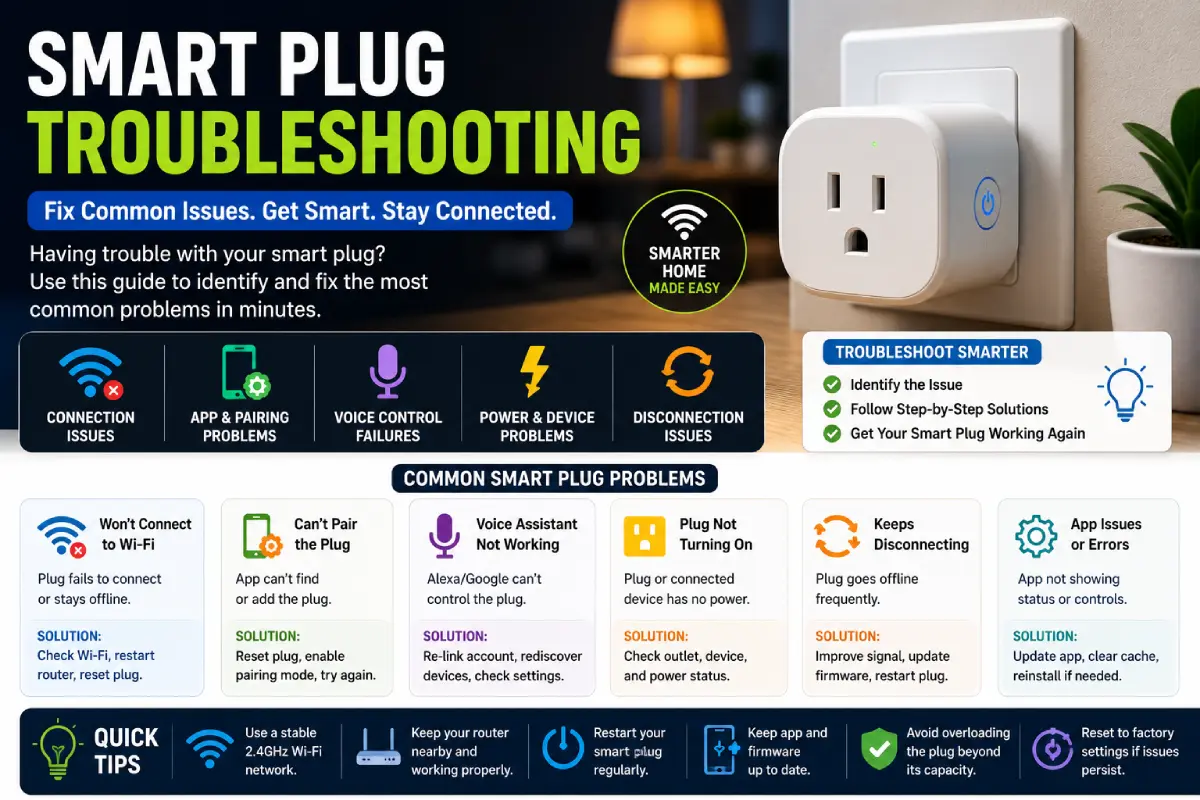
Troubleshooting During Installation
| Problem | Possible Cause | Solution |
| Device won’t pair | Weak Wi-Fi signal | Move closer to the router or hub during setup. |
| Bulb appears offline | Power interrupted | Ensure the wall switch remains on. |
| Voice assistant can’t find device | Not synced | Refresh device discovery in the assistant’s app. |
| Automation doesn’t run | Incorrect trigger | Review automation settings and permissions. |
| Delayed responses | Network congestion | Improve Wi-Fi coverage or consider a mesh network. |
Best Practices for a Reliable Smart Lighting System
- Start with one room and expand gradually.
- Keep all devices updated with the latest firmware.
- Use consistent naming conventions.
- Group lights by room.
- Back up automation settings if supported.
- Prefer Matter-compatible devices for future flexibility.
- Maintain strong Wi-Fi coverage or use a mesh network in larger homes.
Best Smart Lighting Brands in 2026
With dozens of smart lighting brands available, choosing the right ecosystem can feel overwhelming. While many products offer similar features like app control, voice commands, and scheduling, differences in reliability, compatibility, color quality, automation, and pricing can significantly impact your experience.
The best choice depends on your budget, the size of your home, and whether you prefer a simple Wi-Fi setup or a more advanced ecosystem using Matter, Thread, or Zigbee.
Quick Comparison of the Best Smart Lighting Brands (2026)
| Brand | Best For | Connectivity | Color Quality | Smart Home Support | Budget |
| Philips Hue | Premium whole-home lighting | Zigbee, Matter, Bluetooth | ⭐⭐⭐⭐⭐ | Excellent | $$$$ |
| Govee | RGB lighting & gaming | Wi-Fi, Bluetooth, Matter (selected models) | ⭐⭐⭐⭐☆ | Very Good | $$ |
| Nanoleaf | Decorative lighting & Thread | Thread, Matter, Wi-Fi | ⭐⭐⭐⭐⭐ | Excellent | $$$ |
| LIFX | Bright Wi-Fi smart bulbs | Wi-Fi, Matter (selected models) | ⭐⭐⭐⭐⭐ | Excellent | $$$ |
| WiZ | Budget-friendly smart bulbs | Wi-Fi, Matter (selected models) | ⭐⭐⭐⭐☆ | Very Good | $ |
| TP-Link Kasa | Affordable everyday lighting | Wi-Fi | ⭐⭐⭐⭐☆ | Very Good | $ |
| Aqara | Smart home automation | Zigbee, Matter | ⭐⭐⭐⭐☆ | Excellent | $$ |
| SwitchBot | Hybrid smart home ecosystem | Bluetooth, Wi-Fi, Matter | ⭐⭐⭐⭐☆ | Very Good | $$ |
1. Philips Hue
Best For
- Premium smart homes
- Advanced automation
- Large homes
- Reliable mesh networking
Philips Hue remains one of the most established smart lighting ecosystems. It offers a broad range of products, including bulbs, light strips, ceiling fixtures, outdoor lights, wall lights, and accessories.
Pros
✔ Excellent color accuracy
✔ Reliable Zigbee mesh network
✔ Extensive product range
✔ Strong Matter support
✔ Powerful automation features
✔ Wide third-party compatibility
Cons
✘ Higher upfront cost
✘ Hub recommended for advanced features
Ideal User
Homeowners seeking a scalable, premium lighting ecosystem with advanced automation capabilities.
2. Govee
Best For
- Gaming setups
- Entertainment rooms
- RGB lighting
- Budget-conscious buyers
Govee has gained popularity by offering feature-rich lighting products at competitive prices. Its LED strips, TV backlights, and decorative lighting are especially popular for gaming and media rooms.
Pros
✔ Affordable
✔ Vibrant RGB effects
✔ Music synchronization
✔ Easy installation
✔ Frequent app updates
Cons
✘ Limited premium ecosystem compared to higher-end brands
✘ Product compatibility varies across the lineup
Best Rooms
- Gaming room
- Home theater
- Bedroom
- Entertainment area
3. Nanoleaf
Best For
- Decorative wall lighting
- Creative workspaces
- Matter and Thread users
Nanoleaf specializes in modular light panels and modern smart lighting products designed to combine function with aesthetics.
Pros
✔ Unique modular designs
✔ Excellent Thread support
✔ Bright colors
✔ Dynamic lighting scenes
✔ Music synchronization
Cons
✘ Higher price for decorative products
✘ Not intended as primary room lighting
Perfect For
- Streamers
- Content creators
- Home offices
- Gaming enthusiasts
4. LIFX
Best For
- Bright standalone bulbs
- Homes without a hub
LIFX is known for producing exceptionally bright smart bulbs with rich color reproduction. Most products connect directly to Wi-Fi, making installation straightforward.
Pros
✔ Very bright output
✔ Strong color performance
✔ No dedicated hub required
✔ Excellent app features
Cons
✘ Wi-Fi dependence may affect performance in larger installations
Recommended For
- Living rooms
- Home offices
- Bedrooms
5. WiZ
Best For
- First-time smart home users
- Budget-friendly upgrades
WiZ offers simple, affordable smart lighting products that are easy to install and use.
Pros
✔ Affordable pricing
✔ Easy setup
✔ Wi-Fi connectivity
✔ Good app experience
✔ Supports common smart home platforms
Cons
✘ Smaller product ecosystem than premium brands
Best Choice For
- Apartments
- Small homes
- Entry-level smart lighting
6. TP-Link Kasa
Best For
- Budget smart homes
- Reliable Wi-Fi devices
Kasa provides dependable smart bulbs, plugs, and switches that are easy to integrate into existing Wi-Fi networks.
Pros
✔ Affordable
✔ Reliable
✔ Easy app
✔ No hub required
✔ Strong ecosystem of smart devices
Cons
✘ Limited decorative lighting options
Ideal For
- Bedrooms
- Kitchens
- Offices
7. Aqara
Best For
- Advanced automation
- Matter-compatible smart homes
Aqara focuses on creating an integrated smart home experience with lighting, sensors, cameras, switches, and automation accessories.
Pros
✔ Excellent automation
✔ Reliable Zigbee network
✔ Matter support
✔ Large sensor ecosystem
Cons
✘ Hub recommended for the best experience
Best For
- Homeowners
- Security-focused users
- Automation enthusiasts
8. SwitchBot
Best For
- Existing homes
- Retrofit automation
SwitchBot offers creative products that automate existing devices without major renovations.
Pros
✔ Innovative retrofit solutions
✔ Growing Matter support
✔ Easy installation
✔ Good value
Cons
✘ Smaller lighting range than dedicated lighting brands
Best Brand by Use Case
| Need | Recommended Brand |
| Premium Whole Home | Philips Hue |
| Budget Smart Bulbs | WiZ |
| RGB LED Strips | Govee |
| Gaming Setup | Govee |
| Decorative Wall Lighting | Nanoleaf |
| Bright Smart Bulbs | LIFX |
| Smart Switches | TP-Link Kasa |
| Advanced Automation | Aqara |
| Retrofit Smart Home | SwitchBot |
Smart Lighting Price Comparison
| Product Type | Budget | Mid-Range | Premium |
| Smart Bulb | $10–20 | $20–40 | $40–70 |
| LED Strip | $20–40 | $40–80 | $80–150 |
| Smart Switch | $20–40 | $40–60 | $60–100 |
| Motion Sensor | $20–30 | $30–50 | $50–80 |
| Smart Hub | $40–60 | $60–100 | $100–200 |
Prices vary by region, retailer, and promotional offers.
Which Brand Should You Buy?
Choose Philips Hue if…
- You want the most mature ecosystem.
- You’re building a whole-home setup.
- Reliability is your top priority.
- You’re comfortable paying a premium.
Choose Govee if…
- You love RGB lighting.
- You’re building a gaming room.
- You want great value.
Choose WiZ if…
- You’re new to smart homes.
- You want an affordable upgrade.
- You don’t need advanced automation.
Choose LIFX if…
- You prefer Wi-Fi without a hub.
- Brightness and color quality matter most.
Choose Aqara if…
- You’re investing in a complete smart home.
- You plan to use sensors and advanced automations.
Expert Buying Tips
Before purchasing smart lighting products:
- Stick to one primary ecosystem when possible to simplify management.
- Verify compatibility with your preferred voice assistant and smart home platform.
- Consider whether you may expand to other smart devices, such as thermostats, cameras, or sensors.
- Check whether a hub is required for advanced features.
- Compare warranty terms and software update support.
Recommended Smart Lighting Packages
Budget Package (Under $150)
- 4 Wi-Fi smart bulbs
- 1 smart plug
- Voice assistant integration
Ideal for: Apartments and first-time users.
Mid-Range Package ($150–$400)
- 6 smart bulbs
- 2 LED strips
- Motion sensor
- Smart speaker
Ideal for: Small to medium homes.
Premium Package ($500+)
- Whole-home smart switches
- Outdoor lighting
- Motion and door sensors
- Smart hub
- Multi-room automations
- Voice assistant integration
Ideal for: Homeowners building a fully connected smart home.
Matter & Thread Explained: The Future of Smart Lighting
If you’ve been researching smart lighting, you’ve probably come across terms like Matter, Thread, Zigbee, and Wi-Fi. While they may sound technical, understanding them will help you choose products that work together smoothly and remain compatible for years to come.
Think of these technologies as different “languages” that smart devices use to communicate. The more universally understood the language, the easier it is to mix products from different brands.
What Is Matter?
Matter is a universal smart home standard developed to improve compatibility between devices from different manufacturers. Instead of locking you into a single brand, Matter helps supported devices work together across major smart home platforms.
Benefits of Matter
- Easier device setup
- Better cross-brand compatibility
- Local control for faster responses
- More reliable smart home automation
- Simplified future expansion
For example, a Matter-compatible smart bulb can often be added to your preferred smart home platform without requiring separate integrations.
What Is Thread?
Thread is a low-power wireless networking technology designed specifically for smart home devices.
Unlike Wi-Fi, Thread creates a mesh network, allowing compatible devices to communicate with one another instead of relying solely on a central router.
Advantages of Thread
- Faster communication
- Lower power consumption
- Improved reliability
- Better coverage in larger homes
- Self-healing mesh network
If one Thread device goes offline, the network can often reroute communications through another compatible device.
Matter vs Wi-Fi vs Zigbee vs Thread
| Feature | Wi-Fi | Zigbee | Thread | Matter |
| Internet Required | Usually | No | No | No (for local control) |
| Mesh Networking | ❌ | ✅ | ✅ | Uses underlying network |
| Hub Required | Usually No | Usually Yes | Border Router | Depends on device |
| Power Efficiency | Moderate | High | Very High | Depends on transport |
| Cross-Brand Compatibility | Limited | Moderate | High | Excellent |
Key takeaway: Matter is a compatibility standard, while Wi-Fi, Zigbee, and Thread are communication technologies.
Room-by-Room Smart Lighting Ideas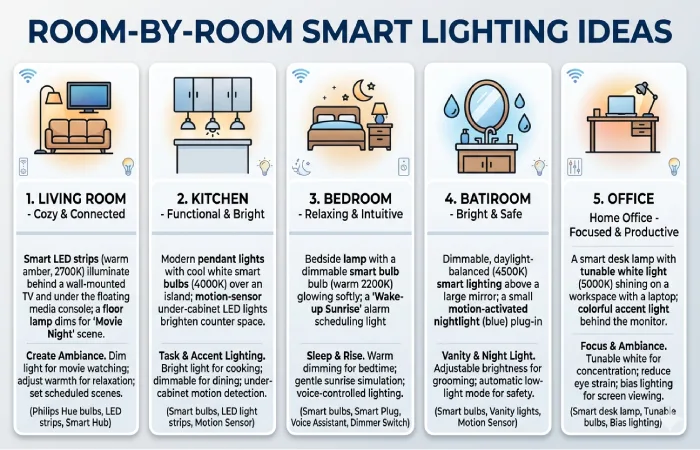
Every room has different lighting needs. Designing your system around how you use each space creates a more comfortable and practical home.
Living Room
The living room often serves multiple purposes throughout the day.
Recommended Devices
- Smart ceiling light
- Smart floor lamp
- LED strip behind TV
- Accent table lamps
Suggested Scenes
| Scene | Lighting |
| Reading | Bright neutral white |
| Movie Night | Dim warm lighting with TV backlight |
| Guests | Balanced warm white |
| Relax | Soft amber tones |
Kitchen
The kitchen benefits from bright, task-focused lighting.
Recommended Setup
- Smart ceiling lights
- Under-cabinet LED strips
- Pantry motion sensor
Automation Ideas
- Lights turn on at sunrise.
- Pantry light activates when the door opens.
- Under-cabinet lighting dims automatically after midnight.
Bedroom
Bedrooms should support both relaxation and waking routines.
Recommended Devices
- Bedside smart lamps
- Ceiling light
- LED strip behind headboard
Automations
- Gentle sunrise wake-up routine.
- Evening warm lighting.
- One-tap “Good Night” scene that turns off all lights except a dim hallway light.
Bathroom
Bathrooms benefit from hands-free lighting.
Recommended Devices
- Motion sensor
- Smart ceiling light
- Vanity lighting
Automation
- Bright white lighting during the day.
- Soft nighttime lighting after 10 PM.
- Automatic shutoff after no movement.
Home Office
Lighting directly affects productivity and comfort.
Recommended Setup
- Adjustable smart desk lamp
- Smart ceiling fixture
Automation
- Cool white during work hours.
- Warm lighting after work ends.
- Focus mode scene with maximum brightness.
Outdoor Areas
Outdoor lighting enhances both security and curb appeal.
Recommended Products
- Smart floodlights
- Pathway lights
- Garden spotlights
- Porch lights
Automations
- Sunset activation.
- Motion-triggered lighting.
- Vacation mode with randomized schedules.
Advanced Smart Lighting Automations
Once your devices are installed, automation transforms them from convenient gadgets into an intelligent lighting system.
Morning Routine
At 6:30 AM:
- Bedroom lights gradually brighten.
- Kitchen lights switch on.
- Hallway lights illuminate.
- Outdoor lights turn off.
Leaving Home
When everyone leaves:
- All indoor lights turn off.
- Porch light turns off (if daylight).
- Security lighting remains active.
Returning Home
When your phone arrives at home:
- Porch light turns on after sunset.
- Entryway lights activate.
- Living room lights illuminate to a comfortable brightness.
Movie Night
One tap can:
- Dim ceiling lights to 15%.
- Turn on TV backlighting.
- Switch off kitchen lights.
- Set accent lighting to warm tones.
Vacation Mode
During extended trips:
- Random lighting schedules simulate occupancy.
- Outdoor lights follow sunset and sunrise.
- Entryway lights activate occasionally in the evening.
This helps make the home appear occupied.
Energy-Saving Strategies
Smart lighting is most effective when paired with thoughtful automation.
Simple Ways to Save Energy
- Turn off lights automatically in empty rooms.
- Use schedules instead of manual control.
- Dim lights when full brightness isn’t necessary.
- Choose LED-based smart bulbs.
- Adjust outdoor lighting based on sunrise and sunset.
- Use motion sensors in low-traffic areas.
Example Energy Comparison
| Scenario | Traditional Lighting | Smart Lighting |
| Empty rooms | Lights stay on | Auto-off |
| Porch light | Manual | Sunset schedule |
| Hallway | Always on | Motion activated |
| Bedroom | Manual | Sleep routine |
While savings vary by household, these practices can reduce unnecessary energy use and extend the lifespan of LED lighting.
Cost Analysis
The total cost of a smart lighting system depends on how many rooms you automate and the types of products you choose.
Example Starter Budget
| Item | Quantity | Estimated Cost |
| Smart Bulbs | 4 | $80–$160 |
| LED Strip | 1 | $30–$80 |
| Motion Sensor | 1 | $25–$50 |
| Smart Speaker | 1 | $50–$100 |
Estimated Total: $185–$390
Mid-Sized Home
| Item | Quantity |
| Smart Bulbs | 10 |
| LED Strips | 3 |
| Smart Switches | 4 |
| Motion Sensors | 3 |
| Outdoor Lights | 2 |
A phased installation can spread costs over time while allowing you to learn what works best in your home.
Common Smart Lighting Mistakes
Avoid these pitfalls:
- Mixing incompatible ecosystems without checking support.
- Installing smart bulbs where wall switches are frequently turned off.
- Neglecting Wi-Fi coverage in larger homes.
- Creating too many overlapping automations.
- Skipping firmware updates.
- Buying products without considering future expansion.
Conclusion
Smart lighting has evolved from a luxury feature into an accessible and practical upgrade for homes of all sizes. Whether you’re starting with a single smart bulb or building a fully connected lighting ecosystem, the right setup can improve convenience, enhance home security, reduce energy waste, and create the perfect atmosphere for every activity.
As you plan your smart lighting journey, focus on choosing products that match your home’s needs, budget, and preferred smart home platform. Matter-compatible devices provide added flexibility for future expansion, while smart switches, bulbs, LED strips, and motion sensors each offer unique benefits depending on where they’re installed. Starting with one room and expanding gradually is often the easiest and most cost-effective approach.
Ultimately, the best smart lighting system is the one that simplifies your daily routine. From automated morning wake-up scenes and hands-free voice control to energy-saving schedules and personalized lighting moods, smart lighting delivers both comfort and efficiency.
By following the recommendations in this guide, you’ll be well-equipped to design a reliable, future-ready smart lighting system that fits your lifestyle today and can grow with your smart home in the years ahead.