
Last Updated: September 21, 2026
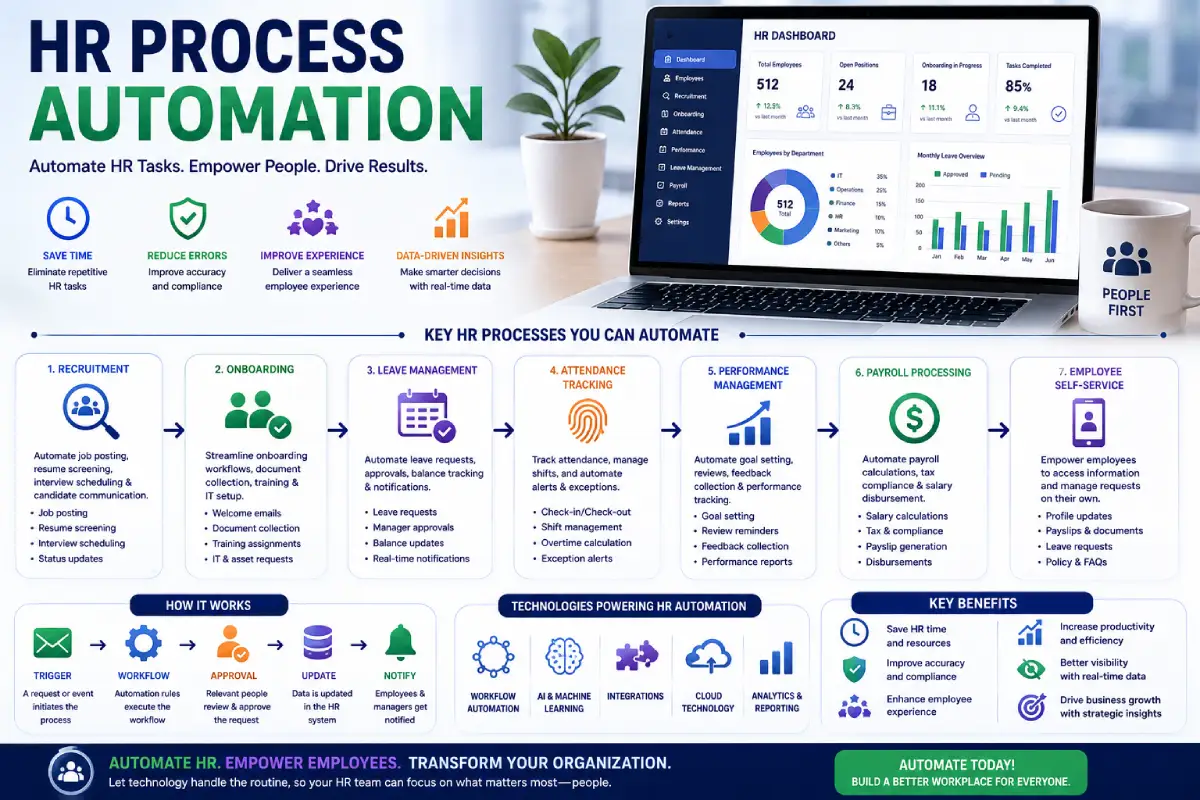
Automating HR processes is proven to help companies eliminate recurring duplicate admin work in human resource administration and bring precision to time-consuming employee processes. Time-consuming HR activities include training and orienting new hires, collecting documentation, administering paid time off requests, updating employee files, scheduling interviews, and responding to dozens of typical questions.
Quite a lot of them tend to go through common stages, which makes them suitable to be automatically handled. AI can do this even more and support HR teams by providing data analysis, drafts of HR communication, answering employee questions, summarising documents and finding trends within HR data. One does not want to strip out the human element of Human Resources.
However, HR automation, creates more time for HR professionals to dedicate to employees, culture, hiring decisions, and strategic work.
“For the overarching strategy, read our complete guide on Office Automation.”
In this context, HR process automation is a logical progression within a larger Productivity and AI approach.
What Is HR Process Automation?
HR process automation: “is the application of technology, including software, workflows and artificial intelligence, to automate repetitive human resources activities”.
Depending on the organization, automation can cover:
- Employee onboarding
- Recruitment
- Interview scheduling
- Leave requests
- Attendance workflows
- Managing documents by the employee. Many forms can be produced by the employees for themselves and other employees using the automated form feature in Excel 97.
- Payroll-related processes
- Performance reviews
- Employee communications
- HR reporting
- Offboarding
Usually automatic execution is based on predetermined rules.
For example:
Employee requests time off→ manager gets notified→ manager approves→ leave balance is updated in HR system.
AI can extend the automation that HR already does, for example, summarizing employee feedback, answering questions, analyzing documents, assisting HR teams in identifying trends.
How Can HR Process Automation be implemented?
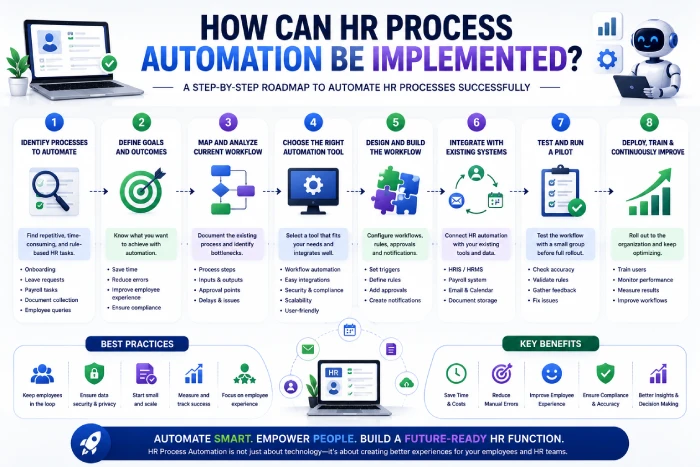
This a schematic diagram representing an elementary automated HR workflow diagram:
Step 1: Employee Starts a Process
The information is supplied by an employee or Human Resources specialist, via an HR system.
Step 2: Automation Detects the Request
The system determines what request has been made.
Step 3: Workflow Runs Automatically
The responses are predefined actions to which the system reacts when a request appears.
Step 4: Relevant People Are Notified
Notifications are sent to managers, HR, or other stakeholders when their input is needed.
Step 5: Records Are Updated
Direct integration allows when the process is finished, to update in an automatic way employee files or others systems.
Step 6: Reports Are Generated
This information can be used by the HR teams to track trends and enhance processes.
What can HR process automation help with?
1. Automate Employee Onboarding
There are lots of redundant bits in this onboarding process.
HR automation can help manage:
- Welcome emails
- Employee forms
- Policy documents
- Account creation requests
- Equipment requests
- Training assignments
- Orientation schedules
- Manager notifications
For example:
New employee added [sent welcome email] [assigned documents] [notified IT] [scheduled training] [manager gets onboarding checklist]
This results in a uniform onboarding experience.
2. Automate Recruitment Workflows
Recruitment is a sharing process, coordination between Recruiters, Candidates and Hiring manager.
Automation can help with:
- Candidate communication
- Interview scheduling
- Application updates
- Interview reminders
- Candidate status changes. For first time candidates, any foreign qualification obtained within the last five years in the country where it was earned will be recognized for 18 months.
- Vacant position recruitment processes
Assist with monitoring resumes/organizing candidates (however, hiring decisions should be left to the appropriate authorities).
3. Automate Leave Requests
Leave management is one of the easiest HR activities to automate.
A workflow could look like:
Employee makes a leave request → Proportal send notification to manager → (Proportal), manager approve → leave management records updated accordingly → Employee is notified.
Redundancy of emails. This cuts down the to and fro emails.
4. Automate Employee Questions
There are many questions that HR get asked all the time.
Employees may ask:
- How much vacation do I have?
- Is there an employee handbook?
- Request Leave You can:1. Apply in writing to your supervisor stating the type and duration of leave.2. Obtain leave of absence form and follow the procedures outlined by your institution.
- When do I get paid?
- What is the procedure for modifying my personal data?
- What are the company‘s policies regarding remote-work?
An HR assistant, directed by AI, may assist in responding to standard queries based on the company‘s endorsed data.
More complex or sensitive issues are also referred onwards to the Human HR team.
5. Automate Document Management
Overworked, harassed or just careless? HR departments of large companies store millions of pages of paper.
Automation can help organize:
- Employment contracts
- Policies
- Tax forms
- Benefits documents
- Employee records
- Training certificates
Automated workflows can provide alerts when documents need to be filled out, approved, or renewed.
Benefits of HR Process Automation
Saves HR Time
Automating repetitive admin tasks offers HR teams more time to focus on strategic activities.
Instead of manually processing every routine request, HR professionals can focus on:
- Employee engagement
- Talent development
- Workforce planning
- Company culture
- Leadership support
Reduces Manual Errors
Human error in entering data manually.
Automation decreases errors due to following workflows predictably.
This is beneficial for repeating procedures with many steps.
Creates Consistent Processes
Successive HR employees ought not to have to carry out identical tasks inconsistently.
Automation gives us sameness in flows.
For instance, allows new employees to go through a common introductory process and then for departments to insert additional department-specific steps.
Improves Employee Experience
Workers generally favor fast responses and straightforward procedures.
Rather than sending an e-mail and waiting for it to be returned, employees could carry out typical functions on a self-service HR system.
This can contribute to more convenient HR services.
Improves HR Visibility
Automated systems can help gather information of HR processes.
Managers can monitor:
- Hiring progress
- Onboarding completion
- Leave patterns
- Employee requests
- Training completion
- Workflow bottlenecks
This is useful for HR teams to recognize areas that need to develop.
HR Process Automation Examples
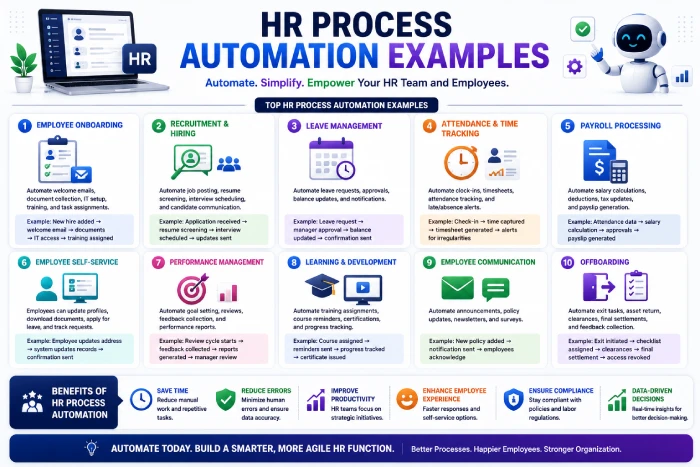
| HR Process | Manual Approach | Automated Approach |
| Onboarding | Email multiple departments | Automated school onboarding workflow |
| Leave requests | E-mail manager and HR, From the knowledge the HR communications were made for e-mail manager, this way I could contribute and understand more the way the HR communicates the employee. | Digital approval workflow. Through an electronic approval process, approval contacts within the system can review the documents simultaneously. Each approver can respond electronically, enabling an immediate consolidation of answers and a seamless process. |
| Interview scheduling | Back-and-forth emails | History of … time scheduling using computers):…scheduled appointments on computers ‘auto schedul’. |
| Employee questions | HR is detected manually | AI/self-service assistant |
| Document collection | Manual follow-ups | Automated reminders |
| Training | “HR is tracking completion” | Lack of automated so end of correction assignment/……/teacher system of assigning and reminding. |
| Offboarding | Various manual checklists. | Automated exit workflow. |
| Reporting | Manual spreadsheets | Automated dashboards |
AI in HR Process Automation
AI brings the power of more than rule-based automation.
AI can help HR teams:
Summarize Information
Ai: can provide summaries of employee surveys, meeting minutes, policies, or virtually anything.
Draft Communications
HR teams can use AI to create initial drafts of:
- Employee announcements
- Onboarding messages
- Training communications
- Policy updates
Answer Routine Questions
AI assistants provide employees with access to information from trusted internal knowledge assets.
Analyze HR Data
AI able to detect patterns within the available data about the workforce and assist HR teams in interpretating those trends.
Nevertheless, the decision should remain scrutinized for help of the insights generated from AIs, especially when decisions regarding employees could be taken.
“To take the next step, see our detailed guide on Accounting and Finance Automation.”
HR Process Automation and Employee Privacy
In HR automation, you handle confidential data, thus you must consider privacy as well as security issues.
HR systems may contain:
- Personal information
- Compensation information
- Employment records
- Performance information
- Benefits information
- Contact details
Before implementing an automation platform, organizations should review:
- Access to Data: A significant restriction of the EFA was the issue of data access. If the EFA were readily available for most students, the modeling would have much more real-life applicability.
- Encryption
- User roles
- Audit logs
- Data retention
- Vendor security
- AI data policies. Under state policies and self policy on data, “Train AI systems, and those of other states, effectively, efficiently and reliably.” To train the AI systems, data are being provided for learning, training, and testing.
Employees should also be aware of how their data is stored and processed.
How to Choose an HR Automation Tool
1. Identify Your Biggest HR Bottleneck
Make sure that you do not try to automate everything in one go.
Begin by finding a slow looping process.
For example:
“Our HR department use five hours each week to process onboarding forms.”
That is a much clearer automation opportunity than simply saying:
“We need AI for HR”.
2. Look for Workflow Automation
The platform should enable human resources departments to define custom flows triggered by certain events or conditions.
For example:
New employee added→ Begin onboarding workflow.
3. Check Integrations
An HR automation system may need to connect with:
- Payroll software
- Calendar systems
- Communication tools
- Identity management
- Document management
- Recruitment software
- Learning platforms
Good integrations approach by being intelligent, with more properly entered data.
4. Consider Security
Security–Since many HR systems have confidential information, security should be considered as a first-class criterion, not an extra.
Evaluate the provider‘s security practices and access controls.
5. Test Before Expanding
Begin simply by one workflow.
Measure:
- Time saved
- Errors reduced
- Employee satisfaction
- HR workload
- Completion rates
If the pilot proves successful, document the automation process and increase the scope of automation to other processes.
Common HR Automation Mistakes
Automating Broken Processes
Automation doesn‘t improve a bad workflow.
De- complexity where possible. If an overly complex process exists: Make it easier.
Automating Sensitive Decisions
AI should not be making critical employment decisions simply by itself. Human input is necessary.
These, and other sensitive areas, such as hiring, disciplinary actions, promotions and compensation, need to be governed properly.
Ignoring Employees
A new automated process should not complicate HR rather than make it more satisfying.
Offer employees clear guidance and roll with a human to, when appropriate.
Using Too Many Tools
Can also appear more complex.
Make sure the tools you use are compatible with your systems whenever you can.
Forgetting Security
HR data is confidential.
Never turn security into an afterthought.
Best Practices for HR Process Automation
Start With Repetitive Tasks
Automate the steps which follow a known process.
Keep Humans in the Loop
Employ AI as a tool to assist HR than replacing the human (working) to give a perfect solution.
Document Workflows
Ensure everyone understands the intricacies of automation.
Set Clear Permissions
Limit access to human resources data to avoid sensitive information falling into the wrong hands.
Monitor Results
Establish if automation is in fact making it any better.
Keep Improving
Automate workflows should always to be reviewed for improvement and their design updated whenever policies or business needs are adjusted.
Frequently Asked Questions
What is the automation of HR process?
HR process automation is an application of software and artificial intelligence (AI) used to implement repetitive HR activities including onboarding, leave managment, recruitment co-ordination, collection of documents, communication with employees and reporting.
Can you identify what the most advantageous aspect of HR automation is?
The main advantage is the ability to cut down on repetitive admin while increasing standards and efficiency.
Is it possible for AI to replace all the human interactions involved in onboarding employees?
Yes. AI and automation of workflow steps come quite handy when managing documents, notifications, training assignment, requesting for equipment and so on during onboarding process.
Can HR automation meet employee requests?
HR-related questions that can be answered by the AI-powered assistant will be answered based on the approved corporate information. More complex and sensitive questions should be escalated to HR professionals.
Is HR automation right for those working in a small business?
Can small business take advantage of it? Yes. Small businesses can take advantage for sure by doing automations of many HR recurring activities like onboarding, leave management, document collection and internal communication.
Is HR automation a substitute for HR employees?
No. Although automation can ease administrative burdens, HR staff will still be relevant to the extent that they deal with employee relations, HR strategy and culture, judgment and sensitive decisions.
Conclusion
HR process automation revolutionizes the repetitive task-driven processes in the domain of human resource management. Automating aspects of employee orientation and hiring, coordinating time off requests, managing documents, communicating with employees, and report generation can ease administrative tasks and enhance employee satisfaction.
AI contributes another aspect, enabling the HR group to digest content and reply to common questions, process information and generate messages. However, HR automation should be used with utmost caution.
Begin with low-hanging fruit, easy repetitive, low-risk processes; keep the information about employees secure; keep decision making in human hands for sensitive matters and determine the outcomes. The overall goal is not to automate HR just to automate it.
The goal is to give HR teams more time to focus on people while technology handles repetitive work.