
Last Updated: September 22, 2026
AI chatbots and assistants have moved from simple question-and-answer tools to practical systems that can help people write content, find information, summarize documents, analyze data, automate repetitive tasks, and support customers. For beginners, understanding how these tools work and where they fit into everyday workflows is the first step toward using them effectively.
This guide explains AI chatbots and assistants, how they work, their main types, common personal and business applications, and the privacy and accuracy issues users should understand before relying on them.
What Are AI Chatbots and Assistants?
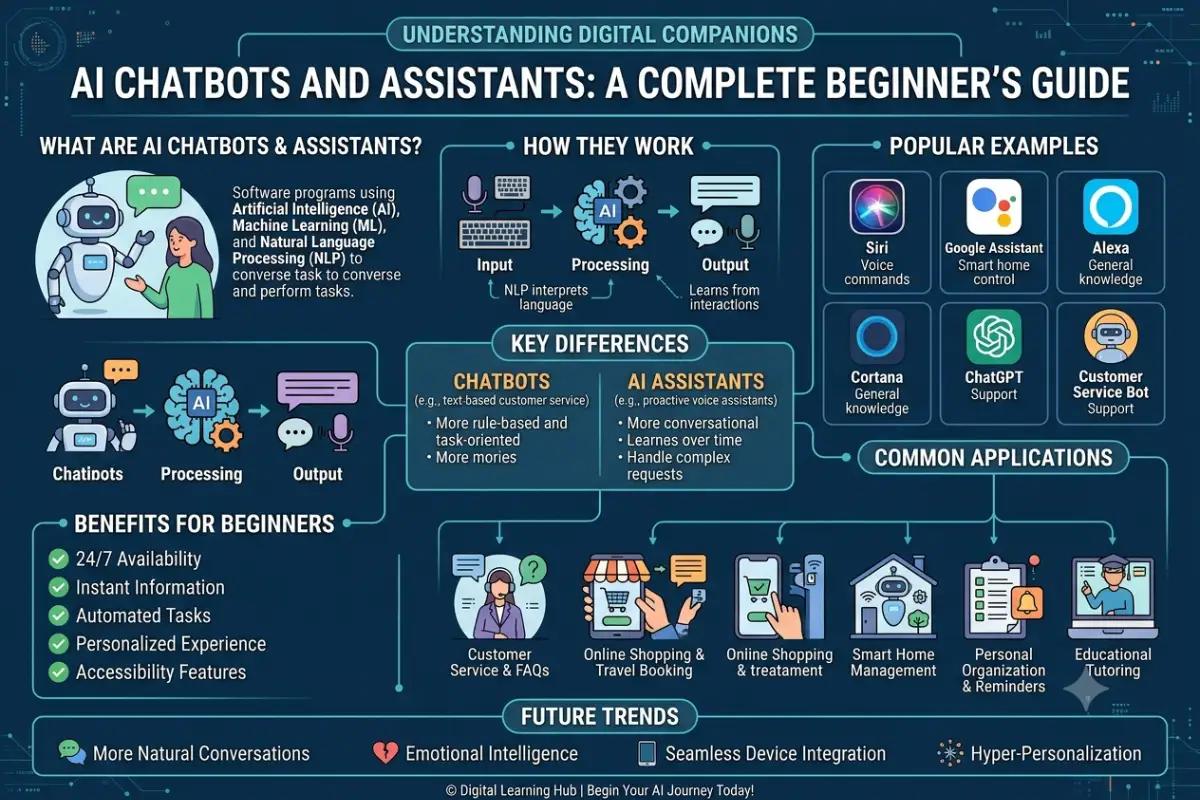
AI chatbots and assistants are software applications that use artificial intelligence to understand user input and generate responses or perform tasks.
A traditional chatbot usually follows predefined rules. For example, a customer might select an option from a menu and receive a fixed response. Modern AI chatbots can understand natural-language questions and generate responses based on the context of the conversation.
An AI assistant can go beyond conversation. Depending on the system and its available integrations, it may help users draft an email, summarize a document, organize information, analyze data, create content, or interact with other software.
The terms chatbot and AI assistant are sometimes used interchangeably, but there is a useful distinction:
| Feature | AI Chatbot | AI Assistant |
| Primary purpose | Conversation and answers | Conversation plus task assistance |
| User interaction | Usually chat-based | Chat, voice, apps, and other interfaces |
| Task execution | Often limited | Can perform multi-step tasks when connected to tools |
| Typical use | Customer support, FAQs | Productivity, research, automation |
| Personalization | Varies | Often more extensive |
| External integrations | Sometimes | Frequently supported |
Some systems can fit into both categories.
AI Chatbots vs Traditional Chatbots
The biggest difference is how the systems process language.
Traditional chatbots commonly depend on predefined decision trees, keywords, and rules. AI chatbots can use machine learning and large language models to interpret the meaning of a request and generate a response.
For example, a traditional customer-service bot may recognize a phrase such as “track my order” and direct the user to a tracking page. An AI chatbot may understand different ways of asking the same question and maintain conversational context.
However, AI does not automatically mean that a chatbot is always accurate. The quality of its responses depends on its underlying model, available information, instructions, tools, and the way the system has been designed.
How AI Chatbots Work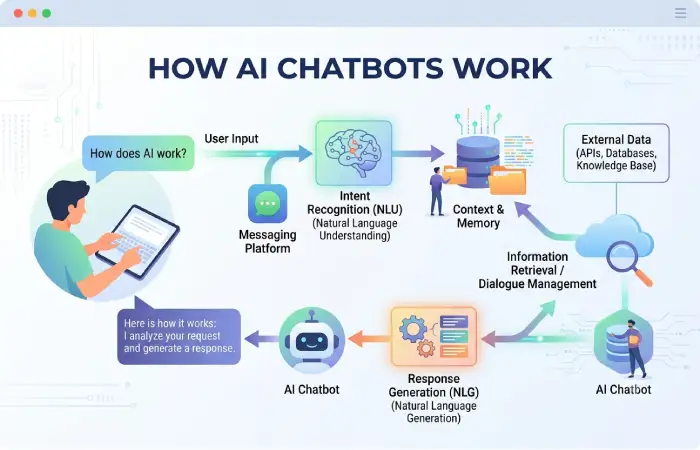
Modern AI chatbots typically combine several technologies, including natural language processing, machine learning, large language models, databases, APIs, and software integrations.
A simplified workflow looks like this:
User input → Language processing → AI model → Context and information → Response or action
1. User Sends a Prompt
The process begins when a user enters a question, instruction, or request.
For example:
“Summarize this report and identify the three most important findings.”
The system processes the text to determine what the user is asking for.
2. The System Processes the Language
Natural language processing helps an AI system interpret words, sentence structure, intent, and context.
Modern systems can process more flexible language than traditional rule-based chatbots. Users do not necessarily need to use exact commands.
3. The AI Model Generates a Response
Many modern assistants use large language models (LLMs). These models are trained on large amounts of data and learn statistical relationships between words, concepts, and patterns.
When generating text, the model predicts appropriate sequences of tokens based on the input and available context.
This is why an AI assistant can produce different responses to similar questions rather than simply returning one predefined answer.
4. Context Improves the Interaction
AI assistants can use information from the current conversation to understand follow-up questions.
For example:
User: “Explain cloud computing.”
User: “Now explain it for a small business.”
The second request can be interpreted in relation to the first one.
More advanced systems may also use external information, uploaded files, databases, or connected applications.
5. Tools and External Data Can Extend Capabilities
An AI assistant does not have to rely only on its language model.
Some systems can connect to tools that allow them to:
- Search information
- Retrieve business data
- Analyze files
- Access calendars
- Work with spreadsheets
- Query databases
- Send or draft communications
- Trigger software workflows
This creates a distinction between a chatbot that generates information and an AI assistant that can use information and perform actions.
6. The System Produces an Output
Finally, the assistant generates a response or performs an authorized action.
The output could be a paragraph of text, a summary, recommendation, structured data, code, or another type of result.
Different Types of AI Assistants
AI assistants can be categorized according to what they do and where they are used.
Conversational AI Assistants
These assistants are designed primarily for natural-language conversations.
They can answer questions, explain concepts, brainstorm ideas, summarize information, and help users work through problems.
Personal AI Assistants
Personal assistants focus on individual productivity and everyday tasks.
Common applications include:
- Writing and rewriting
- Planning
- Research
- Summarization
- Scheduling support
- Learning
- Personal organization
Voice assistants can also fall into this category when they allow users to interact through spoken commands.
Customer Service Chatbots
Businesses use AI chatbots to handle customer interactions.
Typical tasks include answering frequently asked questions, explaining products, helping with order information, and directing customers to the appropriate support channel.
A chatbot can handle common requests without requiring a human employee to respond to every interaction.
Enterprise AI Assistants
Enterprise assistants are designed around business workflows and organizational information.
They may help employees search internal documentation, summarize meetings, analyze company data, generate reports, or interact with business applications.
Access controls become especially important in these environments because business assistants may have access to confidential information.
Specialized AI Assistants
Some assistants are built for a particular industry or task.
Examples include systems designed for:
- Software development
- Marketing
- Education
- Healthcare administration
- Financial analysis
- Legal research
- Data analysis
- IT support
Specialization can make an assistant more useful for a particular workflow, although users still need to verify important outputs.
AI Agents
AI agents represent a more action-oriented category.
Instead of simply responding to a prompt, an agent may break a goal into multiple steps, use available tools, evaluate intermediate results, and continue working toward the requested outcome.
For example, an AI agent might research information, organize the findings, and prepare a report using several connected tools.
The level of autonomy varies considerably between systems.
Common Personal and Business Use Cases
AI chatbots and assistants can be useful in many everyday workflows.
Writing and Content Creation
AI assistants can help users brainstorm topics, create outlines, rewrite passages, summarize material, and adapt content for different audiences.
They can also help with repetitive writing tasks such as product descriptions, email drafts, and social media content.
Human review remains important, particularly when accuracy and original expertise matter.
Research and Information Discovery
AI assistants can help users understand complex topics and organize information.
For example, a user might ask an assistant to explain a technical concept in simple language or create a list of questions to investigate.
When current or specialized information is required, users should verify important claims against reliable sources.
Education and Learning
Students and independent learners can use AI assistants as interactive learning tools.
Potential applications include:
- Explaining difficult concepts
- Creating practice questions
- Summarizing study material
- Providing examples
- Helping structure revision plans
- Reviewing written work
AI should support learning rather than replace independent thinking.
Customer Support
Businesses can deploy chatbots to answer routine customer questions at any time.
A well-designed system can handle repetitive requests while escalating complex or sensitive cases to human representatives.
Marketing
Marketing teams can use AI assistants for tasks such as:
- Keyword brainstorming
- Content outlines
- Audience research
- Campaign ideas
- Email drafts
- Content repurposing
- Performance-data analysis
Human marketers still need to check brand consistency, factual claims, and strategic decisions.
Software Development
AI coding assistants can help developers generate code, explain existing code, identify potential bugs, and create documentation.
However, generated code should be reviewed and tested before being deployed, particularly when it affects security, authentication, payments, or sensitive data.
Business Productivity
AI assistants can reduce time spent on repetitive information work.
For example, an assistant could help summarize a long meeting transcript, extract action items, convert notes into a structured document, or analyze a spreadsheet.
The value comes from integrating AI into a well-defined workflow rather than simply adding an AI tool without a clear purpose.
Benefits of AI Chatbots and Assistants
The usefulness of an AI assistant depends on the task, but several potential advantages are common.
Faster Information Processing
AI can quickly summarize and reorganize large amounts of text, helping users identify relevant information.
24/7 Availability
Automated chatbots can provide support outside normal business hours.
Improved Productivity
AI can assist with repetitive tasks and give employees more time for work requiring judgment, creativity, and direct human interaction.
Natural-Language Interaction
Users can interact with many modern AI systems using ordinary language rather than learning complicated commands.
Scalable Customer Support
Businesses can use automated systems to handle large volumes of routine inquiries before escalating more complicated cases to human staff.
Privacy, Accuracy, and Responsible Use
AI chatbots can be useful, but users should understand their limitations.
Privacy
Avoid entering sensitive information into an AI system unless you understand how that service handles and protects the information.
Depending on the product and account configuration, data may be processed, stored, or used according to the provider’s policies.
Before using AI with business information, review the organization’s privacy, security, and data-retention requirements.
Accuracy
AI-generated responses can contain incorrect information.
A fluent response should not automatically be treated as a verified response.
For important decisions, verify facts using reliable primary or authoritative sources.
Hallucinations
An AI model can sometimes generate information that sounds convincing but is incorrect or unsupported.
This is commonly referred to as an AI hallucination.
Risk can be reduced by:
- Providing clear context.
- Asking the system to identify uncertainty.
- Checking important claims.
- Using authoritative sources.
- Keeping humans involved in high-impact decisions.
Bias and Fairness
AI systems can reflect limitations or biases present in their training data, system design, or deployment environment.
For sensitive applications, organizations should establish appropriate review processes rather than relying on automated outputs alone.
Human Oversight
AI is most useful when people remain responsible for important decisions.
A practical approach is:
AI generates or assists → Human reviews → Reliable sources verify → Human makes the final decision
This is particularly important for legal, financial, medical, employment, security, and other high-impact applications.
How to Choose an AI Chatbot or Assistant
Before selecting a tool, consider what you actually need it to do.
| Requirement | Questions to Ask |
| Main task | What problem should the AI solve? |
| Accuracy | How important is factual accuracy? |
| Data | Will it process confidential information? |
| Integrations | Does it need access to other applications? |
| Automation | Does it only need to answer questions or perform tasks? |
| Cost | Is a free plan sufficient or is a paid plan required? |
| Security | What privacy and access controls are available? |
| Ease of use | Can employees or users adopt it without extensive training? |
| Scalability | Can the system support future growth? |
For personal use, simplicity and usefulness may be the most important considerations. Businesses may also need to evaluate security, administration, integrations, compliance requirements, and total cost.
Best Practices for Using AI Assistants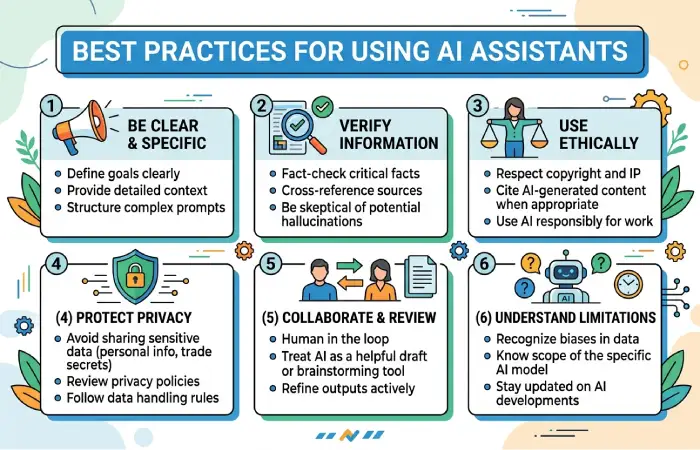
A few simple practices can improve results.
Give clear instructions. Explain the goal, audience, format, and relevant context.
Provide useful context. An assistant generally produces more useful results when it understands the task and constraints.
Break complicated tasks into steps. Large projects can often be handled more effectively by dividing them into smaller tasks.
Check important information. Do not assume that a confident-sounding answer is automatically correct.
Protect sensitive information. Only provide data when you understand the relevant privacy and security implications.
Keep human oversight. Use AI to support judgment rather than automatically delegating high-impact decisions.
The Future of AI Chatbots and Assistants
AI assistants are increasingly moving from simple conversational interfaces toward systems that can work with external tools and complete multi-step workflows.
The important shift is from “AI that answers questions” toward “AI that helps complete tasks.”
As assistants gain better access to applications, organizational information, and specialized tools, they may become integrated into everyday productivity and business software.
At the same time, reliability, privacy, security, transparency, and human oversight will remain important considerations.
Frequently Asked Questions
What is an AI chatbot?
An AI chatbot is software that uses artificial intelligence to understand user messages and generate conversational responses. Modern chatbots may use large language models to handle natural-language questions and maintain conversational context.
What is an AI assistant?
An AI assistant is a software system designed to help users with information and tasks. Depending on its capabilities, it may answer questions, create content, analyze information, or interact with connected applications.
What is the difference between an AI chatbot and an AI assistant?
A chatbot is generally focused on conversation, while an AI assistant can combine conversation with productivity features, external tools, and task execution. The distinction is not always strict.
Can AI chatbots make mistakes?
Yes. AI systems can generate incorrect, incomplete, or misleading information. Important information should be independently verified.
Are AI assistants safe to use?
Safety depends on the tool, its configuration, the information provided, and how it is used. Users should understand privacy policies, protect sensitive information, and maintain human oversight for important tasks.
Can businesses use AI assistants?
Yes. Businesses use AI assistants for customer support, research, content creation, software development, data analysis, internal knowledge management, and workflow automation.
Will AI assistants replace human workers?
AI can automate or assist with some tasks, but its impact varies by occupation, workflow, technology, and implementation. Many applications involve AI assisting people rather than completely replacing them.