
Last Updated: September 17, 2026
Ethernet cabling is still one of the most reliable ways to connect computers, access points, switches, cameras, servers and other network devices. Although Wi-Fi continues to improve, a properly installed Ethernet connection can provide predictable performance, low latency and a stable physical link.
Choosing the right cable, however, is not simply a matter of buying the highest category available. Cable category, connector compatibility, installation quality, distance, interference and network hardware all affect real-world performance.
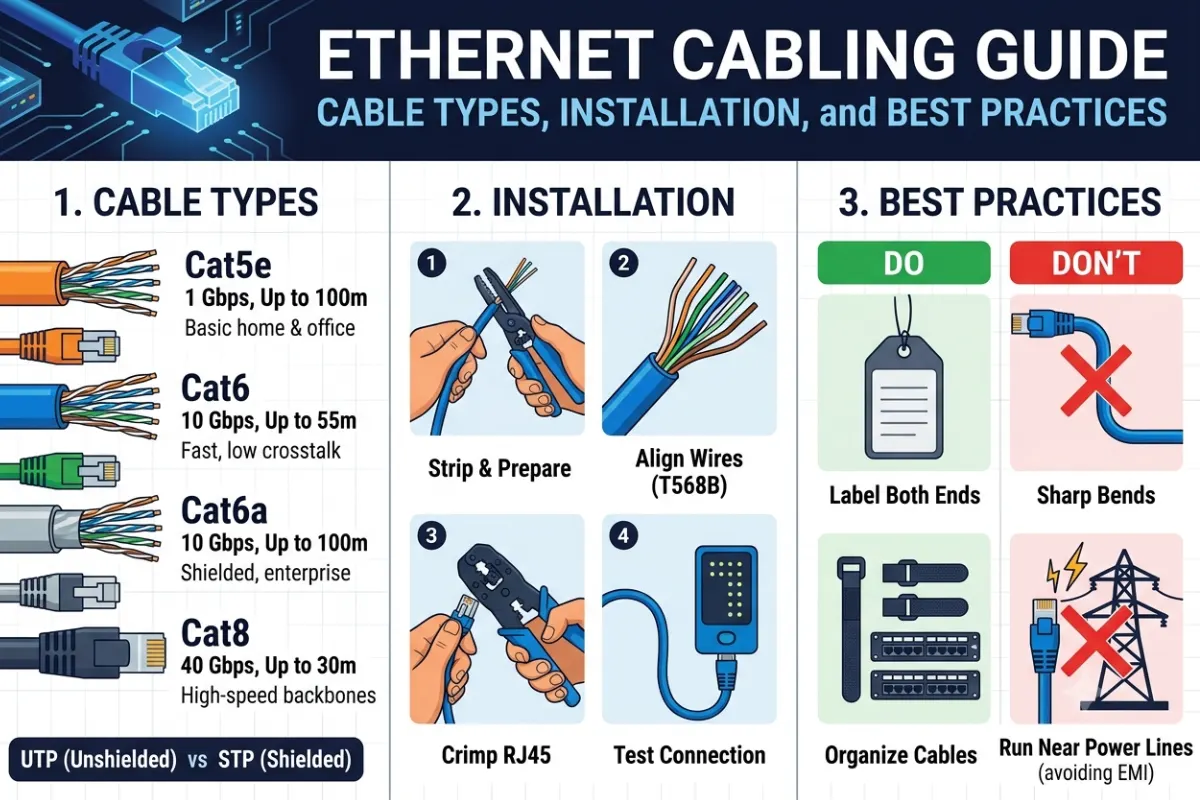
This Ethernet cabling guide explains the major cable categories, how Cat6 compares with Cat6a and Cat7, how to run Ethernet through walls, how to terminate cables, and how to test and troubleshoot installed runs.
What Is Ethernet Cabling?
Ethernet cabling is the physical network connection used to carry Ethernet data between network devices.
A typical wired network might connect:
Internet modem/ONT → Router → Network switch → Ethernet cable → PC, TV, access point, camera or other device
Most traditional Ethernet installations use balanced twisted-pair copper cable. The individual conductors are twisted into pairs to reduce electromagnetic interference and crosstalk.
A standard Ethernet cable contains four twisted pairs, or eight conductors.
The twists are important because they help control interference between pairs and allow the cable to carry high-speed signals over practical distances.
Modern structured cabling systems also use patch panels, keystone jacks and wall outlets rather than permanently connecting a cable directly to every device.
Ethernet Cable Categories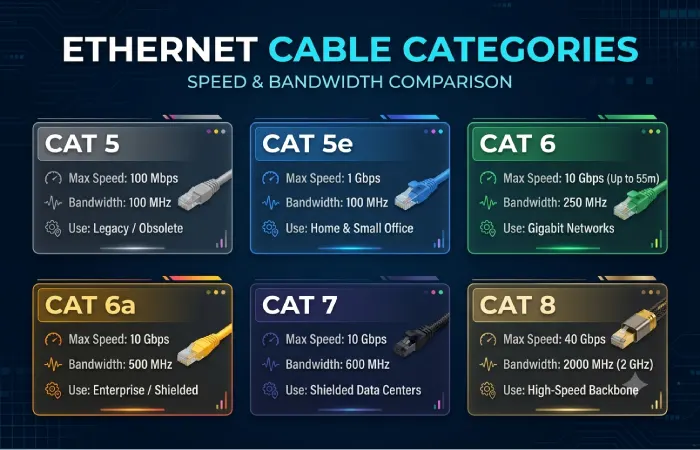
Ethernet cables are classified according to performance requirements such as bandwidth, frequency and resistance to interference.
The most commonly encountered categories are Cat5e, Cat6, Cat6a and Cat7.
| Cable category | Typical bandwidth | Common Ethernet use | Maximum frequency |
| Cat5e | Up to 1Gbps commonly; 2.5/5GbE possible in suitable installations | Home and office networks | 100 MHz |
| Cat6 | 1GbE; 2.5/5GbE and some 10GbE applications | Homes, offices, upgraded networks | 250 MHz |
| Cat6a | 10GbE | New high-performance installations | 500 MHz |
| Cat7 | Up to 10GbE | Specialized/high-performance structured cabling | 600 MHz |
| Cat8 | 25/40GbE over short links | Data-center environments | Up to 2 GHz |
The exact Ethernet speed supported by a cable depends on the complete channel, including cable length, connectors, patch cords, installation quality and networking equipment. Fluke Networks notes that Cat6 can support higher-speed applications in some circumstances, while Cat6a is designed for 10GbE at the full 100-meter channel length.
Cat5e
Cat5e is still perfectly useful for many home and small-office networks.
It is commonly used for:
- Gigabit Ethernet
- Computers
- Smart TVs
- Network printers
- IP cameras
- VoIP phones
- Basic wireless access points
Cat5e operates to 100 MHz and was designed to support Gigabit Ethernet. Suitable installed Cat5e cabling can also support 2.5GbE and, under appropriate conditions, 5GbE.
If an existing building already has good Cat5e cabling, replacing it simply because a newer category exists may not provide a meaningful benefit.
Cat6
Cat6 increases the specified frequency to 250 MHz and provides better performance margins than Cat5e.
It is a popular choice for new residential Ethernet installations because it provides a useful balance between cost, performance and installation difficulty.
Cat6 is suitable for:
- Gigabit networks
- 2.5GbE networks
- 5GbE networks
- Some 10GbE applications over shorter distances
However, 10GbE performance over Cat6 is more dependent on installation conditions and channel length than with Cat6a.
Cat6a
Cat6a is designed for higher-performance networks and supports 10GBASE-T up to 100 meters when the complete channel meets the relevant requirements.
It operates to 500 MHz and generally has greater diameter and stiffness than Cat6.
Cat6a makes sense when installing:
- 10GbE networks
- High-performance workstations
- Network-attached storage
- Business networks
- High-speed wireless access points
- Infrastructure expected to remain in service for many years
Its larger cable size can make installation more difficult, particularly in crowded conduits or small wall boxes.
Cat7
It is different from Cat6 and Cat6a because the terminology is based on the ISO/IEC cabling system rather than the TIA category system.
Cat7 is associated with Class F cabling and can operate to 600 MHz.
One important point is often missed in consumer cable listings: Cat7 is not officially recognized as a TIA category in the same way as Cat5e, Cat6 and Cat6a. Fluke Networks notes that Category 7 was ratified under ISO/IEC rather than TIA.
Therefore, buyers should look at the actual standards compliance, cable construction and connector system rather than assuming that “Cat7” printed on a package automatically means better Ethernet performance.
Cat6 vs Cat6a vs Cat7 Compared
For most new Ethernet installations, the decision between Cat6, Cat6a and Cat7 should be based on the required application rather than the largest number on the package.
| Feature | Cat6 | Cat6a | Cat7 |
| Frequency | 250 MHz | 500 MHz | 600 MHz |
| Common high-speed use | 1/2.5/5GbE | 10GbE | 10GbE |
| 10GbE at 100m | Not the standard full-distance choice | Yes | Yes |
| Shielding | UTP or shielded versions | UTP or shielded versions | Typically shielded |
| Installation | Relatively easy | More difficult | More specialized |
| Cost | Moderate | Higher | Higher/specialized |
| Typical home use | Excellent | Excellent for future-proofing | Usually unnecessary |
| Business infrastructure | Good | Strong choice for 10GbE | Specialized applications |
Which Ethernet cable should you choose?
For an existing Gigabit network, Cat5e may be sufficient.
A new home installation, Cat6 is a practical general-purpose choice.
For a new installation where 10GbE, high-bandwidth servers or long-term infrastructure are important, Cat6a is a strong option.
Cat7 should be selected based on a specific structured-cabling requirement rather than simply because its category number is higher.
Running Ethernet Cables Through Walls
Running Ethernet through walls creates a cleaner installation, but the cable needs to be installed correctly.
Before drilling or routing cable, identify:
- Electrical wiring
- Plumbing
- HVAC ducts
- Structural members
- Existing communications cables
- Fire-rated barriers
- Access restrictions
Avoid blindly drilling into walls.
For new construction or renovation projects, Ethernet cable can be routed through suitable pathways, conduits or structured wiring spaces.
Use solid-core cable for permanent runs
For in-wall Ethernet installations, solid-conductor horizontal cable is generally used for the permanent link.
Patch cables normally use stranded conductors because they need to flex repeatedly.
Do not substitute a thin flexible patch cable for a long permanent in-wall run simply because it is easier to install.
Avoid excessive bends
Ethernet cable should not be sharply bent or crushed.
A tight bend can alter the geometry of the twisted pairs and negatively affect transmission performance.
Follow the cable manufacturer’s minimum bend radius rather than creating sharp corners.
Do not pull too aggressively
Excessive pulling force can stretch or deform the cable.
When pulling cable through conduit, use appropriate pulling methods and avoid dragging it over sharp edges.
Keep Ethernet away from electrical interference
Where practical, maintain separation between Ethernet and power wiring.
If communication and power cables must cross, crossing them at approximately a right angle can reduce the length over which they run alongside each other.
Shielded cabling can help in environments with significant electromagnetic interference, but simply buying shielded cable does not eliminate installation problems. The complete shielded system must be appropriately designed and terminated.
Ethernet Cable Length Limits
A common structured Ethernet channel limit is 100 meters, typically consisting of a permanent link plus patch cords.
For example:
90 m permanent link + 10 m patch-cord allowance = 100 m channel
Cat6a is specifically designed to support 10GBASE-T over a 100-meter channel when the cabling system meets the required specifications.
If you need to cover substantially longer distances, consider:
- Fiber optic cable
- Intermediate switches
- Properly designed network distribution points
Do not assume that adding extra Ethernet cable beyond the normal channel limit will produce reliable results simply because the devices initially establish a connection.
T568A vs T568B Wiring
Ethernet twisted-pair cables use standardized conductor arrangements.
The two commonly referenced wiring schemes are:
- T568A
- T568B
The important rule for a normal Ethernet patch cable is that the two ends use the same wiring scheme.
For example:
T568B → T568B
or
T568A → T568A
Mixing A and B on opposite ends creates a crossover arrangement.
Modern Ethernet equipment often supports automatic crossover detection, but structured cabling should still be installed consistently according to the selected wiring standard and project requirements.
Consistency is particularly important when terminating large numbers of cables.
Terminating Ethernet Cables and Keystone Jacks
A professional Ethernet installation usually terminates permanent cable at a patch panel or keystone jack rather than putting an RJ45-style plug directly onto every in-wall cable.
The basic process is:
- Measure and cut the cable.
- Remove only the required amount of outer jacket.
- Keep the twisted pairs intact as close to the termination as practical.
- Follow the T568A or T568B color pattern.
- Seat each conductor into the correct IDC position.
- Use a proper punch-down tool where required.
- Trim excess conductor.
- Install the jack into the wall plate or patch panel.
- Label both ends of the cable.
Why untwisting matters
The twists in each pair are part of the cable’s electrical design.
Untwisting too much of the pair near the termination can increase crosstalk and reduce performance.
Therefore, avoid stripping several inches of cable and spreading the conductors widely across the jack.
Keep the pair twists as close to the termination point as practical.
Use matching components
A high-quality Cat6 cable connected to low-quality or incompatible components does not automatically produce a Cat6-compliant channel.
The cable, keystone jack, patch panel, connectors and patch cords should be appropriate for the target category.
TIA’s balanced twisted-pair standards cover cabling and connecting hardware as part of the structured cabling system. TIA published ANSI/TIA-568.2-E in 2024 as a revision to TIA-568.2-D.
Patch Panels and Keystone Jacks
A structured installation often looks like this:
Router → Switch → Patch Panel → Permanent Ethernet Cable → Keystone Jack → Patch Cable → Device
This approach makes the network easier to:
- Label
- Test
- Maintain
- Upgrade
- Troubleshoot
- Reconfigure
It also prevents repeated movement of the permanent cable.
For a home office, you may only need a small patch panel. Larger offices can use rack-mounted patch panels and organized cable management.
Ethernet Cable Testing
A cable should be tested after installation rather than relying solely on whether a computer connects to the network.
A basic cable tester can detect problems such as:
- Open conductors
- Short circuits
- Reversed pairs
- Split pairs
- Incorrect wiring order
More advanced certification testers can evaluate additional transmission characteristics and determine whether an installed channel meets the relevant cabling category requirements.
TIA’s current work on field-test requirements includes accuracy and reporting requirements for field testers used with balanced twisted-pair cabling.
Basic cable testing process
Connect the tester to both ends of the cable.
Check that:
- All eight conductors are detected.
- The pin sequence is correct.
- No conductors are open.
- No conductors are shorted.
- The pairs are correctly identified.
For a professional installation, use an appropriate certification tester when certification is required.
Ethernet Cabling Troubleshooting
If an Ethernet connection is unstable or slower than expected, work through the physical layer first.
- Check the connectors
Loose plugs, damaged clips or poorly terminated jacks can cause intermittent connections.
- Check the wiring order
A single incorrectly terminated conductor can prevent a link from working or cause performance problems.
- Test both ends
Do not assume that the cable is good because one end looks correctly terminated.
- Check cable length
Very long runs can introduce attenuation and other transmission problems.
- Inspect for physical damage
Look for:
- Crushed cable
- Sharp bends
- Damaged jackets
- Excessive pulling
- Staples or fasteners penetrating the cable
- Check the negotiated speed
If a connection expected to run at 1Gbps or 10Gbps repeatedly negotiates at a lower speed, investigate the cable, connectors, network ports and configuration.
- Replace components systematically
Try a known-good patch cable.
Then test another switch port or network device.
This helps determine whether the problem is the permanent cable or another part of the network.
Ethernet Cabling Best Practices
A reliable Ethernet installation starts with good cable selection but depends equally on installation discipline.
Plan before pulling cable
Map the route and determine where network outlets, switches and patch panels will be located.
Label both ends
Use consistent labels such as:
PP01-01 → Office-01
This makes future troubleshooting considerably easier.
Leave appropriate service loops
Do not leave huge coils of excess cable, but provide enough cable for future termination and maintenance.
Protect cable from physical damage
Avoid crushing, excessive pulling and sharp bends.
Maintain pair geometry
Do not unnecessarily untwist the pairs during termination.
Use proper pathway systems
Conduit, cable trays and structured pathways make future maintenance easier.
Separate communications and power cabling
Follow applicable electrical and building requirements when routing Ethernet near mains wiring.
Test every permanent run
A link light is not the same as a certified cable test.
Ethernet Cabling for Home Networks
For a typical modern home, Ethernet can connect:
- Wi-Fi access points
- Desktop computers
- Smart TVs
- Gaming consoles
- NAS devices
- Security cameras
- Network printers
- Streaming devices
- Smart-home hubs
A simple architecture could be:
Internet → Router → Switch → Cat6 → Access Point
Then additional Cat6 runs can connect computers, televisions, cameras and other fixed devices.
If you’re installing cable during a renovation, it can be worthwhile to run Ethernet to locations where future access points, cameras or workstations may be installed.
Ethernet Cabling for Business Networks
Business networks generally benefit from a more structured approach.
A typical installation might include:
Internet Edge → Firewall/Router → Core/Distribution Switch → Patch Panel → Horizontal Cabling → Work Area
For new high-performance deployments, Cat6a can be useful where 10GbE connectivity and higher-performance wireless infrastructure are expected.
TIA standards cover structured balanced twisted-pair cabling and have continued to evolve, including requirements associated with power delivery over balanced twisted-pair cabling.
This is increasingly relevant as Ethernet carries not only data but also power to devices such as access points, cameras and other network-connected equipment.
Ethernet Cabling and Power over Ethernet
Power over Ethernet (PoE) allows compatible network equipment to receive electrical power through Ethernet cabling while also transmitting data.
Common PoE devices include:
- Wi-Fi access points
- IP security cameras
- VoIP phones
- Smart lighting controllers
- IoT devices
Cable selection becomes especially important as PoE power levels increase.
The TIA cabling standards have specifically addressed power delivery over balanced twisted-pair cabling.
For a new PoE installation, select cable and connectivity components according to the required power level, cable size, bundle conditions and applicable standards rather than choosing cable category alone.
How Much Does Ethernet Cabling Cost?
The total cost depends on cable category, cable length, installation complexity, connectors, wall access and labor.
| Cost factor | Effect on project |
| Cable category | Higher categories generally cost more |
| Cable length | More cable increases material requirements |
| Number of outlets | More terminations and hardware |
| Wall access | Difficult routes increase labor |
| Conduit | Adds material and installation work |
| Patch panel | Adds structured-cabling hardware |
| Testing | Professional certification adds labor/equipment cost |
| PoE requirements | May affect cable and component selection |
For this reason, comparing cable price alone can produce a misleading estimate.
Common Ethernet Cabling Mistakes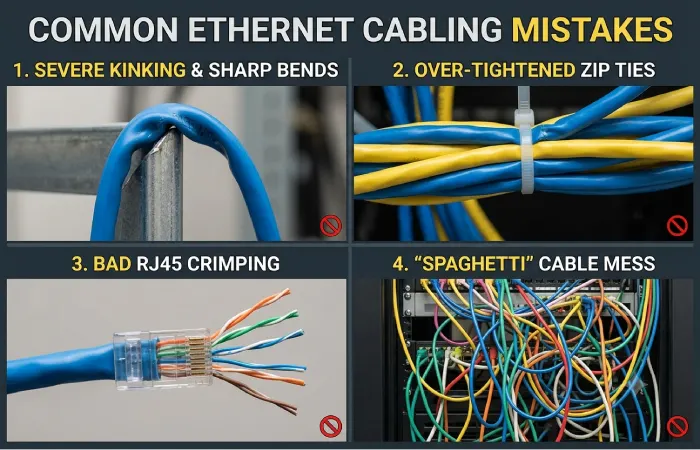
Choosing Cat7 simply because it has a higher number
Category numbers do not tell the entire story. Cat6a may be a more straightforward choice for a 10GbE installation.
Using cheap CCA cable
Be cautious of Ethernet cable marketed as Copper-Clad Aluminum (CCA) when a standards-compliant copper structured cabling system is required.
Mixing incompatible components
Cable category, jacks, patch panels and connectors should be selected as a compatible system.
Untwisting too much cable
Excessive untwisting near the termination can affect transmission performance.
Ignoring cable length
Long runs should be planned around the applicable channel limits.
Running cable next to electrical wiring without planning
Electrical interference and installation requirements need to be considered.
Not labeling cables
Unlabeled cables create unnecessary work when troubleshooting or upgrading a network.
Assuming link lights prove cable quality
A physical link can come up even when the installation has performance problems.
Ethernet Cabling FAQ
What is the best Ethernet cable for a home?
For many new home installations, Cat6 is a practical choice. If you specifically want 10GbE over a full 100-meter channel, Cat6a is more appropriate.
Is Cat6 better than Cat5e?
Cat6 provides higher specified bandwidth and additional performance margin. However, whether you need Cat6 depends on your network equipment, speed requirements and existing cabling.
Is Cat6a worth it?
Cat6a can be worthwhile for new installations where 10GbE, high-performance access points or long-term infrastructure requirements justify the additional installation cost and cable size.
Is Cat7 better than Cat6a?
Cat7 has different standardization and connector considerations. It should not automatically be considered a better choice simply because the category number is higher. Cat6a is already designed for 10GbE over a 100-meter channel.
Can Cat6 run 10Gb Ethernet?
Cat6 can support 10GbE in appropriate conditions, but the supported distance depends on the installation and channel characteristics. Cat6a is the more straightforward choice when 10GbE at the full 100-meter channel is required.
Can Ethernet cable be run through walls?
Yes. Ethernet is commonly installed inside walls using suitable structured-cabling practices. Plan the route carefully, avoid physical damage, maintain bend-radius requirements and follow applicable electrical and building codes.
Should Ethernet cables be shielded?
Not necessarily. Shielding can be useful in environments with significant electromagnetic interference, but the entire cabling system needs to be designed appropriately. UTP is sufficient for many residential and office installations.
How long can an Ethernet cable be?
A standard structured Ethernet channel is generally designed around a 100-meter maximum. For longer distances, fiber or an appropriately designed intermediate network segment may be required.
Do Ethernet cables need to be tested?
Yes. At minimum, basic testing can verify conductor continuity and wiring. Professional installations may require certification testing against the applicable cabling standard.
Final Thoughts
A good Ethernet cabling installation is about more than choosing the newest cable category.
Cat5e remains useful for many existing Gigabit networks. Cat6 offers a strong balance for many new home and office installations, while Cat6a is particularly useful when 10GbE and long-term infrastructure capacity are priorities. Cat7 belongs to a different standards framework and should be selected for a specific cabling requirement rather than simply because its category number is higher.
The installation itself is equally important. Correct routing, bend radius, pair handling, termination, labeling and testing can make the difference between a reliable structured network and a cable that works only intermittently.
For most new projects, start with the required network speed, distance and future upgrade plans, then select the cable and connectivity components that meet those requirements.