
Last Updated: September 17, 2026
A network switch is one of the most important devices in a wired network. It connects computers, access points, printers, cameras, servers, smart devices, and other Ethernet-enabled equipment so they can communicate with each other and access shared network resources.
For a small home network, an inexpensive unmanaged switch may be enough. A business network may require managed switches with VLANs, Power over Ethernet (PoE), higher port counts, monitoring, redundancy, and 10 Gigabit Ethernet.
Choosing the right switch therefore depends on more than the number of ports. You also need to consider network speed, management features, PoE requirements, uplink capacity, installation location, and future expansion.
What Is a Network Switch?
A network switch is a networking device that connects multiple devices over Ethernet. It receives data from one device and forwards it toward the appropriate destination instead of sending every packet to every connected device.
For example, imagine a home office containing a desktop computer, network-attached storage (NAS), printer, smart TV, and wireless access point. Instead of connecting each device directly to the router, you can connect the router to a network switch and connect the devices to the switch.
A basic arrangement looks like this:
Internet → Router → Network Switch → Wired Devices
The router handles functions such as Internet access, IP addressing, and routing between networks. The switch primarily handles communication between devices on the local network.
Switches use MAC addresses to determine where Ethernet frames should be forwarded. This allows traffic to reach the intended device efficiently.
Network Switch vs Router
A router and switch perform different jobs, although modern home networking equipment often combines both into one device.
| Feature | Network Switch | Router |
| Main purpose | Connect devices on a LAN | Connect different networks |
| Uses MAC addresses | Yes | Primarily uses IP addresses |
| Connects multiple wired devices | Yes | Usually limited Ethernet ports |
| Internet connection | No, by itself | Yes |
| VLAN support | Some managed models | Depends on model |
| Routing between networks | Layer 3 models | Yes |
| Typical home use | Expand wired connections | Internet and network management |
A typical home router may already contain a small Ethernet switch. A separate switch becomes useful when you need more wired ports or specialized networking features.
How Does a Network Switch Work?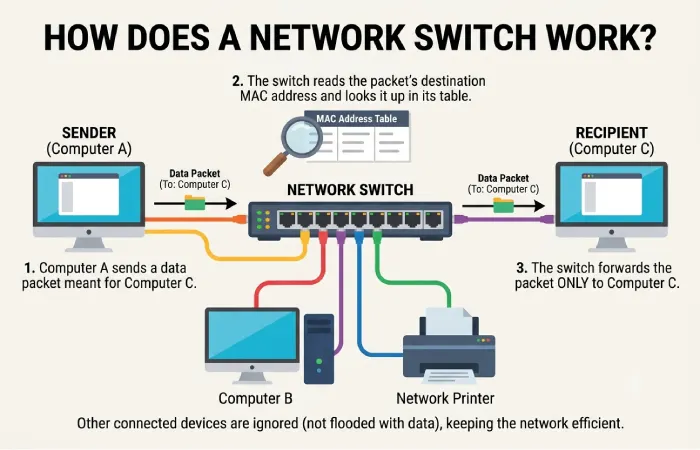
When an Ethernet device sends data, the switch examines the frame and learns which MAC address is associated with each physical port.
The switch stores this information in a MAC address table.
For example:
| Port | Connected Device | MAC Address |
| 1 | Router | MAC A |
| 2 | Desktop | MAC B |
| 3 | NAS | MAC C |
| 4 | Access Point | MAC D |
If the desktop sends data to the NAS, the switch can forward the frame directly toward the NAS port.
This is one of the main differences between modern switches and traditional Ethernet hubs. A hub simply repeats traffic to connected ports, while a switch intelligently forwards frames based on learned addresses.
Types of Network Switches
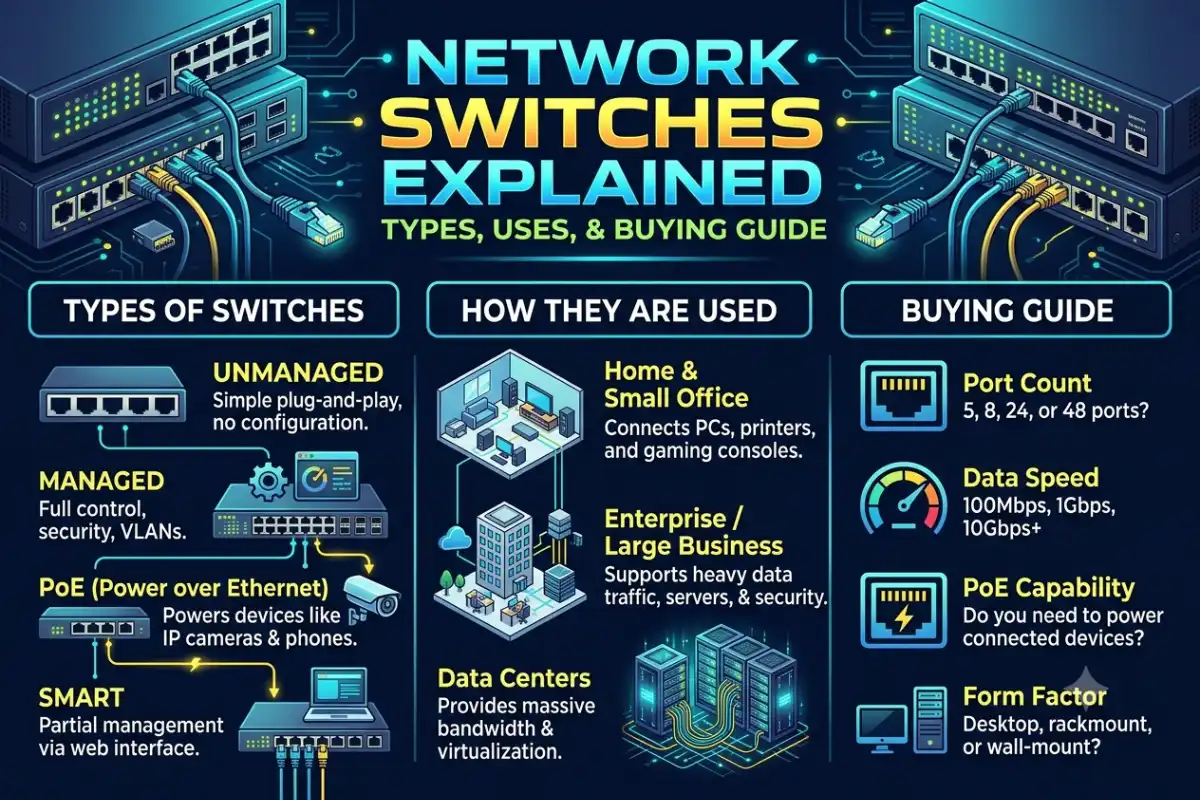
Network switches are available in several categories. The right type depends on how much control, performance, and power delivery your network requires.
Unmanaged Switches
An unmanaged switch is designed for simple plug-and-play networking.
You generally connect Ethernet cables and start using the switch without configuring individual ports.
They are suitable for:
- Home networks
- Small offices
- Basic wired networks
- Connecting PCs, TVs, consoles, and printers
- Expanding router Ethernet ports
Unmanaged switches are usually the easiest option for users who do not need VLANs, traffic monitoring, or advanced security settings.
Managed Switches
Managed switches provide configuration and monitoring capabilities.
Depending on the model, administrators can configure VLANs, QoS, port settings, link aggregation, access controls, monitoring, and other features.
Managed switches are commonly used in businesses, schools, larger homes, laboratories, and advanced home-lab environments.
They are useful when you need more control over how network traffic is separated and managed.
Smart or Web-Managed Switches
Smart switches sit between unmanaged and fully managed products.
They typically provide a web interface for configuring selected features without the complexity of enterprise-grade equipment.
For small businesses and advanced home users, smart switches can provide useful features such as VLANs and QoS while remaining relatively straightforward to configure.
PoE Switches
A Power over Ethernet (PoE) switch can deliver electrical power and network connectivity through the same Ethernet cable.
This is particularly useful for devices installed away from conventional power outlets.
Common PoE devices include:
- IP security cameras
- Wireless access points
- VoIP phones
- Intercom systems
- IoT devices
- Some smart lighting systems
Instead of running separate power and Ethernet cables, a compatible PoE device can receive both through one Ethernet connection.
Layer 2 vs Layer 3 Switches
One of the most important technical distinctions is between Layer 2 and Layer 3 switches.
Layer 2 Switches
Layer 2 switches operate primarily at the data-link layer of the networking model.
They use MAC addresses to forward Ethernet frames between devices.
Layer 2 switches are common in:
- Home networks
- Small businesses
- Access-layer networks
- Basic office networks
- VLAN-based networks
For many users, a Layer 2 switch provides everything needed for wired device connectivity.
Layer 3 Switches
Layer 3 switches add routing capabilities.
Instead of only switching traffic between devices on the same network, they can route traffic between different IP subnets or VLANs.
For example, a business might create separate networks for employees, guests, security cameras, and servers.
A Layer 3 switch can help route traffic between these networks according to configured policies.
| Feature | Layer 2 Switch | Layer 3 Switch |
| Ethernet switching | Yes | Yes |
| MAC-based forwarding | Yes | Yes |
| VLAN support | Many models | Yes |
| Inter-VLAN routing | Usually no | Yes |
| IP routing | No | Yes |
| Typical use | Access networks | Larger or segmented networks |
| Complexity | Lower | Higher |
If you only need additional Ethernet ports, paying for Layer 3 functionality may be unnecessary.
Gigabit vs 10G Switches
Network speed is another major buying consideration.
Gigabit Ethernet provides up to 1 Gbps of theoretical bandwidth per port. It remains suitable for many homes, offices, streaming devices, PCs, printers, and access points.
10 Gigabit Ethernet (10GbE) provides up to 10 Gbps of theoretical bandwidth and is designed for much higher data-transfer requirements.
10GbE can be useful for:
- NAS systems
- Video editing
- Large file transfers
- Workstations
- Servers
- High-performance home labs
- High-speed network backbones
Actual performance depends on the entire network. Installing a 10G switch does not automatically make every device operate at 10 Gbps.
The connected devices, Ethernet adapters, cabling, storage performance, and uplinks must also support the required speed.
Should You Buy a 10G Switch?
For a typical home user with Internet service below 1 Gbps and relatively light local network traffic, Gigabit Ethernet may be sufficient.
A 10G switch becomes more relevant when multiple devices regularly transfer large files across the local network or when you use high-speed NAS and workstation equipment.
Some switches also combine different port speeds, such as 1GbE access ports with faster 2.5GbE, 5GbE, or 10GbE uplinks.
PoE Switches and Use Cases
PoE simplifies installations by carrying power and data over compatible Ethernet connections.
There are several PoE standards, including PoE, PoE+, and PoE++, with different power capabilities.
The important point is that the switch and powered device must support compatible PoE standards and power requirements.
Common PoE Applications
Security cameras: PoE allows cameras to receive network connectivity and power through a single cable.
Wireless access points: Ceiling-mounted access points can receive power from a PoE switch without requiring a nearby electrical outlet.
VoIP phones: Business phones can receive power and network connectivity from Ethernet.
IoT equipment: Some network-connected devices can use PoE to simplify deployment.
PoE Budget
When buying a PoE switch, do not look only at the number of PoE ports.
Check the switch’s total PoE power budget.
For example, a switch may have eight PoE ports but a limited total power budget. If multiple connected devices consume significant power simultaneously, the switch may not be able to provide the maximum rated power to every port at the same time.
Managed vs Unmanaged Switches
The decision between managed and unmanaged switching is one of the easiest ways to narrow your options.
| Requirement | Unmanaged | Managed |
| Plug and play | Yes | Usually requires configuration |
| VLANs | No | Yes |
| QoS | Limited/No | Yes |
| Traffic monitoring | Limited | Yes |
| Port configuration | Minimal | Extensive |
| Home basic networking | Excellent fit | Often unnecessary |
| Business networks | Limited | Better suited |
| Network segmentation | No | Yes |
Choose unmanaged switching when simplicity is the priority.
Choose managed switching when you need network segmentation, monitoring, traffic controls, or centralized administration.
Best Network Switches by Budget
Rather than choosing a switch solely by price, match your budget to the features your network actually requires.
| Budget Level | Typical Configuration | Suitable For |
| Entry-level | 5–8-port Gigabit unmanaged | Basic home networks |
| Budget business | 8–16-port Gigabit smart/managed | Small offices |
| Mid-range | 16–24-port managed or PoE | Growing businesses |
| Performance | 2.5GbE/10GbE mixed ports | NAS and high-speed workstations |
| Advanced | Managed 10GbE/PoE infrastructure | Servers, labs, larger networks |
At the entry level, a simple Gigabit switch can expand the number of wired connections without adding unnecessary complexity.
For a small business, a smart or managed switch can provide VLANs and traffic controls.
For demanding workloads, prioritize faster uplinks and multi-gigabit ports rather than simply buying the switch with the highest port count.
How Many Ports Do You Need?
Count your current wired devices and leave room for expansion.
For example:
Current devices: 6
Future devices: 3
Recommended minimum: 9 ports
Because switches are commonly sold in standard port configurations, moving to a 16-port model may make more sense than buying an 8-port switch and replacing it later.
Remember that one switch port may also be required for the connection between the switch and router.
Ethernet Cable Compatibility
The switch is only one part of the wired network.
Your Ethernet cables also influence achievable speeds.
For Gigabit Ethernet, common twisted-pair Ethernet cabling such as Cat5e and newer categories can support appropriate connections over standard distances.
Higher-speed connections may require more capable cabling depending on the Ethernet standard, distance, and installation environment.
If you are upgrading to multi-gigabit or 10GbE networking, check the cable category and length requirements rather than assuming an existing cable will always deliver the desired speed.
Features to Look for When Buying a Network Switch
Port Speed
Determine whether you need 1GbE, 2.5GbE, 5GbE, or 10GbE.
Do not pay for faster ports that none of your devices can use unless you are planning an upgrade.
Number of Ports
Choose enough ports for your current equipment plus reasonable future expansion.
PoE Support
If you plan to connect cameras, access points, or VoIP phones, check whether PoE is required.
Management
Unmanaged switches are simpler. Managed switches provide significantly more control.
VLAN Support
VLANs allow compatible switches to separate devices into logical networks.
This can be useful for guest networks, IoT devices, security cameras, employees, and other groups.
Uplink Speed
Do not overlook uplinks.
For example, connecting a fast 10GbE switch to the rest of your network through a slow uplink can create a bottleneck when many devices communicate simultaneously.
Noise and Cooling
Some switches use active cooling fans. For a home office, bedroom, or quiet workspace, fanless operation can be an important consideration.
Rack Mounting
Businesses and home labs may benefit from rack-mountable switches, while a small home network may be better served by a compact desktop model.
Common Network Switch Mistakes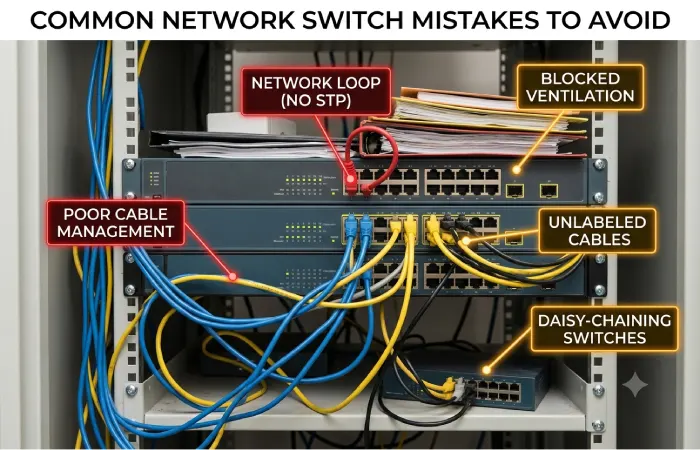
Buying Too Few Ports
A switch with exactly enough ports for today’s devices may quickly become limiting.
Leave some capacity for future devices.
Choosing 10G Without a Need
10GbE can be useful, but the benefits depend on your network hardware and workloads.
If your computers, NAS, and cabling only support Gigabit Ethernet, a 10G switch will not automatically increase their connection speed.
Ignoring PoE Power Requirements
Check the total PoE budget and the power requirements of connected devices.
Forgetting VLAN Requirements
If you intend to separate IoT devices, cameras, guest devices, or business systems into different networks, verify that the switch supports the VLAN features you need.
Focusing Only on Port Count
Two switches with the same number of ports can have very different capabilities.
Compare speed, management, PoE, uplinks, VLAN support, noise, and warranty in addition to port count.
Do You Need a Network Switch at Home?
You may need a switch if your router does not have enough Ethernet ports or if you want to connect several wired devices in one location.
A switch is especially useful for home offices, gaming setups, NAS installations, smart-home hubs, media servers, and wired wireless-access-point installations.
For a simple setup with only a few wired devices, the Ethernet ports built into your router may already be sufficient.
For larger wired networks, adding a switch provides a straightforward way to expand connectivity.
Network Switch Buying Checklist
Before purchasing a switch, check these specifications:
- Number of Ethernet ports
- Port speed
- PoE requirement
- Total PoE power budget
- Managed or unmanaged operation
- VLAN support
- Layer 2 or Layer 3 capabilities
- Uplink speed
- Ethernet cable requirements
- Fanless or fan-cooled design
- Rack or desktop installation
- Warranty and support
- Future expansion requirements
FAQs About Network Switches
What is a network switch used for?
A network switch connects multiple wired devices on the same local network and forwards Ethernet traffic between them.
Is a network switch better than a router?
They perform different jobs. A router connects networks and commonly provides Internet access, while a switch primarily connects devices within a local network.
Do I need a managed or unmanaged switch?
An unmanaged switch is usually sufficient for basic home networking. A managed switch is more appropriate when you need VLANs, traffic controls, monitoring, or advanced configuration.
Is a Gigabit switch enough for home use?
Gigabit switching is sufficient for many home networks. Multi-gigabit or 10GbE becomes more useful when you have compatible high-speed devices and heavy local network traffic.
Can a network switch improve Wi-Fi?
A switch does not directly make Wi-Fi faster. However, it can provide wired connections for wireless access points and help create a better network infrastructure.
Can a switch provide Internet access?
A basic switch does not provide Internet access by itself. It normally connects to a router, which handles routing between the local network and the Internet.
What is a PoE switch?
A PoE switch can deliver electrical power and network connectivity through compatible Ethernet cables, making it useful for devices such as IP cameras, wireless access points, and VoIP phones.
Final Thoughts
Network switches are the foundation of many wired networks, but the right model depends on your requirements.
For a basic home setup, an unmanaged Gigabit switch can provide an inexpensive way to add Ethernet ports. A small business may benefit from managed switching, VLANs, QoS, and PoE. More demanding environments can use multi-gigabit or 10GbE switches for high-speed storage, workstations, and servers.
Before buying, consider the number of ports, connection speeds, PoE requirements, management features, uplinks, and future expansion. Choosing according to those requirements will help you avoid paying for features you do not need while leaving enough room for your network to grow.