
Last Updated: September 17, 2026
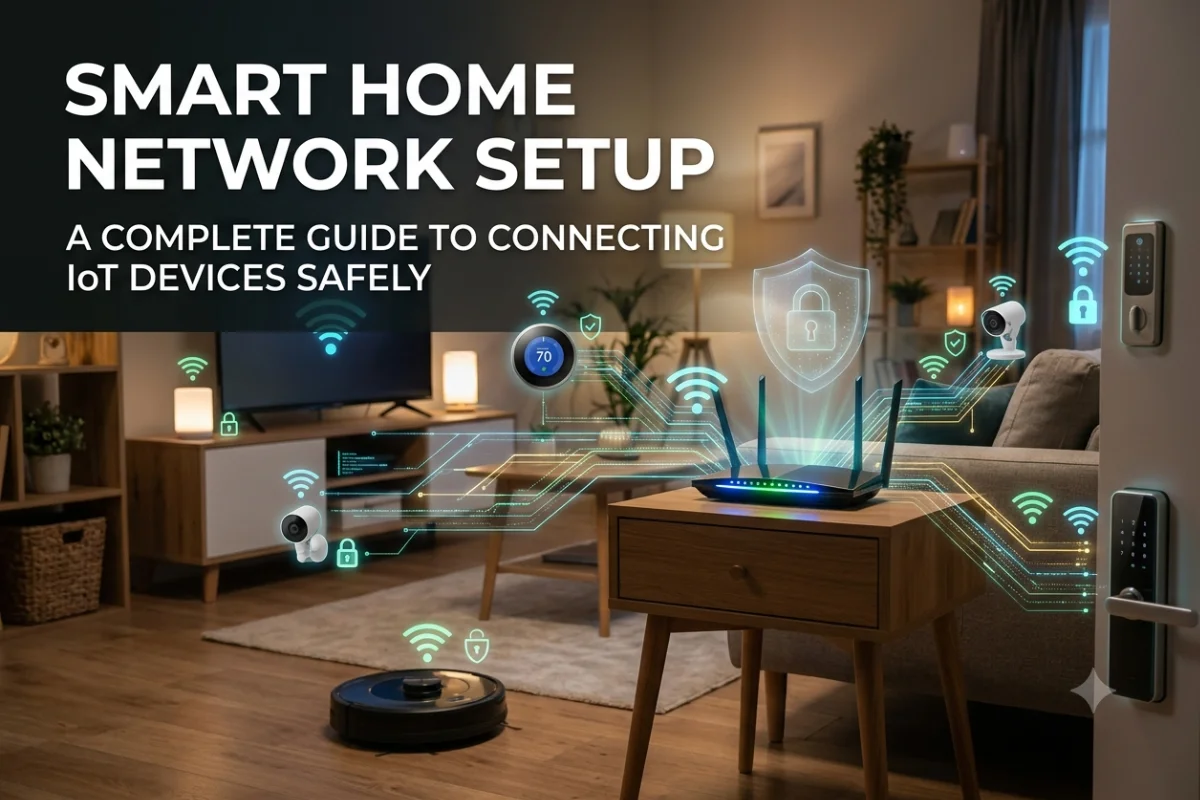
A smart home network connects everything from smart lights and thermostats to security cameras, smart speakers, TVs, appliances, and sensors. Unlike a basic home network, however, a smart home may contain dozens of devices from different manufacturers, using different wireless standards and security practices.
A well-planned smart home network setup keeps these devices connected while protecting computers, phones, personal data, and other important systems. The right router, Wi-Fi configuration, network segmentation, and smart-home protocol can make the network faster, safer, and easier to manage.
This guide explains the equipment you need, how to isolate IoT devices with VLANs, which router features matter, how Zigbee, Z-Wave, and Matter differ, and practical security measures for a connected home.
Smart Home Network Requirements
Before connecting smart devices, plan the network around the number and type of devices you expect to use. A few smart bulbs and speakers have very different requirements from a home containing cameras, video doorbells, smart TVs, appliances, sensors, and multiple smart hubs.
1. A capable router
Your router is the central connection point between your home network and the internet. For a modern smart home, look for features such as:
- Wi-Fi 6 or newer
- WPA3 support
- Guest networking
- VLAN or network-segmentation support
- Automatic firmware updates
- Strong parental and security controls
- Multiple Ethernet ports
- IPv6 support
- Good device-management features
Wi-Fi 6 can be particularly useful when many devices share the wireless network because it includes technologies designed to improve efficiency in busy environments.
2. Reliable Wi-Fi coverage
Smart devices are often distributed throughout the house. A router that provides excellent coverage in one room may not deliver reliable connections to cameras, sensors, or appliances at the other end of the building.
For larger homes, consider a properly configured mesh Wi-Fi system or multiple wired access points.
3. Adequate internet bandwidth
Not every smart device requires significant internet bandwidth. A temperature sensor may transmit only tiny amounts of data, while multiple security cameras can continuously generate much more traffic.
For example, a home with:
| Device type | Typical network demand |
| Smart bulbs | Very low |
| Door/window sensors | Very low |
| Smart thermostat | Low |
| Smart speakers | Low to moderate |
| Smart TVs | Moderate to high |
| Video doorbells | Moderate |
| Security cameras | Moderate to high |
| 4K streaming devices | High |
The important distinction is between internet bandwidth and local network capacity. A device can communicate heavily within your home network without requiring the same amount of internet bandwidth.
4. Ethernet connections
Use Ethernet wherever practical.
Smart-home hubs, network switches, desktop computers, NAS devices, and some security equipment can benefit from wired connections. Reducing unnecessary Wi-Fi traffic also leaves more wireless capacity for mobile and IoT devices.
How to Design a Smart Home Network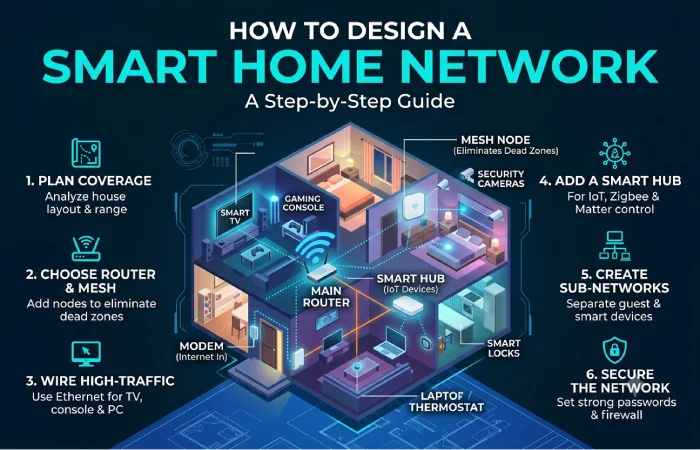
A simple smart-home network can start with one router and one Wi-Fi network. As the number of devices grows, segmentation becomes increasingly useful.
This arrangement limits direct communication between different device groups.
Isolating IoT Devices on VLANs
One of the most useful advanced techniques for a smart home is IoT network isolation.
IoT devices can include inexpensive bulbs, plugs, cameras, appliances, and other equipment that may have limited security controls. Placing them on a separate network can reduce the potential impact if one device is compromised.
A VLAN, or Virtual Local Area Network, allows compatible network equipment to logically separate devices even when they share the same physical infrastructure.
Example VLAN structure
| Network | Purpose | Example devices |
| VLAN 10 | Trusted devices | PCs, phones, tablets |
| VLAN 20 | IoT | Lights, plugs, appliances |
| VLAN 30 | Guest | Visitor devices |
| VLAN 40 | Infrastructure | Network management equipment |
The exact VLAN configuration depends on the router, switches, access points, and smart-home ecosystem you use.
Why isolate IoT devices?
Without segmentation, an infected IoT device may be able to communicate freely with computers and other devices on the same LAN.
With segmentation, firewall rules can restrict traffic between networks.
For example:
Trusted LAN → IoT VLAN Allowed when required
IoT VLAN → Trusted LAN Restricted
Guest VLAN → Trusted LAN Blocked
Guest VLAN → IoT VLAN Blocked
IoT VLAN → Internet Allowed as required
Do not automatically block every connection from IoT devices. Some smart-home products require communication with a phone, hub, local controller, or cloud service.
VLANs are not always necessary
For a small smart home, a router’s guest or IoT network may provide enough separation. VLAN configuration becomes more useful when you have many devices or want detailed control over firewall rules.
If you use VLANs, verify that your router and access points support the necessary features before designing the network around them.
Best Routers for Smart Homes
The “best” router for a smart home depends on the number of devices, house size, internet speed, and your desired level of network control.
Instead of choosing a router based only on maximum advertised Wi-Fi speed, consider these features:
| Feature | Why it matters |
| Wi-Fi 6/6E/7 | Better performance with modern clients |
| WPA3 | Stronger modern wireless security |
| Guest network | Separates visitor devices |
| IoT network | Simplifies smart-device isolation |
| VLAN support | Enables advanced segmentation |
| Ethernet ports | Useful for wired smart-home infrastructure |
| Mesh support | Extends coverage in larger homes |
| Automatic updates | Helps maintain security |
| Traffic monitoring | Helps identify unusual activity |
Router vs mesh Wi-Fi
A conventional router may be enough for an apartment or smaller home.
A mesh system can make more sense when walls, multiple floors, or larger distances create coverage problems. However, mesh nodes should ideally use wired Ethernet backhaul when possible because it avoids using wireless capacity for communication between nodes.
For advanced users, multiple wired access points can provide greater control than relying entirely on wireless mesh connections.
Zigbee, Z-Wave, and Matter Explained
Smart-home devices do not all communicate using ordinary Wi-Fi.
Three technologies you will frequently encounter are Zigbee, Z-Wave, and Matter.
Zigbee
Zigbee is a low-power wireless technology commonly used for smart lights, sensors, switches, plugs, and other home-automation products.
Many Zigbee devices form a mesh network. Powered devices can act as routers, helping signals travel between devices and a central coordinator or hub.
Zigbee is useful when you have many low-power smart devices because it does not require every device to maintain a direct Wi-Fi connection.
Z-Wave
Z-Wave is another low-power wireless technology designed for home automation.
Like Zigbee, Z-Wave supports mesh networking and is commonly used for sensors, locks, switches, thermostats, and other smart-home equipment.
One difference is that Z-Wave operates in dedicated sub-GHz frequency ranges that vary by region, while Zigbee commonly operates around 2.4 GHz.
Matter
This is a newer smart-home application-layer standard intended to improve interoperability between compatible smart-home ecosystems.
Matter can operate over technologies such as Wi-Fi and Thread, while Ethernet can also be used for certain networked devices. Thread is a low-power mesh networking technology designed for connected devices.
Matter does not simply replace Wi-Fi, Zigbee, or Z-Wave. Instead, it defines how compatible smart-home devices and ecosystems can communicate at the application level.
Quick comparison
| Technology | Primary role | Typical devices | Network style |
| Wi-Fi | General connectivity | Cameras, TVs, appliances | Wi-Fi network |
| Zigbee | Low-power automation | Sensors, bulbs, switches | Mesh |
| Z-Wave | Low-power automation | Locks, sensors, switches | Mesh |
| Thread | Low-power IP networking | Sensors, locks, smart-home devices | Mesh |
| Matter | Smart-home application standard | Compatible devices across ecosystems | Uses supported underlying networks |
The best choice is often determined by the devices you already own rather than by selecting a single technology for the entire house.
Setting Up Wi-Fi for Smart Devices
When creating your smart home network, avoid connecting every device to the same network without considering security.
A practical arrangement is:
Main network: computers, phones, tablets, work devices, and other trusted equipment.
IoT network: smart lights, plugs, appliances, TVs, cameras, and other connected devices.
Guest network: visitors’ phones, laptops, and tablets.
Use different passwords for each network. Never reuse the password from your primary network on IoT devices.
2.4 GHz vs 5 GHz
Many smart-home devices support 2.4 GHz Wi-Fi because it provides better range and compatibility with inexpensive IoT hardware.
5 GHz generally provides higher throughput and can experience less congestion in some environments, but its range is usually shorter than 2.4 GHz.
Some newer devices also support 6 GHz, although compatibility varies considerably across IoT products.
Smart Home Network Security Tips
Security should be part of the network design from the beginning rather than something added after devices are installed.
Use strong, unique passwords
Your router administrator password should be unique and different from your Wi-Fi password.
Smart-home accounts should also use strong, unique credentials whenever possible.
Enable WPA3 when supported
WPA3 is the modern Wi-Fi security standard. If all your important devices support it, use WPA3. Mixed WPA2/WPA3 modes may be necessary when older IoT products do not support WPA3.
Change default credentials
Never leave default administrator credentials unchanged on routers, cameras, hubs, or other devices.
Keep firmware updated
Router, access-point, hub, camera, and smart-device firmware should be updated regularly.
Automatic updates are useful when supported because they reduce the chance of leaving known vulnerabilities unpatched.
Disable unnecessary remote access
If you do not need remote administration or internet-accessible device interfaces, disable them.
Exposing router management interfaces, cameras, or other services directly to the internet increases the attack surface.
Use multi-factor authentication
Enable MFA on your router account, smart-home platform, cloud camera account, and other important services whenever available.
Replace unsupported devices
An inexpensive smart plug or camera may remain functional for years, but that does not mean it will continue receiving security updates.
If a manufacturer stops supporting a device, consider replacing it, particularly when the product has access to sensitive networks or personal information.
Firewall Rules for an IoT Network
For advanced installations, firewall rules can control which networks communicate with each other.
A basic policy might allow trusted devices to initiate connections to IoT devices while preventing IoT devices from initiating arbitrary connections to trusted systems.
However, smart-home ecosystems can require specific discovery and communication protocols. Blocking everything between VLANs can break device discovery or control.
Test individual devices after applying firewall restrictions.
Smart Home Network Setup: Step-by-Step
Step 1: Inventory your devices
Make a list of every device that will connect to the network.
Include:
- Smart TVs
- Cameras
- Doorbells
- Smart speakers
- Lights
- Plugs
- Sensors
- Thermostats
- Appliances
- Smart locks
- Hubs and bridges
Record which devices use Wi-Fi, Ethernet, Zigbee, Z-Wave, Thread, or another protocol.
Step 2: Position the router or access points
Place your primary router or access points where they can provide consistent coverage.
Avoid hiding wireless equipment inside cabinets or placing it immediately next to large appliances and other sources of interference.
Step 3: Create your networks
For a basic setup, create:
- Main network
- IoT network
- Guest network
For an advanced setup, use VLANs and firewall rules.
Step 4: Secure the router
Change administrator credentials, enable modern wireless security, install available firmware updates, and disable unnecessary services.
Step 5: Connect smart devices
Connect IoT devices to the dedicated IoT network whenever compatibility allows.
For devices that require a phone to perform initial setup, temporarily follow the manufacturer’s pairing process and then verify that the device remains on the intended network.
Step 6: Configure hubs
If you use Zigbee, Z-Wave, Matter, or another smart-home ecosystem, connect its hub or controller according to the manufacturer’s networking requirements.
Step 7: Test device control
Check that you can:
- Control lights
- View cameras
- Operate smart appliances
- Control thermostats
- Use voice assistants
- Access smart-home hubs
- Receive notifications
Test these functions both locally and remotely if remote access is part of your setup.
Step 8: Monitor the network
Check your router’s connected-device list periodically.
Unknown devices should be investigated rather than ignored.
Common Smart Home Network Problems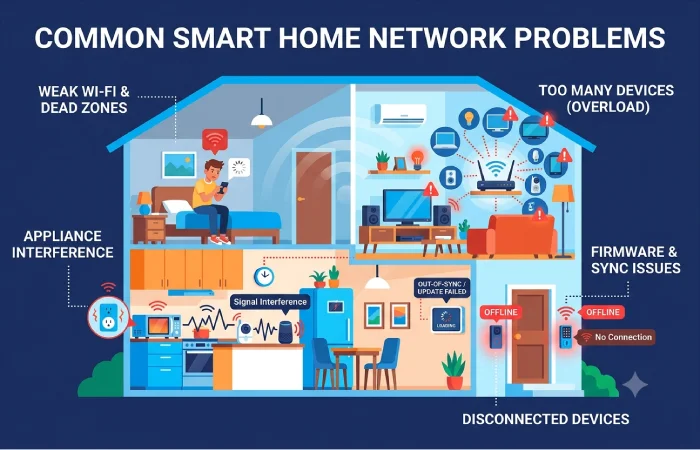
Smart device cannot connect to Wi-Fi
Check whether the device supports your selected Wi-Fi band and security mode.
Some older IoT devices only support 2.4 GHz and may not work correctly with certain advanced Wi-Fi configurations.
Device connects but cannot be controlled
This can happen when firewall rules or VLAN isolation prevent required local communication.
Check the manufacturer’s networking requirements and verify that required discovery and control traffic is permitted.
Smart devices frequently disconnect
Possible causes include:
- Weak Wi-Fi signal
- Wireless interference
- Poor access-point placement
- Router compatibility issues
- Overloaded wireless networks
- Firmware problems
- Insufficient mesh coverage
Moving an access point or using Ethernet backhaul can sometimes improve reliability.
Matter device is difficult to add
Matter setup can involve multiple components, including the Matter controller, commissioning device, and underlying network such as Wi-Fi or Thread.
Make sure the relevant controller, phone, and device are compatible and updated before troubleshooting more advanced network settings.
Smart Home Network Setup Checklist
Use this checklist before considering your network complete:
- Router firmware is current
- Router administrator password is unique
- WPA3 is enabled where practical
- Main and IoT networks are separated
- Guest devices use a separate network
- IoT devices have updated firmware
- Unnecessary remote access is disabled
- MFA is enabled on important accounts
- Smart-home hubs are properly configured
- Cameras have appropriate access controls
- Unknown devices are investigated
- Important infrastructure uses Ethernet where practical
- Network coverage has been tested throughout the home
- Backup configuration information is stored securely
FAQ
What is a smart home network?
A smart home network is the combination of networking equipment, wireless technologies, hubs, and connected devices that allow smart-home products to communicate with each other and access local or cloud services.
Should IoT devices be on a separate network?
Yes, separating IoT devices from trusted computers and phones can reduce unnecessary access between device groups and limit the potential impact of a compromised IoT device.
Do smart-home devices need Wi-Fi?
No. Smart-home devices can use technologies such as Zigbee, Z-Wave, Thread, Ethernet, or other connectivity methods depending on the product.
Is Matter better than Zigbee?
Matter and Zigbee serve different roles, so they are not direct replacements in every setup. Matter is an application-layer standard, while Zigbee provides wireless networking and device communication.
Can I use a normal Wi-Fi router for a smart home?
Yes. A normal modern router can support many smart-home installations. Advanced features such as dedicated IoT networks, VLANs, WPA3, strong firewall controls, and detailed device management become more useful as the network grows.
How many smart devices can a home network support?
There is no universal number. The practical limit depends on the router, wireless technology, device behavior, network design, interference, and available processing and addressing capacity. A network with dozens of IoT devices should be planned differently from one with only a few.
Final Thoughts
A reliable smart home network setup is more than connecting every device to Wi-Fi. The goal is to create a network that provides sufficient coverage and performance while limiting unnecessary communication between trusted devices, IoT equipment, and guests.
For a small installation, a modern router with separate main, IoT, and guest networks may be enough. Larger or more advanced homes can benefit from Ethernet backhaul, VLANs, firewall rules, dedicated access points, and smart-home technologies such as Zigbee, Z-Wave, Thread, and Matter.
Start with a simple architecture, document your devices, secure the router, keep firmware updated, and add segmentation as your smart home grows.