
Last Updated: September 25, 2026
When installation the network of IP photographic camera, Wi-Fi admittance points, VoIP phones or other network equipment, you might have seen the time PoE adjustments. Power over Ethernet (PoE) enables a device to receive together power and data through one Ethernet cable rather than two.
This results in more efficient, manageable, and scalable net deployments.
In this article, we’ll cover all you need to differentiate about PoE switches, what they are, how they work, the different types of PoE, PoE advantages & disadvantages, and how to select the perfect PoE switch for your network.
What Are PoE Switches?
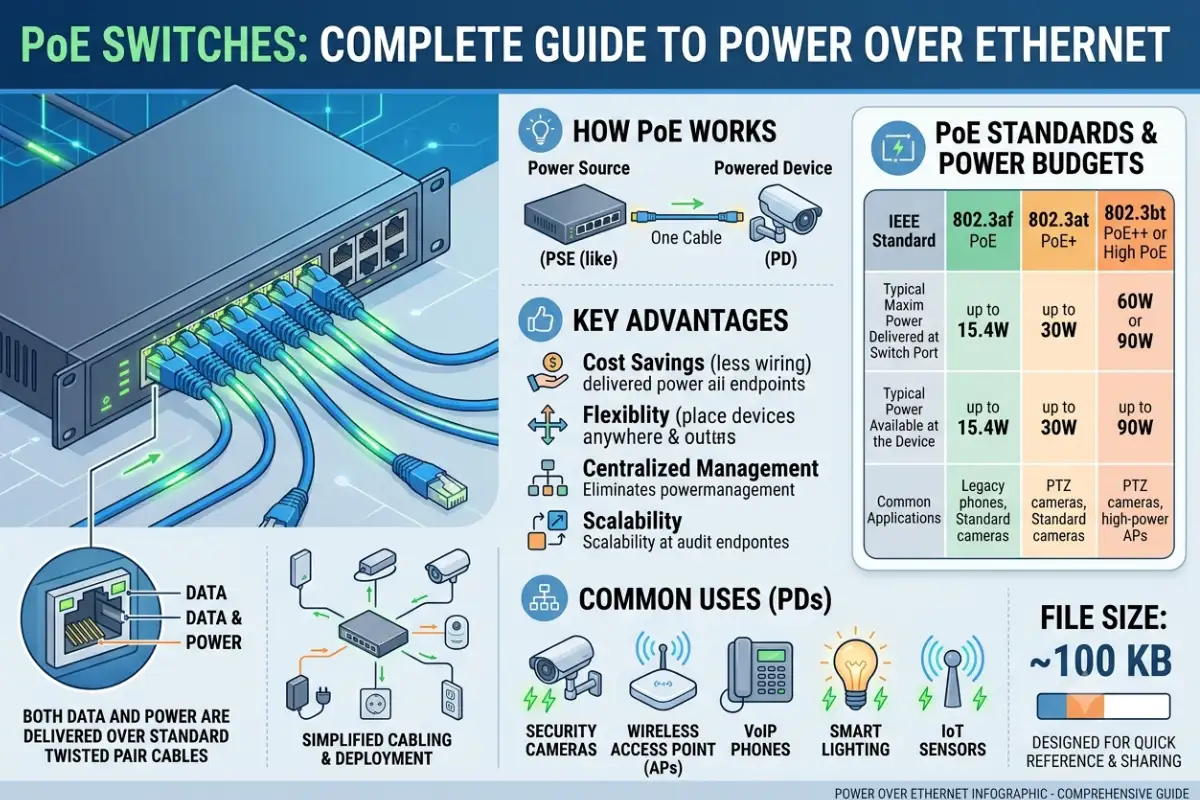
PoE switches, or Power over Ethernet switches, are network switches that can transmit electrical power and network data through Ethernet cables.
A standard network switch primarily handles data connections. A PoE switch can do that while also supplying power to compatible devices.
Common PoE-powered devices include:
- IP security cameras
- Wireless access points
- VoIP phones
- Video doorbells
- Network speakers
- IoT devices
- Certain smart lighting systems
Instead of connecting a device to both an Ethernet cable and a separate power adapter, PoE can potentially provide everything through one network cable.
How Do PoE Switches Work?
A PoE switch is integrated into a network in the same way as an Ethernet switch. As a PoE device is plugged in, the switch identifies the device and figures out if it needs power.
The switch uses the Ethernet port for supplying the electrical power and, at the same time, for the network data.
This is particularly advantageous when the devices are mounted in areas that are difficult to access and no power source is available.
Consider an IP camera close to the front entrance of a building that uses just a single Ethernet cable to a PoE switch. That cable may carry network data for the camera along with its electrical power.
Types of PoE Standards
Not all PoE switches provide the same amount of power. Different IEEE standards support different power levels.
IEEE 802.3af — PoE
The original widely adopted PoE standard is commonly known as 802.3af. It can provide up to 15.4 watts of power from the switch, with less power available to the connected device after cable losses.
It is suitable for many basic devices, including some VoIP phones, access points, and security cameras.
IEEE 802.3at — PoE+
802.3at, commonly called PoE+, provides more power than standard PoE. It can provide up to 30 watts from the switch.
PoE+ is useful for devices with higher power requirements, such as more advanced wireless access points and certain PTZ cameras.
IEEE 802.3bt — PoE++
802.3bt introduced higher-power PoE options and can use additional wire pairs to deliver significantly more power.
Depending on the type, 802.3bt can support devices requiring substantially more power, including some high-performance access points, cameras, displays, and other network equipment.
Always check the power requirements of your device before selecting a PoE switch.
Benefits of PoE Switches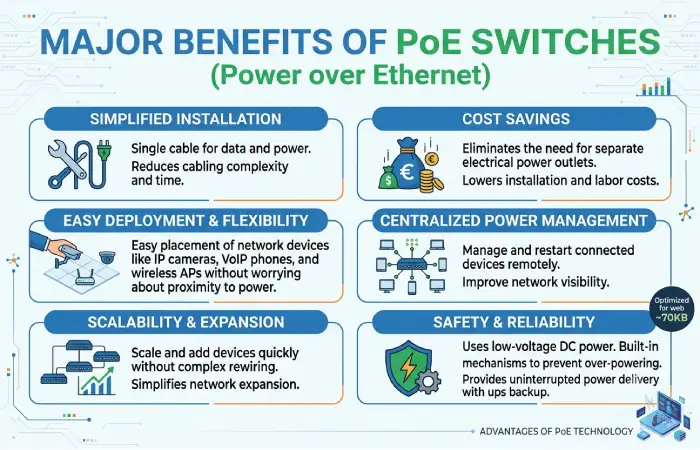
1. One Cable for Power and Data
High PoE Cabling Benefits one of the most major1-PoEdisadvantages of the cabling1-Using a PoE-enabled device, you can avail power and data over one single cable.
This may help to make installations easier and cut down on cables.
2. Easier Installation
This feature can be especially handy when installing devices in hard-to-reach locations.
For instance, a mounted Wi-Fi access point finished a ceiling installation is often more user-friendly, when the need for an electrical outlet near the access point is eliminated.
3. Centralized Power Management
With a PoE switch, multiple devices can receive power from a central location.
This can make network management easier because administrators can manage connected devices and their power source from the network infrastructure.
4. Useful for Security Cameras
Popular with IP cameras It is common to find cameras operating with PoE. Just a cable is needed to connect the camera to the network and power it at the same time.
When it is Time to install series of cameras, this can help, save you much time and effort to cover the offices, warehouse, home or commercial premises.
PoE Switches vs Regular Switches
The primary difference is power delivery.
| Feature | PoE Switch | Regular Switch |
| Network connectivity | Yes | Yes |
| Power over Ethernet | Yes | Usually no |
| IP cameras | Excellent for compatible models | Requires separate power |
| Wi-Fi access points | Can power compatible devices | Separate power required |
| Installation | Often simpler | May require additional power cables |
| Cost | Generally higher | Generally lower |
A regular Ethernet switch may be perfectly suitable if your network devices already have their own power adapters.
What Is PoE Budget?
Total PoE power budget: Another key specification to look for when shopping for PoE switches.
For example, you’ve got a change that has a 120W PoE budget. That does not mean that you can power eight 20W devices while remaining below budget as you will essential 160W.
Calculate the power ingesting of all the peripherals you want to hook up to the switch before purchasing it.
In addition, I’ll leave some space for upcoming devices.
How to Choose the Right PoE Switch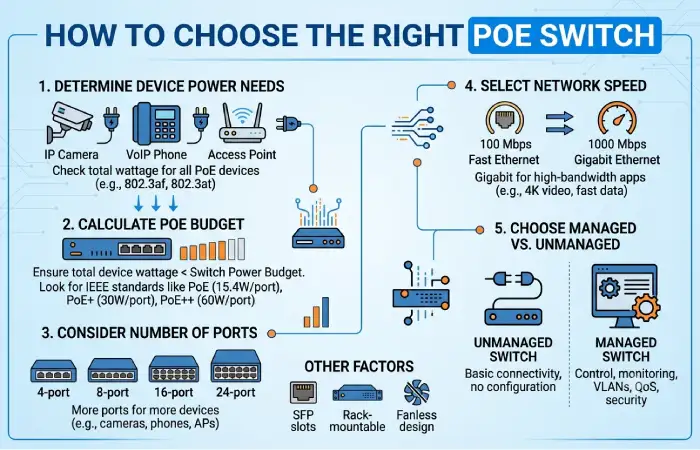
Consider these factors before purchasing a PoE switch:
Number of Ports
Choose enough ports for your current devices while leaving room for future expansion.
PoE Standard
Check whether your devices require PoE, PoE+, or PoE++.
Total Power Budget
Make sure the switch can provide enough power for all connected devices operating simultaneously.
Network Speed
Gigabit Ethernet is a common choice for modern networks, but devices with higher bandwidth requirements may benefit from faster connections.
Managed or Unmanaged
An unmanaged PoE switch can be easier to install, while a managed PoE switch provides additional configuration and monitoring capabilities.
VLAN and Security Features
For business networks, features such as VLAN support, traffic management, monitoring, and port controls may be important.
Are PoE Switches Safe?
PoE devices that conform to these values will be able to identify the presence of a compatible device before power is carried to them.
This is a preventative measure that can avoid powering incompatible devices that do not use the same PoE skill.
You still have to ensure the bandwidth and characteristics of the gear are compatible.
Don’t undertake that it can work simply because the Ethernet device connects via an Ethernet cable.
Final Thoughts
PoE switches brand it easy to send both data & power to your network over one Ethernet cable. Ideal for running IP cameras, radio access points, VoIP headphones, & other network-enabled the devices.
What to consider when purchasing a PoE switch: To start, reflect the following while shopping for PoE switches: number of ports, PoE standard, total power cheap, network speed, & management options.
An unmanaged PoE switch might suffice for a basic setup. For a larger or more complex setup, a managed PoE switch can offer superior monitoring and control features.