
Last Updated: June 22, 2026
Wireless networking is really important for our daily lives now. We use it in our homes. When we work from home. It is also used in industries and with devices that use artificial intelligence. We need networking to be reliable all the time.
As the internet gets faster and we have devices connected to it we need to know how wireless networking works. This way we can make sure everything runs smoothly and quickly. We do not want any interruptions or slow connections.
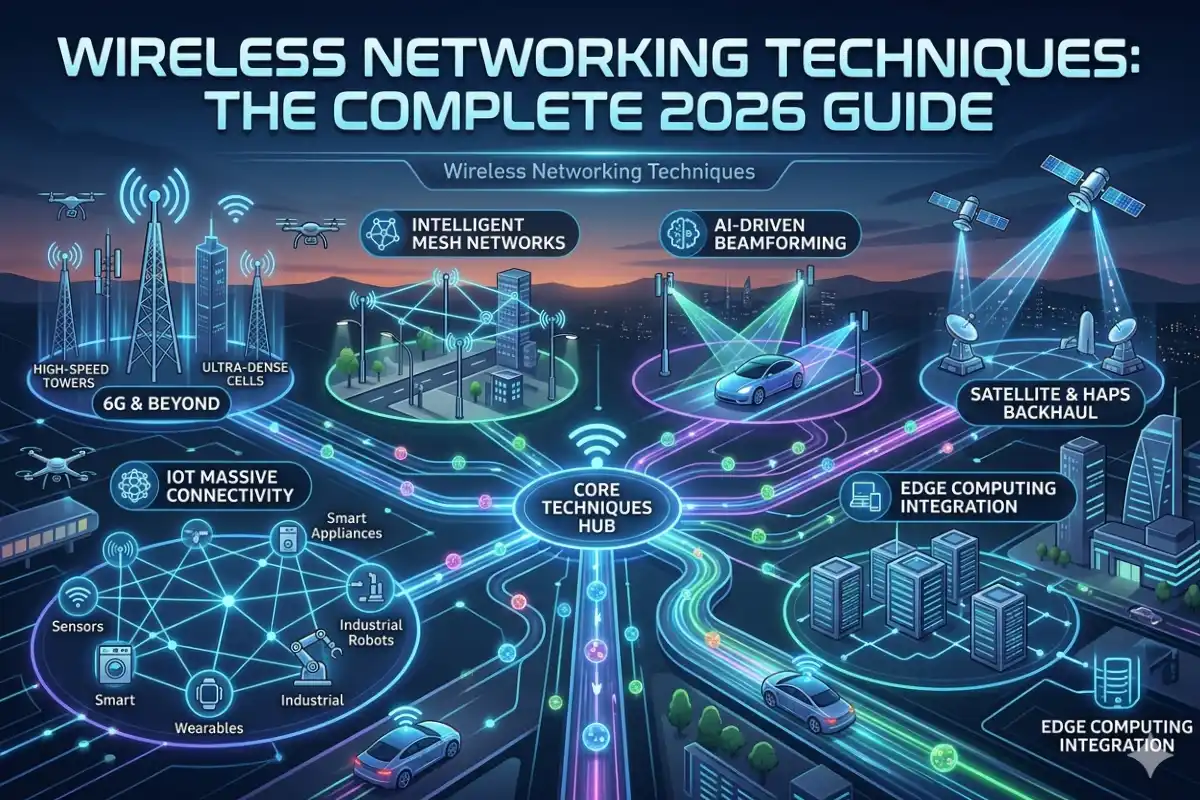
This guide will tell us about the ways to use wireless networking in 2026. It will talk about how to make WiFi work how to use mesh networking and what is new with WiFi 7. We will also learn about where to put our routers and how to keep our networks safe. Finally it will tell us about what’s coming next for wireless technology. Wireless networking is the key, to all of this. This guide will show us the best wireless networking techniques.
Wireless guide from our networking techniques pillar.
What Are Wireless Networking Techniques?
Wireless networking techniques are the ways that we use to send information from one device to another without using any cables.
These wireless networking techniques let devices talk to each other using kinds of signals like radio frequency signals or infrared technology or other ways that do not need cables, for wireless networking techniques to work.
Common applications include:
- Home WiFi networks
- Enterprise wireless systems
- Smart homes
- Industrial IoT
- Public WiFi hotspots
- Wireless surveillance systems
- Remote work environments
The goal is to provide:
- Faster connectivity
- Better coverage
- Lower latency
- Higher reliability
- Improved security
How Wireless Networking Works
Access points or routers which broadcast radio signals form a backbone of a wireless network.
The process typically involves:
- Device requests network access.
- Router authenticates connection.
- Data packets are transmitted wirelessly.
- Network protocols manage traffic.
- Devices receive and process information.
Modern networks operate primarily on:
| Frequency Band | Advantages | Best Use Cases |
| 2.4 GHz | Long range | Basic browsing, IoT devices |
| 5 GHz | Faster speeds | Streaming, gaming |
| 6 GHz | Minimal interference | WiFi 6E and WiFi 7 environments |
Evolution of Wireless Networking
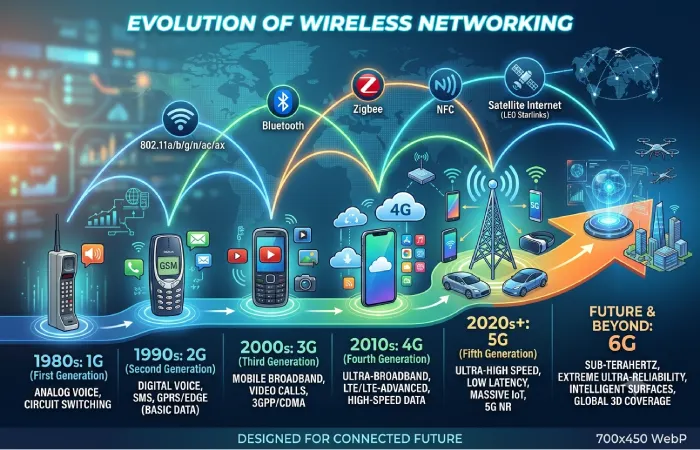
Comparison of Wireless Standards
| Standard | Release Year | Maximum Speed |
| WiFi 4 (802.11n) | 2009 | 600 Mbps |
| WiFi 5 (802.11ac) | 2014 | 3.5 Gbps |
| WiFi 6 (802.11ax) | 2019 | 9.6 Gbps |
| WiFi 6E | 2021 | 9.6 Gbps |
| WiFi 7 (802.11be) | 2024-2026 | Up to 46 Gbps |
Estimated Performance Growth
| Generation | Relative Speed Increase |
| WiFi 4 | 1x |
| WiFi 5 | 6x |
| WiFi 6 | 16x |
| WiFi 7 | 75x |
Strong on basics first? See our computer networking basics guide.
Best Wireless Networking Techniques in 2026
-
Mesh Networking
Mesh networking is really good, at helping us get an internet connection.
Mesh networking does not use one router mesh networking uses many nodes that are placed all around a building.
Benefits
- Eliminates dead zones
- Improves roaming performance
- Enhances reliability
- Scales easily
Ideal For
- Large homes
- Multi-story buildings
- Offices
- Smart homes
Traditional Router vs Mesh Network
| Feature | Traditional Router | Mesh Network |
| Coverage | Limited | Extensive |
| Dead Zones | Common | Rare |
| Scalability | Low | High |
| Device Roaming | Moderate | Seamless |
Mesh Networking Explained
A mesh networkis a Wireless Mesh networkthat uses the router to form an extensive, versatile wireless mesh using more than just the primary router.
The multiple pathways allow data packets to simply redirect to another path when the first one is compromised.
Benefits include:
- Self-healing capability
- Better redundancy
- Consistent coverage
- Improved device handoff
This makes mesh systems one of the best wireless networking techniques for modern households.
-
WiFi Channel Optimization
The internet is really slow when there is channel congestion.
This is a problem. Modern routers can choose the channel on their own but picking the channel manually usually makes the internet work better.
You get performance when you do it manually with modern routers and channel congestion is still a major cause of slow internet speeds.
Recommended Channel Settings
| Frequency | Recommended Channels |
| 2.4 GHz | 1, 6, 11 |
| 5 GHz | Dynamic Selection |
| 6 GHz | Automatic |
Benefits
- Reduced interference
- Faster speeds
- Better stability
- Lower packet loss
-
Band Steering Technology
Band steering automatically moves devices between available frequency bands.
For example:
- Smart TVs → 5 GHz or 6 GHz
- IoT sensors → 2.4 GHz
- Gaming consoles → 6 GHz
This balances network traffic and improves performance.
-
MU-MIMO Technology
Multi-User Multiple Input Multiple Output (MU-MIMO): Routers inMU-MIMO transmit their signal through multiple devices as well.
Without MU-MIMO:
Devices wait their turn.
With MU-MIMO:
Multiple devices receive data concurrently.
Benefits
- Lower latency
- Better streaming
- Faster downloads
- Improved smart-home performance
-
OFDMA Resource Allocation
Orthogonal Frequency Division Multiple Access (OFDMA): OFDM assigns a smaller frequency range on wireless networks, which are typically on a different set of frequencies for communication.
Advantages include:
- Higher efficiency
- Reduced congestion
- Better battery life for mobile devices
- Improved IoT performance
OFDMA is a core component of WiFi 6 and WiFi 7.
WiFi Optimization Techniques for Faster Internet
Optimize Router Placement
Router placement significantly affects network quality.
Best Router Placement Techniques
Place routers:
- Near the center of the building
- Elevated off the floor
- Away from thick walls
- Away from microwaves
- Away from metal objects
Coverage Impact
| Placement | Signal Quality |
| Corner Room | Poor |
| Floor Level | Fair |
| Central Elevated Position | Excellent |
Update Router Firmware
Benefits include:
- Security patches
- Performance improvements
- Bug fixes
- WiFi optimization enhancements
Experts recommend checking firmware quarterly.
Prioritize Traffic with QoS
Quality of Service (QoS) helps prioritize:
- Video conferencing
- Gaming
- Streaming
- General browsing
This prevents bandwidth-hungry devices from affecting critical applications.
Reduce Device Congestion
A typical smart home now contains:
| Year | Average Connected Devices |
| 2020 | 11 |
| 2023 | 17 |
| 2026 | 29+ |
Reducing unnecessary device connections improves overall performance.
How WiFi 7 Improves Smart Networking
WiFi 7 represents the biggest leap in wireless networking technology.
Major WiFi 7 Improvements
Multi-Link Operation (MLO)
Devices can use multiple bands simultaneously.
Benefits:
- Faster speeds
- Lower latency
- Better reliability
320 MHz Channels
WiFi 7 doubles channel width compared to WiFi 6E.
| Standard | Channel Width |
| WiFi 6 | 160 MHz |
| WiFi 7 | 320 MHz |
4K-QAM
Higher modulation efficiency allows more data transmission.
Benefits:
- Higher throughput
- Faster downloads
- Better streaming performance
WiFi 7 Performance Comparison
| Feature | WiFi 6 | WiFi 7 |
| Maximum Speed | 9.6 Gbps | 46 Gbps |
| Channel Width | 160 MHz | 320 MHz |
| Latency | Low | Ultra-Low |
| Multi-Link Operation | No | Yes |
Enterprise Wireless Networking Techniques
Businesses increasingly rely on advanced wireless architectures.
Popular techniques include:
SD-WAN Integration
Benefits:
- Traffic optimization
- Cloud application acceleration
- Enhanced reliability
Wireless Network Segmentation
Separates:
- Guest devices
- Employee devices
- IoT devices
- Security systems
This improves both security and performance.
AI-Powered Network Management
Modern enterprise platforms use AI to:
- Predict congestion
- Optimize channels
- Detect threats
- Improve reliability
Wireless Security Best Practices
Network performance means little without security.
WPA3 Encryption
The current security standard provides:
- Stronger encryption
- Better password protection
- Improved authentication
Network Segmentation
Create separate networks for:
| Device Type | Recommended Network |
| Smart Home Devices | IoT VLAN |
| Guests | Guest WiFi |
| Work Devices | Primary Network |
Regular Security Audits
Check:
- Firmware updates
- Unauthorized devices
- Weak passwords
- Open ports
Common Wireless Networking Problems and Solutions
| Problem | Cause | Solution |
| Slow WiFi | Congestion | Change channel |
| Dead Zones | Poor coverage | Install mesh nodes |
| High Latency | Interference | Use 5 GHz or 6 GHz |
| Frequent Disconnects | Outdated firmware | Update router |
| Weak Signal | Poor placement | Reposition router |
Apply wireless to IoT in our smart networking and IoT guide.
Future Wireless Networking Trends

The future of wireless networking includes:
AI Self-Healing Networks
Networks automatically detect and resolve issues without user intervention.
WiFi Sensing
Routers will detect:
- Movement
- Occupancy
- Environmental changes
Without cameras.
6G Wireless Integration
Expected capabilities include:
- Terabit speeds
- Near-zero latency
- Massive IoT support
Smart Home Automation Expansion
Future networks will support:
- Thousands of connected devices
- Real-time AI processing
- Edge computing
Expert Insights (E-E-A-T Section)
Experience
In real-world deployments, the largest improvements rarely come from purchasing faster internet plans. Most performance gains result from:
- Better router placement
- Channel optimization
- Mesh networking deployment
- Firmware updates
- Device prioritization
Organizations implementing these strategies often experience significant reductions in latency and connectivity issues.
Expertise
Network engineers consistently identify three critical factors affecting wireless performance:
- Coverage quality
- Signal interference
- Device density
Addressing these areas typically delivers greater benefits than increasing bandwidth alone.
Authoritativeness
Global cooperation between networking vendors, service providers, and standards bodies will continue the innovation cycle of wireless networking technologies. WiFi 7 adoption in the premier residential and enterprise environments.
Trustworthiness
Reliable networking decisions should be based on:
- Verified performance testing
- Vendor documentation
- Security best practices
- Independent benchmarking
Avoid relying solely on advertised speed ratings.
Common Questions
What is the best form of wireless networking?
In a current environment, the most sensible approach combines Mesh networking with WiFi 7 to achieve top levels of both speed and dependable reach.
How to make my WiFi speed increase?
Positioning, appropriate router, correct channels, firmware, QoS, lower congestion, there are a great deal of points you can utilize to make it quicker.
Is mesh much better than a router?
Typically for much larger spaces, you’ll wish to acquire a mesh system due to the wider, more constant range and capability to connect with several devices in various spaces.
Does WiFi 7 truly make a huge difference?
It really does, due to improvements such as much greater throughput capabilities, Multi-Link Operation (MLO) capabilities, and wider channels.
Where to put my router?
The simplest method to remember this is in a main position, as high as possible, far away from obstructions such as barriers as well as appliances and big metal gadgets.
Final Thoughts
Wireless networking is getting better and better as more people need to be connected. When you put together a few things like mesh networking and strategies to make WiFi work better and also use security practices and new WiFi 7 technologies you get really great performance for your home and your business.
Whether you are making a home updating your companys network or you just want the internet to be faster using these wireless networking techniques can really make a big difference in how well your internet works how reliable it is and how happy you are with it in 2026 and, after that.